





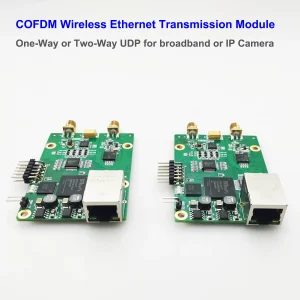
6Dải tần truyền của mô-đun thu phát Ethernet không dây COFDM GHz là từ 50 MHz đến 6000 MHz. Phần sụn bảng cấu hình menu cũng cần nâng cấp để hỗ trợ tối đa 6000Mhz.
Hướng dẫn nâng cấp firmware bảng menu Vcan1886
Kích hoạt 6 Hỗ trợ truyền dẫn GHz
Tải về công cụ nâng cấp và Firwmare.
https://drive.google.com/file/d/1vdNIZ7SpLi3EiC3UxL4pOooL5RxaaXMI/view?usp=drive_link
Mục lục
1. Lý lịch
các 1886 Bộ thu phát hai chiều COFDM vốn hỗ trợ50 MHz – 6000 MHz. Tuy nhiên, bảng menu cũ hơn được giới hạn ở mức phần sụn2500 MHz (2.5 GHz), hiển thị “2” là cài đặt tần số tối đa (≈2000 MHz). Hướng dẫn này trình bày chi tiết quá trình nâng cấp chương trình cơ sở để mở khóa đầy đủ 6 hỗ trợ GHz.
2. Xác minh trước khi nâng cấp
- Bật nguồn bảng menu
- Điều hướng đến cài đặt tần số
- Xác nhận giới hạn:
- Giá trị hiển thị tối đa: “2” (2000 MHz)
- Không thể chọn 3000 MHz hoặc cao hơn
3. Yêu cầu nâng cấp
| Phần cứng | Phần mềm/Tệp |
|---|---|
| • 1886 Bảng thực đơn • Bộ chuyển đổi nối tiếp USB sang RS232 • Máy tính | • Công cụ lập trình STC ISP • RX_Pad.hex (Phần sụn chính)• eeprom.bin (dữ liệu EEPROM) |
4. Kết nối phần cứng
⚠️ Thực hiện tất cả các kết nối TRƯỚC KHI bật nguồn
Kết nối bộ chuyển đổi nối tiếp với bảng menu:
| Bộ chuyển đổi nối tiếp | Bảng thực đơn |
|---|---|
| GND (Đất) | GND (Đất) |
| TX (truyền) | RX (Nhận được) |
| RX (Nhận được) | TX (truyền) |
🎯Lưu ý quan trọng: TX và RX phải được kết nối chéo. Đấu dây không đúng sẽ cản trở việc liên lạc.
5. Quy trình nâng cấp chương trình cơ sở
- Khởi chạy STC ISP trên máy tính của bạn
- Định cấu hình cài đặt:
- Mô hình MCU: Lựa chọn STC11F32XE
- Cổng COM: Chọn cổng của bộ chuyển đổi của bạn (ví dụ., COM3)
💡 Mẹo: Xác minh cổng trong Trình quản lý thiết bị
- Tải tập tin:
- Tệp chương trình: Mở
RX_Pad.hex - Tệp EEPROM: Mở
eeprom.bin
- Tệp chương trình: Mở
- Bắt đầu lập trình:
- nhấp chuột “Tải xuống/Chương trình” (hoặc là “Lập trình lại”)
- Bật nguồn ngay lập tức bảng thực đơn
- Quan sát thanh tiến trình → “Hoạt động đã hoàn thành” (10-30 giây)
- Ngắt kết nối nguồn sau khi flash thành công
6. Xác minh sau nâng cấp
- Khởi động lại bảng menu
- Truy cập cài đặt tần số:
- Chỉ số nâng cấp thành công:
- Giá trị “3” (3000 MHz), “4” (4000 MHz), “5” (5000 MHz) có thể lựa chọn
- Giá trị tối đa “5999” (5999 MHz) xác nhận
- Chỉ số nâng cấp thành công:
- So sánh với trạng thái trước khi nâng cấp (tối đa “2” = 2000 MHz)
✅Tiêu chí thành công: Phạm vi điều chỉnh tần số mở rộng ra ngoài 2500 MHz đến 5990 MHz.
7. Khắc phục sự cố
| Vấn đề | Giải pháp |
|---|---|
| Kết nối không thành công | 1. Xác minh kết nối chéo TX/RX 2. Thử cổng USB khác 3. Cài đặt lại trình điều khiển nối tiếp |
| Gian hàng lập trình tại 0% | 1. Bật nguồn CHÍNH XÁC sau khi nhấp vào “Tải xuống” 2. Thay thế bộ chuyển đổi nối tiếp |
| Vẫn bị giới hạn ở mức 2500 MHz | 1. Phản xạ sử dụng đúngRX_Pad.hex2. Xác nhận mô hình MCU STC11F32XE |
Ghi chú sửa đổi:
- 2025-06-07 v1.0: Bản phát hành đầu tiên
- Các tập tin cần thiết:
RX_Pad.hex,eeprom.bin - Phiên bản công cụ: Khuyến nghị STC ISP v6.88+
Liên hệ hỗ trợ:
Đối với các vấn đề chưa được giải quyết, cung cấp:
- Ảnh chụp màn hình nhật ký lỗi STC ISP
- Mã sửa đổi phần cứng (dưới cùng của bảng menu)
- Mô hình bộ chuyển đổi nối tiếp
⚠️Cảnh báo: Sử dụng tập tin chương trình cơ sở không chính xác có thể làm hỏng thiết bị của bạn. Xác minh tính tương thích của tệp trước khi flash.

Phụ đề trong video
Cách nâng cấp chương trình cơ sở của mô-đun thu phát Ethernet không dây COFDM 6GHz?
Làm thế nào để nâng cấp 1886 phần sụn bảng menu để hỗ trợ 6 Tần số truyền GHz.
Bởi vì của chúng tôi 1886 Bộ thu phát không dây hai chiều COFDM hỗ trợ từ 50 MHz đến 6000 MHz.
Tuy nhiên, bảng công cụ cấu hình Menu chưa kịp cập nhật firmware và chỉ hỗ trợ 2500Mhz, 2.5ghz.
Trước tiên chúng ta hãy xem xét tình hình trước khi nâng cấp.
Nhìn ở đây.
Cài đặt tối đa là 2
Điều này có nghĩa là tần số truyền tối đa là 2000 MHz trở lên và không thể đạt tới 3000 MHz.
Bây giờ chúng ta sẽ nâng cấp bảng này.
và nó có thể đạt tới 6000 MHz 6GHz.
Cách nâng cấp?
Không kết nối nguồn điện trước tiên.
Bảng menu này đang kết nối với RS232.
Công cụ cổng nối tiếp USB sang RS232
Sau đó kết nối Ground với Ground của bảng nút menu
Sau đó kết nối TX với RX của bảng nút menu
RX của RS232 được kết nối với TX của bảng nút menu.
Sau khi kết nối như thế này,
Sau đó thao tác trên máy tính
Chạy tool STC ISP
Mở công cụ.
Chọn loại MCU tại đây.
Mô hình MCU.
Sau đó tìm nó ở đây.
chọn STC11F32XE
Sau đó chọn công cụ cổng nối tiếp.
Theo cổng thực tế của thiết bị của bạn
Sau khi chọn ở đây,
mở tập tin mã
chọn RX_Pad.hex
Mở.
Chọn tập tin EEPROM
chọn eeprom.bin
Nhấp vào Mở, và chọn cái này.
Lập trình lại
Sau khi chọn ở đây,
Bật nguồn.
Bật nguồn và nhìn vào đây.
quá trình nâng cấp sẽ bắt đầu.
Đồng ý, nó sẽ dừng sau khi nâng cấp.
Sau khi nâng cấp, Chúng tôi sẽ vận hành bảng cấu hình menu để xem nó có hỗ trợ 6GHz không.
Chúng tôi nhấn menu để xác minh menu.
Trước đây chúng tôi chỉ có thể điều chỉnh nó lên 2000 MHz trở lên.
Bây giờ chúng ta có thể điều chỉnh nó thành ba, bốn, năm.
và mức tối đa có thể được điều chỉnh thành năm trăm chín mươi chín.
Điều này có nghĩa là việc nâng cấp đã thành công. Cảm ơn bạn đã xem.
Đặt một câu hỏi
Tin nhắn của bạn đã được gửi