





A customer purchased our composite analog video to IP video converter board and encountered two problems during use. The following are the questions he raised and the solutions we gave. We hope that it will also be helpful to people who are interested in this product.
目次
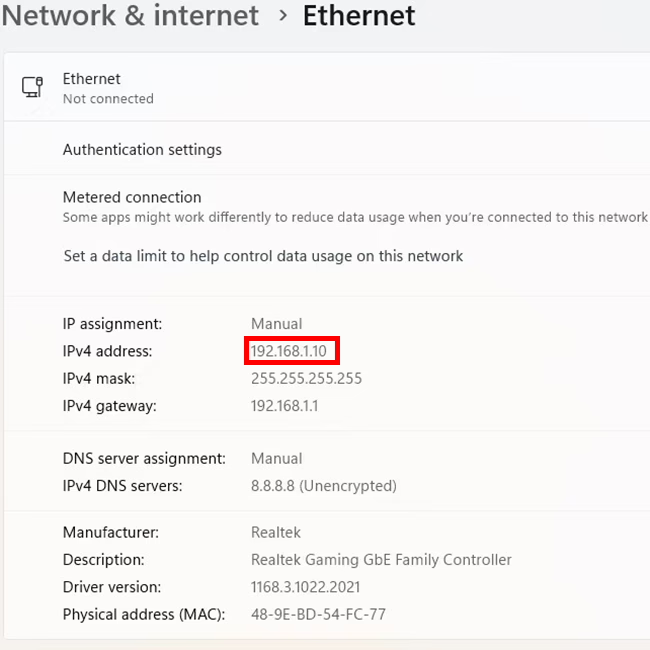
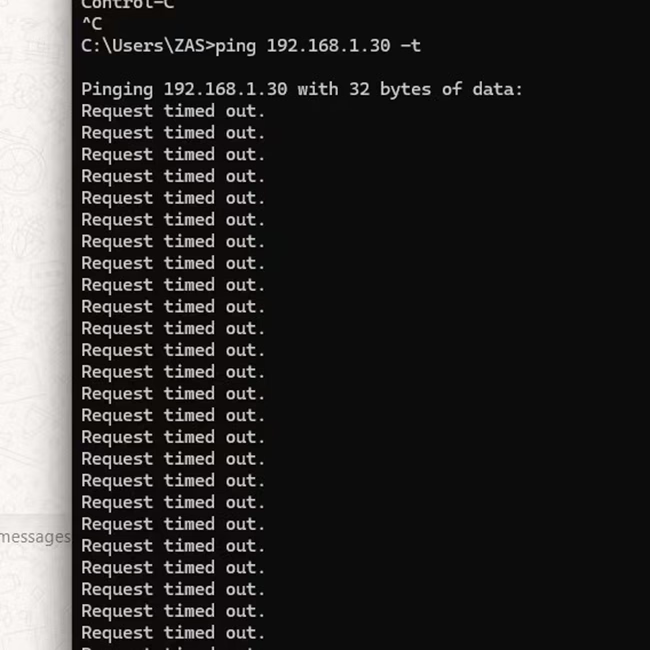
Why can’t I ping this composite video to IP converter connected to the computer via an Ethernet cable?
The default IP address of the composite analog video to IP video converter board is 192.168.1.30.
iVcan.com reply:
- Try changing the network cable, or connect the same network cable to other network devices. Is it normal?
- Is our analog video to network converter connected directly to the computer or through a hub?
- If it is a direct connection, check whether the wired network in your computer’s network neighborhood is displayed normally or unplugged.
- If it passes through a network hub, check whether the network indicator light is flashing or not. Or unplug and plug it in and observe again.
- How long is your network cable? Because our board is relatively small, there is no network transformer, so try to use a short network cable.
- If the network cable is very long, add a network hub in the middle, which has a signal enhancement function.
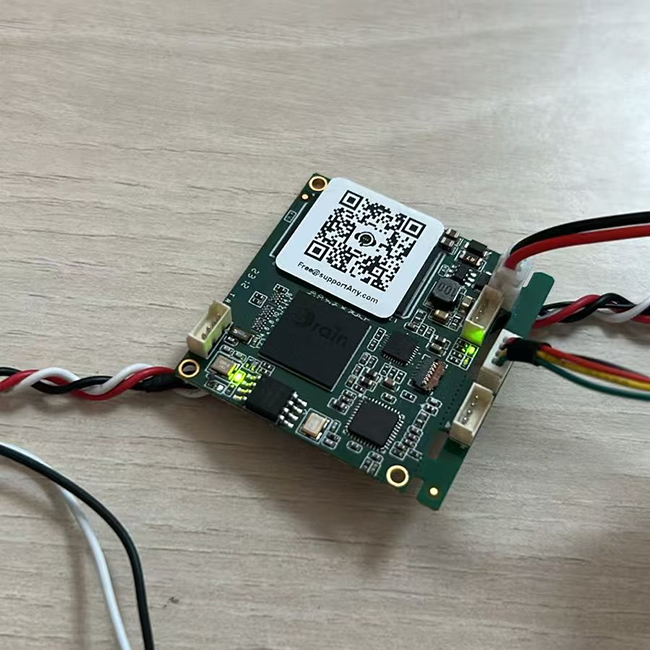
- You can also use the following method to determine whether the network connection is successful from the analog video to network port conversion board.
These two are lights related to the network card. When working normally, one of them is always on and the other one is flashing.


Why is my latency test result two seconds instead of milliseconds?
This user connected an analog camera to our analog video over IP converter board, connected it to a computer via an Ethernet cable, and played it using VLC player. He is streaming through rtsp protocol.
iVcan.com reply:
VLC player is a good general-purpose computer software. It needs to be optimized when playing video streams. Please refer to the link below.
しかし, we recommend using Easyplayer, a specially optimized software.
If the user is still not satisfied with the delay, they can use our specially customized Splayer player that supports the UDP protocol.
About RCA video over IP converter board
アン RCA Video over IP device is a piece of hardware that allows you to transmit RCA composite video signals (along with audio, if supported) over an IPネットワーク. These devices are useful for extending or distributing standard-definition (SD) ビデオ signals over long distances using Ethernet (Cat5e, Cat6) or even the internet.
仕組み
- エンコーディング – The device converts analog composite video (yellow RCA) and stereo audio (red/white RCA) into a digital format.
- IP Transmission – The digital video signal is sent over a ネットワーク (LAN or WAN) via standard Ethernet cables.
- デコード – A receiving unit (デコーダ) converts the signal back to analog RCA video and audio for playback on a TV, モニター, or other display device.
主な特長
- Supports 480i/576i standard-definition video (SDTV).
- Uses Ethernet cables (Cat5e, Cat6) for long-distance transmission.
- Can be used for single-point or multi-point video distribution.
- May support IR, RS-232, or USB for remote control.
- Commonly used in legacy AV systems, 監視カメラ, old gaming consoles, or DVD players.
Composite Video to IP refers to the process of converting analog composite video signals (such as those from CCTV cameras, ビデオデッキ, or older video sources) の中へ digital IP (Internet Protocol) ストリーム so they can be transmitted over a network (LAN, WAN, or the internet).
仕組み:
- Analog Signal Input: A composite video source (RCA or BNC connector) feeds an エンコーダ または converter.
- デジタル化 & 圧縮: The encoder converts the analog signal into a digital format (例えば, H.264, H.265).
- Streaming Over IP: The digital stream is encapsulated in network protocols (RTSP, RTP, HTTP, or RTMP) for transmission over an IP network.
- 見る & ストレージ: The video can be viewed on IP-based devices like computers, NVR, mobile apps, またはクラウドプラットフォーム.
一般的な使用例:
- Upgrading Analog CCTV Systems: Converting legacy security cameras to work with modern IP-based systems.
- 遠隔監視: Streaming old analog video sources over the internet for remote access.
- 放送 & ストリーミング: Sending composite video signals to online platforms or IPTV systems.
Devices Used for Conversion:
- Video Encoders (Composite to IP converters)
- DVRs with Network Streaming Capabilities
- USB Capture Cards with Network Software
エンコーダモジュールボード









デコーダモジュールボード




カスタマイズ可能
新しいエンコーダ製品
| いいえ. | 製品名 | Configuration | 主な特長 | 状態 |
|---|---|---|---|---|
| 1 | デュアルチャンネル USB UVC 可視光ビデオ エンコーダ | 2× USB入力 | デュアルUSBカメラビデオエンコーディングをサポート, およびRTSPストリーミング; ローカルCVBS/HDMI出力; 切り替え可能な表示モード | Mass Production |
| 2 | デュアルチャンネルエンコーダー (1× USB可視光 + 1× USB Thermal Imaging camera) | 2× USB入力 | デュアルUSBカメラをサポート (見える + 熱) 捕獲, エンコーディング, およびRTSPストリーミング; ローカルCVBS/HDMI出力; 切り替え可能な表示モード | Mass Production |
| 3 | RTSP デコーダ HDMI/CVBS ディスプレイ モジュール | HDMI + CVBS出力 | 最大 4×1080P@30fps の RTSP ストリーム デコードをサポート; ビデオストリーミングプロトコル転送をサポート; HDMI/CVBS output display | サンプルあり |
| 4 | RTSP デコーダ HDMI/CVBS ディスプレイ モジュール 4.3"/5" 液晶 | HDMI出力 + 液晶画面 | 最大 4×1080P@30fps の RTSP ストリーム デコードをサポート; プロトコル転送; HDMI/CVBS output display | デバッグ |
| 5 | デュアルチャンネルエンコーダー (1× USB可視光 + 1× CVBSアナログ) | 1× CVBS + 1× USB UVC入力 | デュアルビデオ (USB + CVBS), エンコードとRTSPストリーミング; ローカルCVBS/HDMI出力; 切り替え可能な表示モード | デバッグ |
| 6 | デュアルチャンネルエンコーダー (1× USB UVC + 1× AHDアナログ) | 1× AHD + 1× USB UVC入力 | デュアルビデオキャプチャ (USB + AHD), エンコードとRTSPストリーミング; ローカルCVBS/HDMI出力; 切り替え可能な表示モード | デバッグ |
| 7 | デュアルチャンネルエンコーダー (1× CVBS + 1× AHDアナログビデオ) | CVBS + AHD 2 ビデオ入力 | デュアルアナログビデオキャプチャ, エンコードとRTSPストリーミング; ローカルCVBS/HDMI出力; 切り替え可能な表示モード | デバッグ |
| 8 | デュアルチャンネルエンコーダー (1× CMOSカメラ + 1× USB Thermal Imaging camera) | 1× USBインターフェース | CMOSをサポート + USBサーマルカメラキャプチャ, エンコードとRTSPストリーミング; ローカルCVBS/HDMI出力; 切り替え可能な表示モード | Mass Production |
For customized video input/output conversion solutions not listed in our products, OEM/ODMサポートについてはお問い合わせください. お客様のご要望に合わせた製品の開発が可能です.
質問する
ご回答をありがとうございました。 ✨