





A customer purchased our composite analog video to IP video converter board and encountered two problems during use. The following are the questions he raised and the solutions we gave. We hope that it will also be helpful to people who are interested in this product.
Зміст
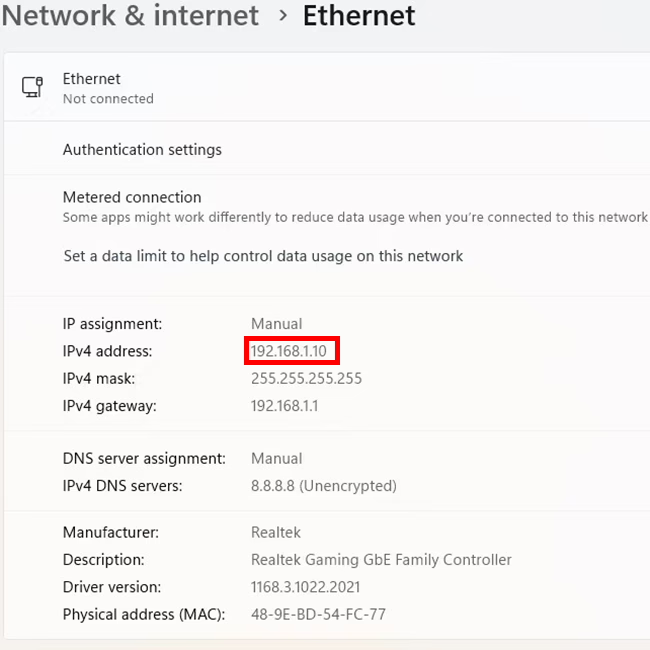
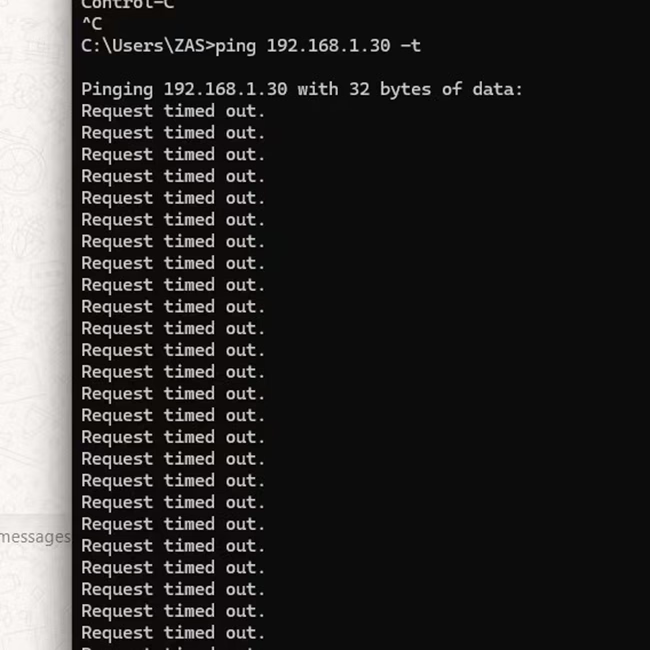
Why can’t I ping this composite video to IP converter connected to the computer via an Ethernet cable?
The default IP address of the composite analog video to IP video converter board is 192.168.1.30.
iVcan.com reply:
- Try changing the network cable, or connect the same network cable to other network devices. Is it normal?
- Is our analog video to network converter connected directly to the computer or through a hub?
- If it is a direct connection, check whether the wired network in your computer’s network neighborhood is displayed normally or unplugged.
- If it passes through a network hub, check whether the network indicator light is flashing or not. Or unplug and plug it in and observe again.
- How long is your network cable? Because our board is relatively small, there is no network transformer, so try to use a short network cable.
- If the network cable is very long, add a network hub in the middle, which has a signal enhancement function.
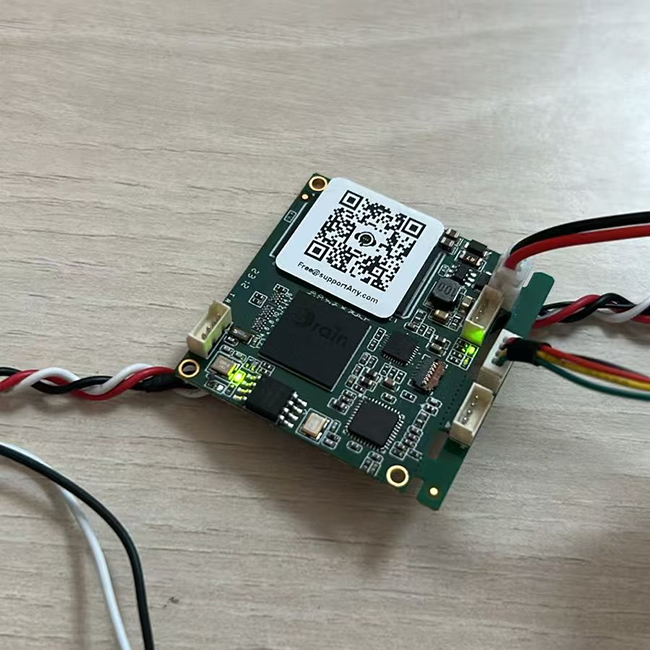
- You can also use the following method to determine whether the network connection is successful from the analog video to network port conversion board.
These two are lights related to the network card. When working normally, one of them is always on and the other one is flashing.


Why is my latency test result two seconds instead of milliseconds?
This user connected an analog camera to our analog video over IP converter board, connected it to a computer via an Ethernet cable, and played it using VLC player. He is streaming through rtsp protocol.
iVcan.com reply:
VLC player is a good general-purpose computer software. It needs to be optimized when playing video streams. Please refer to the link below.
проте, we recommend using Easyplayer, a specially optimized software.
If the user is still not satisfied with the delay, they can use our specially customized Splayer player that supports the UDP protocol.
About RCA video over IP converter board
Ан RCA Video over IP device is a piece of hardware that allows you to transmit RCA composite video signals (along with audio, if supported) over an IP мережа. These devices are useful for extending or distributing standard-definition (SD) відео signals over long distances using Ethernet (Cat5e, Cat6) or even the internet.
Як це працює
- Кодування – The device converts analog composite video (yellow RCA) and stereo audio (red/white RCA) into a digital format.
- IP Transmission – The digital video signal is sent over a мережі (LAN or WAN) via standard Ethernet cables.
- Розшифровка – A receiving unit (декодер) converts the signal back to analog RCA video and audio for playback on a TV, монітор, or other display device.
Ключові риси
- Supports 480i/576i standard-definition video (SDTV).
- Uses Ethernet cables (Cat5e, Cat6) for long-distance transmission.
- Can be used for single-point or multi-point video distribution.
- May support IR, RS-232, or USB for remote control.
- Commonly used in legacy AV systems, відеоспостереження, old gaming consoles, or DVD players.
Composite Video to IP refers to the process of converting analog composite video signals (such as those from CCTV cameras, VCRs, or older video sources) into digital IP (Інтернет-протокол) потоки so they can be transmitted over a network (LAN, WAN, or the internet).
Як це працює:
- Analog Signal Input: A composite video source (RCA or BNC connector) feeds an кодувальник або converter.
- Digitization & Компресія: The encoder converts the analog signal into a digital format (напр., H.264, H.265).
- Streaming Over IP: The digital stream is encapsulated in network protocols (RTSP, RTP, HTTP, або RTMP) for transmission over an IP network.
- Viewing & Зберігання: The video can be viewed on IP-based devices like computers, NVR, mobile apps, or cloud platforms.
Загальні випадки використання:
- Upgrading Analog CCTV Systems: Converting legacy security cameras to work with modern IP-based systems.
- Віддалений моніторинг: Streaming old analog video sources over the internet for remote access.
- Трансляція & Потокове передавання: Sending composite video signals to online platforms or IPTV systems.
Devices Used for Conversion:
- Video Encoders (Composite to IP converters)
- DVRs with Network Streaming Capabilities
- USB Capture Cards with Network Software
Плати модулів кодера









Плати модулів декодера




Доступний для налаштування
New Encoder Products
| Немає. | Назва продукту | конфігурація | Ключові риси | Статус |
|---|---|---|---|---|
| 1 | Двоканальний USB UVC кодер відео у видимому світлі | 2× USB-вхід | Підтримує подвійне кодування відео з камери USB, і потокове передавання RTSP; локальний вихід CVBS/HDMI; перемикання режимів відображення | Масове виробництво |
| 2 | Двоканальний кодер (1× Видиме світло USB + 1× USB-тепловізійна камера) | 2× USB-вхід | Підтримує подвійну камеру USB (видно + теплові) захоплення, encoding, і потокове передавання RTSP; локальний вихід CVBS/HDMI; перемикання режимів відображення | Масове виробництво |
| 3 | Декодер RTSP, модуль дисплея HDMI/CVBS | HDMI + Вихід CVBS | Supports up to 4×1080P@30fps RTSP stream decoding; Підтримка переадресації потокового відео; Вихідний дисплей HDMI/CVBS | Зразок доступний |
| 4 | RTSP декодер HDMI/CVBS дисплейний модуль з 4.3"/5" ЖК | Вихід HDMI + РК-екран | Supports up to 4×1080P@30fps RTSP stream decoding; пересилання протоколу; Вихідний дисплей HDMI/CVBS | Налагодження |
| 5 | Двоканальний кодер (1× Видиме світло USB + 1× Аналог CVBS) | 1× CVBS + 1× USB UVC вхід | Dual video (USB + CVBS), кодування та потокове передавання RTSP; локальний вихід CVBS/HDMI; перемикання режимів відображення | Налагодження |
| 6 | Двоканальний кодер (1× USB UVC + 1× Аналог AHD) | 1× AHD + 1× USB UVC вхід | Подвійне захоплення відео (USB + AHD), кодування та потокове передавання RTSP; локальний вихід CVBS/HDMI; перемикання режимів відображення | Налагодження |
| 7 | Двоканальний кодер (1× CVBS + 1× Аналогове відео AHD) | CVBS + AHD 2 відеовхід | Подвійний аналоговий запис відео, кодування та потокове передавання RTSP; локальний вихід CVBS/HDMI; перемикання режимів відображення | Налагодження |
| 8 | Двоканальний кодер (1× CMOS Camera + 1× USB-тепловізійна камера) | 1× інтерфейс USB | Підтримує CMOS + Зйомка з термокамерою USB, кодування та потокове передавання RTSP; локальний вихід CVBS/HDMI; перемикання режимів відображення | Масове виробництво |
Для індивідуальних рішень для перетворення вхідного/вихідного відеосигналу, яких немає в списку наших продуктів, будь ласка, зв'яжіться з нами для підтримки OEM/ODM. Ми можемо розробити індивідуальні продукти відповідно до ваших вимог.
задавати питання
Дякуємо за вашу відповідь. ✨