





A customer purchased our composite analog video to IP video converter board and encountered two problems during use. The following are the questions he raised and the solutions we gave. We hope that it will also be helpful to people who are interested in this product.
विषयसूची
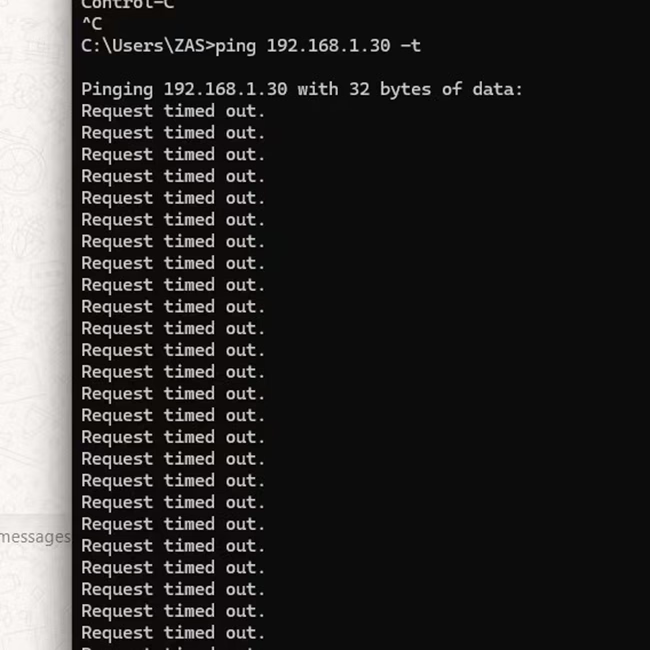
Why can’t I ping this composite video to IP converter connected to the computer via an Ethernet cable?
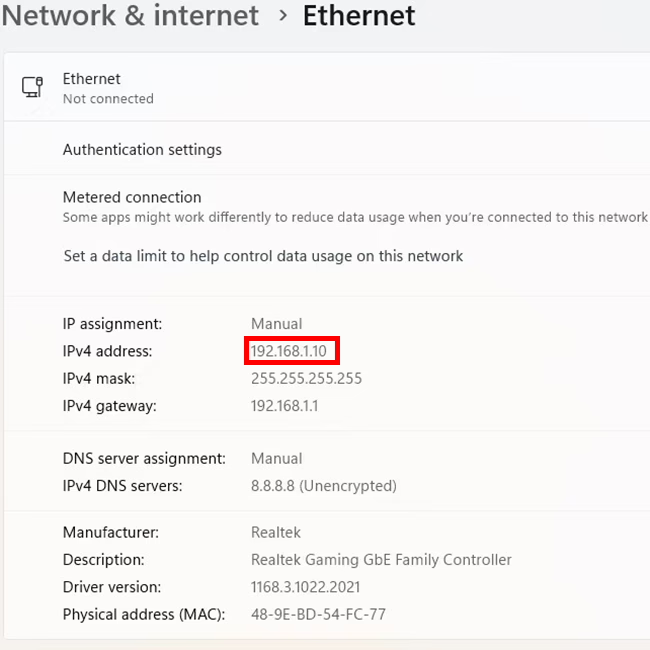
The default IP address of the composite analog video to IP video converter board is 192.168.1.30.
iVcan.com reply:
- Try changing the network cable, or connect the same network cable to other network devices. Is it normal?
- Is our analog video to network converter connected directly to the computer or through a hub?
- If it is a direct connection, check whether the wired network in your computer’s network neighborhood is displayed normally or unplugged.
- If it passes through a network hub, check whether the network indicator light is flashing or not. Or unplug and plug it in and observe again.
- How long is your network cable? Because our board is relatively small, there is no network transformer, so try to use a short network cable.
- If the network cable is very long, add a network hub in the middle, which has a signal enhancement function.
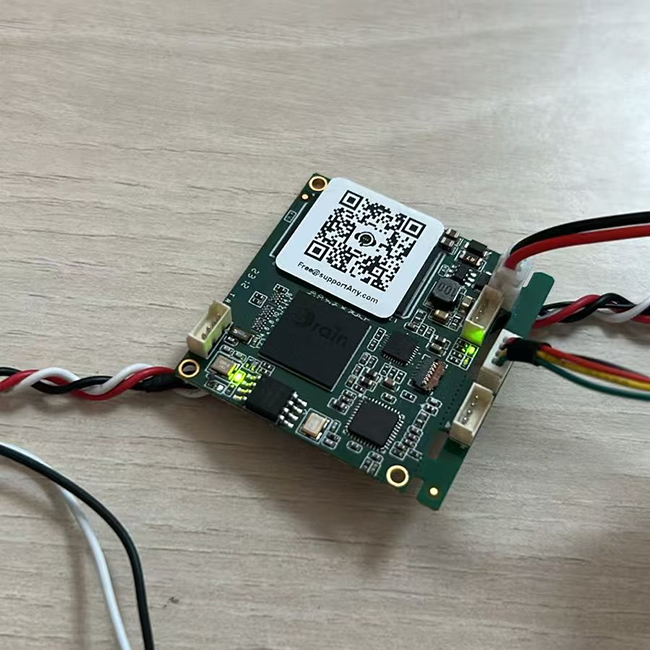
- You can also use the following method to determine whether the network connection is successful from the analog video to network port conversion board.
These two are lights related to the network card. When working normally, one of them is always on and the other one is flashing.


Why is my latency test result two seconds instead of milliseconds?
This user connected an analog camera to our analog video over IP converter board, connected it to a computer via an Ethernet cable, and played it using VLC player. He is streaming through rtsp protocol.
iVcan.com reply:
VLC player is a good general-purpose computer software. It needs to be optimized when playing video streams. Please refer to the link below.
तथापि, we recommend using Easyplayer, a specially optimized software.
If the user is still not satisfied with the delay, they can use our specially customized Splayer player that supports the UDP protocol.
About RCA video over IP converter board
एक RCA Video over IP device is a piece of hardware that allows you to transmit RCA composite video signals (along with audio, if supported) over an आईपी नेटवर्क. These devices are useful for extending or distributing standard-definition (एसडी) वीडियो signals over long distances using ईथरनेट (Cat5e, बिल्ली6) or even the internet.
यह काम किस प्रकार करता है
- एन्कोडिंग – The device converts analog composite video (yellow RCA) and stereo audio (red/white RCA) into a digital format.
- IP Transmission – The digital video signal is sent over a नेटवर्क (LAN or WAN) via standard Ethernet cables.
- डिकोडिंग – A receiving unit (कूटवाचक) converts the signal back to analog RCA video and audio for playback on a TV, निगरानी करना, or other display device.
प्रमुख विशेषताऐं
- Supports 480i/576i standard-definition video (एसडीटीवी).
- Uses Ethernet cables (Cat5e, बिल्ली6) for long-distance transmission.
- Can be used for single-point or multi-point video distribution.
- May support IR, 232 रुपये, or USB for remote control.
- Commonly used in legacy AV systems, सीसीटीवी, old gaming consoles, or DVD players.
Composite Video to IP refers to the process of converting analog composite video signals (such as those from CCTV cameras, वीसीआर, or older video sources) में digital IP (इंटरनेट प्रोटोकॉल) धाराओं so they can be transmitted over a network (लैन, ज़र्द, or the internet).
यह काम किस प्रकार करता है:
- Analog Signal Input: A composite video source (RCA or BNC connector) feeds an encoder या converter.
- डिजिटाइजेशन & दबाव: The encoder converts the analog signal into a digital format (जैसे, 264, एच.265).
- Streaming Over IP: The digital stream is encapsulated in network protocols (आरटीएसपी, आरटीपी, HTTP, or RTMP) for transmission over an IP network.
- देखना & भंडारण: The video can be viewed on IP-based devices like computers, एनवीआर, mobile apps, या क्लाउड प्लेटफ़ॉर्म.
सामान्य उपयोग के मामले:
- Upgrading Analog CCTV Systems: Converting legacy security cameras to work with modern IP-based systems.
- दूरस्थ निगरानी: Streaming old analog video sources over the internet for remote access.
- प्रसारण & स्ट्रीमिंग: Sending composite video signals to online platforms or IPTV systems.
Devices Used for Conversion:
- Video Encoders (Composite to IP converters)
- DVRs with Network Streaming Capabilities
- USB Capture Cards with Network Software
Encoder Modules Boards









डिकोडर मॉड्यूल बोर्ड




अनुकूलन के लिए उपलब्ध है
नए एनकोडर उत्पाद
| नहीं. | प्रोडक्ट का नाम | विन्यास | प्रमुख विशेषताऐं | स्थिति |
|---|---|---|---|---|
| 1 | Dual-Channel USB UVC Visible Light Video Encoder | 2× यूएसबी इनपुट | दोहरी USB कैमरा वीडियो एन्कोडिंग का समर्थन करता है, और आरटीएसपी स्ट्रीमिंग; स्थानीय सीवीबीएस/एचडीएमआई आउटपुट; स्विच करने योग्य डिस्प्ले मोड | बड़े पैमाने पर उत्पादन |
| 2 | दोहरे चैनल एनकोडर (1× USB Visible Light + 1× यूएसबी थर्मल इमेजिंग कैमरा) | 2× यूएसबी इनपुट | डुअल यूएसबी कैमरा को सपोर्ट करता है (दृश्यमान + थर्मल) capture, एन्कोडिंग, और आरटीएसपी स्ट्रीमिंग; स्थानीय सीवीबीएस/एचडीएमआई आउटपुट; स्विच करने योग्य डिस्प्ले मोड | बड़े पैमाने पर उत्पादन |
| 3 | RTSP Decoder HDMI/CVBS Display Module | HDMI + सीवीबीएस आउटपुट | 4×1080P@30fps तक RTSP स्ट्रीम डिकोडिंग का समर्थन करता है; वीडियो स्ट्रीमिंग प्रोटोकॉल अग्रेषण का समर्थन करें; एचडीएमआई/सीवीबीएस आउटपुट डिस्प्ले | Sample Available |
| 4 | आरटीएसपी डिकोडर एचडीएमआई/सीवीबीएस डिस्प्ले मॉड्यूल के साथ 4.3"/5" एलसीडी | HDMI उत्पादन + LCD screen | 4×1080P@30fps तक RTSP स्ट्रीम डिकोडिंग का समर्थन करता है; प्रोटोकॉल अग्रेषण; एचडीएमआई/सीवीबीएस आउटपुट डिस्प्ले | डिबगिंग |
| 5 | दोहरे चैनल एनकोडर (1× USB Visible Light + 1× सीवीबीएस एनालॉग) | 1× CVBS + 1× USB UVC input | Dual video (USB + CVBS), एन्कोडिंग और आरटीएसपी स्ट्रीमिंग; स्थानीय सीवीबीएस/एचडीएमआई आउटपुट; स्विच करने योग्य डिस्प्ले मोड | डिबगिंग |
| 6 | दोहरे चैनल एनकोडर (1× USB UVC + 1× AHD Analog) | 1× एएचडी + 1× USB UVC input | दोहरी वीडियो कैप्चर (USB + ए.एच.डी), एन्कोडिंग और आरटीएसपी स्ट्रीमिंग; स्थानीय सीवीबीएस/एचडीएमआई आउटपुट; स्विच करने योग्य डिस्प्ले मोड | डिबगिंग |
| 7 | दोहरे चैनल एनकोडर (1× CVBS + 1× एएचडी एनालॉग वीडियो) | CVBS + ए.एच.डी 2 वीडियो इनपुट | दोहरी एनालॉग वीडियो कैप्चर, एन्कोडिंग और आरटीएसपी स्ट्रीमिंग; स्थानीय सीवीबीएस/एचडीएमआई आउटपुट; स्विच करने योग्य डिस्प्ले मोड | डिबगिंग |
| 8 | दोहरे चैनल एनकोडर (1× सीएमओएस कैमरा + 1× यूएसबी थर्मल इमेजिंग कैमरा) | 1× यूएसबी इंटरफ़ेस | सीएमओएस का समर्थन करता है + यूएसबी थर्मल कैमरा कैप्चर, एन्कोडिंग और आरटीएसपी स्ट्रीमिंग; स्थानीय सीवीबीएस/एचडीएमआई आउटपुट; स्विच करने योग्य डिस्प्ले मोड | बड़े पैमाने पर उत्पादन |
अनुकूलित वीडियो इनपुट/आउटपुट रूपांतरण समाधानों के लिए जो हमारे उत्पादों में सूचीबद्ध नहीं हैं, OEM/ODM समर्थन के लिए कृपया हमसे संपर्क करें. हम आपकी आवश्यकताओं के आधार पर अनुरूप उत्पाद विकसित कर सकते हैं.
प्रश्न पूछें
आपका संदेश भेज दिया गया है