






How to add add a wireless video relay into a drone video data air uinit and ground unit
FAQ: aggiungere un relè video wireless per il collegamento di comunicazione del drone con terreno a lungo raggio o ostruito
Ha chiesto un cliente, Volevo verificare la possibilità di utilizzare un'unità come relè. Nella posizione in cui vogliamo far volare il nostro drone, c'è un terreno alto, che interrompe la comunicazione. Possiamo usare una terza unità che funga da relè?


Wireless Video trasmissione
1740-1840MHZ 2WPA 30km Transmit e ricevitore video drone a lungo raggio con SBUS TTL

Wireless Video trasmissione
Q1: È possibile utilizzare una delle unità come relè per superare gli ostacoli del terreno ed estendere il raggio di comunicazione?
UN: sì, è possibile configurare una delle unità come nodo relè per migliorare la comunicazione in aree con terreno elevato o altri ostacoli che bloccano la linea visiva diretta tra il drone e la stazione di controllo a terra.
Q2: Come funziona la configurazione del relè?
UN: The relay setup method depends on the software version installed on your device. There are two different versions:
- Point-to-Point Version
- Point-to-Multipoint Version
Each version uses a different configuration method for relay setup.
To determine which version your device is using, Si prega di controllare Web UI interface style of your firmware. The layout and design of the Web UI will indicate whether your firmware is the grado di distanza opzionale o grado di distanza opzionale versione.
Once you identify the firmware version through the Web UI style, follow the corresponding relay setup instructions for that version.
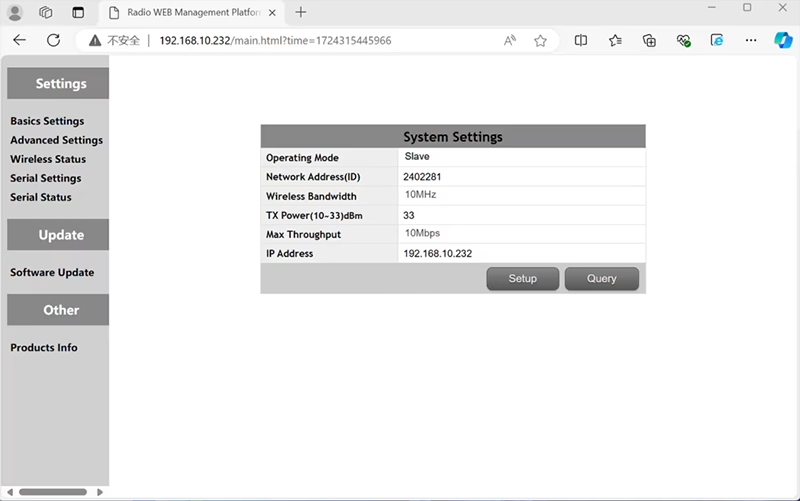

In the standard Point to Point (P2P) configurazione:
- Il Stazione di controllo a terra (GCS) agisce come il nodo principale (maestro).
- Il drone (unità aerea) agisce come il sottonodo (schiavo).
Per abilitare la funzionalità relè, la topologia della rete deve essere modificata:
- Converti il stazione di controllo a terra originale (nodo principale) in a nodo relè.
- Inserisci un altro sottonodo per servire come nuovo terminale della stazione di controllo di terra.
Il nuovo assetto avrà quindi tre nodi:
- Nodo 1 (fuco) - Slave node (in volo)
- Nodo 2 (Relè) - Repeater node (fissato a terra, tipicamente posizionato su un terreno elevato o in un punto medio)
- Nodo 3 (Stazione di controllo a terra) - Master node nodo (lato operatore)
- Drone Unit 8W – 192.168.10.252 (Schiavo)
- Relay Unit 8W- 192.168.10.250 (Ripetitore)
- Ground Unit 2W – 192.168.10.124 (Maestro)
In the standard Point to Multi-Points configuration:
- Il Stazione di controllo a terra (GCS) agisce come il nodo principale (maestro).
- Il drone (unità aerea) agisce come il sottonodo (schiavo).
Per abilitare la funzionalità relè, la topologia della rete deve essere modificata:
- Converti il stazione di controllo a terra originale (nodo principale) in a nodo relè.
- Inserisci un altro sottonodo per servire come nuovo terminale della stazione di controllo di terra.
Il nuovo assetto avrà quindi tre nodi:
- Nodo 1 (fuco) - Slave node (in volo)
- Nodo 2 (Relè) - Master node (fissato a terra, tipicamente posizionato su un terreno elevato o in un punto medio)
- Nodo 3 (Stazione di controllo a terra) - Slave node (lato operatore)
Questa configurazione consente ai segnali di viaggiare dal drone al relè, e poi dal relè all'operatore, garantendo un collegamento stabile e continuo anche quando il percorso diretto è bloccato da colline o edifici.
Q3: Quali sono i vantaggi di questa configurazione di relè?
- Estende la distanza di trasmissione effettiva.
- Mantiene un collegamento di comunicazione stabile con i droni anche su terreni complessi.
- Riduce la perdita di segnale e le interruzioni video.
- Consente il posizionamento flessibile del relè per ottimizzare la copertura.
Q4: Quali modifiche o configurazioni sono necessarie?
Modificare la modalità operativa in relè. Gli ID di tutti e tre i dispositivi devono essere gli stessi. Il nostro team di ingegneri può regolare il firmware e i parametri per abilitare la funzione relè. Devi solo informarci della configurazione prevista (per esempio., distanze, tipo di terreno, altezza di montaggio), e forniremo i file di configurazione e lo schema di collegamento corretti.
Q5: L'unità relè può essere portatile o montata su un veicolo?
sì. Il nodo relè può essere:
- Montaggio fisso (per esempio., sulla cima di una collina o di una torre), o
- Portatile (trasportato da veicolo, o montato su un treppiede con alimentatore).
Possiamo personalizzare l'involucro del relè e l'interfaccia di alimentazione in base allo scenario applicativo.
Q6: Il relè introduce un ritardo aggiuntivo?
La latenza aggiuntiva è minima (tipicamente inferiore a 10-20 ms) e ha un impatto minimo sulle prestazioni video e di controllo in tempo reale.
Q7: Posso impostare o cambiare la modalità relè da solo?
Ti consigliamo di contattare il nostro team di supporto tecnico per la configurazione iniziale per garantire il corretto indirizzamento dei nodi e la pianificazione della frequenza. Dopo l'installazione, il passaggio dalla modalità normale alla modalità relè può essere effettuato tramite software di configurazione o profili predefiniti.
Q8: Why can’t I connect to the relay node?
UN: If the relay and slave nodes are roughly the same distance from the master node, and the master node receives roughly the same amount of power, the relay node might not be able to join the network. When the master node determines that the received power of the two nodes is similar, it will prioritize connecting directly to the slave node.
D9: The three nodes cannot connect to each other. It is necessary to check the wireless transmit/receive status of each node to identify potential issues.
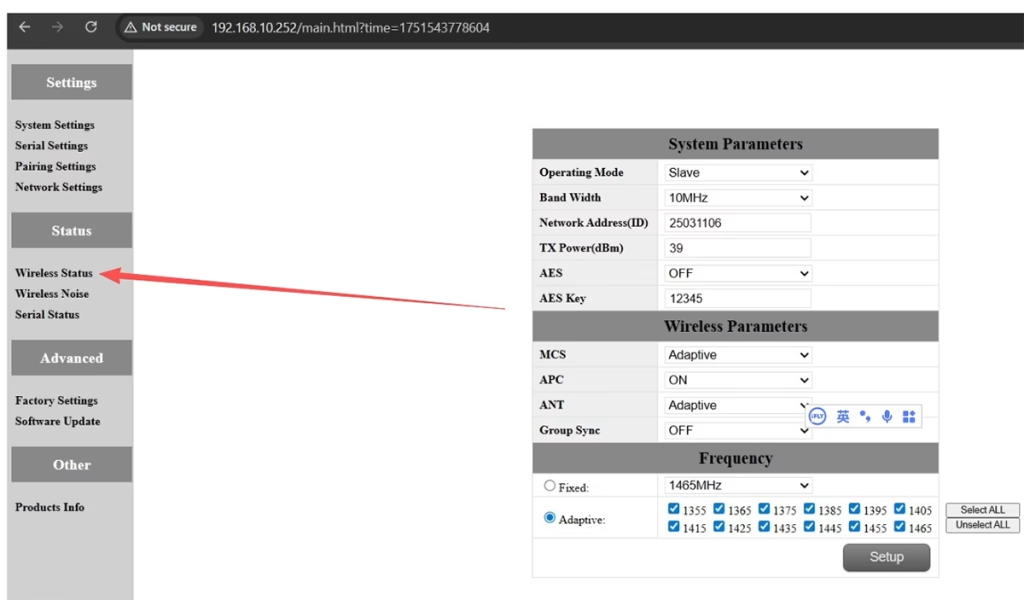
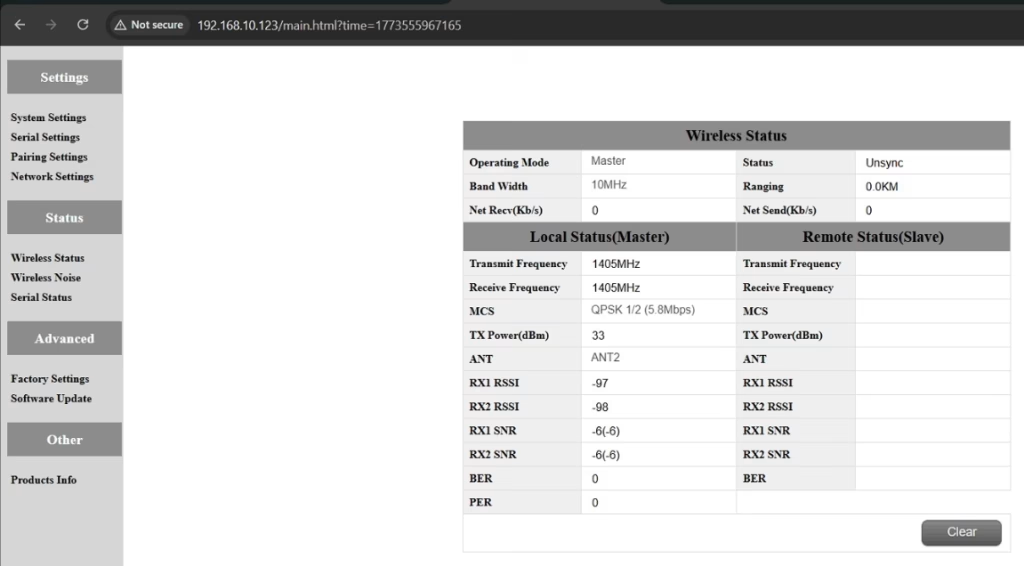
UN: Please do the below test firstly.
Attempt Remote Access
Try to access each node through the management interface or remote tool to check the wireless status.
If remote access fails, proceed to step 2.
Connect Directly via Ethernet
Use an Ethernet cable to connect your computer directly to each node.
Access the node’s management interface or wireless status page.
Check Wireless Transmit/Receive Status
Review the current wireless transmit/receive status, including signal strength, Stato del collegamento, and any error indicators.
Take a screenshot of the current status for each node, ensuring all relevant information is visible.
Send Screenshots to Engineers
Organize the screenshots and send them to the engineering team.
Engineers will analyze the wireless transmit/receive data to determine which node may have an issue.
Appunti:
Label each screenshot with the corresponding node for easy comparison.
Ensure screenshots include key data such as signal strength, connection status, e informazioni sul canale.
Q10: Does the relay unit only require antennas and power to operate? Is an Ethernet connection necessary?
UN: No. The relay unit only requires the antennas and a power supply to operate. Lo fa non require an Ethernet connection. The relay automatically forwards data between the aircraft side and the ground side, enabling seamless communication without the need for a network port connection.
Q11: what is this sync unsync on the wireless status?
UN: These are the parameters seen on the relay node. Il “sincronizzare” at the beginning indicates the connection status between the master node and the relay node, which is currently connected. Il “unsync” at the end indicates the connection status between the relay node and the slave node, which is currently not connected.
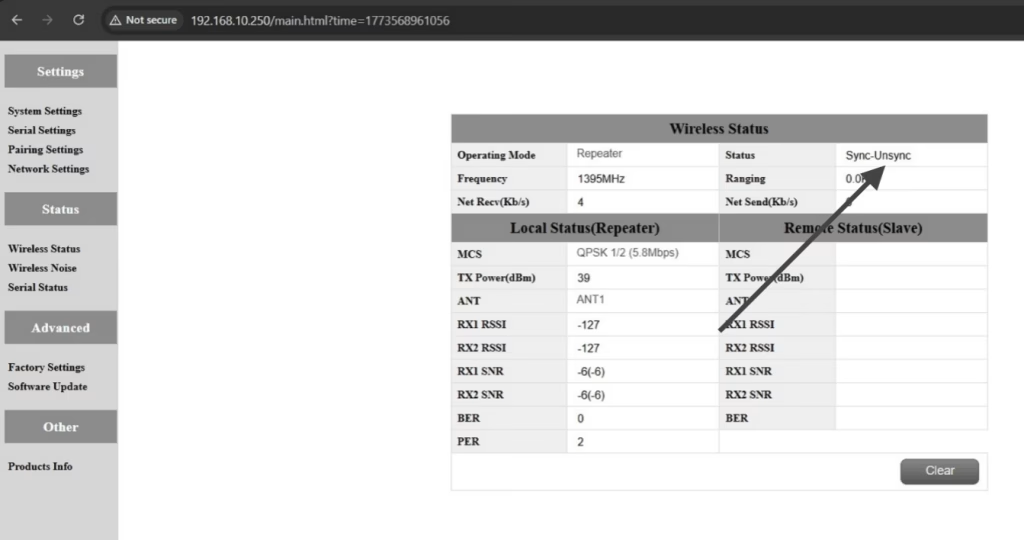
Q12: Why can’t my Slave, Ripetitore, or Master nodes connect? How to fix it?
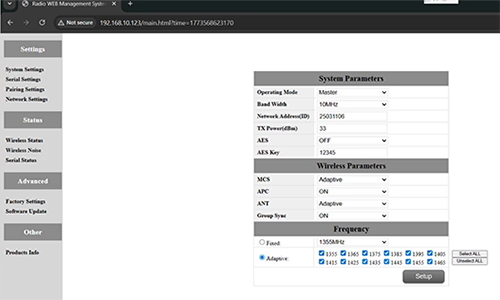
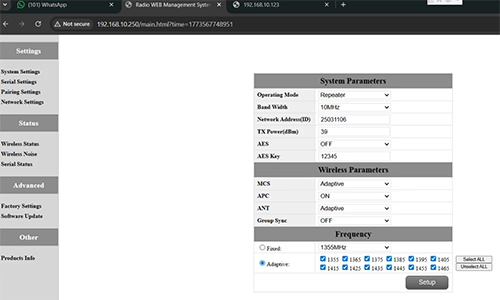
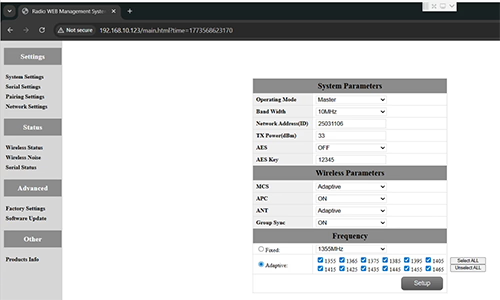
UN: This usually happens when nodes are not properly configured or the Group Sync settings are inconsistent.
- Connect each node directly to a computer using an Ethernet cable.
- Open the system parameter settings page and take a screenshot to share with technical support if needed.
- Controlla il Group Sync impostazioni:
- Se Group Sync Master is On, e Slave Node e Ripetitore are Off, impostato Group Sync a via for all nodes.
- After all nodes are connected successfully, you can enable Master / Schiavo / Repeater Group Sync as needed.
Risultato:
Following these steps has successfully resolved connection issues for other customers.
Q13: In what order should these three devices be powered on?
UN: The correct power-on sequence is critical to ensure proper system connectivity and prevent equipment damage. Follow these steps:
- Power on the Ground Unit first
- This includes the master control station or ground control equipment.
- Ensure all communication interfaces and power supplies are stable.
- Il prossimo, power on the Repeater Node (Relay Unit)
- Wait for the repeater to complete self-checks and establish a connection with the ground unit.
- Verify connection success via status indicators or LEDs.
- Finalmente, power on the Drone or Slave Node
- Make sure the ground unit and repeater node are fully ready before powering the drone.
- Dopo l'accensione, check the communication status between the drone and the repeater/ground units.
⚠️ Notes:
- Always follow the sequence Ground → Repeater → Drone to avoid initialization failures.
- If there are multiple slave nodes or repeaters, power on one at a time and confirm each connection before proceeding.
- Avoid powering all nodes simultaneously to prevent bus conflicts or voltage spikes.
Riepilogo:
✅ Funzione relè – Supportato
✅ Richiede modifiche – sì, un nodo riconfigurato come relè
✅ Numero consigliato di nodi – 3 (fuco / Relè / GCS)
✅ Aggiunta latenza – <20 Signorina
✅ Adatto per – Aree montuose, operazioni a lunga distanza, o condizioni NLOS
Fai una domanda
Grazie per la risposta. ✨