




رمزگذار مدولاتور رمزگشای ماژول دمدولاتور دستورالعمل های پیکربندی پارامتر COFDM AT Command

Download the Encoder Modulator Decoder Demodulator Module Parameter Configuration Instructions below if you need a PDF file.
Update Record:
| نسخه | تاریخ | شرح |
| 1.0 1.1 1.2 1.3 1.4 1.5 1.6 1.7 1.8 1.9 2.0 2.1 | 2016-10-24 2016-11-1 2016-12-26 2017-2-14 2017-2-28 2017-3-27 2017-4-19 2017-5-18 2017-9-12 2018-3-15 2019-6-25 2023-2-24 | نسخه اولیه ATDR reply distinguishing module ATSE, ATGE add audio switch Add ATSP protocol Add ATST, ATGT protocol ATGE command add AESfor status acquisition Added ATGB protocol AV and HDMI output control Support for obtaining the current AV output standard Added ATSU, ATGUcommands Added ATOSD, ATSIP, ATGIP commands Added ATSAD, ATGAD commands |
Users may need to modify the configuration parameters of the module during the use of the COFDM modulator and demodulator module. In order to simplify the user’s operation, we design the parameter configuration into a few simple AT commands. The user only needs to use the specified AT command and pass the corresponding parameters to complete the parameter setting of the COFDM module.
Suitable Models
-
 COFDM Modulator Demodulator Module Encoder Decoder HDMI CVBS AV ورودی AES 256 جریان FHD RF
 -
ماژول COFDM Relay Repeater برای فرستنده و گیرنده ویدیوی بی سیم پهپاد پهپاد Vcan1870
-
فرستنده و گیرنده ویدیوی بی سیم برای دوربین, HDMI HD H265 264 رمزگذار 1W/2.5W PA 1080P60 Vcan1726
-
مدولاتور رمزگذار SDI یا HDMI به IP برد رمزگذاری CVBS H.265 H.264 pcba Ethernet RSTP UDP for UAV Drone Robotic


Command Introduction
The AT command for configuring COFDM module parameters starts with “AT” and ends with an underscore “_”. Each AT command has several or no parameters, and each AT command has a return value. برای جزئیات, please refer to the introduction of the following commands.
Users can configure the parameters of the module through the configuration serial port (TTL level, 3.3V) of the COFDM module. For detailed serial port configuration, refer to the figure below. Please use tools such as “Serial Port Debugging Assistant” to send AT commands to the COFDM module, pay attention to the use of متن, مثلا:

سیommand Classification
The AT commands for configuring COFDM module parameters are mainly divided into the following two categories:
| Query Commands | ATDR, ATGD, ATGE, ATGI , ATGR, ATGT, ATGB, ATGU, ATGIP |
| Setting Commands | ATSD, ATSG, ATSM, ATSE, ATSI, ATSO, ATSR, ATSP, ATST, ATSU,ATOSD, ATSIP |
From the perspective of whether to save after power-off, the setting commands can be divided into:
| Power-off Saving Commands | ATSD, ATSE, ATSI, ATSO, ATSR, ATSP, ATST, ATSU, ATSIP |
| Power-off Not Saving Commands | ATSG, ATSM, ATOSD |
According to the configuration transmitter or receiver, the classification is as follows:
| Sender Configuration Commands | ATDR, ATSD, ATGD, ATSG, ATSM, ATSE, ATGE, ATSI, ATGI, ATSO, ATSP, ATST, ATGT, ATSU, ATGU, ATOSD |
| Receiver Configuration Commands | ATDR, ATSR, ATGR, ATSP, ATST, ATGT, ATGB, ATSIP, ATGIP |
Command Details
Ping Command
| قالب | ATDR_ |
| پارامتر | خیر |
| استفاده کنید | for the integrated system to check whether the serial port is connected and identify the connected modules. |
| ارزش برگشتی | RCB returns the “device profile” string SUE1 returns “ATDRSUE1 OK” string SHD1 returns “ATDRSHD1 OK” string |
| Remark | query command |
Set Device Command
| قالب | ATSD $(mimo), $(gi), $(code_rate), $ (constellation), $(freq(کیلوهرتز)), $(bw(کیلوهرتز)), $(tx1_gain), $(tx2_gain)_ مثال: ATSD0,1,0,0,800000,8000,86.0,86.0_ |
| پارامتر | One Antenna/Dual antenna mimo: 0 mimo disable; 1 mimo enable Guard Interval GI: 0 1/32; 1 1/16; 2 1/8; 3 1/4 Convolution Code Rate: 0 1/2; 1 2 /3; 2 3/4; 3 5/6; 4 7/8; صورت فلکی: 0 QPSK; 1 QAM16; 2 QAM64; RCB Carrier Center Frequency(کیلوهرتز) 200000~2700000(200MHz~2.7GHz, 1KHz step) RC900 Carrier center Frequency(کیلوهرتز) 750000~930000(750MHz~930MHz, 1KHz step) RCB Channel bandwidth bw(کیلوهرتز) 2000~8000(2MHz~8MHz, 1KHz step) RCB Channel bandwidth bw(کیلوهرتز) 2000~8000 (2MHz~8MHz, 1KHz step) Transmitting antenna 1 gain tx1_gain 0.0~89.75dB, 0.25dB stepping Transmitting antenna 2 gain tx2_gain 0.0~89.75dB, 0.25dB stepping |
| Return Value | مانند:ATSD0,1,0,0,800000,8000,86.0,86.0_ SISO,GI: 1/16, CR:1/2, MOD: QPSK, freq:800000کیلوهرتز,bw:8000کیلوهرتز,tx1_gain:86.000000 tx2_gain:86.000000 OK |
| توجه داشته باشید | دستور را تنظیم کنید, صرفه جویی در هنگام خاموش شدن برق. Different Bandwidths, Guard intervals, Convolution code rates, Data rate calculation formulas corresponding to constellations Air interface rate Rate(MBps) = (BandWidth(مگاهرتز) * 8.0/7.0) / (1+GI) * 1512/2048*log2(constellation point) * code_rate * 188/204. Taking 8MHz bandwidth as an example, different guard intervals, convolution code rates, data rates corresponding to constellations and required receiving signal-to-noise ratios  |
اسet Gain Command
| قالب | ATSG$( tx1_gain),$( tx1_gain)_ مثال: ATSG85.0,85.0_ |
| پارامتر | tx1_gain: فرستنده 1 به دست آوردن tx2_gain: فرستنده 2 به دست آوردن |
| استفاده کنید | To dynamically adjust the output power. If the signal SNR/RSSI of the receiver is high, the output power can be reduced through the remote control link. When the SNR/RSSI of the end signal is low, increase the output power (فرستنده) |
| Return Value, | مثال: ATSG85.0,85.0_set gain 85.000000 85.000000 OK |
| Remark | setting command, power off will not save. |
Set Modulation Mode commanد
| قالب | ATSM$(gi), $(code_rate), $(constellation)_ مثال: ATSM1,1,2_ |
| پارامتر | Gard interval GI: 0 1/32; 1 1/16; 2 1/8; 3 1 /4; Convolution code rate: 0 1/2; 1 2/3; 2 3/4; 3 5/6; 4 7/8; صورت فلکی: 0 QPSK; 1 QAM16; 2 QAM64 |
| استفاده کنید | Dynamically adjust the air interface rate, the air interface rate can be increased when the distance is short, and the air interface rate can be reduced when the distance is long (فرستنده) |
| Return Value | مثال:ATSM1,1,2_GI:1/16, CR:2/3, MOD: QAM64, OK |
| Remark | setting command, power off will not save. |
جیet Device Status Command
| قالب | ATGD_ |
| پارامتر | خیر |
| استفاده کنید | query the current number of transmit antennas, فاصله نگهبانی, convolution code rate, number of constellations, transmit frequency, پهنای باند, gain parameters (فرستنده) |
| Return Value | مثال: ATGD_ SISO, GI:1 /16, CR: 1/2, MOD: QPSK, freq: 800000کیلوهرتز, bw: 8000کیلوهرتز, tx1_gain: 86.000000 tx2_gain: 86.000000 OK |
| Remark | query command |
Set Encoder Command
| قالب | ATSE$(llc),$(rt),$(bitrate) ,$(gop),$(صوتی)_ مثال: ATSE0,0,0.0,0,0_ |
| پارامتر | 1. Enhanced data reliability option llc: 0 disable; 1 enable (requires the receiving end to enable this option at the same time, use in pairs, because more redundant data is added to enhance reliability, the video bit rate of the transmitting end should be set when this option is turned off half of) 2. Real-time priority/quality priority rt: 0 image quality priority; 1 real-time priority; 3. میزان بیت: 0 let system decide; >0 specify bitrate(float) 4. I frame interval GOP: 0 let system decide; >0 specify GOP 5. Audio encoding option audio: 0 disable; 1 enable |
| استفاده کنید | Used to set encoding parameters (فرستنده) |
| Return Value | مثال:ATSE0, 0,0.0,0,0_ MODE:0,RT:0,bitrate: 0.0مگابیت در ثانیه,gop:0,صوتی:0,OK |
| Remark | setting command, save when power is off. |
Get Encoder Command
| قالب | ATGE_ |
| پارامتر | خیر |
| استفاده کنید | querying encoding parameters (sending end) |
| Return Value | مثال:ATGE_MODE:0, RT:0,bitrate:4.0مگابیت در ثانیه,gop:10,صوتی:0,aes:0, OK |
| Remark | Query command AES means the current encryption status: 0 disable; 1 enable |
Get Input Command
| قالب | ATGI_ |
| پارامتر | خیر |
| استفاده کنید | query the current camera input parameters (فرستنده) |
| Return Value | مثال:ATGI_input_size: 1080ص, input_rate: 60فریم در ثانیه, sensor_type: hdmi,OK |
| Remark | query command |
Set Input Command
| قالب | ATSI$(input_size),$(input_rate)_ مثال: ATSI1080,25_ |
| پارامتر | 1. Input resolution input_size: 0 let the system detect; >0 specify input size 2. Input frame rate input_rate: 0 let the system detect; > 0 specify input fps |
| استفاده کنید | To specify the input resolution and frame rate to meet some special signal sources, or some special application needs (فرستنده) |
| Return Value | مثال: ATSI1080,25_ Input_size:1080ص,input_rate: 25فریم در ثانیه, OK |
| Remarks | After the user specifies the input resolution and frame rate through this command, the system will no longer detect the signal source (use with caution). The user can restore the default through the following command: ATSI0,0_Set the command and save it after power-off. |
Set Output Command
| قالب | ATSO$(output_size),$(output_rate)_ مثال: ATSO720,30_ |
| پارامتر | 1. فرستنده: encoding output resolution output_size: 0 equal to input_size; >0 specify output size 2. گیرنده: HDMI output resolution (720, 1080) 3. فرستنده: encoding output frame rate output_rate: 0 equal to input_rate; >0 specify output_rate (فریم در ثانیه) 4. گیرنده: HDMI output frame rate 720p supports frame rate (50, 60); 1080p supports frame rate (24, 25, 30, 50, 60) |
| استفاده کنید | 1. فرستنده: Used to specify the encoding output resolution and frame rate to meet the requirements of certain applications for zooming and frame reduction 2. گیرنده: used to configure the resolution and frame rate of HDMI output |
| Return Value | مثال: ATSO720,30_ output_size: 720ص, output_rate: 30فریم در ثانیه, OK |
| Remarks | 1. For HDMI input only, this command is invalid for AV input 2. Output_size <= input_size; output_rate<=input_rate 3. Set the command and save it after the power is off. |
Set Input Sources Command (switch HDMI / CVBS input)
| قالب | ATSU$(vin),$(عین)_ مثال: ATSU0,1 _ |
| پارامتر | 1. Video input selection VIN: 0 let the system detect; 1 force CVBS input; 2 force hdmi/SDI input 2. Audio input selection AIN: 0 let the system detect; 1 force analog input |
| استفاده کنید | Used to meet specific application requirements (مثال: HDMI/SDI input video, MIC input audio) |
| Return Value | مثال: ATSU0,1_ ATSU0,1 OK |
| Remark | setting command, power-off save. |
Get User Command
| قالب | ATGU _ مثال: ATGU_ |
| پارامتر | خیر |
| استفاده کنید | To query user-specific configuration |
| Return Value | مثال: ATGU_ ATGU0,1 OK |
| Remark | query command return parameter description please refer to the ATSU command |
Set Receiver Command
| قالب | ATSR $(freq), $(bw ), $(llc), $(cvbs)_ مثال: ATSR320000,6000,0,0_ |
| پارامتر | 1. DR2C carrier frequency freq(کیلوهرتز) 200000~860000(200مگاهرتز ~ 860 مگاهرتز, 1KHz step) 2. DR900 carrier center frequency freq(کیلوهرتز) 200000~1600000(200MHz~1.6GHz, 1KHz step) 3. DR2C channel bandwidth bw(کیلوهرتز) 2000~8000(2MHz~8MHz, 1KHz step) 4. DR900 channel bandwidth bw(کیلوهرتز) 3200~8000(3.2MHz~8MHz, 1KHz step) 5. Enhanced data reliability option llc: 0 disable; 1 enable (it is required that the transmitter should also enable this option at the same time, and use it in pairs. Since more redundant data is added to enhance reliability, the video bit rate of the transmitter should be set to when this option is turned off half of) 6. AV output system cvbs: 0 pal; 1 ntsc |
| استفاده کنید | To set the receiver parameter |
| Return Value | مثال: ATSR320000,6000,0,0_ ATSR320000,6000,0,0 OK |
| Remark | setting command, save when power is off. |
Get Receiver Command
| قالب | ATGR_ |
| پارامتر | خیر |
| ATGR_ | the receiving end parameter |
| Return Value | مثال: ATGR_ ATGR320000,6000,0,aes:0,cvbs:0 OK |
| Remark | 1. Query command 2. Aes parameter indicates the current encryption status: 0 disable;1 enable 3. CVBS parameter Indicates the current AV output standard: 0 pal;1 ntsc |
Get Bit Error Rate Command
| قالب | ATGB_ |
| پارامتر | خیر |
| استفاده کنید | querying the bit error rate and signal strength of the dual antennas at the receiving end |
| Return Value | مثال: ATGB_ ATGB ber1:0.00% ber2:0.00% RSSI1 :54 RSSI2:53 Lock1:1 Lock2:1 OK |
| Remarks | 1. Query commands 2. Ber1 and ber2 respectively indicate the bit error rate of each antenna, ranging from 0.0% به 100.0% 3. RSSI1 and RSSI2 respectively indicate the signal strength of each antenna, ranging from 0 به 100 4. Lock1 and Lock2 respectively indicate the signal locking status of each antenna (1 Represents signal lock) |
Set Password Command
| قالب | ATSP$(رمز عبور), $(رمز عبور)_ مثال: ATSP123456, 123456_ |
| پارامتر | رمز عبور کلید AES: 6-digit password (ASCII) رمز عبور کلید AES: 6-digit password (ASCII) (repeat it for confirmation) |
| استفاده کنید | برای تنظیم کلید AES فرستنده گیرنده استفاده می شود (فرستنده و گیرنده) |
| Return Value | مثال: ATSP123456_ ATSP123456 OK |
| Remark | 1. وقتی رمز عبور تمام است 0, AES encryption is turned off. 2. Set the command and save it after powering it off. |
Set Data Transfer Command
| قالب | ATST$(نرخ باد), $( parity)_ مثال: ATST115200,0_ |
| پارامتر | 1. Baud rate baud rate: 1200、2400、4800、9600、19200、38400、57600、115200 2. Check Code: 0: None; 1: Odd; 2: Even |
| استفاده کنید | Used to set the baud rate and parity bit of the serial port for data transparent transmission |
| Return Value | مثال: ATST115200,0_ ATST115200,0 OK |
| Remarks | دستور را تنظیم کنید |
Get Data Transfer Command
| قالب | ATGT_ |
| پارامتر | خیر |
| استفاده کنید | Used to query the baud rate and check code |
| Return Value | مثال: ATGT_ ATGT115200,0 OK |
| Remarks | Query command |
Set IP Address Command
| قالب | ATSIP$(ip), $(ip)_ مثال: ATSIP192.168.1.215,192.168.1.215_ |
| پارامترها | Local IP address Local IP address (برای تایید تکرار کنید) |
| استفاده کنید | Used to set the receiver IP address |
| Return Value | مثال: ATSIP_192.168.1 .215,192.168.1.215_ ATSIP192.168.1.215 OK |
| Remarks | 1. After setting the IP address, the receiving end needs to be restarted to take effect. 2. Set the command and save it after powering it off. |
Get IP Address Command
| قالب | ATGIP_ مثال: ATGIP_ |
| پارامتر | خیر |
| استفاده کنید | to query the current IP address of the receiving end |
| ارزش برگشتی | مثال: ATGIP_ ATGIP192.168.0.215 OK |
| Remark | query command |
OSD Overlay Protocol
| قالب | ATOSD$(idx), $(ایکس), $(y), $(خ)_ مثال:ATOSD0,40,20,height: 100m_ |
| پارامتر | 1. IDX index: 0~7 (supports OSD overlay for 8 areas) 2. X-coordinate: 0~1919 3. Y coordinate: 0~1079 4. خ: the string to be displayed at the corresponding coordinates (the space symbol is used to clear the display) |
| استفاده کنید | on the video screen.OSD information |
| ارزش برگشتی | خیر |
| Remarks | 1. The user specifies the x and y coordinates of the OSD display according to the maximum 1920×1080 پیکسل ها, and the system will correct the coordinates according to the actual display situation. 2. The ‘_’ character cannot be contained in the str parameter |
Set Gain To Adjust
| قالب | ATSAD$(freq),$(adjust) _ مثال:ATSAD700000,2.5_ |
| پارامتر | wireless central working frequency: Freq(کیلوهرتز) 200000~2700000(200MHz~2.7GHz, step: 1کیلوهرتز) Adjust the value(دسی بل): ATSD cmd will subtract this value to set the wireless gain |
| تابع | Specify and adjust the value for the wireless gain setting using by ATSD cmd |
| بازخورد | مثال: ATSAD700000,2.5_ freq:700000,adjust:2.50 OK |
| نظرات | Setting command is still valid when stopping power or resetting. |
Get Gain To Adjust
| قالب | ATGAD[$(freq)]_ مثال:ATGAD700000_ |
| پارامتر | wireless central working frequency: Freq(کیلوهرتز) 200000~2700000(200MHz~2.7GHz, step: 1کیلوهرتز) When no parameter provides, it will list all the freq that have adjusted value. |
| تابع | Inquiry adjust the value for wireless gain setting using ATSD cmd |
| بازخورد | مثال: ATGAD700000_ freq:700000,adjust:2.50 OK ATGAD_ freq:700000 750000 OK |
| نظرات | Inquiry command. |
Serial Port Utility software download
HTTPS://www.alithon.com/downloads
پرسش و پاسخ
1. How can I return to the No Password setting with 000000 indications after the change?
Reset the password to 000000 (one must not be missing) through the Parameter Configuration Panel Board.
or set it through این ATSP_command
2. I see that Gain is the output power of the transmitter. Please tell me the range of settings of this parameter. All setting level (به دست آوردن) good for linear output operation? Or do you suggest some limited range for better linear operation?
The Gain of the COFDM configuration is the internal Gain, not the actual output power of the transmitter. The internal gain range is 0~89.75dB and the linear output:
1. At around 300~500MHz, the Gain is set to 89.75, and the actual output power of the transmitter module is about -5dBm.
2. At around 1000~1500MHz, the Gain is set to 89.75, and the actual output power of the transmitter module is about -6dBm to -10dBm.
3. I tried to set – B bandwidth (کیلوهرتز) and E bit rate (مگابیت در ثانیه). When I set E, the new value does not apply. بنابراین. the E setting is only for monitoring of available bitrate? if I wish to change the E (میزان بیت) I have to change only B (پهنای باند)? Am I right?
It is not recommended to modify the video bit rate ‘E’ directly, because if the output video bit rate is greater than the wireless air interface rate, the system will not work normally.
به طور پیش فرض, the internal video bit rate ‘E’ will be set to 0 for automatic. Customers only need to modify ‘B’ to modify the wireless parameters, and the video bit rate will automatically adapt.
You can also adjust the wireless air interface rate by modifying GI and CR.
For more details on the Encoder Modulator Decoder Demodulator Module, please send an inquiry to us.


COFDM Modulator Demodulator Module Encoder Decoder HDMI CVBS AV ورودی AES 256 جریان FHD RF
$1,450.00
COFDM Modulator Demodulator Module Encoder Decoder HDMI CVBS AV ورودی AES 256 جریان FHD RF
فهرست مطالب
Another side view

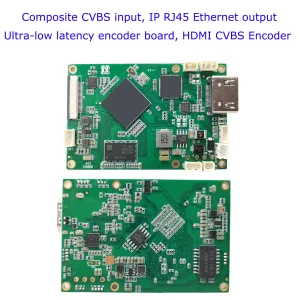
COFDM Encoder module, CVBS / ورودی HDMI, IP output

For More details about the COFDM encoder board, please visit here
COFDM Encoder module Advantage:
- Ultra-low latency H.265/H.264 audio and video encoding maximum support 1080P@60 real-time video capture and encoding
- HDMI or AV audio and video input, after encoding, the Ethernet port output or Output to wireless module, video encoding bit rate can be dynamically configured
- Support audio input and audio decoding output
- Support two videos (HDMI+AV) simultaneous input encoding (گزینه, the default is HDMI or AV encoding, pick one from two input sourcing). )
- رابط کاربری وب یا serial port UART AT command for configuration management

COFDM transmitter module
COFDM transmitter module
COFDM modulator-demodulator datasheet download
COFDM demodulator Vcan1776RX-H264 datasheet
The last version of the TX RX board
TX: V6.5.6p
RX: 4.1.2ص
COFDM Wireless Video encoder modulator board
SDI+AHD+CVBS Video Encoder and H264 H265 decoder
Some clients also need SDI AHD CVBS video encoder modulator transmitter video decoder demodulator receiver HDMI output. We also have another model Vcan1776-SDI+AHD+CVBS supports these functions.
 Which video decoder board supports H264 H265 and super-low latency?


The left-side blue decoder board supports H265 and H264 decoding but does not support low-latency decoding. (Samsun Chipset)
The right-side blackboard supports H264 decoding but supports H264 low-latency decoding. (HiSilicon)
پرسش و پاسخ
سوال: What’s the precise RF power output at 1400 مگاهرتز? Can I adjust the output power using software?
پاسخ دهید: The maximum RF power at 1400MHz is about -9 به -12 DBM به, the exact RF power can be set via parameter configuration board or via uart with AT command.


پست نسبی
- How to make SD upgrade card for wireless video receiver?
- How to upgrade the COFDM Video Receiver firmware?
- How to change the starting logo of cofdm hd video receiver?
- Formatting the SD card to FAT32 should fix the video recording issue.
- راهنمای پیکربندی گیرنده COFDM و پروتکل جریان
- نحوه ارسال داده های پروازی منوی OSD تعریف شده توسط کاربر از طریق برد گیرنده رسیور فرستنده ویدیوی بی سیم COFDM
- پیکربندی پارامتر ماژول COFDM دستورات UART AT
| ورودی ویدئو | HDMI+CVBS, SDI+AHD( or CVBS) |
|---|
1 بررسی برای COFDM Modulator Demodulator Module Encoder Decoder HDMI CVBS AV ورودی AES 256 جریان FHD RF
یک بررسی اضافه کنید


محصولات مرتبط


CVBS HDMI به IP رمزگذار



تابلوهای ماژول های رمزگذار









تابلوهای ماژول های رمزگشا




برای سفارشی سازی موجود است
محصولات رمزگذار جدید
| خیر. | نام محصول | پیکر بندی | ویژگی های کلیدی | وضعیت |
|---|---|---|---|---|
| 1 | رمزگذار ویدئویی نور مرئی UVC دو کاناله USB | 2× ورودی USB | پشتیبانی از کدگذاری ویدئویی با دوربین دوگانه USB, و RTSP جریان; خروجی محلی CVBS/HDMI; حالت های نمایش قابل تغییر | تولید انبوه |
| 2 | رمزگذار دو کاناله (1× نور مرئی USB + 1× دوربین تصویربرداری حرارتی USB) | 2× ورودی USB | پشتیبانی از دوربین دوگانه USB (قابل مشاهده است + حرارتی) گرفتن, رمزگذاری, و RTSP جریان; خروجی محلی CVBS/HDMI; حالت های نمایش قابل تغییر | تولید انبوه |
| 3 | ماژول نمایش HDMI/CVBS رسیور RTSP | HDMI + خروجی CVBS | پشتیبانی از رمزگشایی جریان RTSP تا 4×1080P@30fps; پشتیبانی از ارسال پروتکل جریان ویدئو; نمایشگر خروجی HDMI/CVBS | نمونه موجود است |
| 4 | ماژول نمایش HDMI/CVBS رسیور RTSP با 4.3"/5" ال سی دی | خروجی HDMI + صفحه نمایش LCD | پشتیبانی از رمزگشایی جریان RTSP تا 4×1080P@30fps; ارسال پروتکل; نمایشگر خروجی HDMI/CVBS | اشکال زدایی |
| 5 | رمزگذار دو کاناله (1× نور مرئی USB + 1× CVBS آنالوگ) | 1× CVBS + 1× ورودی USB UVC | ویدئوی دوگانه (یو اس بی + CVBS), رمزگذاری و جریان RTSP; خروجی محلی CVBS/HDMI; حالت های نمایش قابل تغییر | اشکال زدایی |
| 6 | رمزگذار دو کاناله (1× USB UVC + 1× AHD آنالوگ) | 1× AHD + 1× ورودی USB UVC | فیلمبرداری دوگانه (یو اس بی + AHD), رمزگذاری و جریان RTSP; خروجی محلی CVBS/HDMI; حالت های نمایش قابل تغییر | اشکال زدایی |
| 7 | رمزگذار دو کاناله (1× CVBS + 1× ویدئو آنالوگ AHD) | CVBS + AHD 2 ورودی ویدیو | فیلمبرداری دوگانه آنالوگ, رمزگذاری و جریان RTSP; خروجی محلی CVBS/HDMI; حالت های نمایش قابل تغییر | اشکال زدایی |
| 8 | رمزگذار دو کاناله (1× دوربین CMOS + 1× دوربین تصویربرداری حرارتی USB) | 1× رابط USB | پشتیبانی از CMOS + ضبط دوربین حرارتی USB, رمزگذاری و جریان RTSP; خروجی محلی CVBS/HDMI; حالت های نمایش قابل تغییر | تولید انبوه |
برای راه حل های تبدیل ورودی/خروجی ویدیویی سفارشی شده که در محصولات ما ذکر نشده است, لطفا برای پشتیبانی OEM/ODM با ما تماس بگیرید. ما می توانیم محصولات متناسب با نیاز شما را توسعه دهیم.
iVcan.com –
This COFDM module is the professional-grade backbone our live production team desperately needed! We replaced a bulky $10K rig with this compact unit, streaming zero-latency 1080p video via HDMI/CVBS from drones and rally cars across 3km of urban chaos. The AES-256 encryption kept feeds secure during a high-profile emergency event, while the built-in bit-error correction maintained crystal clarity through concrete structures and rain. Setup took minutes: just linked cameras to AV/HDMI inputs, set RF parameters, and hit stream. For broadcasters, first responders, or industrial inspections needing tamper-proof, long-range HD video with military-grade security, this module delivers flawless performance at a fraction of traditional costs!