






How to add add a wireless video relay into a drone video data air uinit and ground unit
FAQ: Fügen Sie ein drahtloses Videorelais für die Kommunikationsverbindung der Drohne mit großer Reichweite oder versperrtem Gelände hinzu
Ein Kunde fragte, Ich wollte die Möglichkeit prüfen, eine Einheit als Relais zu verwenden. An dem Ort, an dem wir unsere Drohne fliegen wollen, Es gibt hohes Gelände, was die Kommunikation stört. Können wir eine dritte Einheit als Relais verwenden??


Drahtlose Video-Übertragung
1740-1840MHz 2WPA 30 km Langstrecken -Video -Sender und Empfänger mit SBUS TTL

Drahtlose Video-Übertragung
8 Watts Power Amplifier 100 km Drohnen -Videodaten -Radio -Link
Q1: Kann eine der Einheiten als Relais verwendet werden, um Geländehindernisse zu überwinden und die Kommunikationsreichweite zu erweitern??
EIN: Ja, Es ist möglich, eine der Einheiten als Relaisknoten zu konfigurieren, um die Kommunikation in Gebieten mit hohem Gelände oder anderen Hindernissen zu verbessern, die die direkte Sichtlinie zwischen der Drohne und der Bodenkontrollstation blockieren.
Q2: Wie funktioniert das Relais-Setup??
EIN: The relay setup method depends on the software version installed on your device. There are two different versions:
- Point-to-Point Version
- Point-to-Multipoint Version
Each version uses a different configuration method for relay setup.
To determine which version your device is using, Bitte überprüfen Sie die Web UI interface style of your firmware. The layout and design of the Web UI will indicate whether your firmware is the optionale Distanznote oder optionale Distanznote Ausführung.
Once you identify the firmware version through the Web UI style, follow the corresponding relay setup instructions for that version.
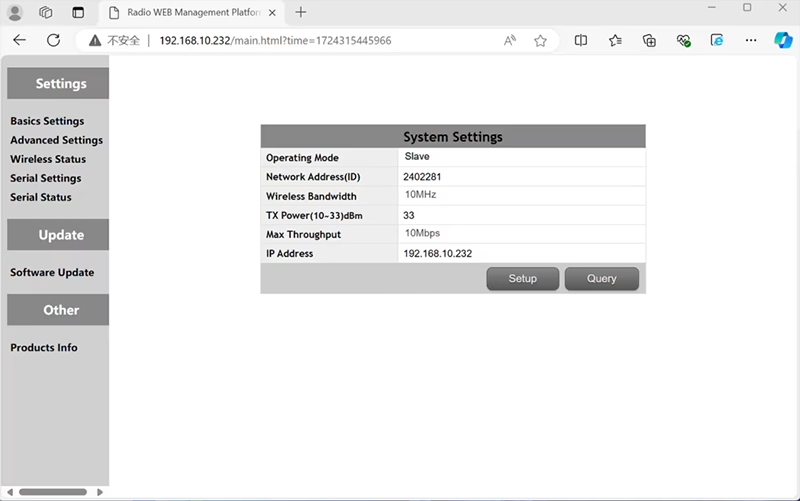

In the standard Point to Point (P2P) Konfiguration:
- Das Bodenkontrollstation (GCS) fungiert als Hauptknoten (Meister).
- Das Drohne (Lufteinheit) fungiert als Unterknoten (Sklave).
Um die Relaisfunktion zu aktivieren, Die Netzwerktopologie muss geändert werden:
- Konvertieren Sie die ursprüngliche Bodenkontrollstation (Hauptknoten) in ein Relaisknoten.
- Hinzufügen ein weiterer Unterknoten als dienen neues Terminal der Bodenkontrollstation.
Das neue Setup wird daher haben drei Knoten:
- Knoten 1 (Drohne) - Slave node (in der Luft)
- Knoten 2 (Relais) - Repeater node (am Boden befestigt, typischerweise auf hohem Gelände oder in der Mitte platziert)
- Knoten 3 (Bodenkontrollstation) - Masterknoten Knoten (Bedienerseite)
- Drone Unit 8W – 192.168.10.252 (Sklave)
- Relay Unit 8W- 192.168.10.250 (Verstärker)
- Ground Unit 2W – 192.168.10.124 (Meister)
In the standard Point to Multi-Points configuration:
- Das Bodenkontrollstation (GCS) fungiert als Hauptknoten (Meister).
- Das Drohne (Lufteinheit) fungiert als Unterknoten (Sklave).
Um die Relaisfunktion zu aktivieren, Die Netzwerktopologie muss geändert werden:
- Konvertieren Sie die ursprüngliche Bodenkontrollstation (Hauptknoten) in ein Relaisknoten.
- Hinzufügen ein weiterer Unterknoten als dienen neues Terminal der Bodenkontrollstation.
Das neue Setup wird daher haben drei Knoten:
- Knoten 1 (Drohne) - Slave node (in der Luft)
- Knoten 2 (Relais) - Masterknoten (am Boden befestigt, typischerweise auf hohem Gelände oder in der Mitte platziert)
- Knoten 3 (Bodenkontrollstation) - Slave node (Bedienerseite)
Diese Konfiguration ermöglicht die Übertragung von Signalen von der Drohne zum Relais, und dann vom Relais zum Operator, Gewährleistung einer stabilen und kontinuierlichen Verbindung, selbst wenn der direkte Weg durch Hügel oder Gebäude blockiert ist.
Q3: Welche Vorteile bietet dieses Relais-Setup??
- Verlängert die effektive Übertragungsreichweite.
- Hält eine stabile Drohnen-Kommunikationsverbindung auch in komplexem Gelände aufrecht.
- Reduziert Signalverlust und Videounterbrechungen.
- Ermöglicht eine flexible Platzierung des Relais zur Optimierung der Abdeckung.
Q4: Welche Änderungen oder Konfigurationen sind erforderlich?
Ändern Sie die Betriebsart auf Relais. Die IDs aller drei Geräte müssen gleich sein. Unser Technikteam kann die Firmware und Parameter anpassen, um die Relaisfunktion zu aktivieren. Sie müssen uns lediglich Ihr geplantes Setup mitteilen (z.B., Entfernungen, Geländetyp, Montagehöhe), und wir stellen die richtigen Konfigurationsdateien und Verbindungsdiagramme zur Verfügung.
Q5: Kann die Relaiseinheit tragbar oder im Fahrzeug montiert sein??
Ja. Der Relaisknoten kann sein:
- Fest montiert (z.B., auf einem Hügel oder Turm), oder
- tragbar (mit Fahrzeug befördert, oder auf einem Stativ mit Netzteil montiert).
Wir können das Relaisgehäuse und die Stromschnittstelle entsprechend Ihrem Anwendungsszenario anpassen.
Q6: Führt das Relais eine zusätzliche Verzögerung ein??
Die zusätzliche Latenz ist minimal (typischerweise weniger als 10–20 ms) und hat nur geringe Auswirkungen auf die Echtzeit-Video- und Steuerungsleistung.
Q7: Kann ich den Relaismodus selbst einrichten oder umschalten??
Wir empfehlen Ihnen, sich für die Erstkonfiguration an unser technisches Support-Team zu wenden, um eine korrekte Knotenadressierung und Frequenzplanung sicherzustellen. Nach der Einrichtung, Das Umschalten zwischen Normalmodus und Relaismodus kann über Konfigurationssoftware oder vordefinierte Profile erfolgen.
Q8: Why can’t I connect to the relay node?
EIN: If the relay and slave nodes are roughly the same distance from the master node, and the master node receives roughly the same amount of power, the relay node might not be able to join the network. When the master node determines that the received power of the two nodes is similar, it will prioritize connecting directly to the slave node.
F9: The three nodes cannot connect to each other. It is necessary to check the wireless transmit/receive status of each node to identify potential issues.
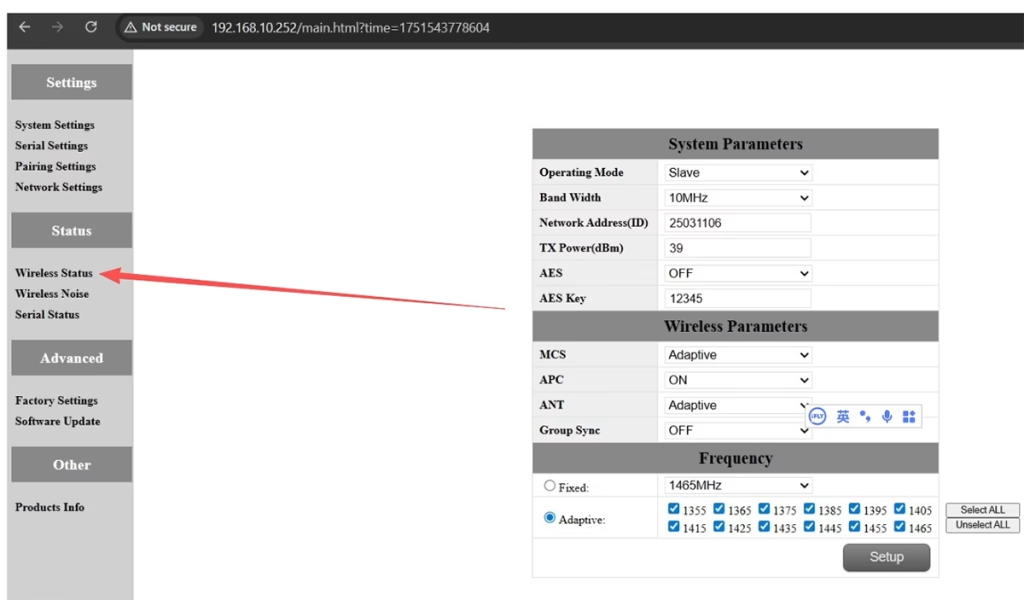
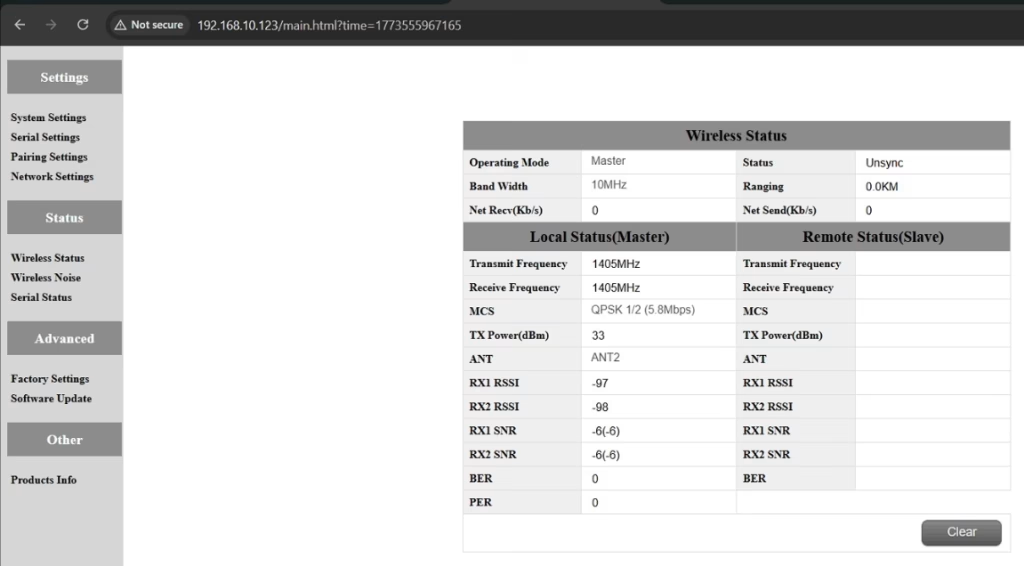
EIN: Please do the below test firstly.
Attempt Remote Access
Try to access each node through the management interface or remote tool to check the wireless status.
If remote access fails, proceed to step 2.
Connect Directly via Ethernet
Use an Ethernet cable to connect your computer directly to each node.
Access the node’s management interface or wireless status page.
Check Wireless Transmit/Receive Status
Review the current wireless transmit/receive status, including signal strength, Linkstatus, and any error indicators.
Take a screenshot of the current status for each node, ensuring all relevant information is visible.
Send Screenshots to Engineers
Organize the screenshots and send them to the engineering team.
Engineers will analyze the wireless transmit/receive data to determine which node may have an issue.
Anmerkungen:
Label each screenshot with the corresponding node for easy comparison.
Ensure screenshots include key data such as signal strength, connection status, und Kanalinformationen.
F10: Does the relay unit only require antennas and power to operate? Is an Ethernet connection necessary?
EIN: Nein. The relay unit only requires the antennas and a power supply to operate. Das tut es nicht require an Ethernet connection. The relay automatically forwards data between the aircraft side and the ground side, enabling seamless communication without the need for a network port connection.
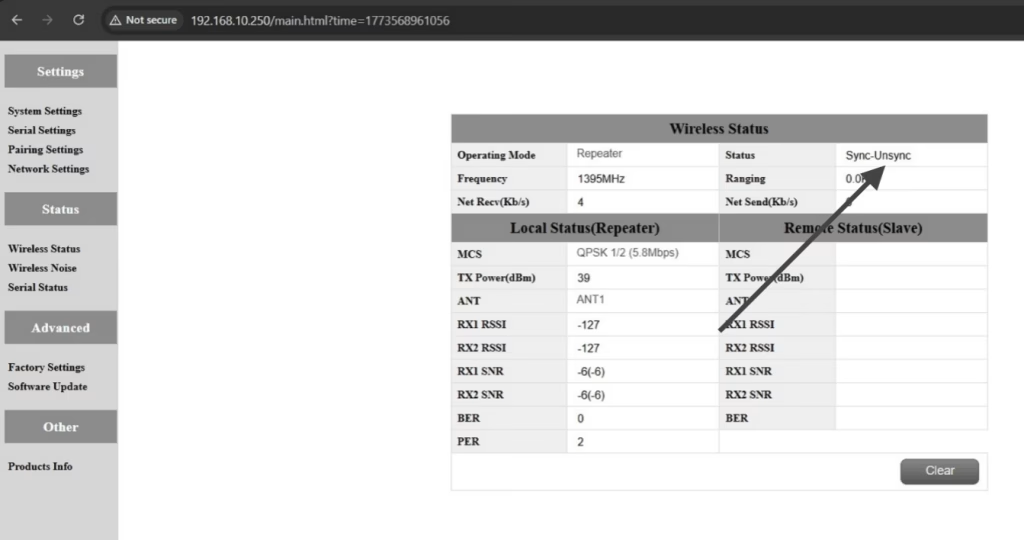
F11: what is this sync unsync on the wireless status?
EIN: These are the parameters seen on the relay node. Das „Synchronisation“ at the beginning indicates the connection status between the master node and the relay node, which is currently connected. Das „unsync“ at the end indicates the connection status between the relay node and the slave node, which is currently not connected.
F12: Why can’t my Slave, Verstärker, or Master nodes connect? How to fix it?
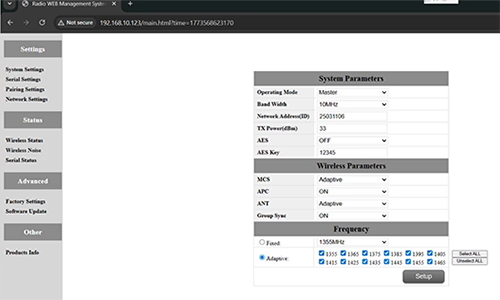
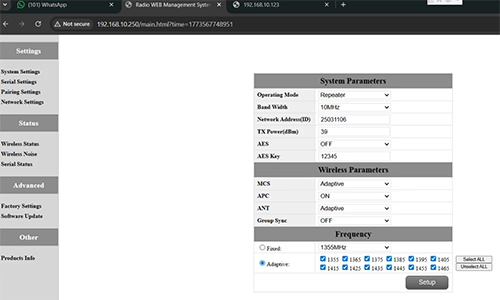
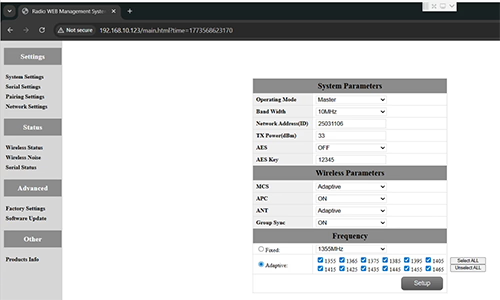
EIN: This usually happens when nodes are not properly configured or the Group Sync settings are inconsistent.
- Connect each node directly to a computer using an Ethernet cable.
- Open the system parameter settings page and take a screenshot to share with technical support if needed.
- Überprüfen Sie die Group Sync Einstellungen:
- Wenn Group Sync Master is On, und Slave Node und Verstärker are Off, einstellen Group Sync nach Aus for all nodes.
- After all nodes are connected successfully, you can enable Master / Sklave / Repeater Group Sync as needed.
Ergebnis:
Following these steps has successfully resolved connection issues for other customers.
F13: In what order should these three devices be powered on?
EIN: The correct power-on sequence is critical to ensure proper system connectivity and prevent equipment damage. Follow these steps:
- Power on the Ground Unit first
- This includes the master control station or ground control equipment.
- Ensure all communication interfaces and power supplies are stable.
- Nächster, power on the Repeater Node (Relay Unit)
- Wait for the repeater to complete self-checks and establish a connection with the ground unit.
- Verify connection success via status indicators or LEDs.
- Endlich, power on the Drone or Slave Node
- Make sure the ground unit and repeater node are fully ready before powering the drone.
- Nach dem Einschalten, check the communication status between the drone and the repeater/ground units.
⚠️ Notes:
- Always follow the sequence Ground → Repeater → Drone to avoid initialization failures.
- If there are multiple slave nodes or repeaters, power on one at a time and confirm each connection before proceeding.
- Avoid powering all nodes simultaneously to prevent bus conflicts or voltage spikes.
Zusammenfassung:
✅ Relaisfunktion – Unterstützt
✅ Modifikation erforderlich – Ja, Ein Knoten wurde als Relais umkonfiguriert
✅ Empfohlene Knotenanzahl – 3 (Drohne / Relais / GCS)
✅ Zusätzliche Latenz – <20 Frau
✅ Geeignet für – Bergige Gebiete, Ferneinsätze, oder NLOS -Bedingungen
Stelle eine Frage
Vielen Dank für deine Antwort. ✨