






无线视频 & 数据传输设备
1. 免责声明
Thank you very much for using our products!
Please use this product in accordance with local laws and regulations. We will not bear any legal liability for any result or loss caused by unauthorized use, 安装, or refit of this product, ETC. Please use this product carefully according to the procedures and precautions mentioned in this manual. No refund or exchange support and free-maintenance services will be provided if this product is damaged due to disassembly, impact, misoperation, and other reasons.
This manual is copyrighted by Shenzhen Vcan Group Limited. Reproduction in any form is not allowed without permission.
2. 防范措施
In order to ensure the correct and best use of this product, before the operation, please read this manual carefully and follow the relevant procedures and precautions for fear of damage to the device or poor performance due to misoperation or improper use. The operator should have some basic knowledge of communication electronics. When installing and using this product, please pay attention to the following.
Installation precautions:
- Before the device is powered on, loads such as an antenna or an attenuator must be installed to the antenna interface, 否则, the power amplifier module inside the device will be damaged.
- When replacing the antenna, the power must be cut off first, 否则, the power amplifier module inside the device will be damaged.
- The antenna connection matching the device frequency should be selected, 否则, the power amplifier module inside the device may be damaged.
- Please use a DC power supply of dc12v ~ dc30v to supply power to the device, 否则, the circuit may be damaged or the device may work abnormally.
- The antenna of the device should be exposed in the air as far as possible and obstacles should be avoided in order to prevent shortened communication distance.
- The antenna should be installed as far away from large metal parts as possible.
- The device should be kept at a certain distance from another electronic device as far as possible to reduce electromagnetic interference between devices.
Operation precautions:
- Make sure that all interfaces of the device are correctly connected and tightened with intact wiring.
2. After powering it on, wireless data transmission can be realized in about 20 秒.
3.High-power co-frequency interference in the surroundings will lead to the normal communication of the device. The problem can be solved by changing the working frequency of the device or cutting off the co-frequency interference source.
4.The IP network segment of the computer should be consistent with that of the device, 否则, the configured software will not be opened normally.
5. 期间 the connection test, a distance of over 3m between the devices should be kept in order to avoid power saturation and may damage to the RF devices.
3. 产品概述
Operation precautions:
The Video & Data wireless transmission device is characterized by small size, low power consumption, and long communication distance, ETC. It supports the simultaneous transmission of network data, 飞行控制数据, PTZ control data, and remote control data encoded by HD cameras.
The central node can be used under a point-to-point or a point-to-multipoint mode. Two devices are subject to the point-to-point mode, while three or more devices must be subject to the point-to-multipoint mode. Therefore, only a slave node is needed to expand the application of the device. It has been provided with an encryption function, so channel encryption keys can be set independently.
This device supports the transparent transmission protocol and can be used to transmit flight control and other mounted data simultaneously. The ground end can be used to exchange data with the ground station through a serial port or network port (UDP/TCP). It supports serial port and SBUS transmission functions, and thus the distance of the UAV control link can be extended.
4. 产品特点
- Supporting multiple frequency ranges and bandwidths.
- Having multiple control interfaces.
- High carrier-to-noise ratio
- 宽输入电压范围, supporting DC12~30V voltage input.
- 低功耗.
- 最大限度. downlink rate: 30Mbps, 带宽: 20兆赫;
- 最大限度. uplink rate: 26Mbps, 带宽: 20兆赫.
- Support OTA / local/remote upgrade.
- Supporting point-to-multipoint mode and multiple purposes.
5. Product functions
- Working frequency ranges: 800兆赫 / 1.4千兆赫 / 2.4GHz for free choice.
- Adjustable bandwidth among 3MHz, 5兆赫, 10MHz and 20MHz.
- Adjustable mapping mode among QPSK, 16QAM and 64AQM.
- Supporting three serial ports and one SBUS.
- Supporting simultaneous transmission of at most 3 网络端口.
- Support AES128 encryption
6. 技术参数
| 物品 | Spec/Parameters |
| 空中单位 / 地面单位 | |
| 工作电压 | DC12V~DC30V,标准输入DC12V |
| 功耗 | ≤11W @ 33dBm |
| 调制 | OFDM |
| 数据接口 | 串口(TTL/RS232)/SBUS |
| 频率 | 1428〜1448兆赫 |
| Channel rate | 上行链路(最大限度): 30Mbps,Downlink(最大限度):26Mbps |
| 带宽 | 3/5/10/20兆赫 |
| 延迟 | ≤15ms |
| 发射功率 | ≤33dBm(Adjustable) |
| 工作温度 | -30℃~60℃ |
| 储存温度 | -40℃~75℃ |
| 天线 | 6分贝 / 12分贝 |
| 通讯协议 | IEEE802.3, Transparent serial data |
| 沟通 | 点对点, Point to Multi-Points relay mode |
| 范围 | 3~10Km |
| 外形尺寸 | 115*92*28毫米 |
| 重量 | ≤260g |
7. Physical picture and the dimension of the transmission device
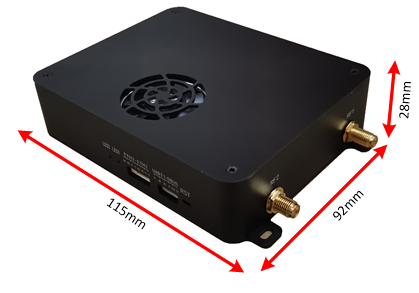
Fig. 4.1Physical picture and the dimension
Device interface
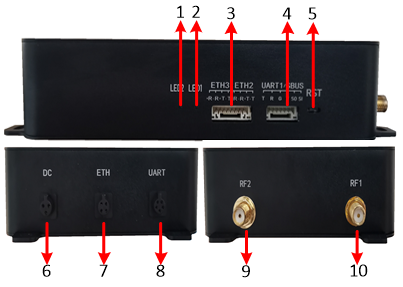
Fig. 4.2 物理接口
①Signal strength indicator light (绿色的: 强的, 蓝色的: 中等的, 红色的: weak);
②Frequency range indicator light (绿色的: 2.4G, 蓝色的: 1.4G, 红色的: 800中号);
③ Two standby network ports are provided, the air end can connect 3 相机, and the ground end can connect at most 3 computers for monitoring;
④SBUS interface / standby data serial port: one end is connected to the SBUS interface on the ground end, and the other is connected to the coaching interface of the remote controller;
⑤Reset: the device can be restarted by pressing it down for 1~2s; the factory settings can be restored by pressing it down for more than 5s;
⑥ Power interface, 电压范围: DC12V~DC30V;
⑦Network interface: the video output interface (接地端) can be connected to PC or the ground station; the video input interface (主机端) can be connected to the camera;
⑧Serial port (UART): 串口 2 is a data serial port, 串口 3 is a multiplex serial port (a default data serial port, configuration mode can be selected and exited by inputting “#cfg#” 和 “#ext#”, 分别). UART level standard: TTL-3.3V/RS232;
⑨ Secondary antenna interface;
⑩ Main antenna interface.
8.Installation instructions
Air end installation

Fig. 5.1 Schematic diagram of air end installation and connection
Ground-end installation
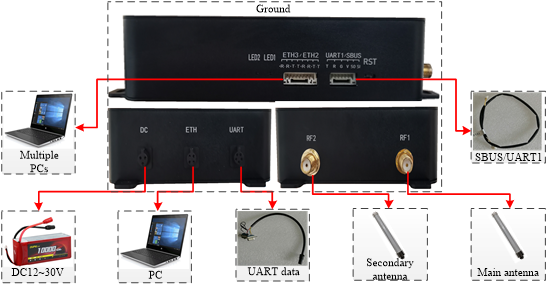
Fig. 5.2 Schematic diagram of ground end installation and connection
The installation at the air end is consistent with that at the ground end.
The air end and ground end of the XK-F303E two-way Video & Data integrated device are shown in Fig. 5.1 和 5.2. Detailed installation steps:
① Connect the main and secondary antennas of the corresponding frequency points to Port RF1 and RF2 first, and make sure that the connection is tight;
② Connect the air end network interface to the pod, and the ground end network interface to the computer/ground station;
③ SBUS interface: connect the air end to the aircraft flight controller and the ground end to the remote controller. Make sure that the connection is correct;
④ If the user’s serial data is needed to be transmitted, use a USB serial cable to connect it to the PC end;
⑤ Finally, power on.
9. Web page configuration
- 9.1 Login Interface
Input the device IP on the web page to enter the interface shown in Fig. 9.1.

Fig. 9.1 Login interface
The parameter setting page can be shown by entering Account: “行政” and Password: “行政”. 中国人 / English pages are supported.
- 9.2 “Wireless Parameter Setting” 界面
The central node parameter setting involves master-slave setting, frequency range setting, frequency hopping setting, power setting, bandwidth setting, uplink/downlink setting, 组网方式, and encryption setting.

Fig. 9.2.1 “Wireless Parameter Setting” 界面 (掌握)
The parameter setting of access node involves master-slave setting, frequency range setting, power setting and encryption setting.
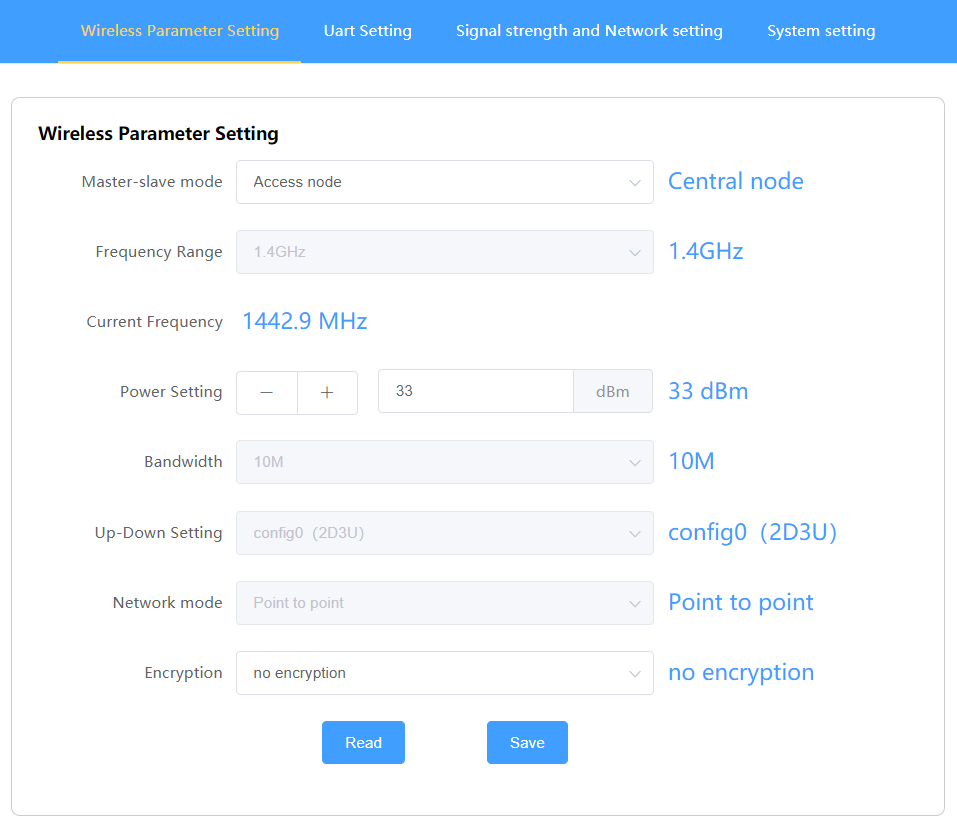
Fig. 9.2.2 “Wireless Parameter Setting” 界面 (奴隶)
- Master-slave setting
该 “Central Node” 和 “Access Node” can be set. More than two devices are required to form a successful link, and there can only be one central node.
- Frequency hopping setting
跳频: When setting the frequency hopping, the frequency point of the device changes automatically.
Frequency fixing: the frequency points in the list can be set manually. 例如, 1.4G frequency range includes the following frequency points:
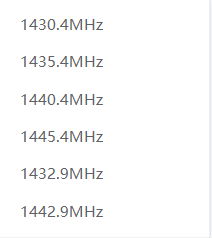
Fig.9.2.3 Dropdown option of “Frequency Range Fixing Point”
- Power setting
Setting range: 0~33dBm
- 带宽设置
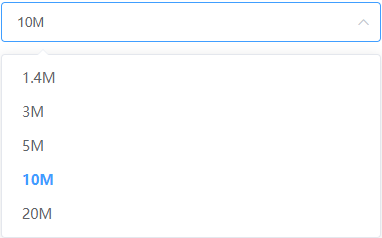
Fig. 9.2.4 Dropdown option of “Bandwidth Setting”
The bandwidth settings are 1.4Mhz, 3兆赫, 5兆赫, 10兆赫, 和20MHz.
The wider the bandwidth is, the higher the transmission rate / the shorter the transmission distance will become; The farther the transmission distance is, the lower the transmission rate will become.
- Uplink/downlink setting
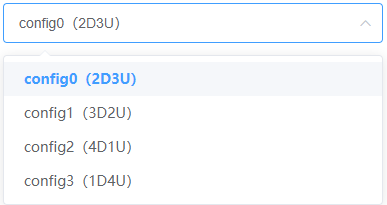
Fig. 9.2.5 Dropdown option of “上行链路 / Downlink Setting”
The uplink/downlink settings are config0, 配置1, config2, and config3.
When the time slot ratio is set under different bandwidths, the quality of the transmitted image will change, so an appropriate time slot ratio is needed. The UL rate is the speed of the access node sent to the central node. The DL rate is the speed of the central node sent to the access node, which is similar to the 4G base station mode, IE. the center node is the base station, and the access node is the transmission of the mobile terminal.
The set parameters are shown in Fig. 9.2.6:

Fig. 9.2.6 Time slot ratio reference
- 组网方式
配套 “点对点” 和 “点对多点”.
- Encryption setting
Supporting AES128 encryption, 最多 16 bits allowed.
- 9.3 “Serial port setting” 界面

Fig. 9.3.1 “Serial port setting” 界面
Two serial ports are provided to support serial data network forwarding and UDP data flow.

Fig. 9.3.2
Settable serial ports (2 RS232 和 1 TTL) are provided. The settable baud rates are 9600, 19200, 38400, 57600, 和 115200.

Fig. 9.3.3 Dropdown option of “Baud Rate Setting”
- “Signal strength and network setting” 界面
包括: “Signal Strength Status” 和 “Network Parameter Setting”
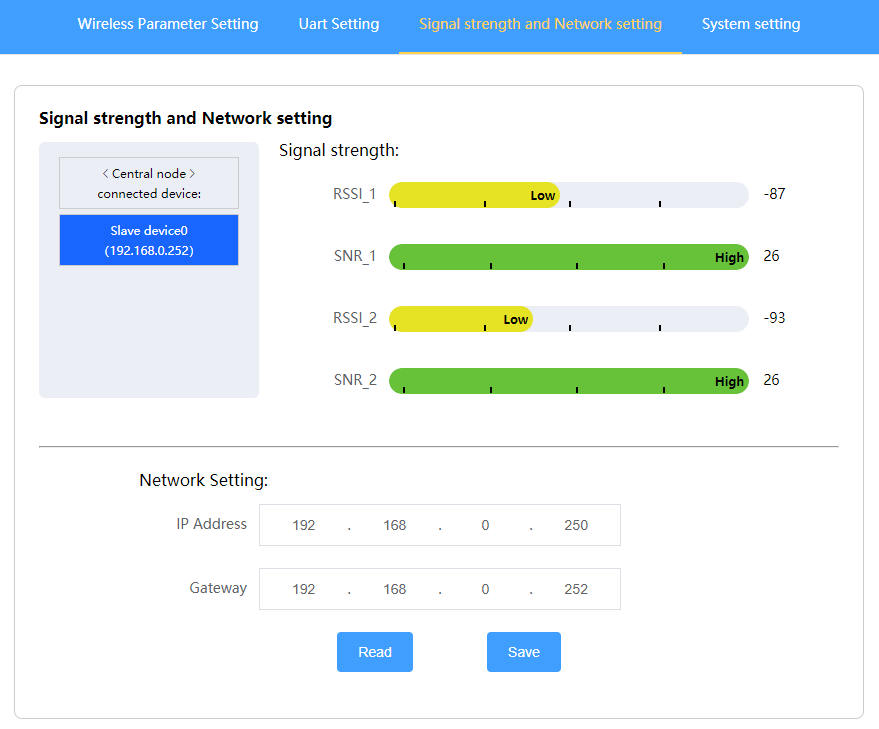
Fig. 9.4.1 “Signal strength and network setting” 界面
- Signal strength and network setting
The list on the left shows the networking information of the device:
All-access nodes in the network can be observed after entering the central node network configuration page, while on the access node network configuration interface, only the central node can be observed.
信号强度: indicating the wireless signal strength of the equipment. The signal strength “-141 ~ -44” is from weak to strong in turn. The higher the SNR is, the better the quality of the wireless signal is.
- Network parameter setting
The local IP indicates the IP address of the device. The IP destination should be set as follows:
点对点: the IP destination address of the central node should be set with the IP address of the access node with which the network is established, and the IP destination address of the access node should also be set with the IP address of the central node with which the network is established.
点对多点: the IP destination of the central node can be set with the IP address of any slave node with which the network is established, 然而, all access nodes should be set with the IP address of the central node (set flexibly according to the actual application. The destination address of this device is the IP address of this device transmitted from the serial port to another device. The two terminal devices are specified to form the serial port link).
注意: all networking devices should be kept within the same network segment!
- “System setting” interface
Including device model, device temperature, 固件版本, baseband version, webpage version, ETC.

Fig. 9.5 “System Setting” interface
Supporting versions upgraded in a real-time way for the sake of easy operation; Supporting soft restart and restoring factory settings.
10. PC IP setting

Fig. 10.1.1 Network connection

Fig. 10.1.2 PC IP address setting
The PC IP address network segment should be consistent with that of the network camera! The IP address should not change, 否则, a connection failure will be caused.
11. Network camera setting
第一的, log in to the network camera page to learn how to set the IP address parameters of the network camera. The parameter selection of different types of webcams is a little different. The setting is shown below:
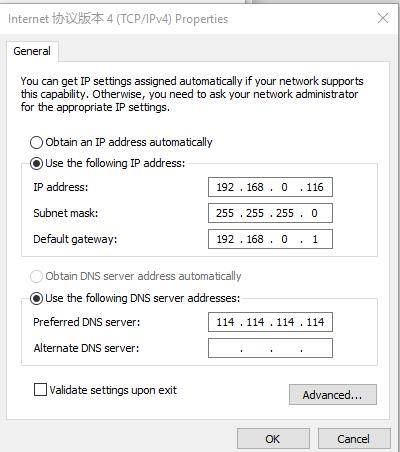
Fig. 11.2 Network setting of network camera
The network segment of the camera should be the same as that of the PC IP address. 例如, the above configuration is 192.168.0.X, 然而, the two IP addresses cannot be the same, 否则, a failure will be caused.
12. Network decoding
Enter the IP address of the camera in the browser player to observe the decoding effect. Other decoding software can also be used, enter the RTSP streaming address and port number.
问一个问题
感谢您的回复。 ✨