





Mục lục
Troubleshooting VCAN1746 Configuration and CVBS Input Issues
In recent field deployments of the VCAN1746 video transmission cards, several customers have reported technical problems affecting configuration storage and CVBS input stability. After reviewing the details and consulting with our engineering team, we have summarized the findings below to help other users diagnose similar issues.
1. Configuration Save Failure — Potential SPI Flash Damage
Some users have observed that configuration changes—such as compression type or port settings—cannot be saved through the web interface. Although the UI loads normally and allows parameter modification, the settings revert to their previous values after rebooting the device.
Our engineers have confirmed that these symptoms are consistent with a known SPI Flash failure, specifically involving early batches that used a Winbond flash chip. In these cases, the flash becomes non-erasable, preventing any new data from being written.
To verify whether a card is affected, we advise users to:
- Check the back side of the board
- Photograph the flash chip used on the PCB
- Confirm whether it is the early Winbond model or the updated replacement
This issue is purely hardware-related and is not caused by firmware or configuration behavior.
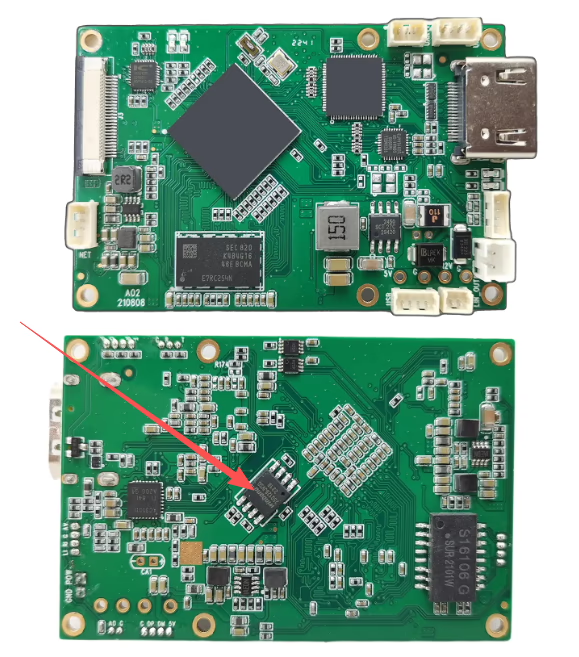
Please take a clear photo of the marking on the chip indicated by the arrow. The early batches used a Winbond flash chip, and some major customers reported this exact issue. Since the problem is caused by a hardware failure of the flash chip (not a software issue), we had to switch to a different flash model. Vì thế, we need to confirm which flash chip version is used on the customer’s faulty board.
2. CVBS Input Stops After 15–20 Minutes — Possible Thermal or Flash-Related Issue
Some deployments have shown that the CVBS input works normally on startup and the device begins transmitting Ethernet packets. Tuy nhiên, after approximately 15–20 minutes of operation, the card either stops receiving CVBS input or stops sending Ethernet packets entirely. All indicator LEDs also stop functioning.
A quick restart restores operation, but the system fails again within a few minutes. After allowing the board to cool for about an hour, the normal 15–20 minute operation window returns.
Our engineers recommend the following steps to help diagnose the issue:
- Access the encoder’s giao diện web after the issue occurs
- Kiểm tra Băng hình page and take a screenshot of the current video-input detection status

- Record a short video showing the status LEDs on the board during operation
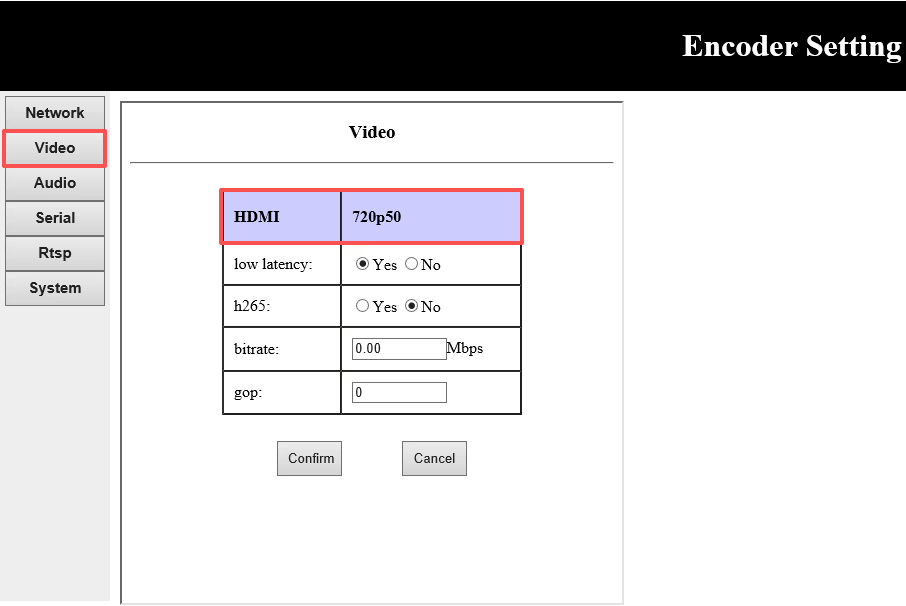
These materials will help the engineering team analyze the behavior more accurately and determine whether it is related to hardware, thermal conditions, or other factors.
Các bước tiếp theo
We continue to work closely with customers to identify affected units. If you have encountered similar symptoms, chúng tôi khuyên bạn nên:
- Checking the hardware revision of your VCAN1746 boards
- Sending us photos of the flash chip for verification
- Reporting the runtime behavior, video-input status, and LED status when the failure occurs
Our team is committed to improving product reliability and supporting customers with any field issues that arise.
Clients’ feedback
Phải, so the second issue is not related to SPI. I have performed the tests which u ask me but unfortunately I was not able to capture video. However i m sharing the test finding with u. When the problem occurs and the video gets stuck, both the input AV status LED and NET status LED are still blinking. I go to the web UI and checked video tab and it shows pal. So by this, i got the idea that the ivcan card is still decoding pal video as well as output Ethernet. So there might be some impedence mismatch or termination problem between video camera and ivcan1746 AV input end. I place a 220uF capacitor in series between AV signal line of ivcan1746 card and pal video camera. It resolves the stuck video issue however it degrade the quality of the video. Can u tell me the name of the video decoder chip and schematics of related circuitary if possible.
CVBS to Ethernet video encoder board schematic
Hỏi đáp
Q: Is the SPI flash used only once at startup to load configuration into the controller, or does the controller continue to access it during operation?
Một: The system divides the SPI flash into Chỉ đọc (RO) và Read-Write (RW) partitions. Configuration files are stored in the RW partition.
During system operation, the controller continuously accesses the configuration files in the RW partition.
When configuration changes are made, the system performs erase and write operations on the corresponding flash sectors, similar to how a Windows system writes to a hard drive.
Read operations do không trigger erasure or writing, and therefore do không affect the lifespan of the flash chip.
Tóm lại, the SPI flash is actively used both at startup and during configuration updates, but normal read operations are safe and do not degrade the flash memory.
Q: When the issue occurs and the video freezes, what does the decoder side display— a completely black screen or something else?
Một: If the decoder shows a black screen, this is expected behavior. When the CVBS interface chip loses the input signal, it automatically outputs a full-black video frame. This is the default behavior of the CVBS interface chip.
Khi điều này xảy ra, you may also observe the following symptoms:
The Web UI video tab displays “PAL”
The encoder AV status LED và NET LED continue blinking (indicating the system is still running)
The video remains frozen or black
These signs indicate that the encoder’s CVBS interface chip is not detecting a valid video signal from the customer’s CVBS camera.
The root cause is likely between the customer’s CVBS camera và encoder board’s CVBS interface chip — specifically that the encoder board is not recognizing the signal from the camera.
Bảng mô-đun bộ mã hóa









Bảng mô-đun giải mã




Có sẵn để tùy chỉnh
Sản phẩm mã hóa mới
| KHÔNG. | Tên sản phẩm | Cấu hình | Các tính năng chính | Trạng thái |
|---|---|---|---|---|
| 1 | Bộ mã hóa video ánh sáng nhìn thấy USB UVC hai kênh | 2× đầu vào USB | Hỗ trợ mã hóa video camera USB kép, và truyền phát RTSP; đầu ra CVBS/HDMI cục bộ; chế độ hiển thị có thể chuyển đổi | Sản xuất hàng loạt |
| 2 | Bộ mã hóa kênh đôi (1× Đèn nhìn thấy được USB + 1× Camera chụp ảnh nhiệt USB) | 2× đầu vào USB | Hỗ trợ camera USB kép (dễ thấy + nhiệt) capture, mã hóa, và truyền phát RTSP; đầu ra CVBS/HDMI cục bộ; chế độ hiển thị có thể chuyển đổi | Sản xuất hàng loạt |
| 3 | Mô-đun hiển thị HDMI/CVBS của bộ giải mã RTSP | HDMI + Đầu ra CVBS | Hỗ trợ giải mã luồng RTSP lên tới 4×1080P@30fps; Hỗ trợ chuyển tiếp giao thức truyền phát video; Màn hình đầu ra HDMI/CVBS | Mẫu có sẵn |
| 4 | Mô-đun hiển thị HDMI/CVBS Bộ giải mã RTSP với 4.3"/5" LCD | Đầu ra HDMI + LCD screen | Hỗ trợ giải mã luồng RTSP lên tới 4×1080P@30fps; chuyển tiếp giao thức; Màn hình đầu ra HDMI/CVBS | Gỡ lỗi |
| 5 | Bộ mã hóa kênh đôi (1× Đèn nhìn thấy được USB + 1× CVBS Tương tự) | 1× CVBS + 1× Đầu vào USB UVC | Video kép (USB + CVBS), mã hóa và truyền phát RTSP; đầu ra CVBS/HDMI cục bộ; chế độ hiển thị có thể chuyển đổi | Gỡ lỗi |
| 6 | Bộ mã hóa kênh đôi (1× USB UVC + 1× AHD Tương tự) | 1× AHD + 1× Đầu vào USB UVC | Quay video kép (USB + AHD), mã hóa và truyền phát RTSP; đầu ra CVBS/HDMI cục bộ; chế độ hiển thị có thể chuyển đổi | Gỡ lỗi |
| 7 | Bộ mã hóa kênh đôi (1× CVBS + 1× Video tương tự AHD) | CVBS + AHD 2 đầu vào video | Quay video analog kép, mã hóa và truyền phát RTSP; đầu ra CVBS/HDMI cục bộ; chế độ hiển thị có thể chuyển đổi | Gỡ lỗi |
| 8 | Bộ mã hóa kênh đôi (1× Máy ảnh CMOS + 1× Camera chụp ảnh nhiệt USB) | 1× Giao diện USB | Hỗ trợ CMOS + Chụp ảnh nhiệt USB, mã hóa và truyền phát RTSP; đầu ra CVBS/HDMI cục bộ; chế độ hiển thị có thể chuyển đổi | Sản xuất hàng loạt |
Dành cho các giải pháp chuyển đổi đầu vào/đầu ra video tùy chỉnh không được liệt kê trong các sản phẩm của chúng tôi, vui lòng liên hệ với chúng tôi để được hỗ trợ OEM/ODM. Chúng tôi có thể phát triển các sản phẩm phù hợp dựa trên yêu cầu của bạn.
Đặt một câu hỏi
Tin nhắn của bạn đã được gửi