







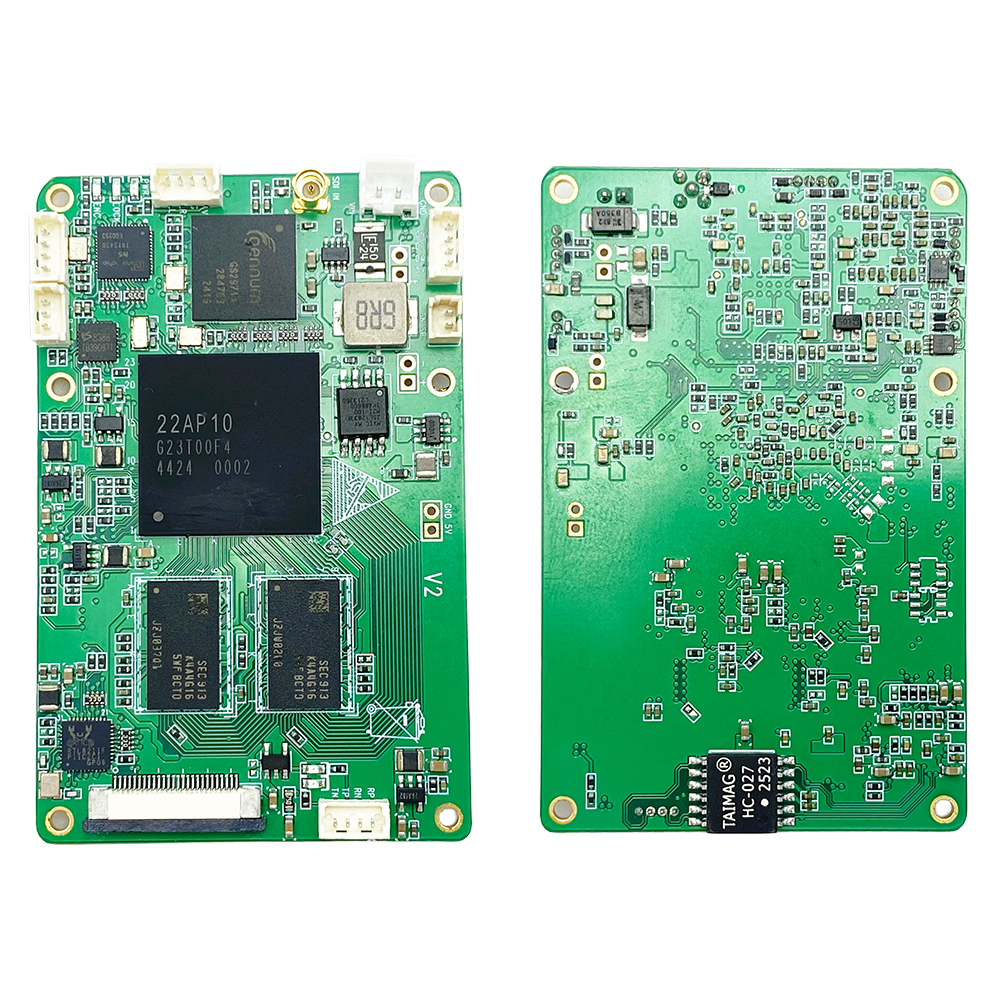
Кодер H264 H265 SDI AHD в IP с низкой задержкой и потоковой передачей UDP RTSP
В Vcan1731 Video Encoder Module представляет собой компактный, high-performance H.265/H.264 encoding solution designed for professional video transmission over IP networks. It supports SDI, AHD, and analog (ИЗ) video inputs and converts them into low-latency Ethernet streams for real-time monitoring, беспроводная передача, or embedded system integration.
With ultra-low latency encoding, flexible I/O interfaces, and robust industrial design, this module is ideal for UAV systems, промышленная инспекция, наблюдение, транслировать, and real-time wireless video links.
Оглавление
Ключевая особенность
- Низкая задержка H.265 / H.264 hardware video encoding
- Поддерживает до Full HD 1080P @ 60fps
- Multiple video inputs: SDI / AHD / ИЗ (CVBS)
- Ethernet output via РТСП / UDP TS streaming protocols
- Поддерживает simultaneous audio encoding and transmission
- Встроенный AAC stereo audio codec (16-кусочек, 32Кбит/с)
- Optional dual input mode: SDI + AHD/AV simultaneous encoding
- Сверхнизкая задержка:
- ~200–250ms with H.265 decoder pairing
- ~80–150ms with H.264 low-latency mode pairing
- Интегрированный UART data transparent transmission over IP
- Web UI and UART-based configuration and management
- Adjustable bitrate control via Web UI or control UART
- Industrial-grade compact design for embedded applications
Обзор продукта
The Vcan1731 encoder converts SDI or analog video signals into IP-based streams in real time. After encoding, the video stream is transmitted over Ethernet using RTSP or UDP TS protocols, making it suitable for both wired and wireless transmission systems.
Помимо видео и аудио, the module supports one channel of UART data encapsulation, allowing telemetry or control data to be transmitted alongside the video stream. This makes it highly suitable for integrated communication systems such as UAV ground links, робототехника, и платформы удаленного мониторинга.
видео & Audio Specifications
Видео вход
- SDI (MMCX female connector)
- AHD / CVBS (4-pin PH1.25mm connector)
- Auto-detection or software-controlled switching
- Optional simultaneous SDI + AHD/AV encoding
Supported Resolutions
- 1080п: 60 / 50 / 30 / 25 / 24 fps (progressive & interlaced)
- 720п: 60 / 50 / 30 fps
- ИЗ (CVBS): NTSC 720×480 @60i, PAL 720×576 @50i
- AHD: 1080P30 / 1080P25 and similar formats
Кодирование видео
- H.265 / H.264 hardware encoding
- Bitrate adjustable via Web UI or UART
- Low-latency H.264 mode using P-frame optimized encoding
аудио
- Embedded SDI audio or analog audio input
- Кодировка AAC, стерео, 16-кусочек, 32 Кбит/с
- Audio output supported via Ethernet-decoded stream
Потоковое вещание & Сеть
- Output formats:
- RTSP-поток
- UDP-поток TS
- РТСП + UDP TS simultaneous output
- Ethernet-based IP transmission
- Supports integration with third-party video players and decoders
- AES256 encryption for secure transmission
Контроль & Управление
- Web-based UI for full configuration
- UART control interface for embedded integration
- Настраиваемый битрейт, разрешение, encoding mode, and network parameters
- Firmware upgrade via USB Host interface
UART Data Transmission
The Vcan1731 supports one channel of UART data encapsulation within the video stream. When paired with compatible decoder modules, UART data is transmitted transparently over IP alongside video, позволяющий:
- Remote telemetry transmission
- Sensor or control signal integration
- Bidirectional system communication (with compatible decoder systems)
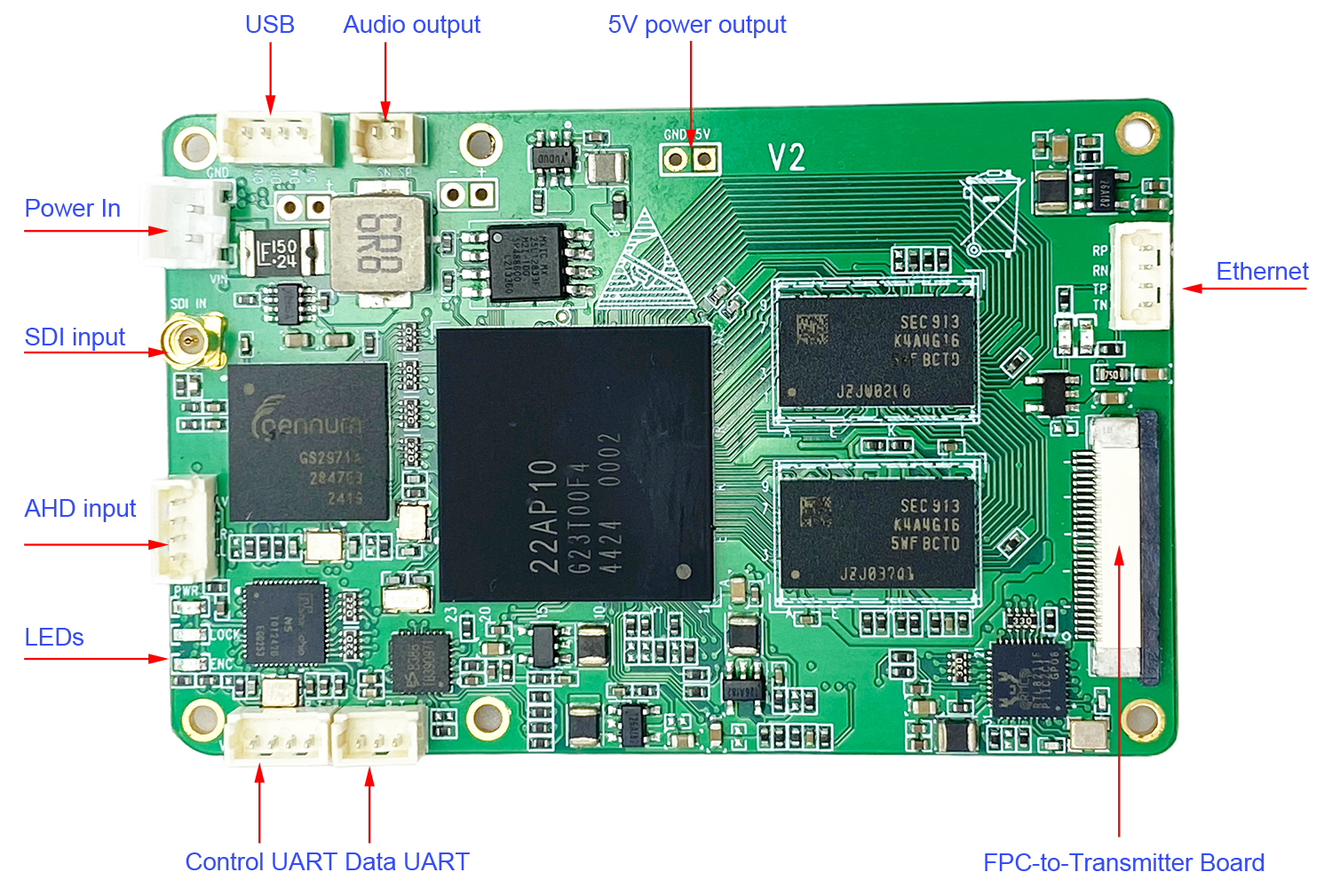
Interface Overview (ввод/вывод)
- SDI Input: MMCX female connector
- Analog Video/Audio Input: 4-штифт PH1,25 мм (AHD / CVBS compatible)
- Данные UART: 3-штифт PH1,25 мм, ТТЛ 3,3 В (adjustable baud rate)
- Управление UART (CFG): 4-штифт PH1,25 мм, ТТЛ 3,3 В
- USB-хост: 4-штифт PH1,25 мм (обновление прошивки / reserved use)
- Аудиовыход: 2-штифт PH1,25 мм (line-out from remote stream)
- Входная мощность: 2-штифт PH2,0 мм (7–24 В постоянного тока)
- Ethernet: 4-штифт PH1,25 мм
- FPC Interface: For COFDM or two-way OFDM modulator integration

Светодиодные индикаторы
- PWR LED: Power status indicator (solid ON when powered)
- LOCK LED: Lights when valid video signal is detected
- ENC LED: Blinks during active video encoding
Источник питания
- Входное напряжение: 7–24 В постоянного тока
- Потребляемая мощность: <320мА при 12 В
- Built-in anti-reverse protection
- Reserved 5V output available for external fan or auxiliary modules
Физические характеристики
- Габаритные размеры: 70 × 45 мм (исключая разъемы)
- вес: 18.6 г
- Compact PCB design for embedded integration
Условия окружающей среды
- Рабочая Температура: 0°С до +70°С
- Optional extended version: -40°С до +85°С
- Температура хранения: -40°С до +85°С
Типичные применения
- БПЛА / drone video transmission systems
- Industrial inspection and robotics
- Wireless live video streaming systems
- Security and surveillance solutions
- Embedded IP video conversion systems
Вопросы-Ответы
вопрос: I configured both RTSP and UDP streaming, but there is still no video stream output. What should I check?
А: Please connect the encoder board directly to your computer using an Ethernet cable.
- Open a web browser and enter: 192.168.1.30
- Log in to the encoder web interface.
- Перейти к видео tab/page.
- Проверьте Вход информация о статусе. You should see detected video input information such as: SDI 1080p30, AHD 1080p25, or other video format parameters. This information indicates that the encoder board has successfully detected the SDI/AHD camera video signal.
If no input information is displayed, the issue is related to the video input source. пожалуйста, проверьте: SDI/AHD camera power supply, Video cable connection, Camera output resolution and format compatibility, Whether the camera is outputting a valid video signal
If the input signal is detected correctly, then the hardware video source is working properly. Следующий, please check the encoder configuration settings, включая: RTSP/UDP enable settings, Streaming address and port number, Network IP configuration, Bitrate and encoding parameters, Firewall or network blocking issues, VLC or player decoding settings.
For initial testing, we recommend using VLC Media Player to verify the RTSP stream connection locally before testing UDP multicast or external network streaming.
вопрос: Why can’t VLC play the UDP stream? Do I need special software?
А: The UDP stream is not standard MPEG-TS over UDP, but a custom low-latency protocol optimized for real-time transmission. Поэтому, VLC may not decode it correctly. We recommend using our SPlayer, which is fully compatible and optimized for ultra-low latency playback. Если необходимо, we can also provide an SDK and technical documentation, allowing customers to develop their own player or integrate the stream into third-party software.
вопрос: Can the UDP stream be changed to a standard format compatible with VLC or GStreamer? What are the differences between firmware versions?
А: да. Мы предоставляем two different firmware versions:
- Engineering (Proprietary Protocol) Прошивка: Использует custom low-latency UDP protocol, Поддерживает dual video inputs (SDI + AHD/CVBS simultaneous encoding), Requires our SPlayer or SDK-based player integration.
- Стандартный (MPEG-TS) Прошивка: Uses standard MPEG-TS over UDP protocol, Fully compatible with ВЛК, GStreamer, and other standard players, Поддерживает only one video input (SDI or AHD or CVBS) at a time, Делает not support dual-input simultaneous encoding.
Краткое содержание: 1. Выбирать proprietary firmware для сверхнизкая задержка + dual-channel encoding. 2. Выбирать standard firmware для broad compatibility with VLC/GStreamer.
вопрос: Поддерживает ли система многоадресную рассылку? Могу ли я вывести один поток на несколько IP-адресов??
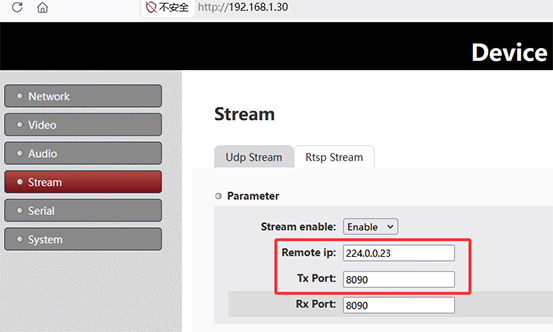
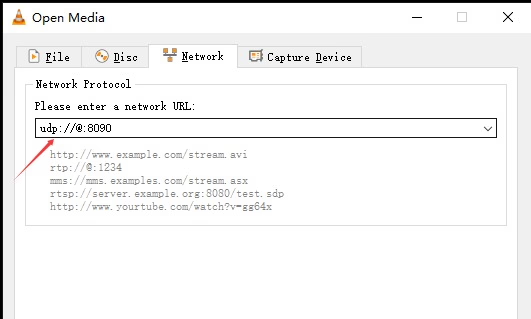
А: да. Система поддерживает многоадресную рассылку UDP., allowing one stream to be delivered to multiple receivers simultaneously without duplicating the stream per IP. Чтобы использовать многоадресную рассылку, установить Удаленный IP на стороне отправителя по адресу многоадресной рассылки, например 224.0.0.23. Все получатели присоединяются к одной группе многоадресной рассылки, используя один и тот же адрес.. На стороне получателя, настроить тот же многоадресный IP:
- Сплейер: установите IP-адрес группы на
224.0.0.23 - ВЛК: открыть
udp://@224.0.0.23:8090
Многоадресная рассылка обеспечивает потоковую передачу «один ко многим» в одной сети.. Фактический IP-адрес устройства не имеет решающего значения.; вместо, delivery depends on network multicast support and devices joining the same group. Примечание: Условия сети могут повлиять на производительность. Среды с VPN, виртуальные машины, несколько сетевых адаптеров, или коммутаторы без поддержки IGMP могут повлиять на прием многоадресной рассылки..

Одноадресная рассылка
Прошивка
SPlayer Versions
- V1.x: Single-stream playback (standard MPEG-TS firmware) update_image_ts_v1.1t_2025.8.27
- V2.x: Dual-stream playback (proprietary low-latency firmware, SDI + AHD support)




iVcan.com –
The Low Latency H.264/H.265 SDI AHD to IP Video Encoder with UDP/RTSP streaming (Vcan1731) delivers a very impressive and reliable performance. Setup is straightforward thanks to the intuitive Web UI, and configuration via UART is a strong advantage for embedded integration. The real standout feature is the ultra-low latency, which makes real-time monitoring feel smooth and highly responsive, especially in UAV and industrial inspection scenarios. Video quality remains stable even at 1080p 60fps, and switching between SDI, AHD, and CVBS inputs is seamless. Network streaming over RTSP and UDP works consistently, and multicast support is especially useful for multi-view systems. Общий, it feels like a well-engineered, industrial-grade solution that balances flexibility, стабильность, and performance very effectively for professional applications.