






How to add add a wireless video relay into a drone video data air uinit and ground unit
자주하는 질문: 장거리 또는 장애물이 있는 지형에서의 드론 통신 링크를 위한 무선 비디오 릴레이 추가
클라이언트가 물었다, 하나의 유닛을 릴레이로 사용할 수 있는지 확인하고 싶었습니다.. 드론을 날리고 싶은 장소에서, 지형이 높아요, 의사소통을 방해하는 것. 세 번째 장치를 릴레이 역할로 사용할 수 있습니까??


무선 비디오 전송
Q1: 지형 장애물을 극복하고 통신 범위를 확장하기 위해 장치 중 하나를 중계기로 사용할 수 있습니까??
에이: 예, 드론과 지상 관제소 사이의 직접 시야를 차단하는 높은 지형이나 기타 장애물이 있는 지역에서 통신을 개선하기 위해 장치 중 하나를 릴레이 노드로 구성할 수 있습니다..
Q2: 릴레이 설정은 어떻게 작동하나요??
에이: The relay setup method depends on the software version installed on your device. There are two different versions:
- Point-to-Point Version
- Point-to-Multipoint Version
Each version uses a different configuration method for relay setup.
To determine which version your device is using, 확인해 주세요 Web UI interface style of your firmware. The layout and design of the Web UI will indicate whether your firmware is the 선택적 거리 등급 또는 선택적 거리 등급 버전.
Once you identify the firmware version through the Web UI style, follow the corresponding relay setup instructions for that version.
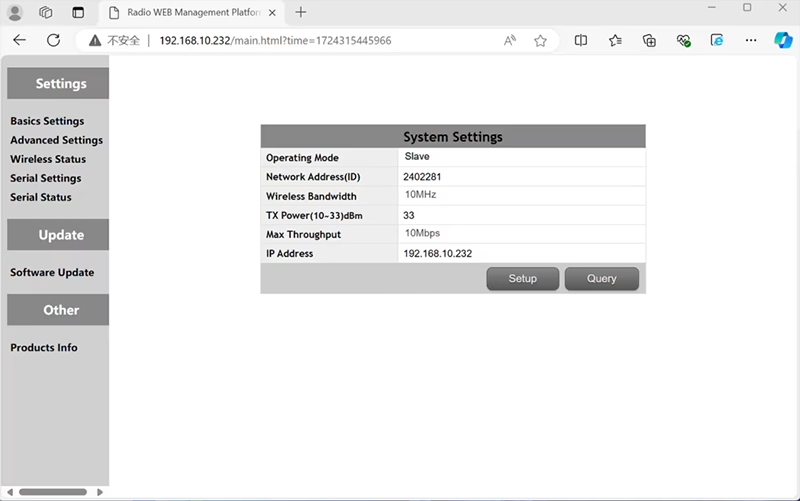

In the standard Point to Point (P2P) 구성:
- 그만큼 지상통제소 (GCS) 역할을 한다 메인 노드 (주인).
- 그만큼 무인 비행기 (공기 단위) 역할을 한다 하위 노드 (노예).
릴레이 기능을 활성화하려면, 네트워크 토폴로지를 수정해야 합니다.:
- 변환하다 원래 지상 제어 스테이션 (메인 노드) 으로 릴레이 노드.
- 더하다 하위 노드가 하나 더 있음 역할을 하기 위해 새로운 지상 관제소 터미널.
따라서 새로운 설정에는 세 개의 노드:
- 마디 1 (무인 비행기) - Slave node (공기 중)
- 마디 2 (선택적 거리 등급) - Repeater node (지상에 고정, 일반적으로 높은 지형이나 중간 지점에 배치됩니다.)
- 마디 3 (지상통제소) - Master node 마디 (운영자 측)
- Drone Unit 8W – 192.168.10.252 (노예)
- Relay Unit 8W- 192.168.10.250 (연발총)
- Ground Unit 2W – 192.168.10.124 (주인)
In the standard Point to Multi-Points configuration:
- 그만큼 지상통제소 (GCS) 역할을 한다 메인 노드 (주인).
- 그만큼 무인 비행기 (공기 단위) 역할을 한다 하위 노드 (노예).
릴레이 기능을 활성화하려면, 네트워크 토폴로지를 수정해야 합니다.:
- 변환하다 원래 지상 제어 스테이션 (메인 노드) 으로 릴레이 노드.
- 더하다 하위 노드가 하나 더 있음 역할을 하기 위해 새로운 지상 관제소 터미널.
따라서 새로운 설정에는 세 개의 노드:
- 마디 1 (무인 비행기) - Slave node (공기 중)
- 마디 2 (선택적 거리 등급) - Master node (지상에 고정, 일반적으로 높은 지형이나 중간 지점에 배치됩니다.)
- 마디 3 (지상통제소) - Slave node (운영자 측)
이 구성을 사용하면 신호가 드론에서 릴레이로 이동할 수 있습니다., 그런 다음 릴레이에서 운영자에게, 언덕이나 건물에 의해 직접 경로가 차단되는 경우에도 안정적이고 지속적인 연결을 보장합니다..
Q3: 이 릴레이 설정의 장점은 무엇입니까??
- 유효 전송 거리 연장.
- 복잡한 지형에서도 안정적인 드론 통신 링크 유지.
- 신호 손실 및 비디오 중단 감소.
- 적용 범위를 최적화하기 위해 릴레이를 유연하게 배치할 수 있습니다..
Q4: 어떤 수정이나 구성이 필요한가요??
작동 모드를 릴레이로 변경. 세 장치의 ID는 모두 동일해야 합니다.. 당사 엔지니어링 팀은 릴레이 기능을 활성화하기 위해 펌웨어 및 매개변수를 조정할 수 있습니다.. 원하는 설정만 알려주시면 됩니다. (예를 들어, 거리, 지형 유형, 장착 높이), 그리고 우리는 적절한 구성 파일과 연결 다이어그램을 제공할 것입니다.
Q5: 릴레이 유닛을 휴대할 수 있거나 차량에 장착할 수 있습니까??
예. 릴레이 노드는 다음과 같습니다.:
- 고정 장착 (예를 들어, 언덕 꼭대기나 탑에), 또는
- 가지고 다닐 수 있는 (차량으로 운반, 또는 전원 공급 장치가 있는 삼각대에 장착).
귀하의 애플리케이션 시나리오에 따라 릴레이 케이스와 전원 인터페이스를 맞춤화할 수 있습니다..
Q6: 릴레이로 인해 추가 지연이 발생합니까??
추가 대기 시간은 최소화됩니다. (일반적으로 10~20ms 미만) 실시간 비디오 및 제어 성능에 거의 영향을 미치지 않습니다..
Q7: 릴레이 모드를 직접 설정하거나 전환할 수 있나요??
올바른 노드 주소 지정 및 주파수 계획을 보장하려면 초기 구성을 위해 기술 지원 팀에 문의하는 것이 좋습니다.. 설정 후, 일반 모드와 릴레이 모드 간 전환은 구성 소프트웨어 또는 사전 정의된 프로필을 통해 수행할 수 있습니다..
Q8: Why can’t I connect to the relay node?
에이: If the relay and slave nodes are roughly the same distance from the master node, and the master node receives roughly the same amount of power, the relay node might not be able to join the network. When the master node determines that the received power of the two nodes is similar, it will prioritize connecting directly to the slave node.
Q9: The three nodes cannot connect to each other. It is necessary to check the wireless transmit/receive status of each node to identify potential issues.
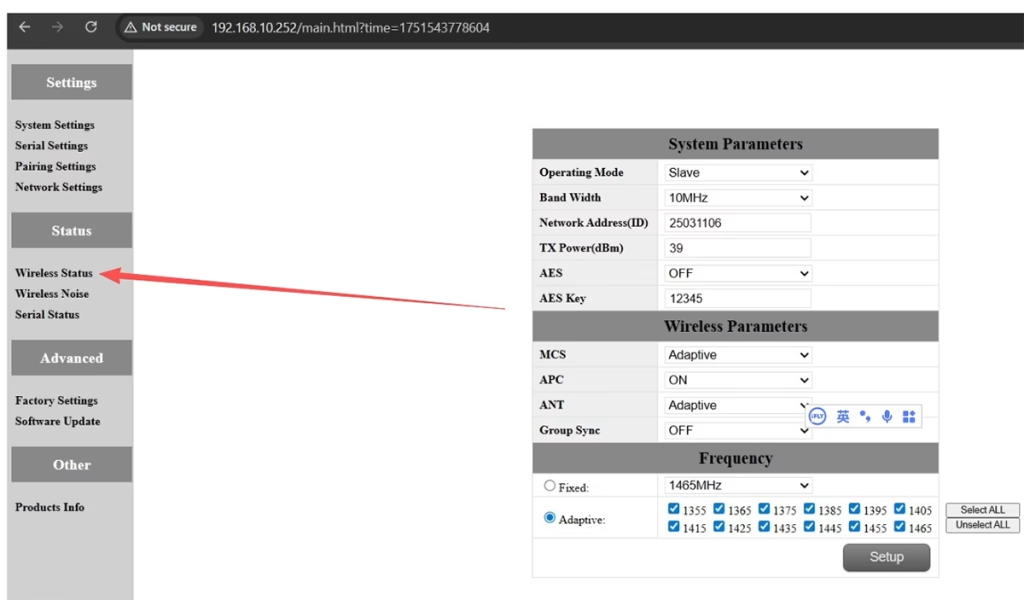
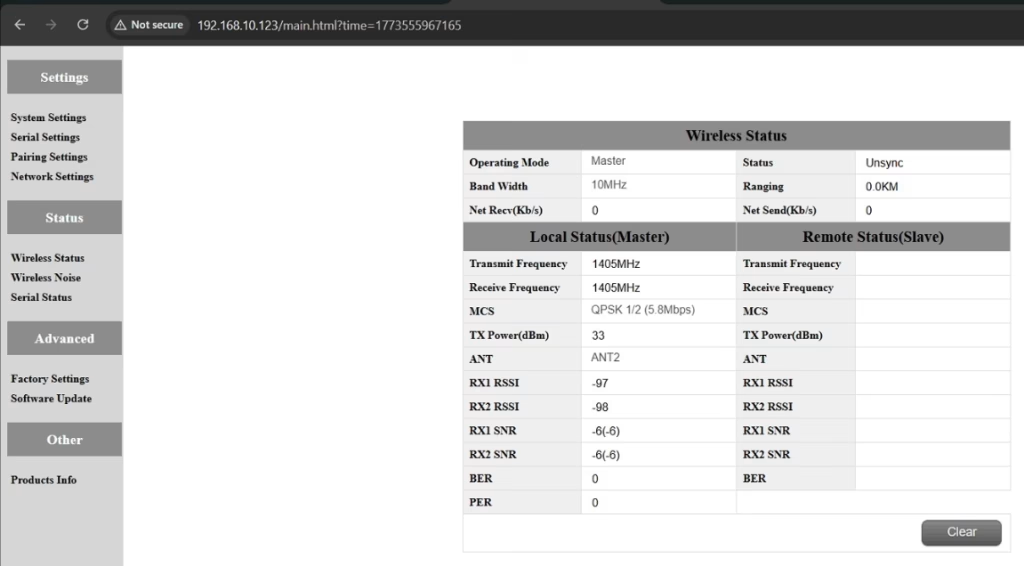
에이: Please do the below test firstly.
Attempt Remote Access
Try to access each node through the management interface or remote tool to check the wireless status.
If remote access fails, proceed to step 2.
Connect Directly via Ethernet
Use an Ethernet cable to connect your computer directly to each node.
Access the node’s management interface or wireless status page.
Check Wireless Transmit/Receive Status
Review the current wireless transmit/receive status, including signal strength, 링크 상태, and any error indicators.
Take a screenshot of the current status for each node, ensuring all relevant information is visible.
Send Screenshots to Engineers
Organize the screenshots and send them to the engineering team.
Engineers will analyze the wireless transmit/receive data to determine which node may have an issue.
노트:
Label each screenshot with the corresponding node for easy comparison.
Ensure screenshots include key data such as signal strength, connection status, 및 채널 정보.
Q10: Does the relay unit only require antennas and power to operate? Is an Ethernet connection necessary?
에이: 아니. The relay unit only requires the antennas and a power supply to operate. 그렇습니다 아니 require an Ethernet connection. The relay automatically forwards data between the aircraft side and the ground side, enabling seamless communication without the need for a network port connection.
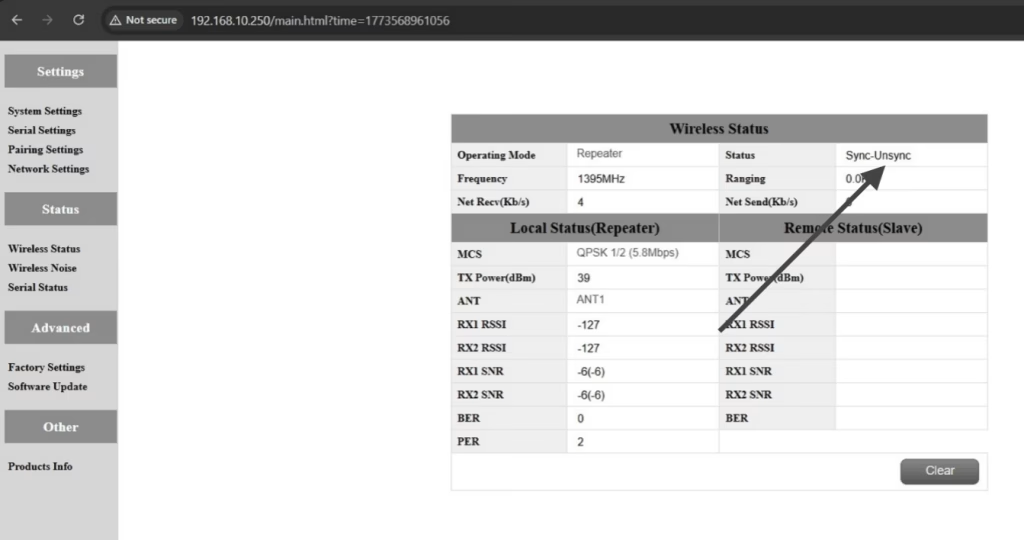
Q11: what is this sync unsync on the wireless status?
에이: These are the parameters seen on the relay node. 그만큼 “동조” at the beginning indicates the connection status between the master node and the relay node, which is currently connected. 그만큼 “unsync” at the end indicates the connection status between the relay node and the slave node, which is currently not connected.
Q12: Why can’t my Slave, 연발총, or Master nodes connect? How to fix it?
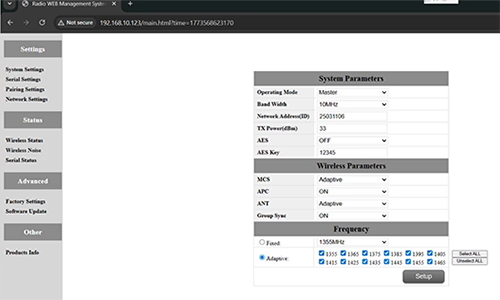
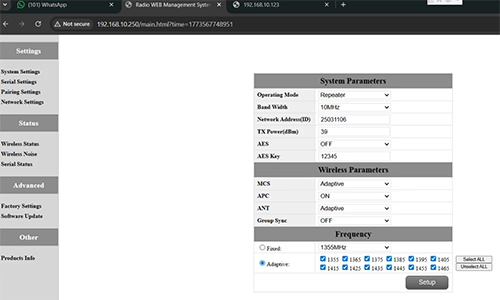
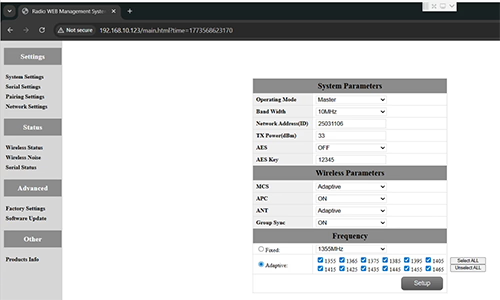
에이: This usually happens when nodes are not properly configured or the Group Sync settings are inconsistent.
- Connect each node directly to a computer using an Ethernet cable.
- Open the system parameter settings page and take a screenshot to share with technical support if needed.
- 확인해보세요 Group Sync 설정:
- 만약에 Group Sync Master is On, 과 Slave Node 과 연발총 are Off, 세트 Group Sync 에 떨어져서 for all nodes.
- After all nodes are connected successfully, you can enable Master / 노예 / Repeater Group Sync as needed.
결과:
Following these steps has successfully resolved connection issues for other customers.
Q13: In what order should these three devices be powered on?
에이: The correct power-on sequence is critical to ensure proper system connectivity and prevent equipment damage. Follow these steps:
- Power on the Ground Unit first
- This includes the master control station or ground control equipment.
- Ensure all communication interfaces and power supplies are stable.
- 다음 것, power on the Repeater Node (Relay Unit)
- Wait for the repeater to complete self-checks and establish a connection with the ground unit.
- Verify connection success via status indicators or LEDs.
- 마지막으로, power on the Drone or Slave Node
- Make sure the ground unit and repeater node are fully ready before powering the drone.
- 전원을 켠 후, check the communication status between the drone and the repeater/ground units.
⚠️ Notes:
- Always follow the sequence Ground → Repeater → Drone to avoid initialization failures.
- If there are multiple slave nodes or repeaters, power on one at a time and confirm each connection before proceeding.
- Avoid powering all nodes simultaneously to prevent bus conflicts or voltage spikes.
요약:
✅ 릴레이 기능 – 지원
✅ 수정 필요 – 예, 하나의 노드가 릴레이로 재구성됨
✅ 권장 노드 수 – 3 (무인 비행기 / 선택적 거리 등급 / GCS)
✅ 대기 시간 추가 – <20 MS
✅ 다음에 적합 – 산악 지역, 장거리 작전, 또는 NLOS 조건
질문하기
응답해 주셔서 감사합니다. ✨