





Many customers want to transmit video, 声音的, and UART data using our encoder boards. Here’s a clear guide on what’s possible, the limitations, and the best way to achieve it.
1. Current Status of HDMI+CVBS Encoder Boards
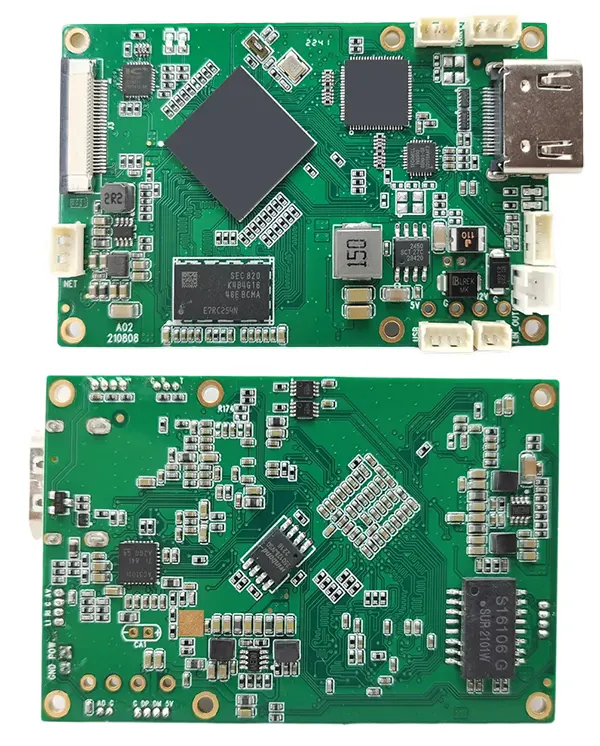
| 特征 | HDMI+CVBS Encoder Board |
|---|---|
| Serial tab in web UI | ❌ Not available |
| UART data transmission | ❌ Not available by default; 可以定制 |
| Video/Audio Protocols | ✅ RTSP (video/audio only) ✅ UDP (supports video/audio + UART if used with decoder) |
Key point: The encoder board alone cannot decode UART data on a PC with VLC or other generic players. You need our paired decoder board.

CVBS HDMI到IP编码器

CVBS HDMI到IP编码器
2. How UART Data Transmission Works
- Encoder Board
- Accepts UART data input for transmission (UDP only).
- RTSP stream is video/audio only; UART data cannot be sent via RTSP.
- Decoder Board
- Required to properly decode UART data from the encoder.
- Generic video players (例如, 可见光通信) cannot decode UART data.
Illustration of Setup:
PC ---Ethernet---> HDMI+CVBS Encoder Board ---UDP---> Matching Decoder Board ---> UART Data Output
3. 选择: 的 (CVBS) Input with UART
If you are using 的 (CVBS) 输入, you can use our dedicated converter board:
CVBS/AV Video to Ethernet IP Video Stream Converter Board
| 特征 | 的 (CVBS) Converter Board |
|---|---|
| HDMI输入 | ❌ Not supported |
| UART data input | ✅ Supported |
| Data retrieval on PC | ✅ TCP protocol |
提示: This is ideal if you only need UART + CVBS video streaming, and want to receive UART data directly on a PC.
4. Recommendations
- HDMI+CVBS input + UART: Must use both encoder and matching decoder.
- 的 (CVBS) + UART: Use the AV converter board with TCP to retrieve UART data on PC.
- Do not expect VLC or generic players to decode UART data; they only handle video/audio streams.
结论:
Our encoder boards can transmit UART data, 但 only with the matching decoder or the AV converter board. Understanding these options ensures you pick the right board for your system and avoid confusion or failed setups.
目录
编码器模块板









解码器模块板




可定制
新编码器产品
| 没有. | 产品名称 | 组态 | 主要特点 | 地位 |
|---|---|---|---|---|
| 1 | 双通道 USB UVC 可见光视频编码器 | 2× USB 输入 | 支持双USB摄像头视频编码, and RTSP streaming; 本地CVBS/HDMI输出; 可切换显示模式 | 量产 |
| 2 | 双通道编码器 (1× USB Visible Light + 1× USB热像仪) | 2× USB 输入 | 支持双USB摄像头 (可见的 + 热的) 捕获, 编码, and RTSP streaming; 本地CVBS/HDMI输出; 可切换显示模式 | 量产 |
| 3 | RTSP 解码器 HDMI/CVBS 显示模块 | HDMI + CVBS输出 | 最高支持4×1080P@30fps RTSP码流解码; 支持视频流协议转发; HDMI/CVBS输出显示 | 提供样品 |
| 4 | RTSP 解码器 HDMI/CVBS 显示模块 4.3"/5" 液晶显示屏 | HDMI输出 + 液晶屏 | 最高支持4×1080P@30fps RTSP码流解码; 协议转发; HDMI/CVBS输出显示 | 调试 |
| 5 | 双通道编码器 (1× USB Visible Light + 1× CVBS 模拟) | 1× CVBS + 1× USB UVC 输入 | 双视频 (USB + CVBS), 编码和 RTSP 流媒体; 本地CVBS/HDMI输出; 可切换显示模式 | 调试 |
| 6 | 双通道编码器 (1× USB UVC + 1× AHD 模拟) | 1× AHD + 1× USB UVC 输入 | 双视频采集 (USB + AHD), 编码和 RTSP 流媒体; 本地CVBS/HDMI输出; 可切换显示模式 | 调试 |
| 7 | 双通道编码器 (1× CVBS + 1× AHD Analog Video) | CVBS + AHD 2 视频输入 | 双模拟视频采集, 编码和 RTSP 流媒体; 本地CVBS/HDMI输出; 可切换显示模式 | 调试 |
| 8 | 双通道编码器 (1× CMOS 相机 + 1× USB热像仪) | 1× USB 接口 | 支持CMOS + USB热像仪捕捉, 编码和 RTSP 流媒体; 本地CVBS/HDMI输出; 可切换显示模式 | 量产 |
For customized video input/output conversion solutions not listed in our products, 请联系我们获取 OEM/ODM 支持. 我们可以根据您的要求开发定制产品.
问一个问题
感谢您的回复。 ✨