






How to add add a wireless video relay into a drone video data air uinit and ground unit
FAQ: dodaj bezprzewodowy przekaźnik wideo do połączenia dronów z terenem dalekiego zasięgu lub z przeszkodami
Zapytał klient, Chciałem sprawdzić możliwość wykorzystania jednego urządzenia jako przekaźnika. W miejscu, w którym chcemy latać naszym dronem, jest wysoki teren, co zakłóca komunikację. Czy możemy użyć trzeciego urządzenia, które będzie działać jako przekaźnik??


Transmisja bezprzewodowa Wideo
1740-1840MHZ 2WPA 30 km dronem nadajnik i odbiornik Drone z SBUS TTL

Transmisja bezprzewodowa Wideo
Q1: Czy jedno z urządzeń może pełnić funkcję przekaźnika do pokonywania przeszkód terenowych i zwiększania zasięgu komunikacji??
ZA: tak, istnieje możliwość skonfigurowania jednej z jednostek jako węzła przekaźnikowego w celu usprawnienia komunikacji w obszarach o wysokim terenie lub innych przeszkodach utrudniających bezpośrednią widoczność pomiędzy dronem a naziemną stacją kontroli.
Q2: Jak działa konfiguracja przekaźnika?
ZA: The relay setup method depends on the software version installed on your device. There are two different versions:
- Point-to-Point Version
- Point-to-Multipoint Version
Each version uses a different configuration method for relay setup.
To determine which version your device is using, proszę sprawdzić Web UI interface style of your firmware. The layout and design of the Web UI will indicate whether your firmware is the opcjonalna klasa odległości lub opcjonalna klasa odległości wersja.
Once you identify the firmware version through the Web UI style, follow the corresponding relay setup instructions for that version.
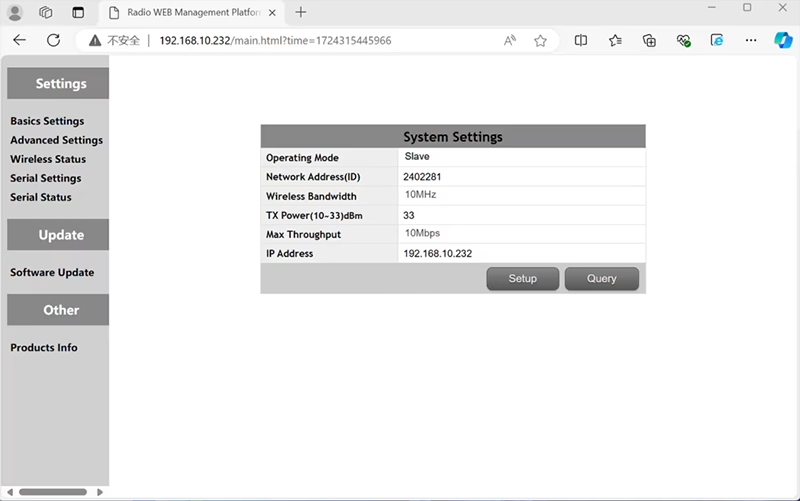

In the standard Point to Point (P2P) konfiguracja:
- Plik Naziemna Stacja Kontroli (GCS) pełni funkcję główny węzeł (mistrz).
- Plik warkot (jednostka powietrza) pełni funkcję podwęzeł (niewolnik).
Aby włączyć funkcję przekaźnika, topologia sieci wymaga modyfikacji:
- Konwertuj oryginalna naziemna stacja kontroli (główny węzeł) w węzeł przekaźnikowy.
- Dodaj jeszcze jeden podwęzeł służyć jako nowy terminal naziemnej stacji kontroli.
Nowa konfiguracja będzie zatem mieć trzy węzły:
- Węzeł 1 (Warkot) - Slave node (przewieziony drogą lotniczą)
- Węzeł 2 (Przekaźnik) - Repeater node (zamocowany na ziemi, zwykle umieszczane na wzniesieniu lub w punkcie środkowym)
- Węzeł 3 (Naziemna Stacja Kontroli) - Węzeł główny węzeł (strona operatora)
- Drone Unit 8W – 192.168.10.252 (Niewolnik)
- Relay Unit 8W- 192.168.10.250 (Przekaźnik)
- Ground Unit 2W – 192.168.10.124 (Mistrz)
In the standard Point to Multi-Points configuration:
- Plik Naziemna Stacja Kontroli (GCS) pełni funkcję główny węzeł (mistrz).
- Plik warkot (jednostka powietrza) pełni funkcję podwęzeł (niewolnik).
Aby włączyć funkcję przekaźnika, topologia sieci wymaga modyfikacji:
- Konwertuj oryginalna naziemna stacja kontroli (główny węzeł) w węzeł przekaźnikowy.
- Dodaj jeszcze jeden podwęzeł służyć jako nowy terminal naziemnej stacji kontroli.
Nowa konfiguracja będzie zatem mieć trzy węzły:
- Węzeł 1 (Warkot) - Slave node (przewieziony drogą lotniczą)
- Węzeł 2 (Przekaźnik) - Węzeł główny (zamocowany na ziemi, zwykle umieszczane na wzniesieniu lub w punkcie środkowym)
- Węzeł 3 (Naziemna Stacja Kontroli) - Slave node (strona operatora)
Taka konfiguracja umożliwia przesyłanie sygnałów z drona do przekaźnika, a następnie od przekaźnika do operatora, zapewnienie stabilnego i ciągłego połączenia nawet wtedy, gdy bezpośrednią ścieżkę blokują wzgórza lub budynki.
Q3: Jakie są zalety tej konfiguracji przekaźnika?
- Wydłuża efektywną odległość transmisji.
- Utrzymuje stabilne łącze komunikacyjne z dronem nawet w złożonym terenie.
- Redukuje utratę sygnału i przerwy w transmisji wideo.
- Umożliwia elastyczne rozmieszczenie przekaźnika w celu optymalizacji zasięgu.
Q4: Jakie modyfikacje lub konfiguracje są wymagane?
Zmień tryb pracy na przekaźnik. Identyfikatory wszystkich trzech urządzeń muszą być takie same. Nasz zespół inżynierów może dostosować oprogramowanie sprzętowe i parametry, aby włączyć funkcję przekaźnika. Wystarczy, że poinformujesz nas o planowanej konfiguracji (np., odległości, typ terenu, wysokość montażu), a my dostarczymy odpowiednie pliki konfiguracyjne i schemat połączeń.
Pytanie 5: Czy moduł przekaźnika może być przenośny lub montowany na pojeździe??
tak. Węzeł przekaźnikowy może być:
- Montowane na stałe (np., na wzgórzu lub wieży), lub
- Przenośny (przewożony pojazdem, lub zamontowany na statywie z zasilaczem).
Możemy dostosować obudowę przekaźnika i interfejs zasilania zgodnie ze scenariuszem aplikacji.
Pytanie 6: Czy przekaźnik wprowadza dodatkowe opóźnienie?
Dodatkowe opóźnienie jest minimalne (zazwyczaj mniej niż 10–20 ms) i ma niewielki wpływ na wydajność wideo i sterowania w czasie rzeczywistym.
P7: Czy mogę samodzielnie skonfigurować lub przełączyć tryb przekaźnika??
Zalecamy skontaktowanie się z naszym zespołem pomocy technicznej w celu wstępnej konfiguracji, aby zapewnić prawidłowe adresowanie węzłów i planowanie częstotliwości. Po konfiguracji, przełączanie między trybem normalnym a trybem przekaźnikowym można wykonać za pomocą oprogramowania konfiguracyjnego lub predefiniowanych profili.
Q8: Why can’t I connect to the relay node?
ZA: If the relay and slave nodes are roughly the same distance from the master node, and the master node receives roughly the same amount of power, the relay node might not be able to join the network. When the master node determines that the received power of the two nodes is similar, it will prioritize connecting directly to the slave node.
Pytanie 9: The three nodes cannot connect to each other. It is necessary to check the wireless transmit/receive status of each node to identify potential issues.
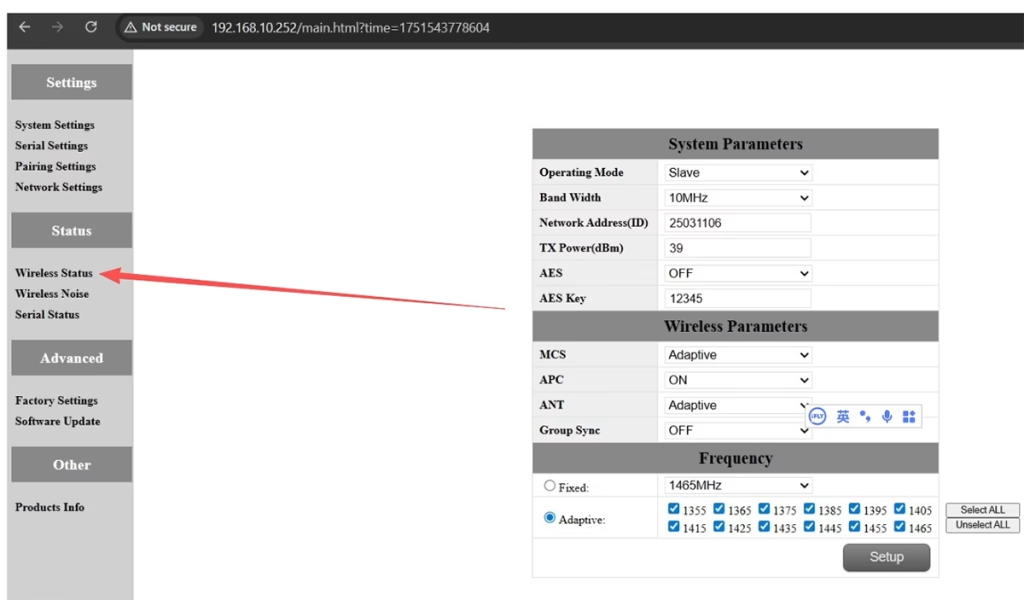
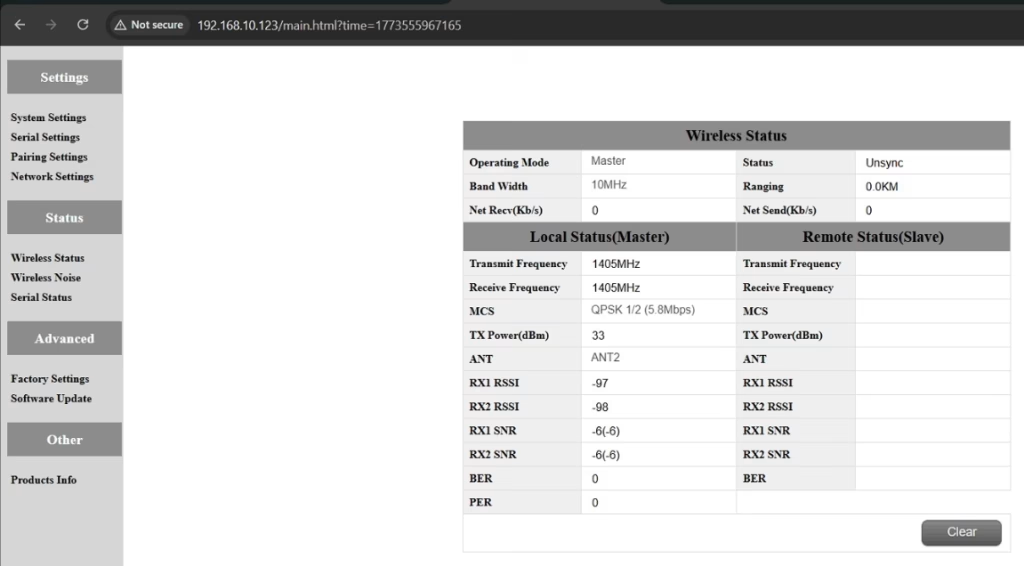
ZA: Please do the below test firstly.
Attempt Remote Access
Try to access each node through the management interface or remote tool to check the wireless status.
If remote access fails, proceed to step 2.
Connect Directly via Ethernet
Use an Ethernet cable to connect your computer directly to each node.
Access the node’s management interface or wireless status page.
Check Wireless Transmit/Receive Status
Review the current wireless transmit/receive status, including signal strength, stan łącza, and any error indicators.
Take a screenshot of the current status for each node, ensuring all relevant information is visible.
Send Screenshots to Engineers
Organize the screenshots and send them to the engineering team.
Engineers will analyze the wireless transmit/receive data to determine which node may have an issue.
Uwagi:
Label each screenshot with the corresponding node for easy comparison.
Ensure screenshots include key data such as signal strength, connection status, i informacje o kanale.
Pytanie 10: Does the relay unit only require antennas and power to operate? Is an Ethernet connection necessary?
ZA: Nie. The relay unit only requires the antennas and a power supply to operate. It does nie require an Ethernet connection. The relay automatically forwards data between the aircraft side and the ground side, enabling seamless communication without the need for a network port connection.
Pytanie 11: what is this sync unsync on the wireless status?
ZA: These are the parameters seen on the relay node. Plik “synchronizacja” at the beginning indicates the connection status between the master node and the relay node, which is currently connected. Plik “unsync” at the end indicates the connection status between the relay node and the slave node, which is currently not connected.
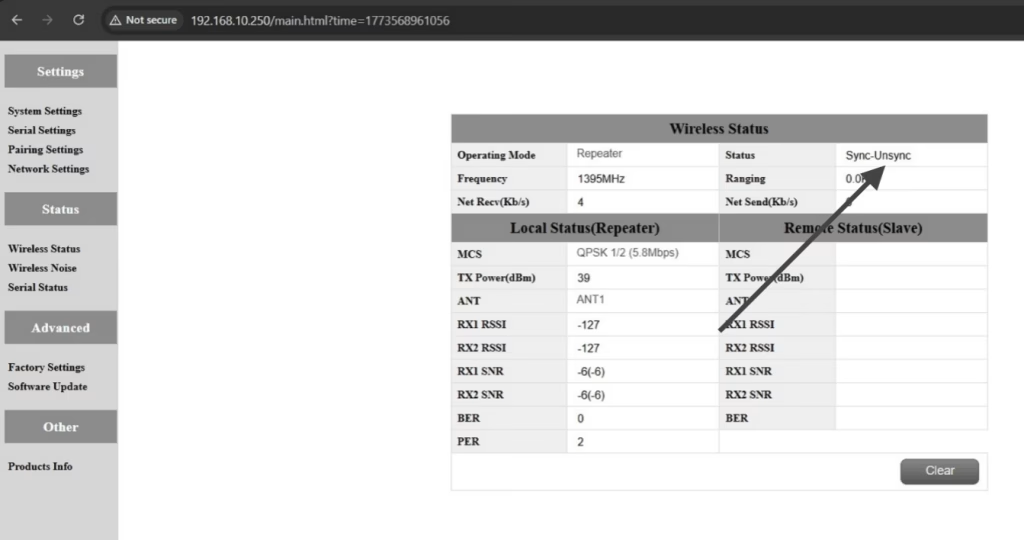
Pytanie 12: Why can’t my Slave, Przekaźnik, or Master nodes connect? How to fix it?
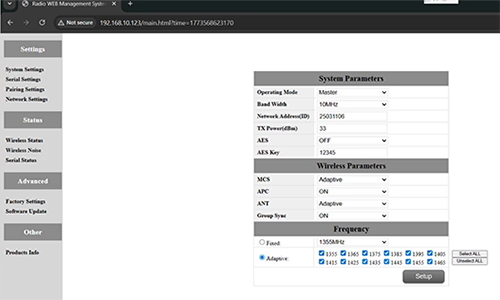
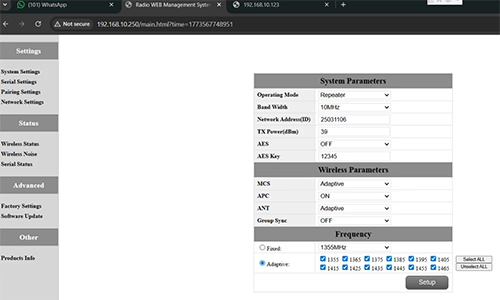
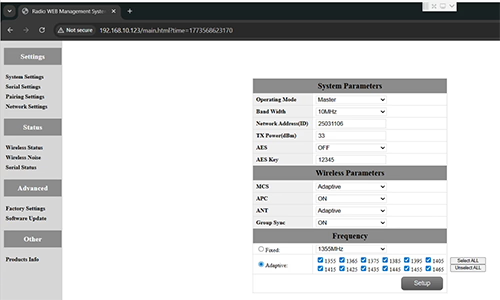
ZA: This usually happens when nodes are not properly configured or the Group Sync settings are inconsistent.
- Connect each node directly to a computer using an Ethernet cable.
- Open the system parameter settings page and take a screenshot to share with technical support if needed.
- Sprawdź Group Sync ustawienia:
- Gdyby Group Sync Master is On, i Slave Node i Przekaźnik are Off, zestaw Group Sync do Poza for all nodes.
- After all nodes are connected successfully, you can enable Master / Niewolnik / Repeater Group Sync as needed.
Wynik:
Following these steps has successfully resolved connection issues for other customers.
Pytanie 13: In what order should these three devices be powered on?
ZA: The correct power-on sequence is critical to ensure proper system connectivity and prevent equipment damage. Follow these steps:
- Power on the Ground Unit first
- This includes the master control station or ground control equipment.
- Ensure all communication interfaces and power supplies are stable.
- Następny, power on the Repeater Node (Relay Unit)
- Wait for the repeater to complete self-checks and establish a connection with the ground unit.
- Verify connection success via status indicators or LEDs.
- Wreszcie, power on the Drone or Slave Node
- Make sure the ground unit and repeater node are fully ready before powering the drone.
- Po włączeniu, check the communication status between the drone and the repeater/ground units.
⚠️ Notes:
- Always follow the sequence Ground → Repeater → Drone to avoid initialization failures.
- If there are multiple slave nodes or repeaters, power on one at a time and confirm each connection before proceeding.
- Avoid powering all nodes simultaneously to prevent bus conflicts or voltage spikes.
Streszczenie:
✅ Funkcja przekaźnika – Utrzymany
✅ Wymaga modyfikacji – tak, jeden węzeł został ponownie skonfigurowany jako przekaźnik
✅ Zalecana liczba węzłów – 3 (Warkot / Przekaźnik / GCS)
✅ Dodano opóźnienie – <20 ms
✅ Nadaje się do – Obszary górzyste, operacji długodystansowych, lub warunki NLOS
Zadać pytanie
Twoja wiadomość została wysłana