





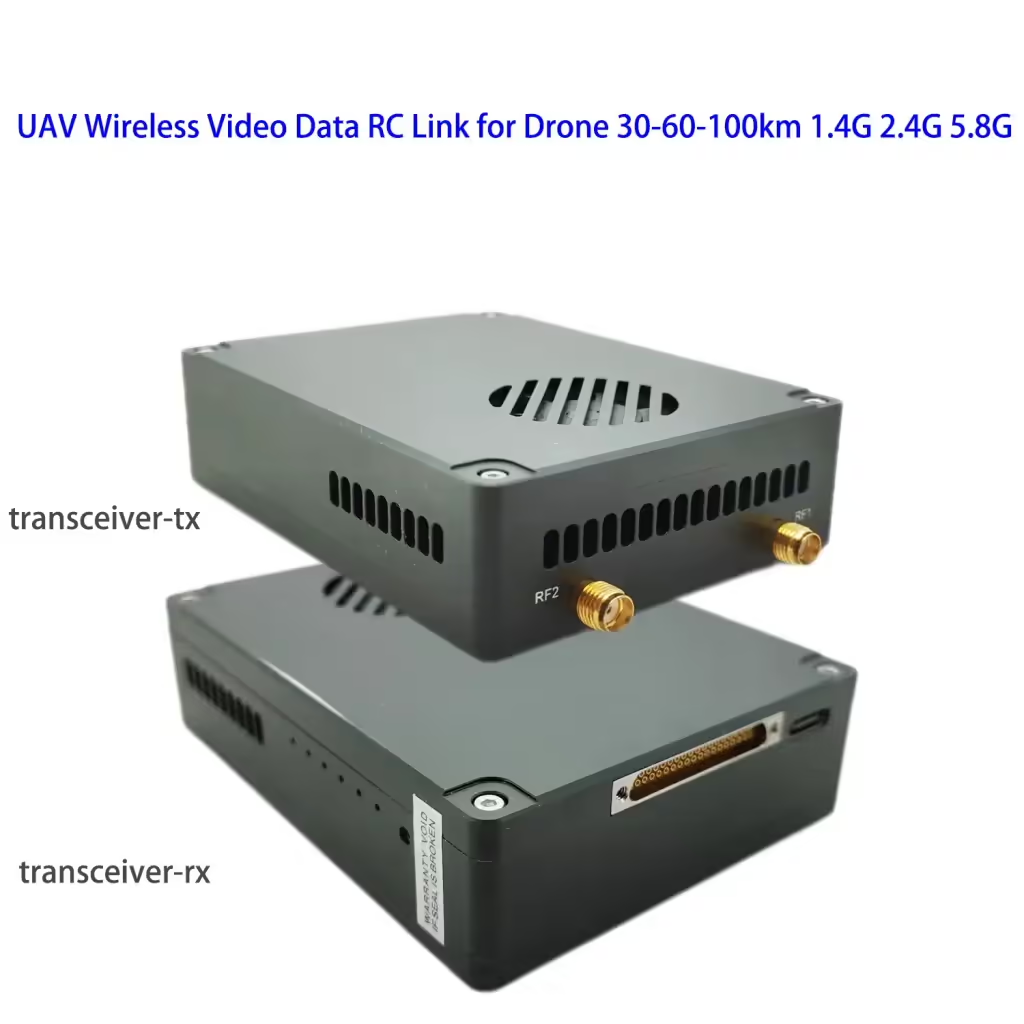
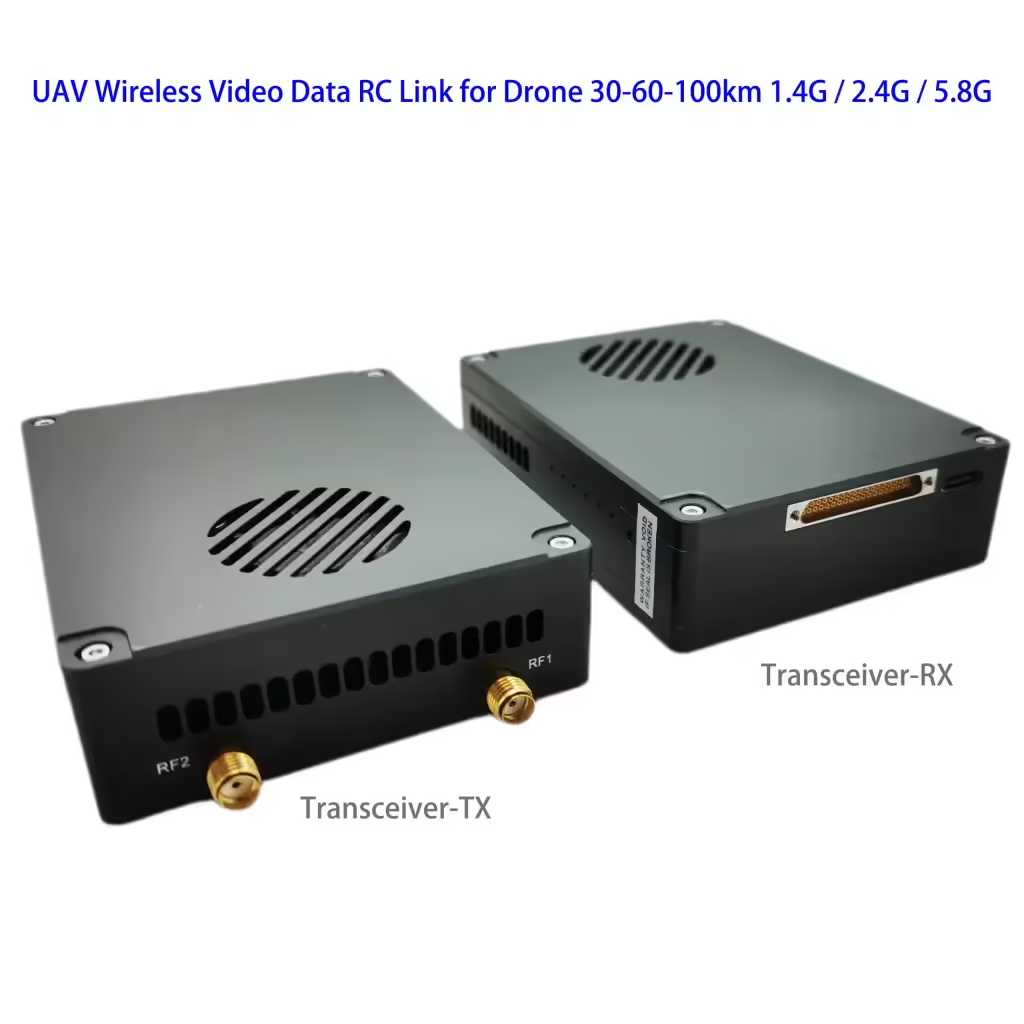
UAV ワイヤレスビデオデータ RC リンクドローン 15-20-30-50-100-150km 1.4 グラム / 2.4G / 5.8G トランシーバー送受信機 Vcan1818
目次
特徴:
- Video Data Control 3 で 1
- 30-60KM wireless transmission ( 2.4G周波数, 2W: 30キロ; 5W: 50キロ; 10W: 100キロ)
- 4K high-definition images with low latency
- H265/H264 video compression
- Rich interface (Ethernet for IP camera, 力, SBUS, TTL, カスタマイズされた)
- Adaptive retransmission
- Automatic frequency hopping
仕様:
チャネル帯域幅: 2.5メガヘルツ(アップリンク), 10メガヘルツ(ダウンリンク)
最大放出エネルギー: 27dBmの / 30dBmの
ビデオフォーマット:
の: パル, 50INTSC, 60i
HDMI: 576i60, 480p@60fps, 720p@50fps, 720p@60fps, 1080p@50fps, 1080p@60fps
SDl: 720p@50fps, 720p@60fps, 1080p@50fps, 1080p@60fps
変調方式: OFDM
星座: BPSK, QPSK, 16QAM
前方誤り訂正符号: LDPC(1/2, 2/3, 3/4, 5/6)
二重モード: TDD
Downlink throughput rate: 2Mbps~8Mbps
Uplink throughput rate: 300kbps (シリアルポート + ネットワークポート + リモコン)
ビデオインターフェース: ネットワークポート, HDMI/SDI/AV
Other interfaces: シリアルポート, PPM/SBUS, SB
暗号化: AES128/256
ビデオ圧縮: H.264/H265(HDMI/SDI/AV)
Screen-to-screen latency: <300ミズ
Ground end size:
92X69X24mm (ネットワークポート)
Air unit size:
92X69X24mm
重量: 195グラム (Vcan1818-2W-30km, 195グラム)
使用温度: -20°C-55°C
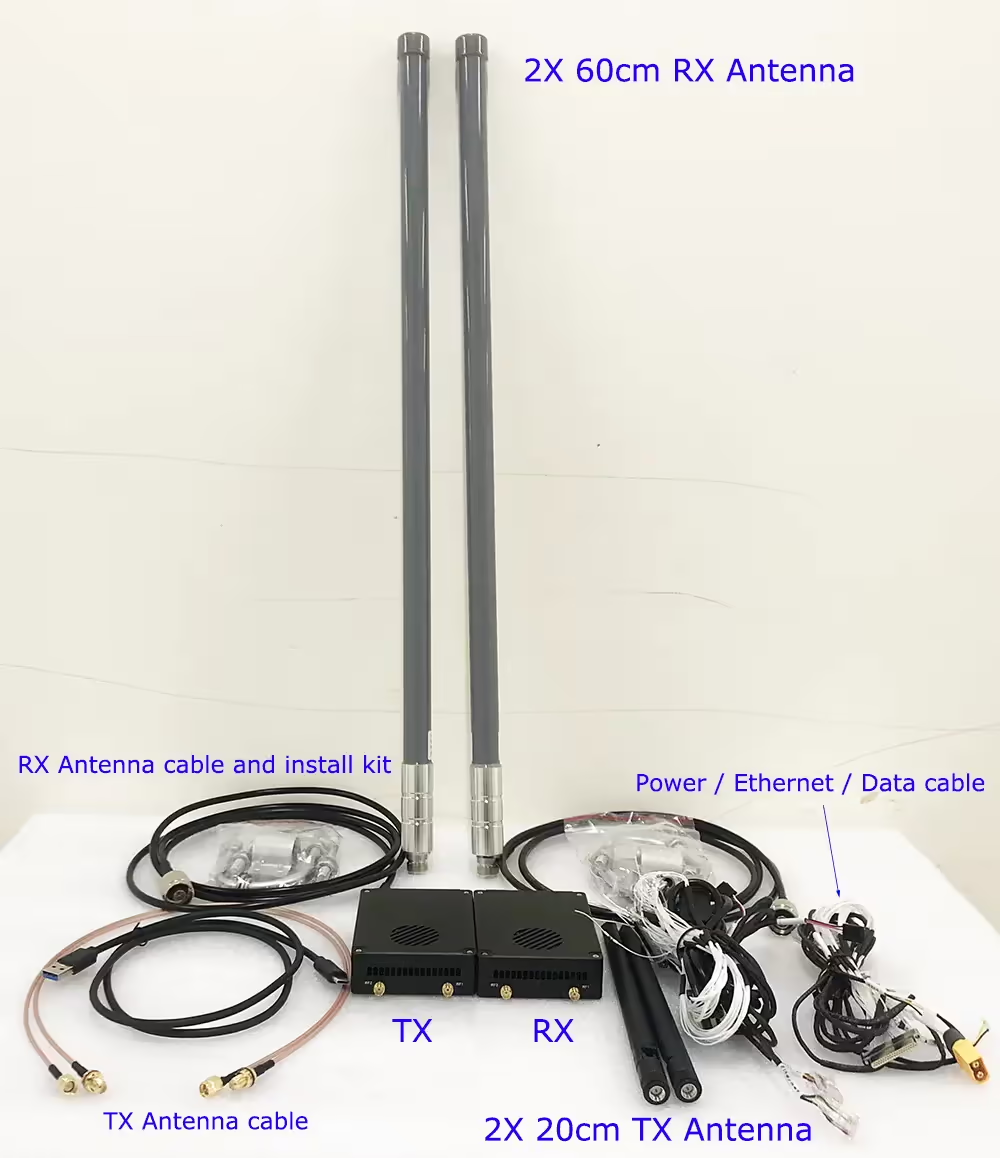
入力 / 出力
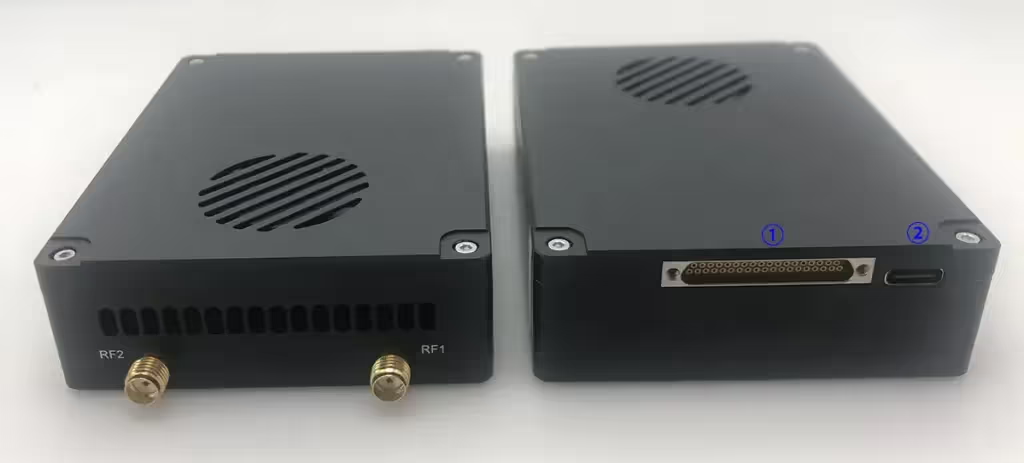
- MIMO connector: 力, イーサネットポート, Data transmission serial port, and remote control SBUS/TTL/PPM
- USB: Connect to the computer USB, which can be used to configure and upgrade the device and other related operations.
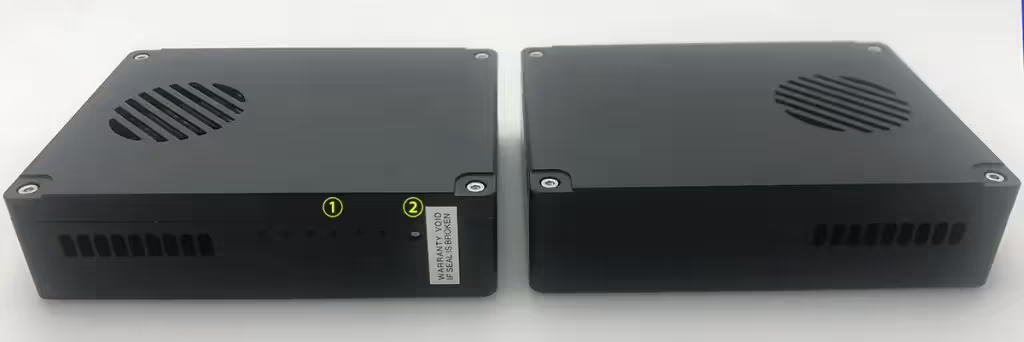
導かれた
From left to right are:
電源表示灯 (1)
Ethernet port indicators (3)
Uplink and downlink indicators (2).
When the wireless link is established normally, the link indicator of the air system will be off. The downlink indicator is multiplexed with the binding indicator function.
Pair button
Long press the button until the binding indicator light flashes, then release it to execute the binding operation. The factory equipment has been bound. If it is not necessary, the customer does not need to bind again.
航空ユニット
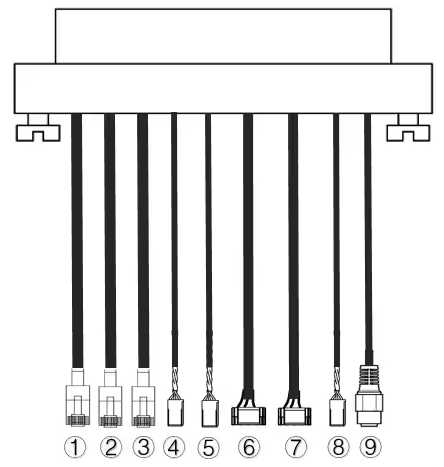
| いいえ. | インタフェース |
| 1,2,3 | Ethernet |
| 4,5 | S.バス, as shown in the picture, の 1セント pin from the left of the Dupont connector is the S.BUS signal, そして 3rd Gです. |
| 6,7 | テレメトリーシリアル, 写真のように, の 2nd GH1.25コネクタの左からのピンがRxです, の 3rd 送信です, の 6番目 Gです. (デフォルトではTTL, RS232/422の代替品) |
| 8 | PPM, as shown in the picture, の 1セント pin from the left is the PPM signal, そして 3rd Gです. |
| 9 | 力 |
Ethernet 1, Ethernet 2
TTL 1 tracker, TTL2
SBUS 1, SBUS 2
Power In
地上ユニット
Vcan1818-ground-unit-IO-cable
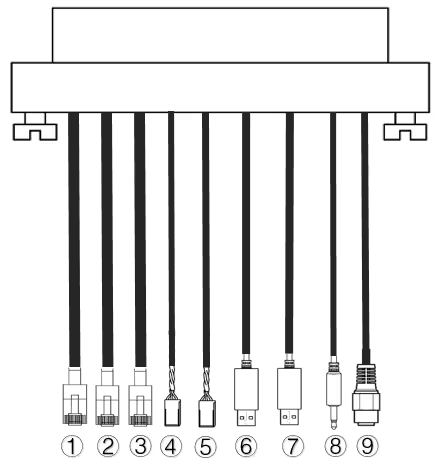
| いいえ. | インタフェース |
| 1,2,3 | Ethernet |
| 4,5 | S.バス, 写真のように, の 1セント 左からのピンがS.BUS信号, の 2nd 5V+です, の 3rd Gです. |
| 6,7 | シリアルUSB(デフォルトでは TTL-USB, RS232/422の代替品) |
| 8 | PPM |
| 9 | 力 |
Ethernet 1, イーサネット2
TTL1, TTL2
SBUS 1, SBUS 2
Power In
よくある質問
- The frequency is 2410-2478 Mhz in our test video.
- This model's working frequency is customized, we also can change it to 2325 メガヘルツ.
- Vcan1818-5W has 6Mbps at 20km, 30キロ, and 40km.
- Vcan1818-2W has 6Mbps at 20km, and 2-3Mbps at 30 and 40km.
- The default frequency range is 800-900Mhz
- Except 800Mhz, 1.4G and 2.4G, Other frequencies can be customized if the order quantity meets our MOQ request (50 pairs)
- The default transmitter has 2 sets of RJ45 Ethernet Video camera input.
- We also can customize 3 sets of RJ45 Ethernet video camera input when you order and notify us.
- Power Amplifier at 0.5 Watts support 2.4G and 5.8G both.
- Power Amplifier at 10 watts support 2.4G or 5.8G, it can not support two frequency bands at this 10 Watts output.
- If you choose a 10-watt power amplifier inside, it can not support 2.4G and 5.8G at the same time.
- はい, 3G~3.9Ghz working frequency is optional. 実際には, we can modify other frequencies if you need. You should have an order and agree to wait for 2 months for engineer development. (need re-layout the PCBA and small quantity to produce and test)
- Regarding automatic frequency hopping-FHSS, はい, it will auto-change to use the next working frequency if the signal is blocked or jammed.
- The drone wireless video data link module Vcan1818 power supply range: DC18-26V.
- 電源を入れる前にアンテナを取り付ける必要があります.
- また, you should double check that the screws of the antenna and RF transmitter are tightened.
- Because if the antenna is not installed or the contact is poor, the power amplifier will burn out.
- You should install both two antennas on the air terminal.
- It is best to use the transmitter antenna we configure for you, ensuring that the frequency and gain of the antenna are tested and verified.
- The two antennas are best installed on both sides of the drone to ensure that the drone can still get the best signal when turning and maintain uninterrupted contact with the ground control station.
- You should install both two antennas on the ground terminal.
- It is best to use the transmitter antenna we configure for you, ensuring that the frequency and gain of the antenna are tested and verified.
-
The two ground wireless video data receiver antennas should be kept as far apart as possible.
-
They should be installed as high as possible above the ground to receive the signal from the drone transmitter.
-
The feeder cable is relatively long. For the convenience of packaging and transportation, it is bundled into a circle. 実際の使用中, you must remember to unfold the feeder line. Do not let it remain in its original round shape, because this will invisibly create an electronic interference environment.
-
はい, 標準 PPM 信号をトレーナー ポート経由で出力するだけです;
-
Or use the S.BUS receiver for communication.
- いいえ, a plane can only have one air unit transmitter. If you need it to support more cameras, please tell us to offer you a better solution.
- P2P point-to-point devices can only install one ground terminal.
- P2MP point-to-multipoint devices support multiple ground terminals.
- If you have this requirement, please remember to tell us when placing your order and we can configure it for you.
- Please check whether the antenna of the drone VTX is far away from the GPS to avoid blocking interference from the GPS.
- The frequency band of 1.4G equipment is close to the GPS frequency band, したがって、ある程度のアンテナ分離を確保する必要があります.
- LED1 (電源インジケーターライト): 電源投入後, 光はいつも青い.
- LED2~4 (ネットワーク接続インジケーター):
- ライトが常に点灯している場合, ネットワークポートの物理リンクが接続されていることを意味します.
- If the light is off, ネットワークポートの物理リンクが接続されていないことを意味します.
- LED5 (アップリンクインジケーター):
- ライトが点灯しているとき, 地上ユニットと航空ユニット間のリンクが確立されたことを示します;
- When the light is off, 地上ユニットと航空ユニット間のリンクが切断されたことを示します.
- LED6 (ダウンリンクインジケーターライト):
- ライトが点灯しているとき, 航空ユニットと地上ユニット間のリンクが確立されたことを示します;
- When the light is off, 航空ユニットと地上ユニット間のリンクが切断されたことを示します.
以下の手順に従ってください:
- 空気側モジュールと接地側モジュールの電源が正常であるか確認してください。;
- エアエンドとグラウンドエンドが正常にバインドされているかを確認してください;
- 空中ターミナルと地上ターミナルモジュールのアンテナ設置が正常か確認してください。: アンテナの設置位置に障害物はないか; アンテナのインターフェースが緩んでいるかどうか; フィーダーが締められていないかどうか, インターフェースが緩んでいるかどうか;
- 管理ソフトウェアを使用して、地上端末の送信周波数が航空端末の受信周波数と一致しているかどうかを確認します;
- 上記のいずれの操作を行っても問題が解決しない場合, please contact our wireless video link technical support person.
以下の手順に従ってください:
- 空気側モジュールと接地側モジュールの電源が正常であるか確認してください。;
- エアエンドとグラウンドエンドが正常にバインドされているかを確認してください;
- 空中ターミナルと地上ターミナルモジュールのアンテナ設置が正常か確認してください。: アンテナの設置位置に障害物はないか; アンテナのインターフェースが緩んでいるかどうか; フィーダーが締められていないかどうか, インターフェースが緩んでいるかどうか;
- 管理ソフトウェアを使用して、航空端末の送信周波数が地上端末の受信周波数と一致しているかどうかを確認します;
- 上記のいずれの操作を行っても問題が解決しない場合, please contact our wireless video link technical support person.
以下の手順に従ってください:
-
空気側モジュールと接地側モジュールの電源が正常であるか確認してください。, and whether the modules start normally;
-
ネットワークケーブルが正常に接続されているか確認してください;
-
ネットワークカメラの電源が正常に供給されているかどうかを確認してください;
-
上記のいずれの操作を行っても問題が解決しない場合, please contact our wireless video link technical support person.
以下の手順に従ってください:
-
無線リンク状態が正常に確立されているか確認する;
-
Please check whether the connection between the flight controller and the air terminal is correct, and whether the connection between the ground terminal and the ground station is correct;
-
空中端モジュールと地上端モジュールのデータ伝送ラインシーケンスが正常かどうかを確認してください。. 当社は標準ケーブルを提供しています. 配線を自分で行う場合, 行の順序を確認してください;
-
データ送信のボーレートが飛行制御と一致しているかどうかを管理ソフトウェアで確認します。;
-
地上局のコンピュータのファイアウォールが閉じられているかどうか;
-
上記のいずれの操作を行っても問題が解決しない場合, please contact our wireless video link technical support person.
以下の手順に従ってください:
-
無線リンク状態が正常に確立されているか確認する.
-
Please check whether the connection between the flight controller and the air terminal is correct, and whether the connection between the ground terminal and the remote control is correct;
-
PPMモードを使用する場合, リモコンのモード設定を確認してください; S.BUSモードを使用する場合, 受信機とリモコンの設定を確認してください;
-
空中端モジュールと地上端モジュールのリモコン線の順序が正しいか確認してください。;
-
管理ソフトウェアを通じてリモート制御モードが正しく設定されているかどうかを確認します;
-
上記のいずれの操作を行っても問題が解決しない場合, please contact our wireless video link technical support person.
以下の手順に従ってください:
-
無線リンク状態が正常に確立されているか確認する;
-
航空ターミナルと地上ターミナルのネットワーク物理接続インジケーターが正常かどうかを確認します;
-
ネットワークカメラを使用する場合, ネットワークカメラのIPアドレスを確認してください, ログインユーザー名とパスワード;
-
地上局コンピュータとネットワークカメラのIPアドレス構成が同じネットワークセグメント内にあるかどうか;
-
RTSPを再生するためのビデオストリームアドレスの設定が正しいかどうか;
-
地上局のコンピュータのファイアウォールが閉じられているかどうか;
-
上記のいずれの操作を行っても問題が解決しない場合, please contact our wireless video link technical support person.
以下の手順に従ってください:
-
ダウンリンクモードの設定が適切かどうかを確認する;
-
使用しているネットワークケーブルが正しく接続されているか;
-
ダウンリンクに干渉があるかどうか, 動作周波数ポイントの変更を検討してください;
-
干渉がなければ, 通信リンクの限界距離に達したかどうか;
-
ポッドのダウンリンク速度が大きく変動していないかどうかを観察します。. 例えば, ポッドの固定ビットレートは 3 Mbps, クライアントのダウンリンク速度は次のように設定されます。 3.97 Mbps, ポッドのビットレートのピーク値は、ある段階にある可能性が高く、それが超えている場合は、 3.97 Mbps, この時ラグやモザイク現象が発生します. クライアントのダウンリンク速度を次のように設定します。 5.27 Mbps, ダウンリンク速度が超過しているかどうかを確認します。 3.97 Mbps. 超えた場合 3.97 Mbps, クライアントのダウンリンク速度をポッドのピーク値より大きく設定します。;
-
クライアントのリアルタイムのダウンリンク速度を確認する, ダブルカメラストリームがあるかどうか;
-
上記のいずれの操作を行っても問題が解決しない場合, please contact our wireless video link technical support person.
以下の手順に従ってください:
-
アンテナと接続ケーブルが正しく取り付けられているか、ワイヤレスビデオリンクの標準材質であるかを確認します。;
-
エアターミナルのアンテナ設置が負荷によって妨げられないように注意してください。, 接地端子のアンテナの近距離に明らかな障害物がないこと。, 航空端末と地上端末のアンテナが地面に対して垂直であること;
-
Check whether the video transmission equipment hardware such as the power amplifier is damaged;
-
ダウンリンクモードの設定値に無理がないか, 高速ダウンリンクモードにより通信距離が大幅に短縮されます;
-
使用周波数が著しく妨害されているかどうか, クライアントを通じて最適な周波数を選択できます;
-
飛行環境において航空ターミナルと地上ターミナルが著しく遮断されているかどうか, 複雑な地理的環境は通信距離に影響します;
-
上記のいずれの操作を行っても問題が解決しない場合, please contact our wireless video link technical support person.
-
ごめん, the most used working frequency is 800Mhz, 1.4G, および2.4G. Other frequencies should be customized.
- 443Mhz seems COFDM frequency range from 170-860Mhz, but most COFDM video transmitters and receivers are one-way transmission.
The two-way transmission model is here.


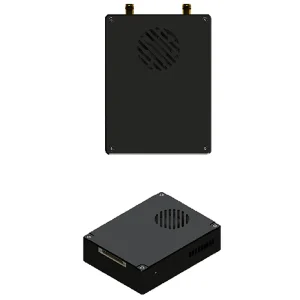




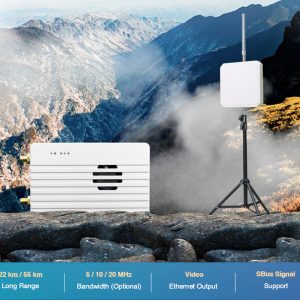
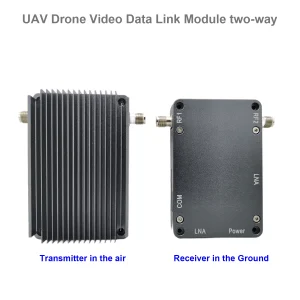

iVcan.com –
I have been using the Vcan1818 UAV Wireless Video Data RC Link for several months, そしてそれは私の期待を上回りました. The video quality is excellent with 4K resolution and low latency, making real-time monitoring smooth and reliable. セットアップは簡単です, and the adaptive frequency hopping ensures a stable connection even in complex electromagnetic environments. The long-distance transmission up to 100km is impressive, and the H265/H264 compression combined with AES encryption provides both efficiency and security. The multiple interfaces, HDMIを含む, SDI, の, Ethernet, and SBUS, offer great flexibility for different UAV applications. 全体, this module delivers professional-grade performance for drone video and data transmission.