






How to add add a wireless video relay into a drone video data air uinit and ground unit
FAQ: tambahkan relai video nirkabel untuk tautan komunikasi drone dengan medan jarak jauh atau terhalang
Seorang klien bertanya, Saya ingin memeriksa kemungkinan menggunakan satu unit sebagai relay. Di lokasi dimana kita ingin menerbangkan drone kita, ada dataran tinggi, yang mengganggu komunikasi. Bisakah kita menggunakan unit ketiga sebagai relay?


Transmisi Video Wireless
1740-1840MHZ 2WPA 30km Panjang Video Transmitter dan Penerima dengan SBUS TTL

Transmisi Video Wireless
Q1: Dapatkah salah satu unit digunakan sebagai relay untuk mengatasi hambatan medan dan memperluas jangkauan komunikasi?
SEBUAH: iya nih, dimungkinkan untuk mengonfigurasi salah satu unit sebagai simpul relai untuk meningkatkan komunikasi di area dengan medan tinggi atau penghalang lain yang menghalangi garis pandang langsung antara drone dan stasiun kendali darat.
Q2: Bagaimana cara kerja pengaturan relai?
SEBUAH: The relay setup method depends on the software version installed on your device. There are two different versions:
- Point-to-Point Version
- Point-to-Multipoint Version
Each version uses a different configuration method for relay setup.
To determine which version your device is using, tolong cek Web UI interface style of your firmware. The layout and design of the Web UI will indicate whether your firmware is the Poin ke poin atau Point-to-Multipoint versi.
Once you identify the firmware version through the Web UI style, follow the corresponding relay setup instructions for that version.
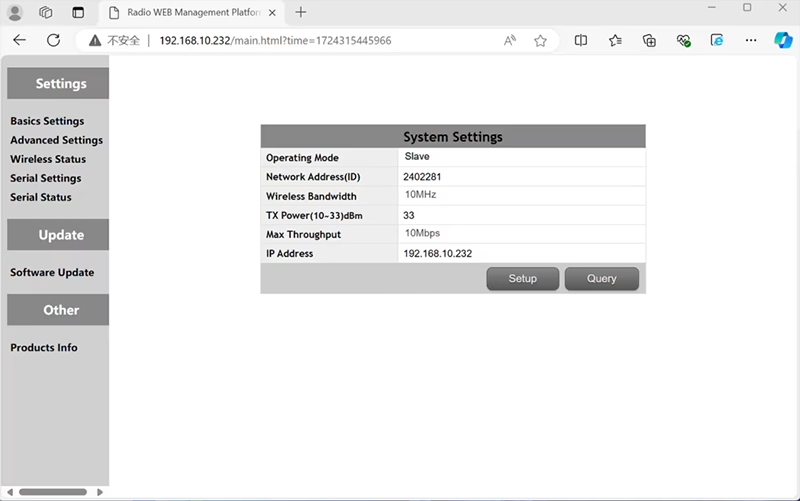

In the standard Point to Point (P2P) konfigurasi:
- Itu Stasiun Kontrol Darat (GCS) bertindak sebagai simpul utama (menguasai).
- Itu dengung (udara unit) bertindak sebagai sub simpul (budak).
Untuk mengaktifkan fungsionalitas relai, topologi jaringan perlu dimodifikasi:
- Konversikan stasiun kendali darat asli (simpul utama) menjadi a simpul relai.
- Menambahkan satu sub node lagi untuk melayani sebagai terminal stasiun kendali darat baru.
Oleh karena itu, pengaturan baru akan terjadi tiga node:
- simpul 1 (Dengung) - Slave node (Airborne)
- simpul 2 (Menyampaikan) - Repeater node (diperbaiki di tanah, biasanya ditempatkan di dataran tinggi atau titik tengah)
- simpul 3 (Stasiun Kontrol Darat) - simpul utama simpul (sisi operator)
- Drone Unit 8W – 192.168.10.252 (Budak)
- Relay Unit 8W- 192.168.10.250 (Pengulang)
- Ground Unit 2W – 192.168.10.124 (Menguasai)
In the standard Point to Multi-Points configuration:
- Itu Stasiun Kontrol Darat (GCS) bertindak sebagai simpul utama (menguasai).
- Itu dengung (udara unit) bertindak sebagai sub simpul (budak).
Untuk mengaktifkan fungsionalitas relai, topologi jaringan perlu dimodifikasi:
- Konversikan stasiun kendali darat asli (simpul utama) menjadi a simpul relai.
- Menambahkan satu sub node lagi untuk melayani sebagai terminal stasiun kendali darat baru.
Oleh karena itu, pengaturan baru akan terjadi tiga node:
- simpul 1 (Dengung) - Slave node (Airborne)
- simpul 2 (Menyampaikan) - simpul utama (diperbaiki di tanah, biasanya ditempatkan di dataran tinggi atau titik tengah)
- simpul 3 (Stasiun Kontrol Darat) - Slave node (sisi operator)
Konfigurasi ini memungkinkan sinyal berpindah dari drone ke relai, dan kemudian dari relai ke operator, memastikan hubungan yang stabil dan berkesinambungan meskipun jalur langsungnya terhalang oleh bukit atau bangunan.
Q3: Apa keuntungan dari pengaturan relay ini?
- Memperluas jarak transmisi efektif.
- Mempertahankan hubungan komunikasi drone yang stabil bahkan di medan yang kompleks.
- Mengurangi kehilangan sinyal dan gangguan video.
- Memungkinkan penempatan relai yang fleksibel untuk mengoptimalkan jangkauan.
Q4: Modifikasi atau konfigurasi apa yang diperlukan?
Ubah mode pengoperasian menjadi relai. ID ketiga perangkat harus sama. Tim teknik kami dapat menyesuaikan firmware dan parameter untuk mengaktifkan fungsi relai. Anda hanya perlu memberi tahu kami tentang pengaturan yang Anda inginkan (misalnya, jarak, tipe medan, ketinggian pemasangan), dan kami akan menyediakan file konfigurasi dan diagram koneksi yang tepat.
P5: Bisakah unit relai portabel atau dipasang di kendaraan?
iya nih. Node relai bisa:
- Dipasang tetap (misalnya, di puncak bukit atau menara), atau
- portabel (dibawa dengan kendaraan, atau dipasang pada tripod dengan catu daya).
Kami dapat menyesuaikan casing relai dan antarmuka daya sesuai dengan skenario aplikasi Anda.
P6: Apakah relai menimbulkan penundaan ekstra?
Latensi tambahannya minimal (biasanya kurang dari 10–20 ms) dan berdampak kecil pada kinerja video dan kontrol real-time.
P7: Dapatkah saya mengatur atau mengganti mode relai sendiri?
Kami menyarankan Anda menghubungi tim dukungan teknis kami untuk konfigurasi awal guna memastikan pengalamatan node dan perencanaan frekuensi yang benar. Setelah pengaturan, peralihan antara mode normal dan mode relai dapat dilakukan melalui perangkat lunak konfigurasi atau profil yang telah ditentukan sebelumnya.
Q8: Why can’t I connect to the relay node?
SEBUAH: If the relay and slave nodes are roughly the same distance from the master node, and the master node receives roughly the same amount of power, the relay node might not be able to join the network. When the master node determines that the received power of the two nodes is similar, it will prioritize connecting directly to the slave node.
Q9: The three nodes cannot connect to each other. It is necessary to check the wireless transmit/receive status of each node to identify potential issues.
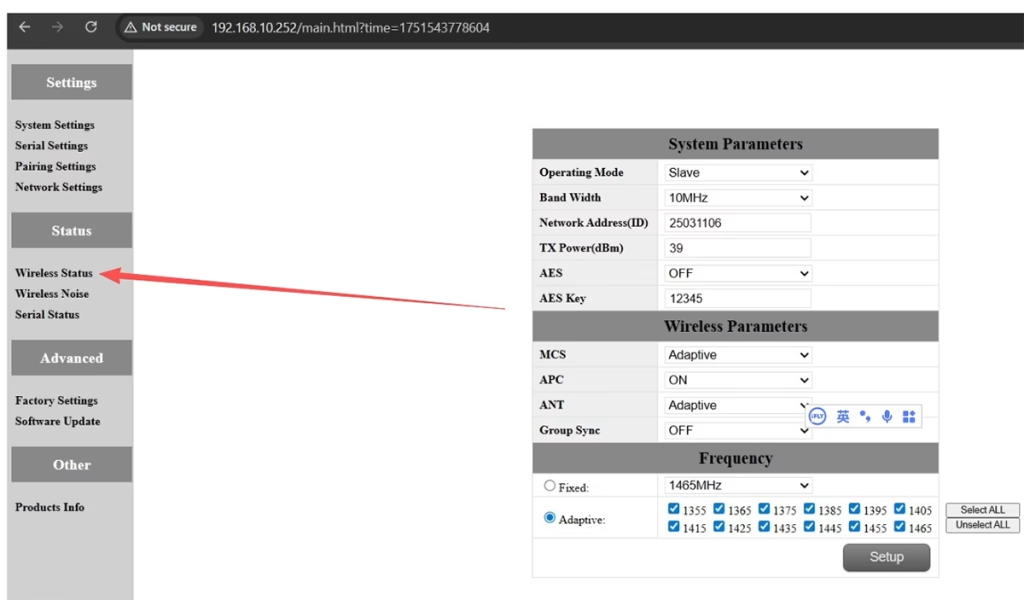
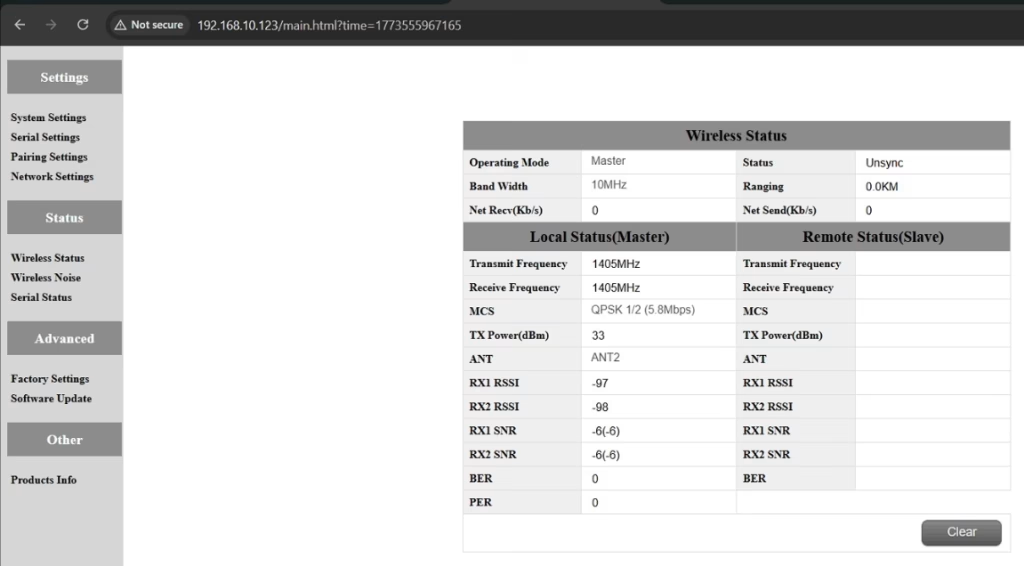
SEBUAH: Please do the below test firstly.
Attempt Remote Access
Try to access each node through the management interface or remote tool to check the wireless status.
If remote access fails, proceed to step 2.
Connect Directly via Ethernet
Use an Ethernet cable to connect your computer directly to each node.
Access the node’s management interface or wireless status page.
Check Wireless Transmit/Receive Status
Review the current wireless transmit/receive status, including signal strength, status tautan, and any error indicators.
Take a screenshot of the current status for each node, ensuring all relevant information is visible.
Send Screenshots to Engineers
Organize the screenshots and send them to the engineering team.
Engineers will analyze the wireless transmit/receive data to determine which node may have an issue.
Catatan:
Label each screenshot with the corresponding node for easy comparison.
Ensure screenshots include key data such as signal strength, connection status, dan menyalurkan informasi.
Q10: Does the relay unit only require antennas and power to operate? Is an Ethernet connection necessary?
SEBUAH: Tidak. The relay unit only requires the antennas and a power supply to operate. Memang benar tidak require an Ethernet connection. The relay automatically forwards data between the aircraft side and the ground side, enabling seamless communication without the need for a network port connection.
Q11: what is this sync unsync on the wireless status?
SEBUAH: These are the parameters seen on the relay node. Itu “sinkronisasi” at the beginning indicates the connection status between the master node and the relay node, which is currently connected. Itu “unsync” at the end indicates the connection status between the relay node and the slave node, which is currently not connected.
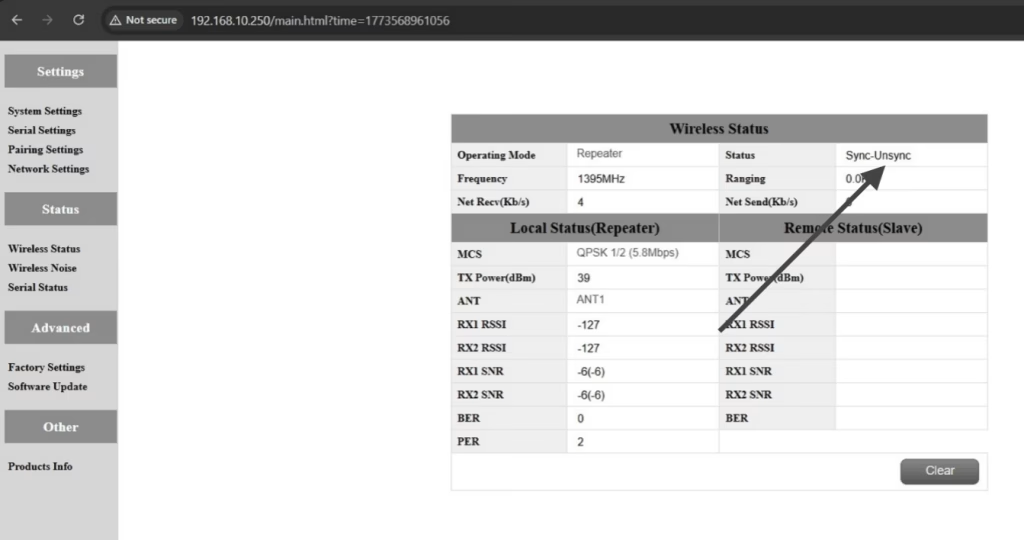
Q12: Why can’t my Slave, Pengulang, or Master nodes connect? How to fix it?
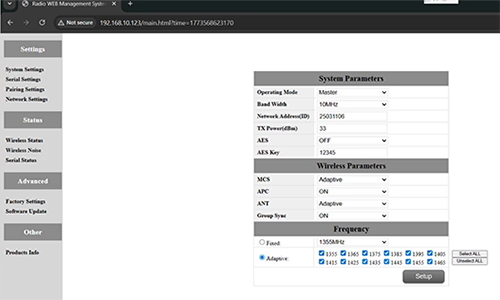
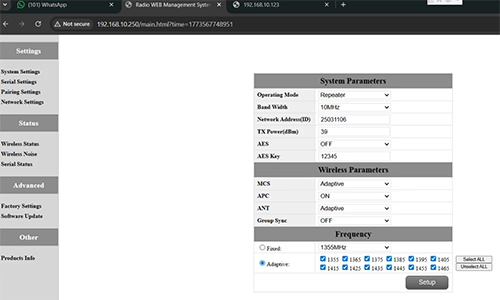
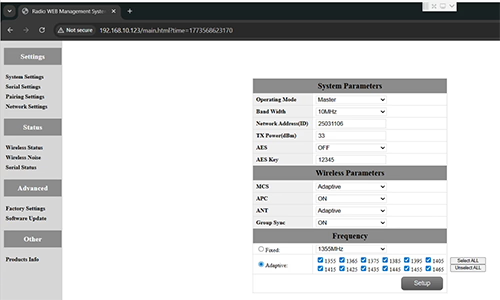
SEBUAH: This usually happens when nodes are not properly configured or the Group Sync settings are inconsistent.
- Connect each node directly to a computer using an Ethernet cable.
- Open the system parameter settings page and take a screenshot to share with technical support if needed.
- Periksa Group Sync Pengaturan:
- di bagian atas halaman mana pun Group Sync Master is On, dan Slave Node dan Pengulang are Off, set Group Sync untuk Mati for all nodes.
- After all nodes are connected successfully, you can enable Master / Budak / Repeater Group Sync as needed.
Hasil:
Following these steps has successfully resolved connection issues for other customers.
Q13: In what order should these three devices be powered on?
SEBUAH: The correct power-on sequence is critical to ensure proper system connectivity and prevent equipment damage. Follow these steps:
- Power on the Ground Unit first
- This includes the master control station or ground control equipment.
- Ensure all communication interfaces and power supplies are stable.
- Berikutnya, power on the Repeater Node (Relay Unit)
- Wait for the repeater to complete self-checks and establish a connection with the ground unit.
- Verify connection success via status indicators or LEDs.
- Akhirnya, power on the Drone or Slave Node
- Make sure the ground unit and repeater node are fully ready before powering the drone.
- Setelah dinyalakan, check the communication status between the drone and the repeater/ground units.
⚠️ Notes:
- Always follow the sequence Ground → Repeater → Drone to avoid initialization failures.
- If there are multiple slave nodes or repeaters, power on one at a time and confirm each connection before proceeding.
- Avoid powering all nodes simultaneously to prevent bus conflicts or voltage spikes.
Ringkasan:
✅ Fungsi relai – didukung
✅ Membutuhkan modifikasi – iya nih, satu node dikonfigurasi ulang sebagai relai
✅ Jumlah node yang disarankan – 3 (Dengung / Menyampaikan / GCS)
✅ Menambahkan latensi – <20 Nona
✅ Cocok untuk – Daerah pegunungan, operasi jarak jauh, atau kondisi NLOS
Berikan pertanyaan
Terima kasih atas tanggapan Anda. ✨