






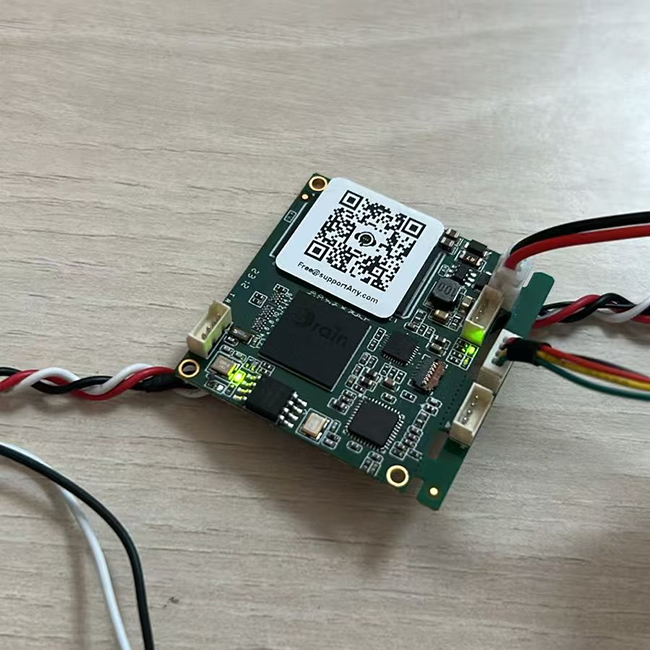
לקוח רכש שלנו לוח ממיר וידאו אנלוגי ל-IP מרוכב ונתקל בשתי בעיות במהלך השימוש. להלן השאלות שהוא העלה והפתרונות שנתנו. אנו מקווים שזה יעזור גם לאנשים שמתעניינים במוצר זה.
תוכן העניינים
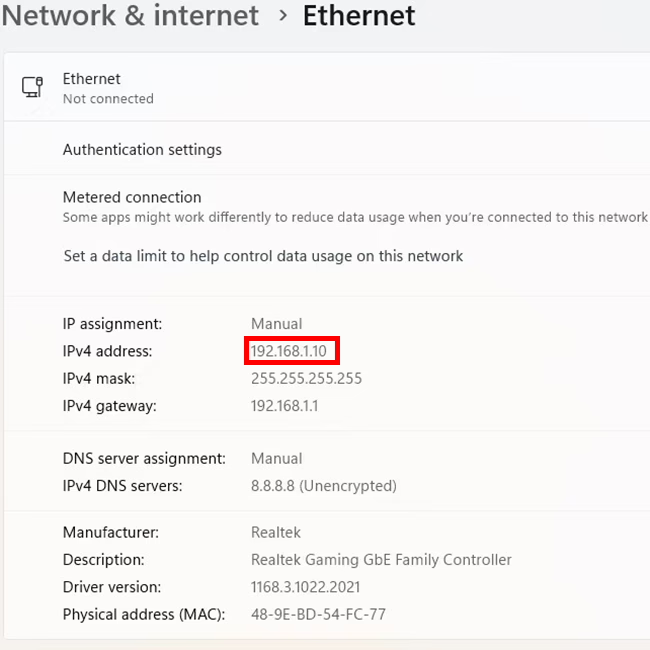
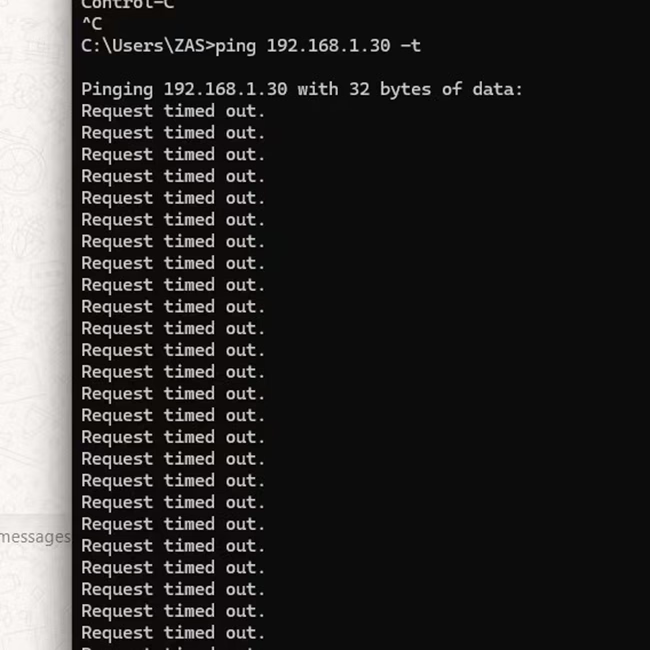
מדוע איני יכול לעשות פינג ממיר וידאו מורכב ל-IP המחובר למחשב באמצעות כבל Ethernet?
כתובת ה-IP המוגדרת כברירת מחדל של לוח ממיר וידאו אנלוגי ל-IP המורכב היא 192.168.1.30.
תשובה של iVcan.com:
- נסה להחליף את כבל הרשת, או חבר את אותו כבל רשת להתקני רשת אחרים. האם זה נורמלי?
- האם ממיר הווידאו לרשת האנלוגי שלנו מחובר ישירות למחשב או דרך רכזת?
- אם זה חיבור ישיר, בדוק אם הרשת הקווית בשכונת הרשת של המחשב שלך מוצגת כרגיל או מנותקת.
- אם זה עובר דרך רכזת רשת, בדוק אם נורית חיווי הרשת מהבהבת או לא. או לנתק ולחבר אותו ולצפות שוב.
- כמה ארוך כבל הרשת שלך? כי הלוח שלנו קטן יחסית, אין שנאי רשת, אז נסה להשתמש בכבל רשת קצר.
- אם כבל הרשת ארוך מאוד, הוסף רכזת רשת באמצע, בעל פונקציית שיפור האות.
- אתה יכול גם להשתמש בשיטה הבאה כדי לקבוע אם חיבור הרשת הצליח מלוח ההמרה של הווידאו האנלוגי ליציאת הרשת.
שני אלה הם נורות הקשורות לכרטיס הרשת. כשעובדים כרגיל, אחד מהם תמיד דולק והשני מהבהב.

למה תוצאת בדיקת השהיה שלי היא שתי שניות במקום אלפיות שניות?
משתמש זה חיבר מצלמה אנלוגית ללוח ממיר הווידאו האנלוגי שלנו, חיבר אותו למחשב באמצעות כבל Ethernet, ושיחק אותו באמצעות נגן VLC. הוא זורם דרך פרוטוקול rtsp.
תשובה של iVcan.com:
נגן VLC הוא תוכנת מחשב טובה לשימוש כללי. יש לבצע אופטימיזציה בעת הפעלת זרמי וידאו. אנא עיין בקישור למטה.
למרות זאת, אנו ממליצים להשתמש ב-Easyplayer, תוכנה מותאמת במיוחד.
אם המשתמש עדיין לא מרוצה מהעיכוב, הם יכולים להשתמש בנגן Splayer המותאם אישית שלנו התומך בפרוטוקול UDP.
על לוח ממיר וידאו RCA על IP
AN מכשיר RCA Video over IP הוא חלק חומרה המאפשר לך לשדר אותות וידאו מרוכבים RCA (יחד עם אודיו, אם נתמך) מעל א רשת IP. התקנים אלה שימושיים להרחבה או הפצה הגדרה סטנדרטית (SD) וִידֵאוֹ אותות למרחקים ארוכים באמצעות אתרנט (Cat5e, Cat6) או אפילו האינטרנט.
איך זה עובד
- הַצפָּנָה – המכשיר ממיר וידאו מורכב אנלוגי (RCA צהוב) ואודיו סטריאו (אדום/לבן RCA) לפורמט דיגיטלי.
- שידור IP – אות הווידאו הדיגיטלי נשלח דרך a רֶשֶׁת (LAN או WAN) באמצעות כבלי Ethernet סטנדרטיים.
- פִּעַנוּחַ – יחידה קולטת (מפענח) ממיר את האות בחזרה ל וידאו ואודיו RCA אנלוגיים להשמעה בטלוויזיה, צג, או מכשיר תצוגה אחר.
תכונות עיקריות
- תומך בווידאו 480i/576i סטנדרטי (SDTV).
- משתמש בכבלי Ethernet (Cat5e, Cat6) לשידור למרחקים ארוכים.
- ניתן להשתמש בהפצת וידאו חד נקודתית או מרובה נקודות.
- עשוי לתמוך ב-IR, RS-232, או USB עבור שלט רחוק.
- בשימוש נפוץ במערכות AV מדור קודם, CCTV, קונסולות משחקים ישנות, או נגני DVD.
וידאו מרוכב ל-IP מתייחס לתהליך ההמרה אותות וידאו מרוכבים אנלוגיים (כמו אלה ממצלמות במעגל סגור, VCRS, או מקורות וידאו ישנים יותר) לְתוֹך IP דיגיטלי (פרוטוקול אינטרנט) זרמים כך שהם יכולים להיות משודרים דרך רשת (LAN, WAN, או האינטרנט).
איך זה עובד:
- כניסת אות אנלוגי: מקור וידאו מורכב (מחבר RCA או BNC) מאכיל את א קוֹדַאִי אוֹ מֵמִיר.
- דיגיטציה & דְחִיסָה: המקודד ממיר את האות האנלוגי לפורמט דיגיטלי (לְמָשָׁל, H.264, H.265).
- סטרימינג על גבי IP: הזרם הדיגיטלי מוקף בפרוטוקולי רשת (RTSP, RTP, HTTP, או RTMP) לשידור על גבי רשת IP.
- צפייה & אִחסוּן: ניתן לצפות בסרטון במכשירים מבוססי IP כמו מחשבים, NVRS, אפליקציות לנייד, או פלטפורמות ענן.
מקרי שימוש נפוצים:
- שדרוג מערכות טלוויזיה במעגל סגור אנלוגיות: המרת מצלמות אבטחה מדור קודם לעבודה עם מערכות מודרניות מבוססות IP.
- ניטור מרחוק: הזרמת מקורות וידאו אנלוגיים ישנים דרך האינטרנט לגישה מרחוק.
- מִשׁדָר & נְהִירָה: שליחת אותות וידאו מרוכבים לפלטפורמות מקוונות או למערכות IPTV.
התקנים המשמשים להמרה:
- מקודדי וידאו (ממירי מרוכבים ל-IP)
- מכשירי DVR עם יכולות הזרמת רשת
- כרטיסי לכידת USB עם תוכנת רשת
לוחות מודולי מקודד









לוחות מודולי מפענח




זמין להתאמה אישית
מוצרי מקודד חדשים
| לא. | שם מוצר | תְצוּרָה | תכונות עיקריות | סטָטוּס |
|---|---|---|---|---|
| 1 | מקודד וידאו כפול ערוצי USB UVC אור נראה | 2× כניסת USB | תומך בקידוד וידאו של מצלמת USB כפולה, והזרמת RTSP; פלט CVBS/HDMI מקומי; מצבי תצוגה ניתנים להחלפה | ייצור המוני |
| 2 | מקודד כפול ערוצים (1× אור גלוי USB + 1× מצלמת הדמיה תרמית USB) | 2× כניסת USB | תומך במצלמת USB כפולה (נִרְאֶה + תֶרמִי) לִלְכּוֹד, הַצפָּנָה, והזרמת RTSP; פלט CVBS/HDMI מקומי; מצבי תצוגה ניתנים להחלפה | ייצור המוני |
| 3 | מפענח RTSP מודול תצוגה HDMI/CVBS | HDMI + פלט CVBS | תומך בפענוח זרם של עד 4×1080P@30fps RTSP; תמיכה בהעברת פרוטוקול הזרמת וידאו; תצוגת פלט HDMI/CVBS | מדגם זמין |
| 4 | מפענח RTSP HDMI/CVBS מודול תצוגה עם 4.3"/5" LCD | יציאת HDMI + מסך LCD | תומך בפענוח זרם של עד 4×1080P@30fps RTSP; העברת פרוטוקול; תצוגת פלט HDMI/CVBS | איתור באגים |
| 5 | מקודד כפול ערוצים (1× אור גלוי USB + 1× CVBS אנלוגי) | 1× CVBS + 1× כניסת UVC USB | וידאו כפול (יו אס בי + CVBS), קידוד והזרמת RTSP; פלט CVBS/HDMI מקומי; מצבי תצוגה ניתנים להחלפה | איתור באגים |
| 6 | מקודד כפול ערוצים (1× USB UVC + 1× AHD אנלוגי) | 1× AHD + 1× כניסת UVC USB | לכידת וידאו כפולה (יו אס בי + AHD), קידוד והזרמת RTSP; פלט CVBS/HDMI מקומי; מצבי תצוגה ניתנים להחלפה | איתור באגים |
| 7 | מקודד כפול ערוצים (1× CVBS + 1× וידאו אנלוגי AHD) | CVBS + AHD 2 מסך TFT LCD צבעוני | לכידת וידאו אנלוגית כפולה, קידוד והזרמת RTSP; פלט CVBS/HDMI מקומי; מצבי תצוגה ניתנים להחלפה | איתור באגים |
| 8 | מקודד כפול ערוצים (1× מצלמת CMOS + 1× מצלמת הדמיה תרמית USB) | 1× ממשק USB | תומך ב-CMOS + לכידת מצלמה תרמית USB, קידוד והזרמת RTSP; פלט CVBS/HDMI מקומי; מצבי תצוגה ניתנים להחלפה | ייצור המוני |
לפתרונות המרת קלט/פלט וידאו מותאמים אישית שאינם מופיעים במוצרים שלנו, אנא פנה אלינו לתמיכה ב-OEM/ODM. אנו יכולים לפתח מוצרים מותאמים בהתאם לדרישות שלך.
שאל שאלה
תודה רבה ששלחת את התשובה! ✨