






How to add add a wireless video relay into a drone video data air uinit and ground unit
שאלות נפוצות: הוסף ממסר וידאו אלחוטי לקישור תקשורת של מזל"ט עם שטח ארוך טווח או חסום
שאלה לקוחה, רציתי לבדוק את האפשרות להשתמש ביחידה אחת כממסר. במיקום שבו אנחנו רוצים להטיס את המל"ט שלנו, יש שטח גבוה, מה שמשבש את התקשורת. האם נוכל להשתמש ביחידה שלישית כדי לשמש כממסר?


שידור וידאו אלחוטי
1740-1840MHz 2WPA 30 ק"מ טווח ארוך משדר וידאו מקלט עם SBUS TTL

שידור וידאו אלחוטי
Q1: האם אחת מהיחידות יכולה לשמש כממסר להתגברות על מכשולי שטח ולהרחיב את טווח התקשורת?
א: כן, ניתן להגדיר את אחת מהיחידות כצומת ממסר לשיפור התקשורת באזורים עם שטח גבוה או חסימות אחרות החוסמות את קו הראייה הישיר בין המל"ט לתחנת הבקרה הקרקעית.
Q2: כיצד פועלת הגדרת הממסר?
א: The relay setup method depends on the software version installed on your device. There are two different versions:
- Point-to-Point Version
- Point-to-Multipoint Version
Each version uses a different configuration method for relay setup.
To determine which version your device is using, בבקשה בדוק את ה Web UI interface style of your firmware. The layout and design of the Web UI will indicate whether your firmware is the נקודה לנקודה אוֹ נקודה לריבוי נקודות גרסה.
Once you identify the firmware version through the Web UI style, follow the corresponding relay setup instructions for that version.
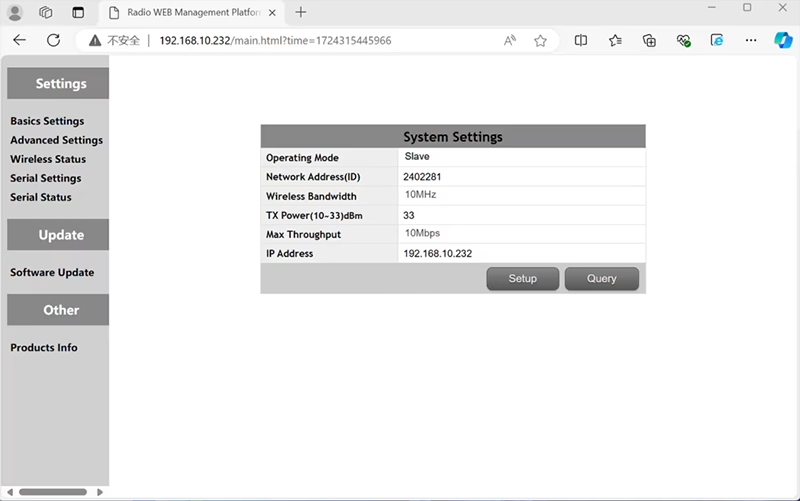

In the standard Point to Point (P2P) תְצוּרָה:
- ה תחנת בקרת קרקע (GCS) פועל בתור צומת ראשי (לִשְׁלוֹט).
- ה מזל"ט (יחידת האוויר) פועל בתור תת צומת (עֶבֶד).
כדי לאפשר פונקציונליות ממסר, יש לשנות את טופולוגיית הרשת:
- המר את ה תחנת בקרת קרקע מקורית (צומת ראשי) לתוך א צומת ממסר.
- לְהוֹסִיף עוד תת צומת אחד לשמש בתור מסוף תחנת בקרת קרקע חדשה.
ההגדרה החדשה תהיה אפוא שלושה צמתים:
- צוֹמֶת 1 (מזל"ט) - Slave node (מוֹטָס)
- צוֹמֶת 2 (ממסר) - Repeater node (קבוע על הקרקע, ממוקם בדרך כלל בשטח גבוה או בנקודת אמצע)
- צוֹמֶת 3 (תחנת בקרת קרקע) - צומת מאסטר צוֹמֶת (הצד של המפעיל)
- Drone Unit 8W – 192.168.10.252 (עֶבֶד)
- Relay Unit 8W- 192.168.10.250 (מַהְדֵר)
- Ground Unit 2W – 192.168.10.124 (לִשְׁלוֹט)
In the standard Point to Multi-Points configuration:
- ה תחנת בקרת קרקע (GCS) פועל בתור צומת ראשי (לִשְׁלוֹט).
- ה מזל"ט (יחידת האוויר) פועל בתור תת צומת (עֶבֶד).
כדי לאפשר פונקציונליות ממסר, יש לשנות את טופולוגיית הרשת:
- המר את ה תחנת בקרת קרקע מקורית (צומת ראשי) לתוך א צומת ממסר.
- לְהוֹסִיף עוד תת צומת אחד לשמש בתור מסוף תחנת בקרת קרקע חדשה.
ההגדרה החדשה תהיה אפוא שלושה צמתים:
- צוֹמֶת 1 (מזל"ט) - Slave node (מוֹטָס)
- צוֹמֶת 2 (ממסר) - צומת מאסטר (קבוע על הקרקע, ממוקם בדרך כלל בשטח גבוה או בנקודת אמצע)
- צוֹמֶת 3 (תחנת בקרת קרקע) - Slave node (הצד של המפעיל)
תצורה זו מאפשרת לנוע לאותות מהרחפן לממסר, ולאחר מכן מהממסר למפעיל, הבטחת קישור יציב ורציף גם כאשר השביל הישיר חסום על ידי גבעות או מבנים.
Q3: מהם היתרונות של הגדרת ממסר זו?
- מאריך את מרחק השידור האפקטיבי.
- שומר על קישור תקשורת רחפן יציב גם בשטח מורכב.
- מפחית אובדן אות והפרעות וידאו.
- מאפשר מיקום גמיש של ממסר כדי לייעל את הכיסוי.
Q4: אילו שינויים או תצורות נדרשים?
שנה את מצב ההפעלה לממסר. המזהים של כל שלושת המכשירים חייבים להיות זהים. צוות ההנדסה שלנו יכול להתאים את הקושחה והפרמטרים כדי לאפשר את פונקציית הממסר. אתה רק צריך להודיע לנו על ההגדרה המיועדת שלך (לְמָשָׁל, מרחקים, סוג שטח, גובה הרכבה), ואנו נספק את קבצי התצורה הנכונים ואת דיאגרמת החיבור.
ש 5: האם יחידת הממסר יכולה להיות ניידת או מותקנת ברכב?
כן. צומת הממסר יכול להיות:
- קבוע-רכוב (לְמָשָׁל, על ראש גבעה או מגדל), אוֹ
- Portable (נישא ברכב, או מותקן על חצובה עם ספק כוח).
אנו יכולים להתאים אישית את מעטפת הממסר וממשק החשמל בהתאם לתרחיש היישום שלך.
שאלה 6: האם הממסר מציג עיכוב נוסף?
זמן האחזור הנוסף הוא מינימלי (בדרך כלל פחות מ-10-20 אלפיות השנייה) ויש לו השפעה מועטה על ביצועי וידאו ושליטה בזמן אמת.
ש 7: האם אני יכול להגדיר או להחליף מצב ממסר בעצמי?
אנו ממליצים ליצור קשר עם צוות התמיכה הטכנית שלנו לצורך הגדרה ראשונית כדי להבטיח כתובת נכונה של צומת ותכנון תדרים. לאחר ההגדרה, מעבר בין מצב רגיל למצב ממסר יכול להתבצע באמצעות תוכנת תצורה או פרופילים מוגדרים מראש.
שאלה 8: Why can’t I connect to the relay node?
א: If the relay and slave nodes are roughly the same distance from the master node, and the master node receives roughly the same amount of power, the relay node might not be able to join the network. When the master node determines that the received power of the two nodes is similar, it will prioritize connecting directly to the slave node.
שאלה 9: The three nodes cannot connect to each other. It is necessary to check the wireless transmit/receive status of each node to identify potential issues.
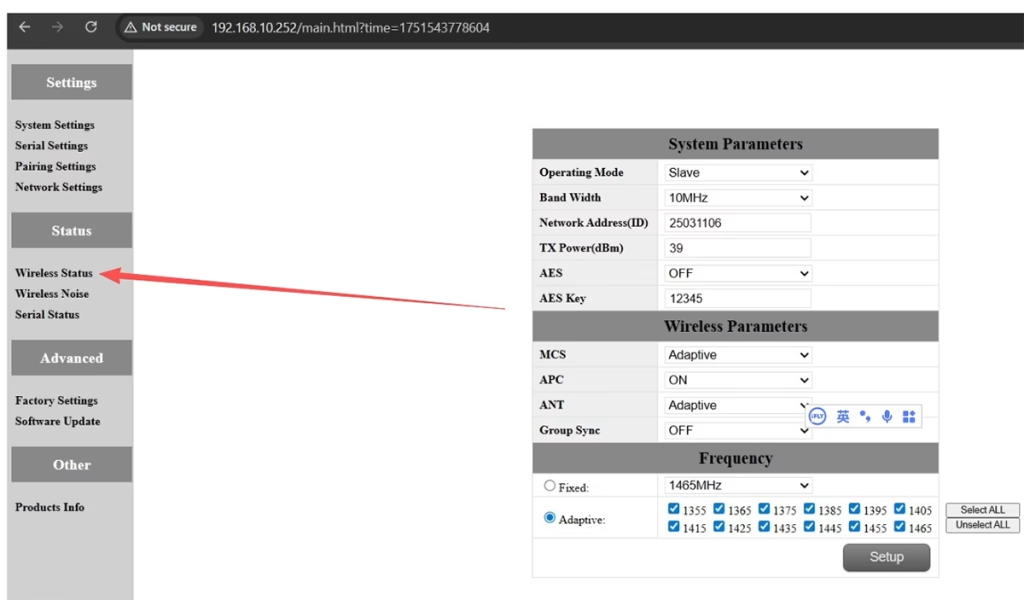
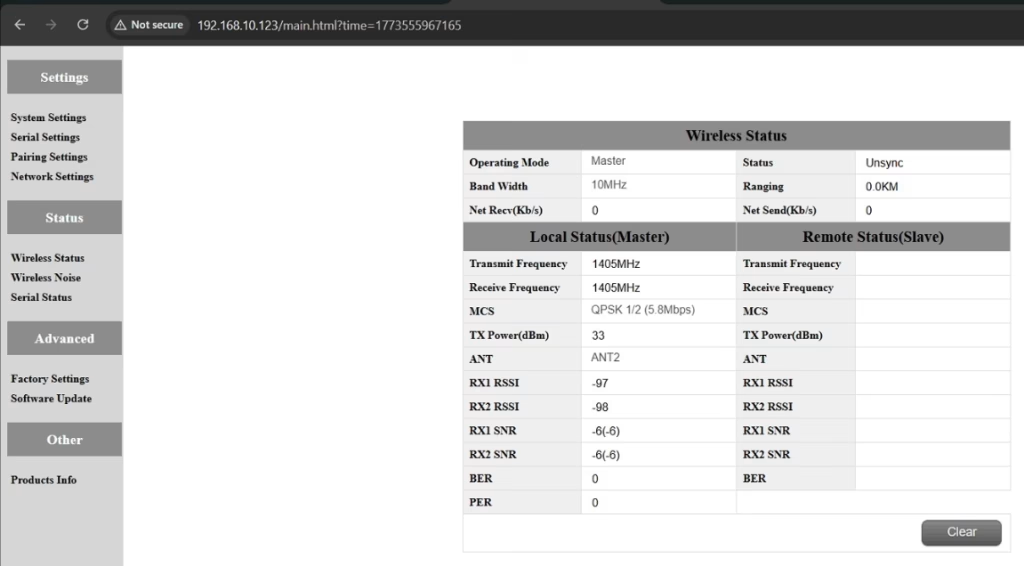
א: Please do the below test firstly.
Attempt Remote Access
Try to access each node through the management interface or remote tool to check the wireless status.
If remote access fails, proceed to step 2.
Connect Directly via Ethernet
Use an Ethernet cable to connect your computer directly to each node.
Access the node’s management interface or wireless status page.
Check Wireless Transmit/Receive Status
Review the current wireless transmit/receive status, including signal strength, סטטוס קישור, and any error indicators.
Take a screenshot of the current status for each node, ensuring all relevant information is visible.
Send Screenshots to Engineers
Organize the screenshots and send them to the engineering team.
Engineers will analyze the wireless transmit/receive data to determine which node may have an issue.
הערות:
Label each screenshot with the corresponding node for easy comparison.
Ensure screenshots include key data such as signal strength, connection status, ומידע על הערוצים.
שאלה 10: Does the relay unit only require antennas and power to operate? Is an Ethernet connection necessary?
א: לא. The relay unit only requires the antennas and a power supply to operate. זה כן לא require an Ethernet connection. The relay automatically forwards data between the aircraft side and the ground side, enabling seamless communication without the need for a network port connection.
שאלה 11: what is this sync unsync on the wireless status?
א: These are the parameters seen on the relay node. ה “סנכרון” at the beginning indicates the connection status between the master node and the relay node, which is currently connected. ה “unsync” at the end indicates the connection status between the relay node and the slave node, which is currently not connected.
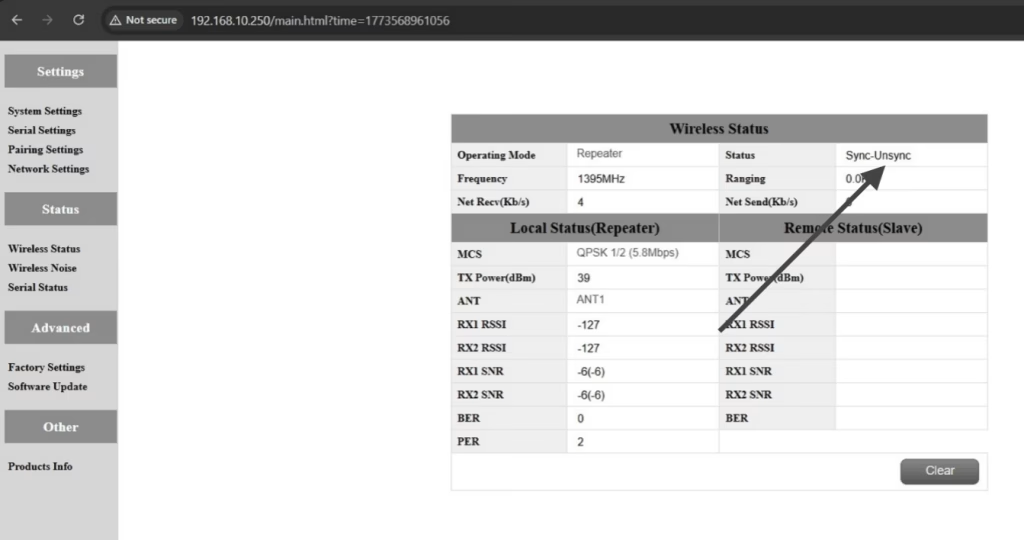
שאלה 12: Why can’t my Slave, מַהְדֵר, or Master nodes connect? How to fix it?
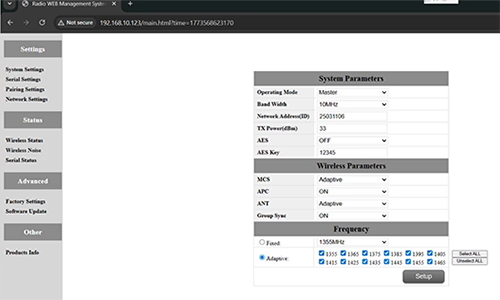
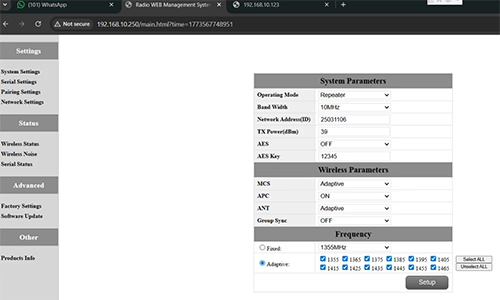
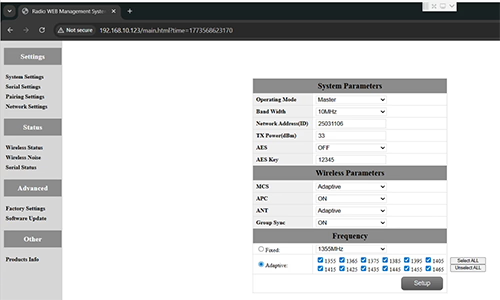
א: This usually happens when nodes are not properly configured or the Group Sync settings are inconsistent.
- Connect each node directly to a computer using an Ethernet cable.
- Open the system parameter settings page and take a screenshot to share with technical support if needed.
- בדוק את Group Sync הגדרות:
- אם Group Sync Master is On, ו Slave Node ו מַהְדֵר are Off, מַעֲרֶכֶת Group Sync ל כבוי for all nodes.
- After all nodes are connected successfully, you can enable Master / עֶבֶד / Repeater Group Sync as needed.
תוֹצָאָה:
Following these steps has successfully resolved connection issues for other customers.
שאלה 13: In what order should these three devices be powered on?
א: The correct power-on sequence is critical to ensure proper system connectivity and prevent equipment damage. Follow these steps:
- Power on the Ground Unit first
- This includes the master control station or ground control equipment.
- Ensure all communication interfaces and power supplies are stable.
- הַבָּא, power on the Repeater Node (Relay Unit)
- Wait for the repeater to complete self-checks and establish a connection with the ground unit.
- Verify connection success via status indicators or LEDs.
- סוף כל סוף, power on the Drone or Slave Node
- Make sure the ground unit and repeater node are fully ready before powering the drone.
- לאחר הדלקה, check the communication status between the drone and the repeater/ground units.
⚠️ Notes:
- Always follow the sequence Ground → Repeater → Drone to avoid initialization failures.
- If there are multiple slave nodes or repeaters, power on one at a time and confirm each connection before proceeding.
- Avoid powering all nodes simultaneously to prevent bus conflicts or voltage spikes.
תַקצִיר:
✅ פונקציית ממסר - נתמך
✅ דורש שינוי - כן, צומת אחד הוגדר מחדש כממסר
✅ מספר צמתים מומלץ - 3 (מזל"ט / ממסר / GCS)
✅ השהיה נוסף - <20 גברת
✅ מתאים ל- אזורים הרריים, פעולות למרחקים ארוכים, או תנאי NLOS
שאל שאלה
תודה רבה ששלחת את התשובה! ✨