UAV Broadband Relay Guide: How to Build a Drone Wireless Video Radio Link Relay for Mountain-Blocked Long-Range Flights
In long-range UAV operations, mountainous terrain is one of the most common causes of video and control signal degradation. Even with high-power links, غیر خط دید (NLOS) conditions can dramatically reduce usable range, leading to pixelated video, unstable control, or complete signal loss.
This article explainshow to build a simple and effective UAV broadband wireless link relay systemusing existing Vcan1933 equipment, based on a real deployment scenario. For more product details, ببینید Vcan1933 Drone Link for Long-Range Video & داده ها.
فهرست مطالب
1. Problem Description
Total flight distance required: 35–40 km
Mountain obstruction:~11 km from the take-off point
Current performance:
Video available up to ~25 km (highly pixelated, minimal control)
No signal beyond 25 کیلومتر
Available equipment:
Vcan19338W واحد (previous system)
Vcan19332W واحد (recently purchased)
Additional advantage:
A suitablerelay installation locationhas already been identified
The goal is to reuse existing hardware to overcome the mountain blockage and extend the effective range.
2. Is the 2W Vcan1933 Suitable for a Relay?
Yes — absolutely.
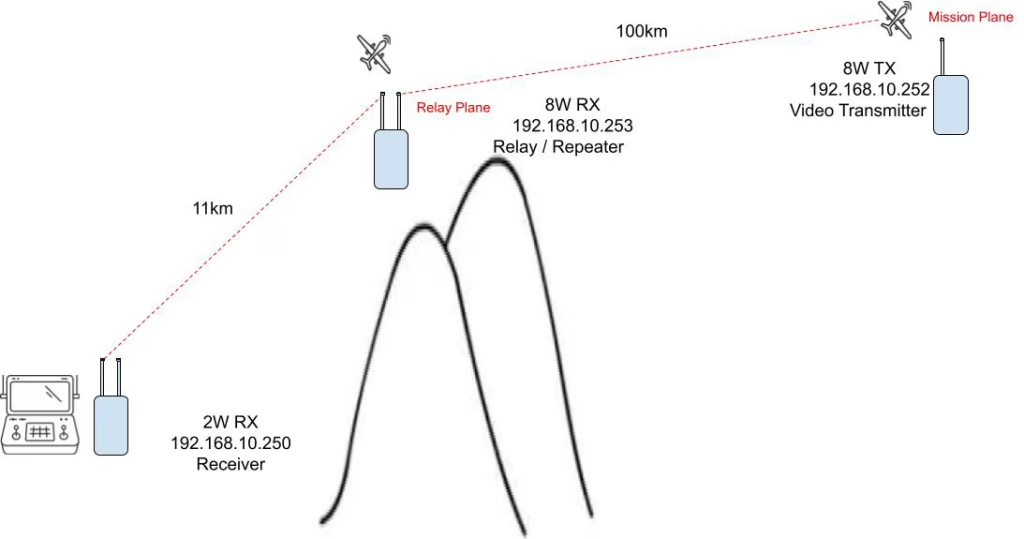
Because the relay site is only about11 km from the ground station, a 2W unit is more than sufficient for the ground-side link. The key is toreassign the rolesof the existing devices correctly.
UAV Broadband Relay Guide-How to Build a Drone Wireless Video Radio Link Relay
3. Recommended Relay Architecture
Device Role Assignment
Location
دستگاه
IP Address
Role
Mission UAV
8W Vcan1933 TX
192.168.10.252
برده / واحد هوا
Relay site (mountain / hill)
8W Vcan1933 RX
192.168.10.250 (before) 192.168.10.253 (بعد از)
تکرار کننده
Ground station
2W Vcan1933 RX
192.168.10.250
برده / واحد زمینی
This setup ensures:
Maximum uplink reliability from the mission UAV
Strong mid-point signal regeneration at the relay
Stable short-distance link to the ground station
4. Step-by-Step Configuration Guide
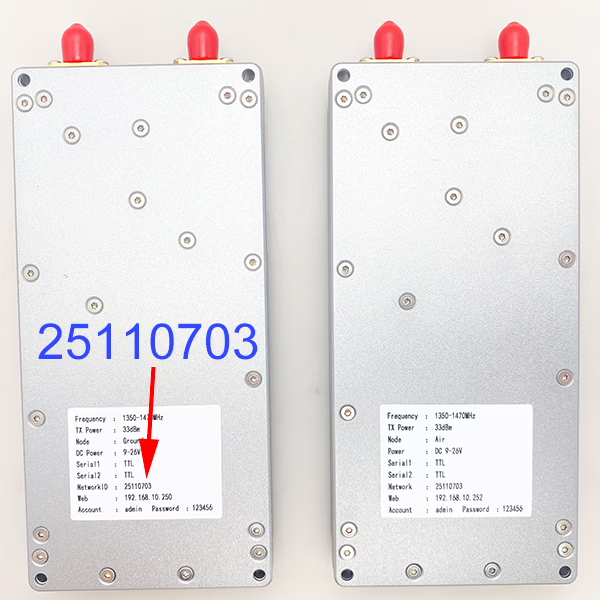
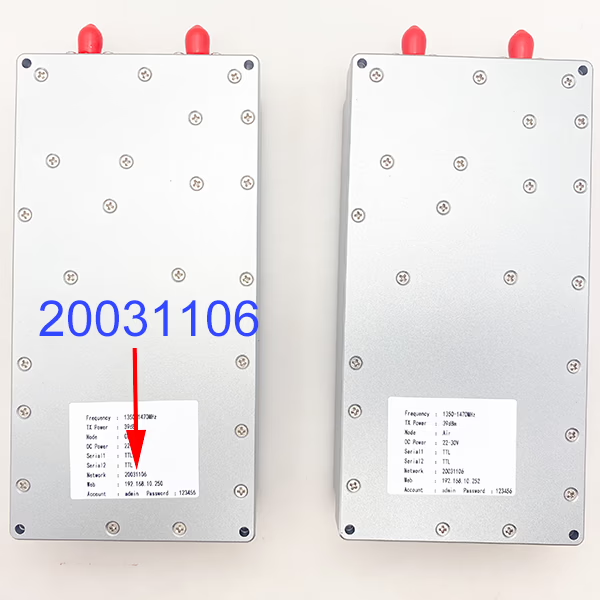
مرحله 1: Unify the Network ID (Very Important)
Originally, the two Vcan1933 systems operateindependently, each with its ownNetwork ID.
For a relay system to work:
All three devices must use the same Network ID
Mission UAV (8W TX)
Relay unit (8W RX → Repeater)
Ground station unit (2W RX)
This allows all units to operate within the same network and forward data correctly.
عملیات: Change 2W Master Ground Unit ID25110703 به 20031106 (default ID of 8W set network).
If both the8W Master Ground Unit و 2W Master Ground Unitkeep this default value, anIP conflict will occur.
Action required:
Change the IP address of the8W Master (واحد زمینی)to a different unused IP, مثلا:
192.168.10.253
Make sure the new IP remains in the same subnet and does not conflict with any other device.
مرحله 3: Set the Relay Device to Repeater Mode
Power on the8W receiverthat will be installed at the relay location
Access its management interface:
Default IP: 192.168.8.250
Log in to the web configuration page
Change the device role and IP address:
از Master→تکرار کننده
از 192.168.10.250→R192.168.10.253
Save the configuration and reboot if required
پس از پیکربندی, this unit will:
Receive the video and control signals from the mission UAV
Regenerate and forward them toward the ground station
how to modify the IP address of UAV Broadband radio linkhow to modify the operating model and network address ID of UAV Broadband radio link
5. Deployment Tips for Best Performance
Ensureclear line-of-sight:
UAV ↔ Relay
Relay ↔ Ground station
Install the relay antenna at ahigher elevationwhenever possible
استفاده کنید longer omnidirectional antennasat the relay site to maximize link quality
Secure stable power for the relay (battery or fixed power source)
Test the full system on the ground before flight.
Check the repeater wireless noise from ground unit 192.168.10.250Check the wireless noise of salve air unit on mission plane from repeater 192.168.10.253Check the slave wireless noise from slave unit 192.168.10.252
6. Expected Result
With the relay properly configured:
The mountain no longer blocks the primary link
Video quality remains stable beyond 25 کیلومتر
Control reliability improves significantly
Total flight distance of35–40 kmbecomes achievable under proper RF conditions
7. نتیجه
By reusing an existing8W Vcan1933unit as a repeater and deploying a2W Vcan1933at the ground station, you can build a cost-effective and reliableUAV broadband wireless link relay system. This approach is ideal for long-range UAV missions in mountainous or obstructed environments, without requiring additional custom hardware.









سوال بپرسید
از پاسخ شما سپاسگزاریم. ✨