





Table of Contents
We need a product with SDI and PAL as input and the Ethernet stream as output, with H.265 decoding.
1. Vcan1681 supports SDI and PAL.
https://ivcan.com/p/hdmi-to-ip-encoder-modulator-module-board-cvbs-hdmi/
2. We have two firmware to support H265 and H264 encoder and decoder.
Does your video encoder decoder support HD-SDI? 1080p or 1080i.
1. Max supports 1080P.
2. HDMI input supports 4k.
Can your encoder is compatible with any h264/h265 decoder i.e. Nvidia jetson decoder etc
We need to ask the engineer, please tell us the details of the video decoder if you have.
We also have video encoder and decoder board, if you both us ours, then it is no problem.
For 4k or 1080p video what will be ethernet data rate?
The video bitrate is configurable by the customer (使用者).
We will use your video encoder board with two input (HDMI 和 PAL) and with 12V alimentation. Is it ok?
你說的是HDMI輸入還是AV輸入 (support two video types), 或者您需要 HDMI 和 AV 來支援兩個同時輸入?
Q: We need to have HDMI and AV to support two simultaneous inputs.
A: 好的. Our firmware engineer will some days to make a new firmware to meet this function you need. I will upgrade it and show you the test video. https://youtu.be/izdFa1nw7u8
維康: Please help to confirm that HDMI and cvbs can be supported at the same time, 但音訊只能選擇兩者之一 (系統根據視訊存取情況選擇HDMI音訊/類比音訊), is it ok for you?
客戶: We don’t need audio, so do what is the best for you.
維康: Our software engineer has made a software for you. Please check the pictures in the attachments.
Now it supports an HDMI camera and CVBS camera.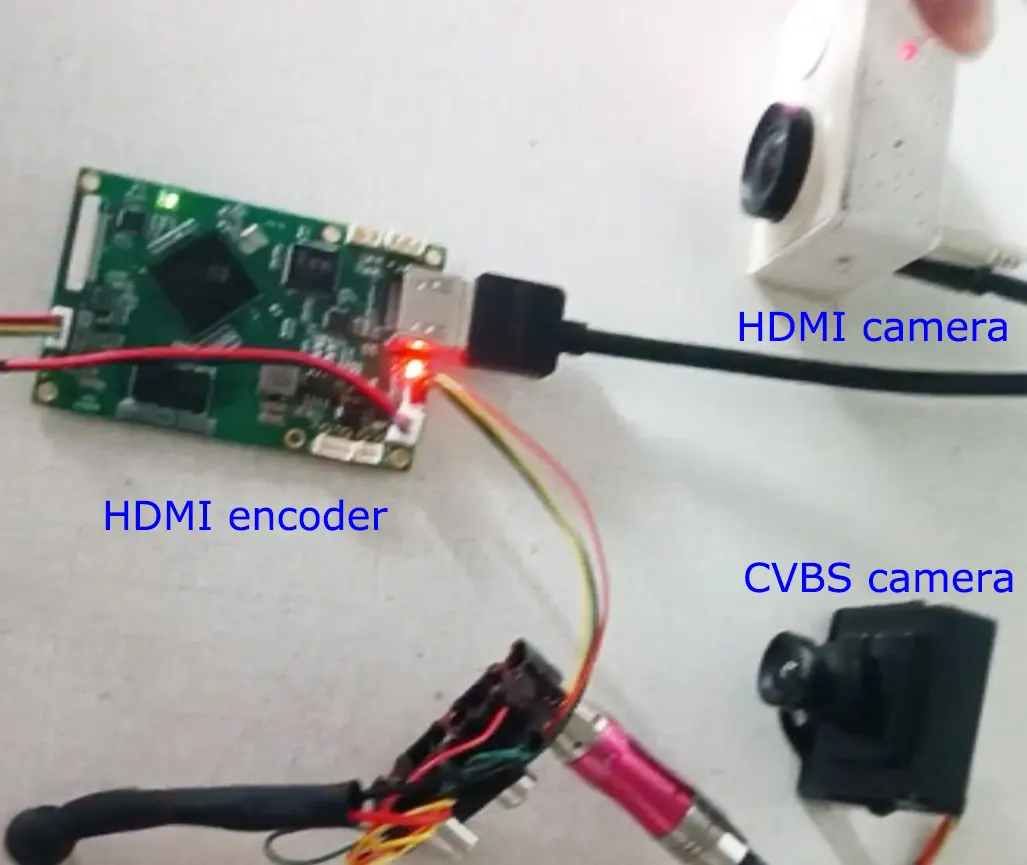
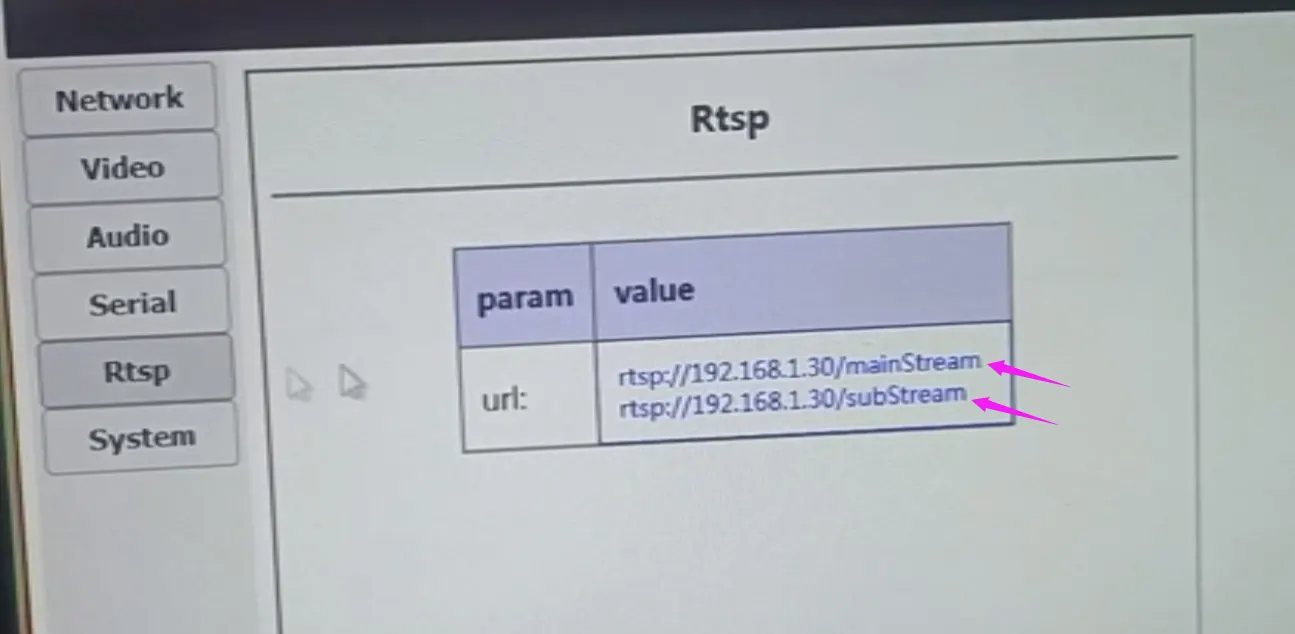
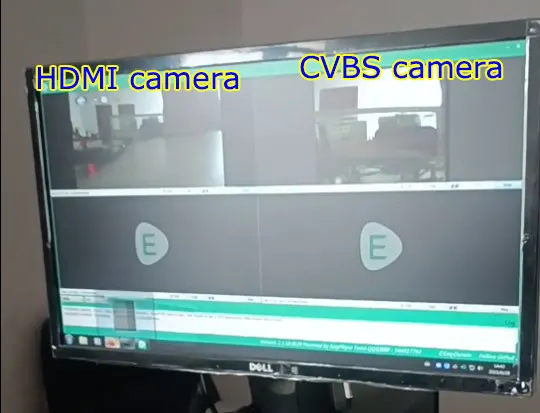
客戶:
我已經用我們的系統多次測試了您的編碼器. 整體運作良好.
But we have one big issue to be able to validate its usage :
Whenever we turn on the system Camera and the encoder at the same time we are unable to read the “主流”, 我們只能讀取 “子流”.
我們必須 “重新啟動” 編碼器透過網路介面使其工作: after the reboot we can directly read the mainStream.
We tried with both VLC and GStreamer.
我們可以嘗試什麼讓兩個串流在啟動時都可讀 ?
維康:
在我們的工程師看來, 要嘛是攝影機辨識問題,要嘛是客戶使用問題.
懷疑闆卡無法辨識客戶的HDMI相機.
這很容易驗證 (如果無法存取子流, 很難驗證).
登入編碼器板的Web伺服器,可以在影片頁面看到攝影機辨識狀態.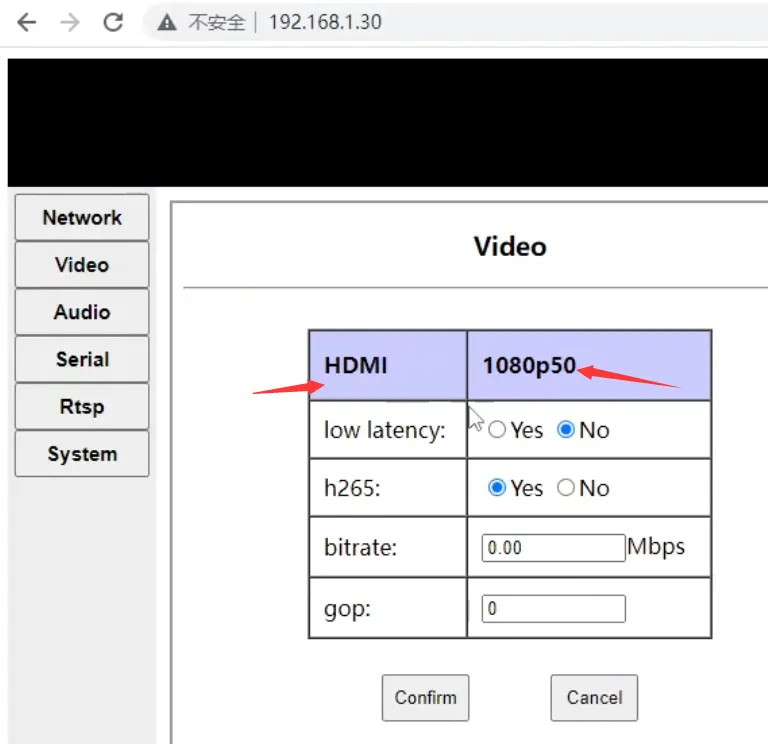
維康:
影片頁面只會顯示一台攝影機的辨識狀態. 如果同時連接並辨識 HDMI 和 AV 攝影機, 影片頁面會顯示HDMI相機的辨識狀態 (例如 1080p60):
只要HDMI攝影機能正常辨識即可, 主流可以正常訪問.
如果 HDMI 攝影機無法正常識別, 請再次檢查板上的HDMI接線和電源 (請注意,這是一個電源循環, 不是網頁上的軟體重啟)
另外, 該板使用隨機 Mac 位址, 所以每次重開機時Mac位址都會改變.
對於具有 ARP 快取的設備 (例如個人電腦), 重新啟動後, 這將是暫時的 (幾秒鐘) 無法從網路存取開發板. , 逾時後重新發起arp請求之前我們無法訪問 (表現為重啟後幾秒鐘內無法ping通編碼板)
所以, 我猜還有一種可能是當客戶接上主流的時候, 由於以上原因無法訪問. 然後當客戶訪問子流時, arp快取刷新,客戶可以訪問, 但客戶並沒有重新審視主流.
“每當我們同時開啟系統相機和編碼器時, we cannot read the “Mainstream”, we can only read the “subStream”.“
維康:
從你這裡的描述來看, 看來你的相機是在我們的編碼板之後啟動的. 請先啟動相機, 然後通電啟動我們的編碼板來嘗試一下. 可能不是同時開機. 開機順序也很重要. 例如, 您的相機啟動需求 10 秒, 但我們的編碼器板啟動只需要 5 秒.
因為我不確定你的相機開機後初始化是否很慢.
因為我們的編碼器板啟動速度非常快, 可能是啟動我們的編碼器板後相機還沒初始化, 這可能會導致一些意想不到的問題. This can also explain why “We have to “Reboot” the encoder via the web interface to make it work: after the reboot we can directly read the mainStream.”, 因為當你的網頁重新啟動編碼器板時, 相機已經初始化.
所以, 最終建議如下 (我盡力把想到的都列出來,讓大家分別測試一下);
查看Web伺服器的影片頁面,確認HDMI攝影機是否正常識別 (您可以將螢幕截圖發送給我們). 只要相機能正常識別, 主流可以訪問;
建議先在cmd下ping編碼板, 然後在vlc下訪問mainStream和subStream,避免因為隨機mac問題誤認為Mainstream無法訪問.
讓您先啟動相機 (幾秒鐘), 然後通電啟動我們的編碼板來嘗試 (參見上述原因)
Follow your original operation of “turn on the system camera and the encoder at the same time”. When the problem “we are unable to read the “mainstream”, we can only read the “subStream”.” is reproduced, 請勿透過網頁重啟編碼板, 但可以在相機和編碼板之間熱插拔 HDMI 電纜. 我認為這只是熱插拔操作 (因為我懷疑是插件檢測問題導致相機無法連接編碼板. 發送HDMI訊號).
客戶:
I can always read the subStream. The mainStream only after reboot.
維康:
Then our encoder board can detect your camera.
Please do a test.
讓您先啟動相機 (幾秒鐘), 然後通電啟動我們的編碼板來嘗試.
The engineer worries about that your camera startup needs 10 秒, 但我們的編碼器板啟動只需要 5 秒.
Please do this test to rule out the possibility of different startup times.
維康:
When you are testing, it is better to adjust the setting back (red words) or see the below picture.
客戶:
The encoder board and the camera are both powered on at the exact same time. It is likely that the camera startup takes a bit longer than the encoder board.
I confirm that the camera seems to be not recognized on startup “CVBS pal” is displayed at the top.
I can ping the board fine before trying to read both streams
When I start my camera first (幾秒鐘), then power on (15 seconds later) and start the encoding board, I can read the stream just fine.
If I “turn on the system camera and the encoder at the same time”. And then hot plug the HDMI (15 seconds later), I can read the stream just fine.
What can I do to be able to read the mainStream without having to do on of these things ? Send an http request reboot with my software, a few seconds after startup ?
維康:
出色地, that proves my guess right. For our other customers, the camera and our encoding board are all powered on at the same time. The cameras can recognize our encoding board normally and send out HDMI signals. Only a few customers have encountered such problems using their customized HDMI cameras. The following is Solved by customers themselves (modifying their camera settings/changing cameras).
客戶:
Do you have the version of the software you develop for us? We will precise it in our PO.
維康: The firmware version is v6.5.5a for your device.
We have a faulty of the video encoder, 我該怎麼辦?
1. From the photo you showed, we found that the capacitor and inductor in the lower left corner were damaged due to external force. Perhaps they were knocked off during packaging and transportation, and your company accidentally knocked them off during operation.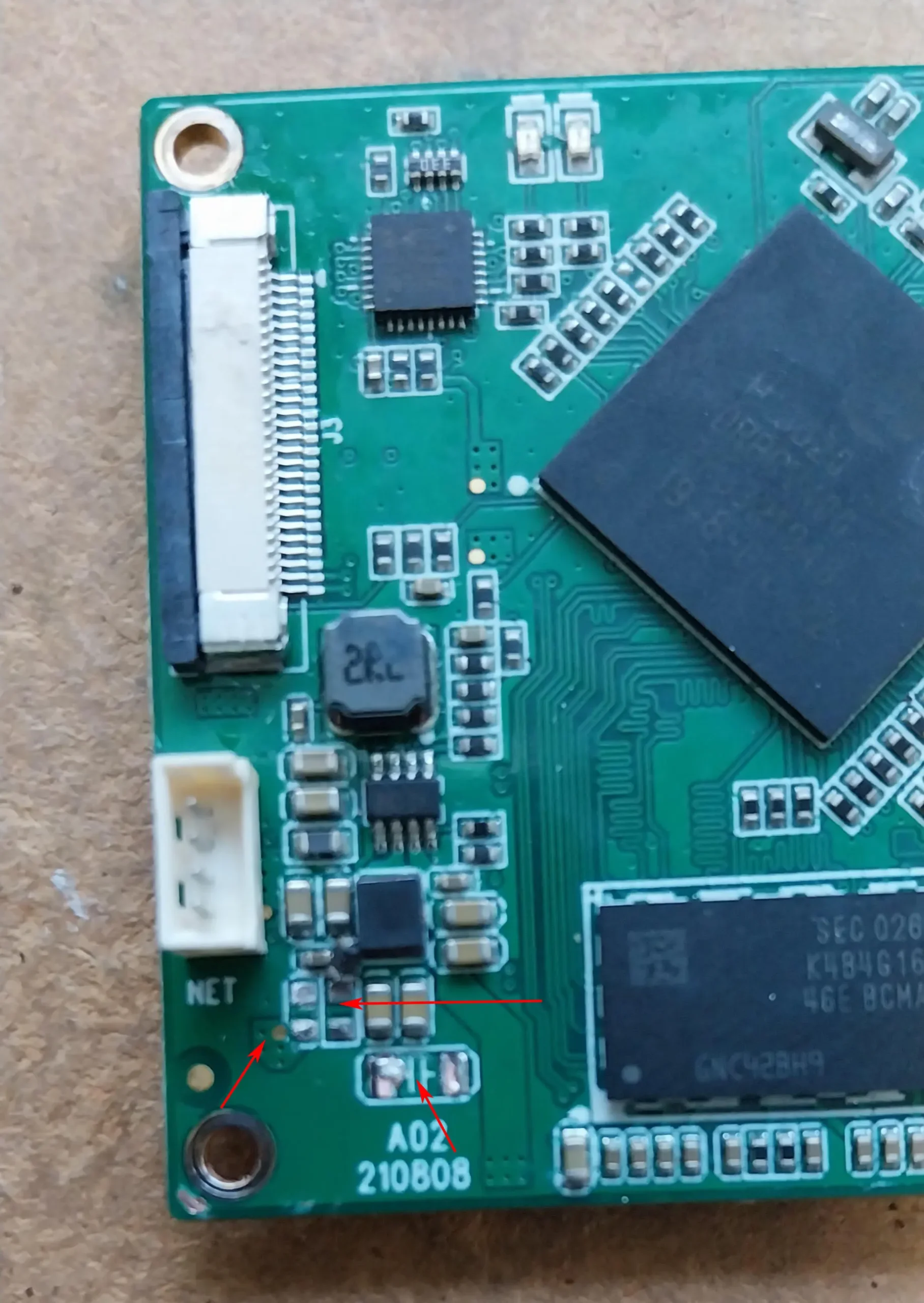
The highlighted ones are the missing devices, 哪些是:
1、C176:CAP,10核因子,+/-10%,X7R,1000V,SMD1206
2、C21:CAP,22UF,+/-20%,X5R,6.3V,SMD0603
3、R34:FB,120R@100M,+/-25%,3A,SMD0603 (magnetic beads)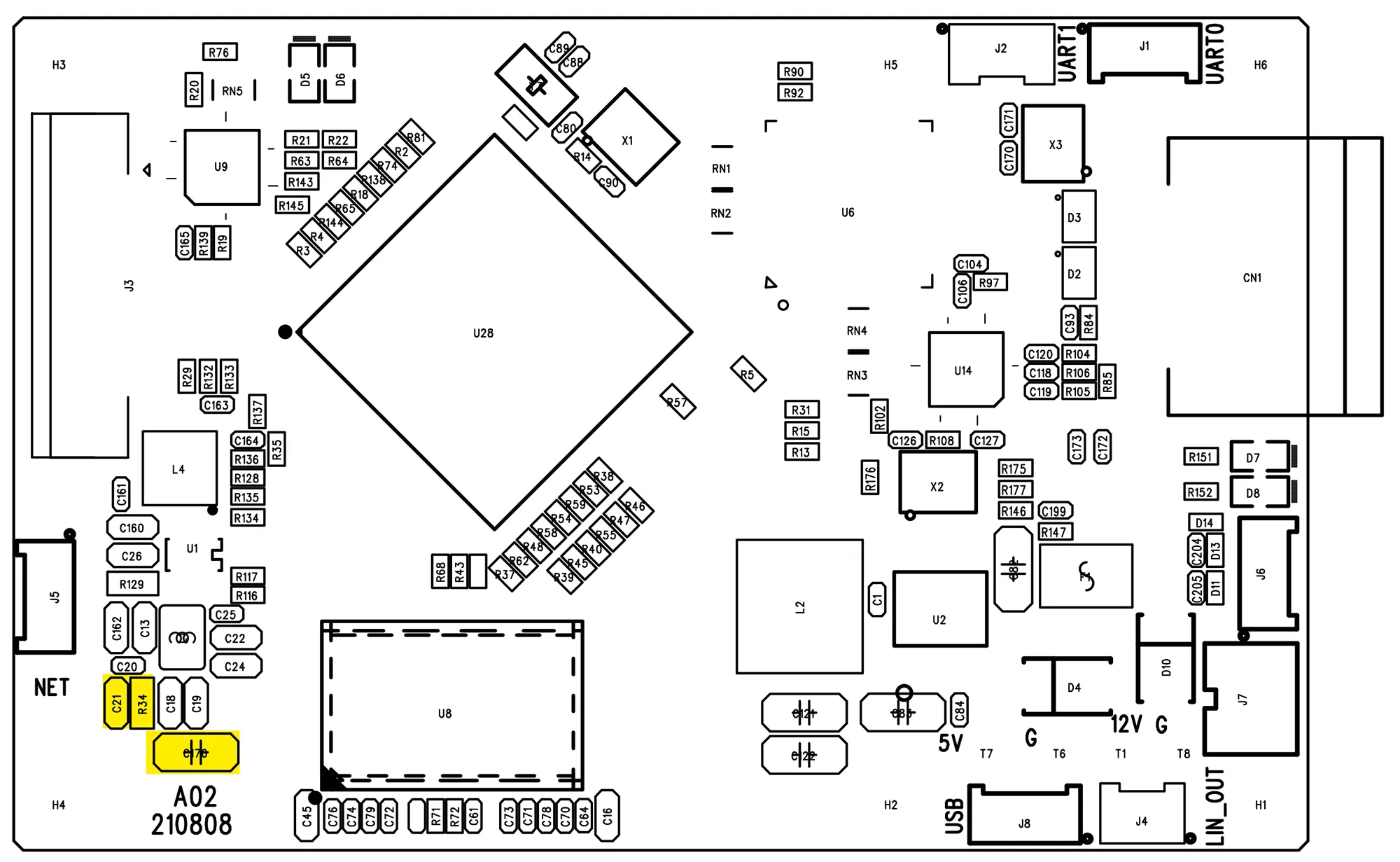
Please try to find the same parts, replace them and then check carefully to see if there are any other missing parts.
If you still have questions, 請聯絡我們.
客戶:
this faulty part is used to operate which circuit?
維康:
1.5電源電壓, powering DDR, 請檢查下面的圖片.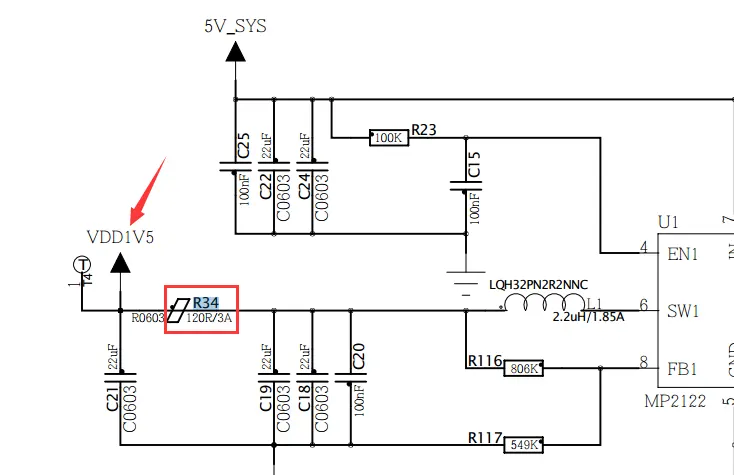
客戶:
We replaced the components according to your advice, the encoder is not functional.
另外, we noted other quality problems with the welds, several manual reworks.
How can we proceed with a standard exchange under warranty?
維康:
Don’t worry about it, please send it back to us, and we will change a new one for you.
Does your HDMI + CVBS video encoder board support ONVIF?
The engineer said that the ONVIF protocol is not fully supported. It depends on your specific requirements.
The video player supports RTSP, 可見光通信, Easyplay, and protocol support UDP player.
Can I use hdmi stream and CVBS stream together?
Our video encoding board supports two channels of video at the same time, one is HDMI video stream and CVBS video stream encoding.
Do you have any LVDS to IP encoder board?
No now.
問題: 您的 DVB-T 調變器的時間特性是什麼 (發射機) 有? We can see the below if we look at DVB-T standard ETSI EN 300 744.

But what times are in your DVB-T TX module?
We need it because we are thinking of fast-changing frequency during video streaming, so we need to understand the real times for this mode. We use QPSK, CR=1/2, GI=1/32, bandwidth = 8 MHz.
回答: In our DVB-T modulator, both transmitted symbol time and guard time are the same, 和 400 744 規格
cvbs converter to IP, конвертер av сигнала в ethernet, SDI CVBS encoder,
Q: How much will be the latency if I connect two cameras (HDMI + CVBS)?
I have two cameras, one is a hdmi camera, and the second is a CVBS camera. I will convert both video streams to IP ethernet by this board and the opposite receiver side will be a computer.
A:
The delay of the video encoding board must take into account the encoding and decoding. It is impossible to test the accurate delay from the encoding board alone.
通常, the delay caused by the decoder board is greater.
With different software players, the latency varies greatly. 例如, using our 斯佩爾 the delay is about 100ms, and using VLC the delay can be up to 300ms.
The delay of the CVBS camera is difficult to measure accurately. Delays below 100ms are difficult to measure with a stopwatch. 另外, the delay of Vcan1681 itself is not easy to test. Without the decoder board, you can’t even see the image. It cannot be calculated by using a stopwatch, and there is no way to measure it with an oscilloscope.
After the customer buys the encoding board, he will definitely need a player to decode. Then it is better to ask the customer what kind of player he plans to use for decoding (ours, the customer’s own, or a third party), so that we can know better whether the coding board can meet customer requirements (function and performance) or not.
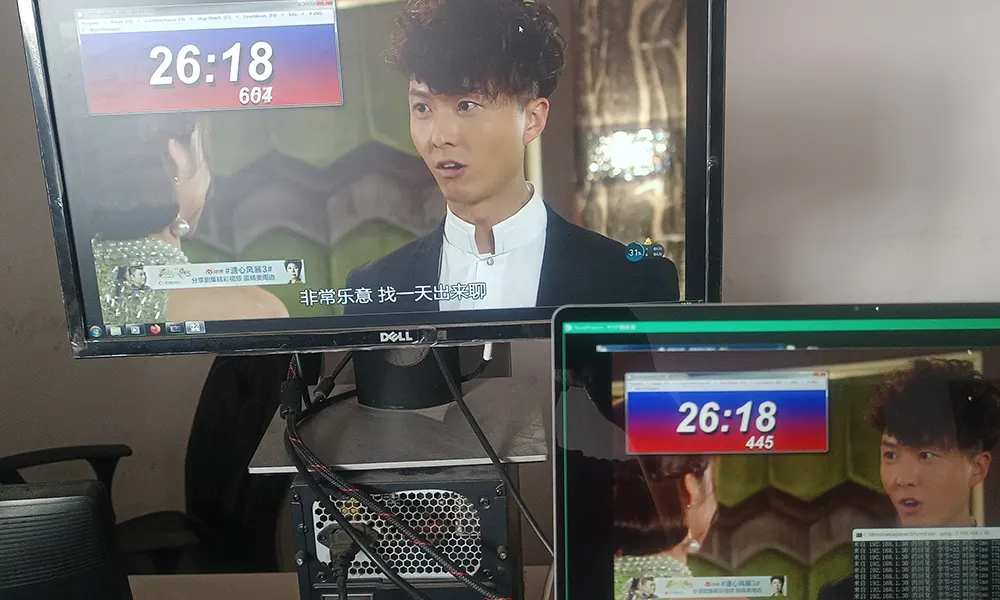
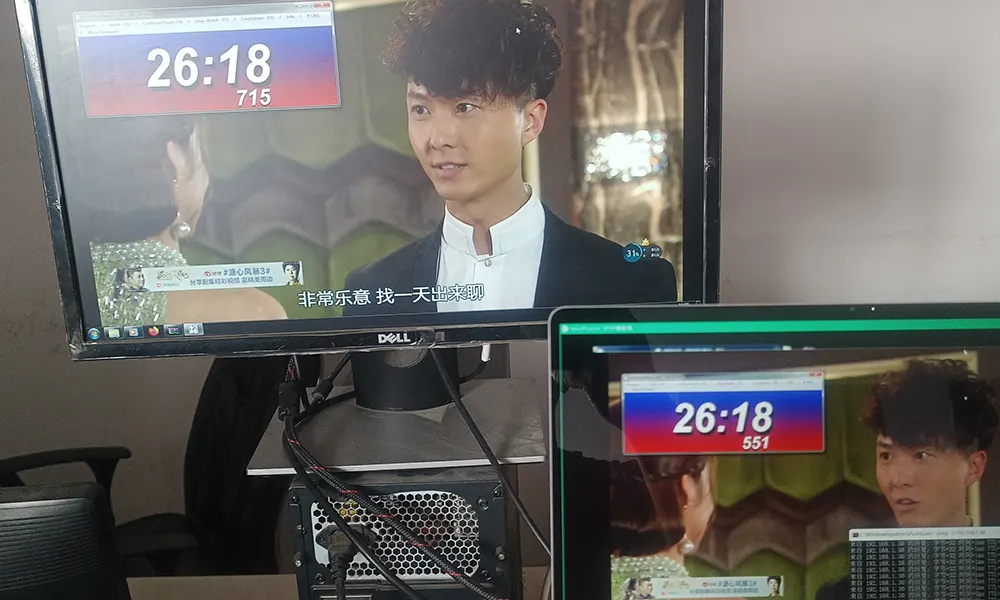
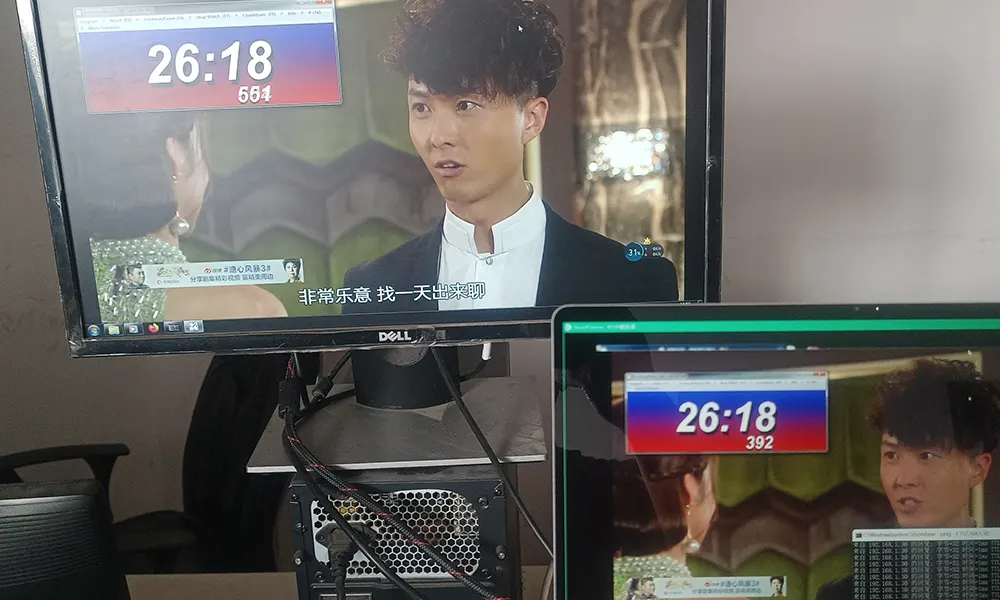
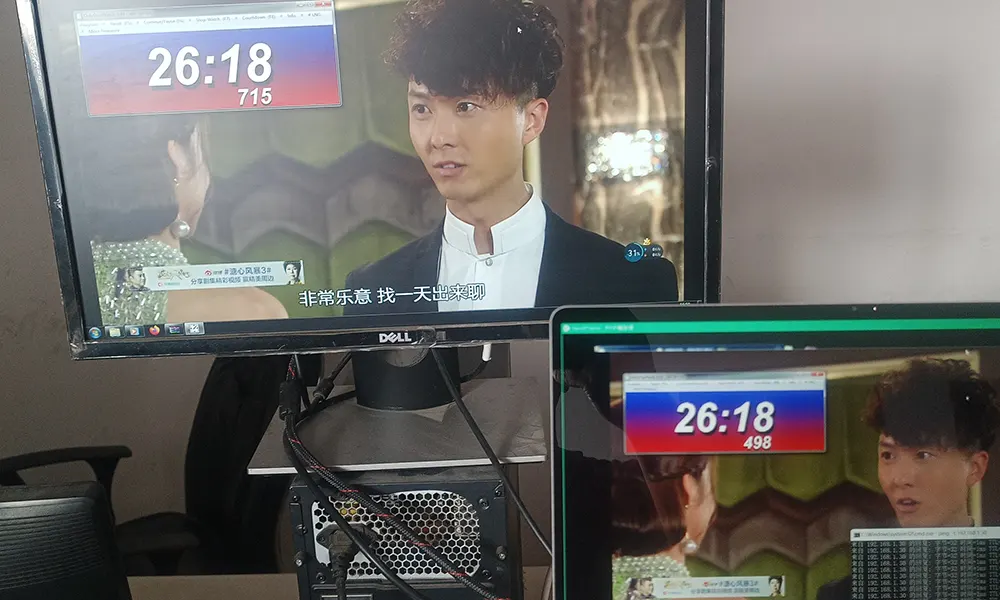
How to test the video encoder board latency?
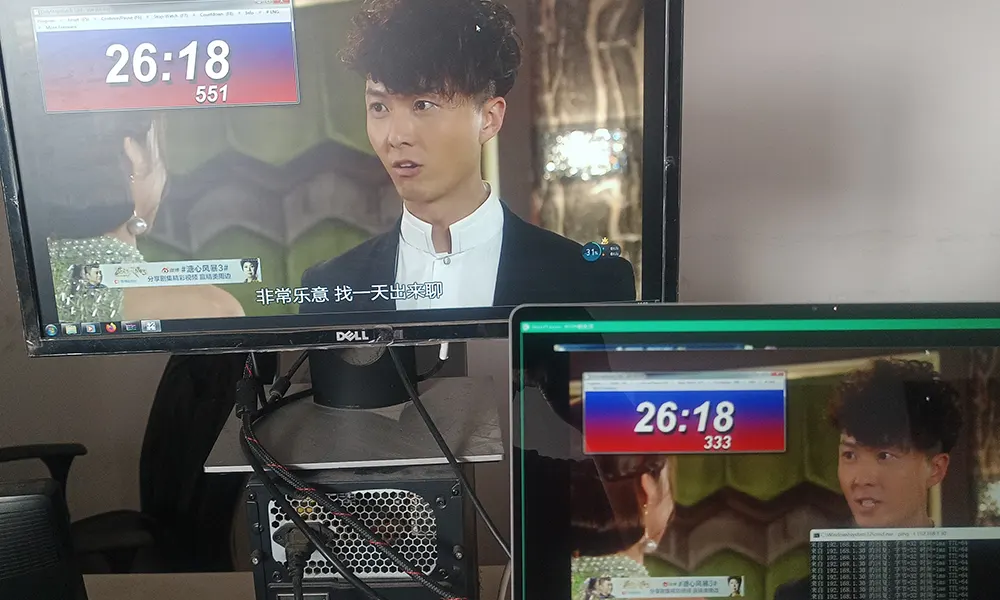
- I pointed the camera at the stopwatch on my computer screen.
- Another computer plays the video sent from the current encoding board and also displays the stopwatch on the computer screen.
- You need to reduce two times, namely the delay from the camera to the monitor. (Including camera and screen delay)
- 請檢查下面的圖片
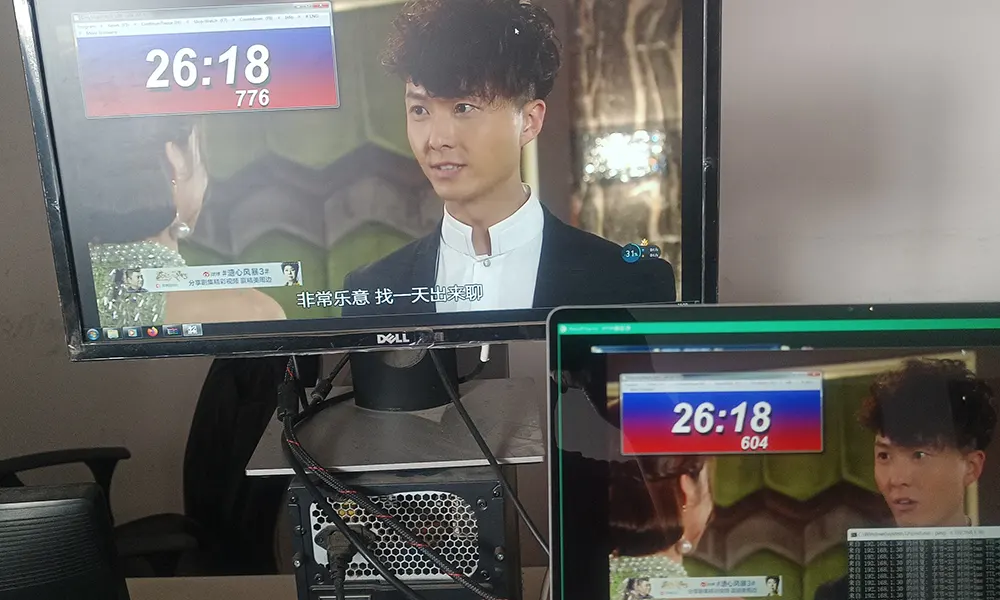
Q: How much is the latency if I use your encoder and decoder board?
A: It is better to use our encoder and decoder board. The encoder and decoder board prices is the same. The below latency test result is only for your reference, not including the camera delay.
- CVBS input to our encoder board—–our decoder board with HDMI output, the delay is 60~90ms
- HDMI input to our encoder board—–our decoder board with HDMI output, the delay is 90~130ms
- HDMI 720P input our encoder board——–our decoder board with HDMI output, the delay between 80~100ms
- HDMI 1080P input our encoder board——–our decoder board with HDMI output, the delay between 100~130ms
For lower latency, you also can use our video encoder and video decoder board. It will be much better than playing the video streaming on your computer via the VLC player.
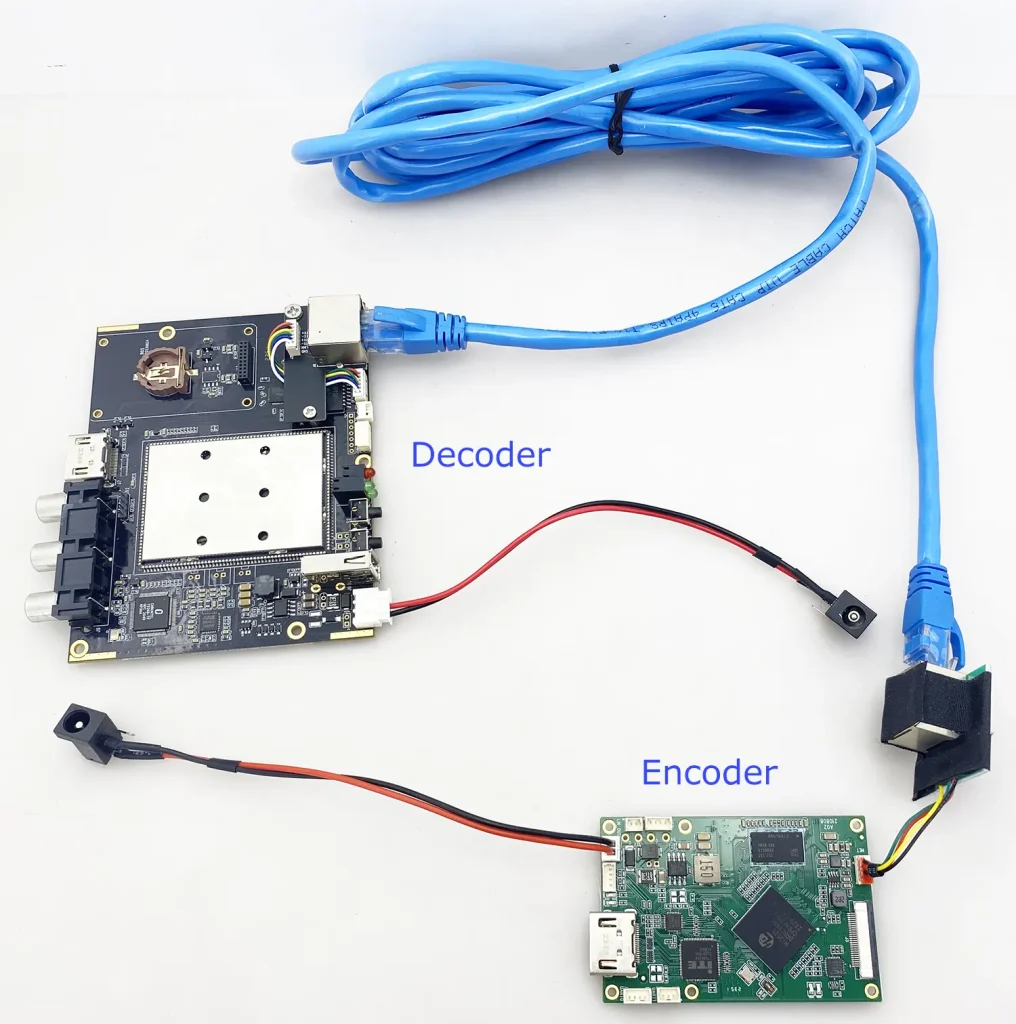
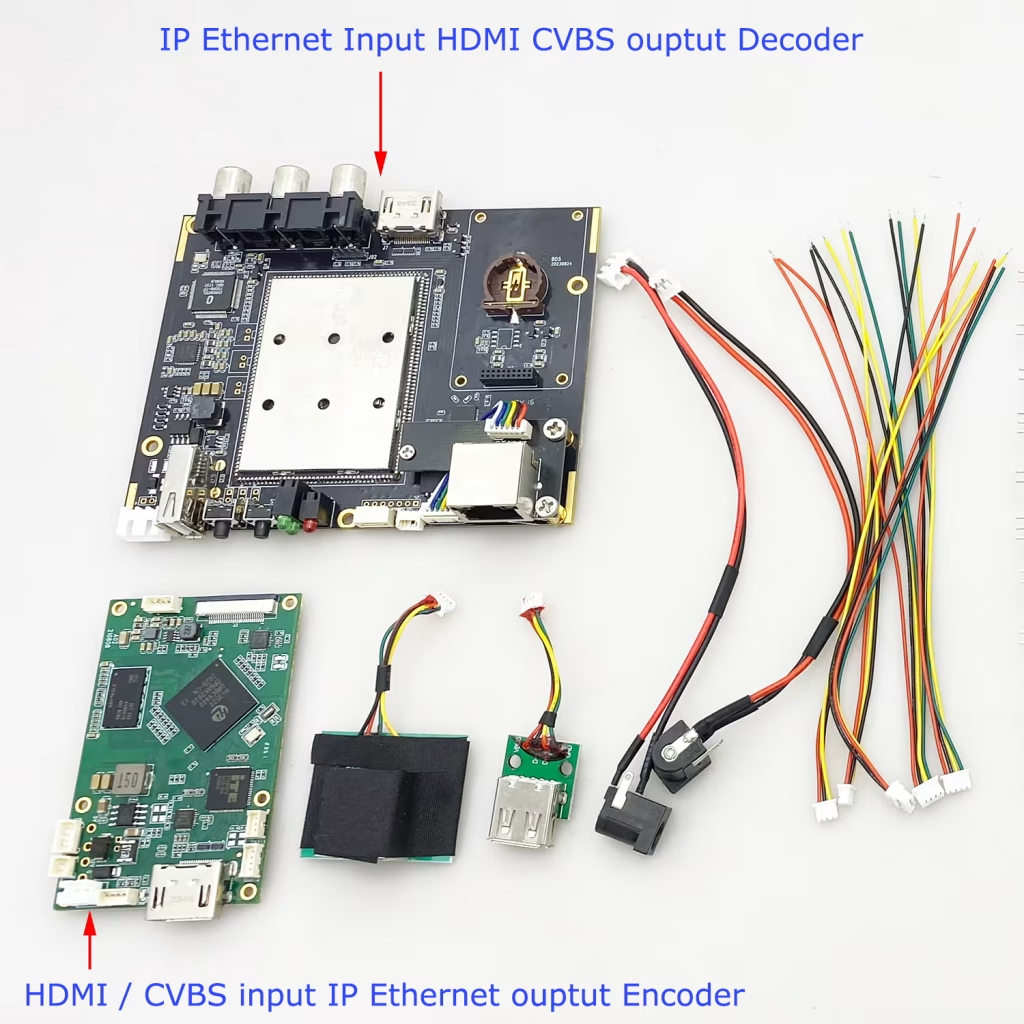
Q: 哪款視訊解碼板支援H264 H265和超低延遲?
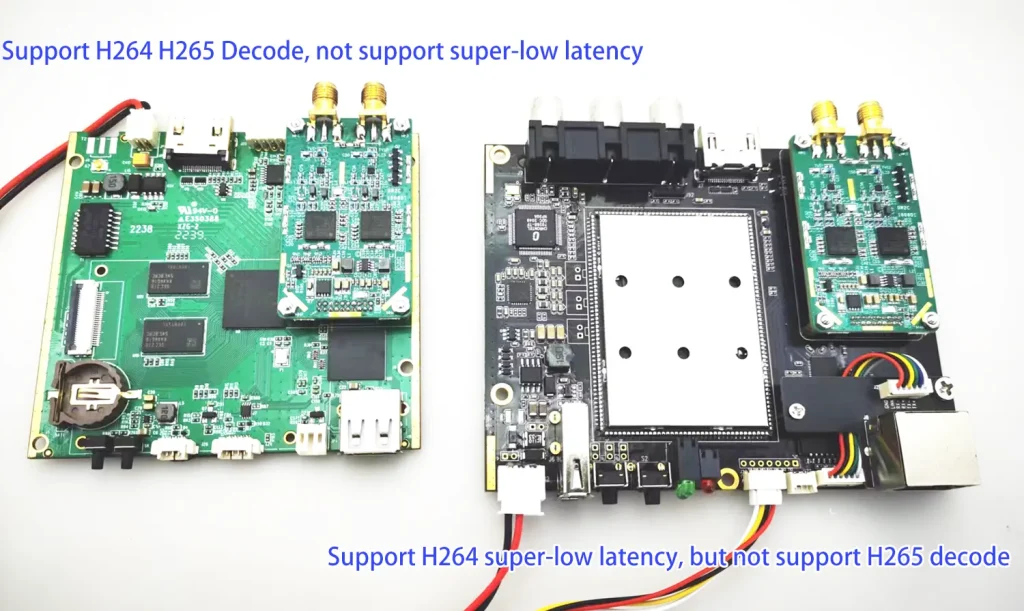
左側藍色解碼板支援H265、H264解碼,但不支援低延遲解碼. (三星晶片組)
右側黑板支援H264解碼但支援H264低延遲解碼. (海思)
Q: We are looking for an ultra-low-delay fpv video transmission system.
We need a TX module + camera for an fpv drone and an RX module with Ethernet (智慧財產) 輸出. What would you recommend?
A: We recommended Vcan1746 and Vcan1777,
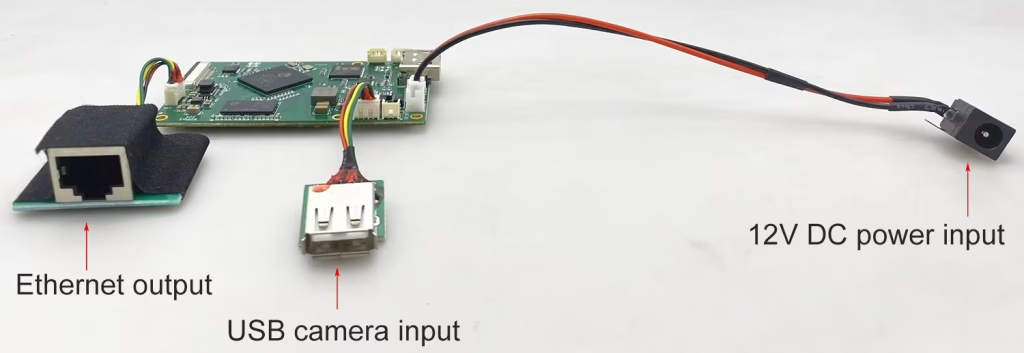
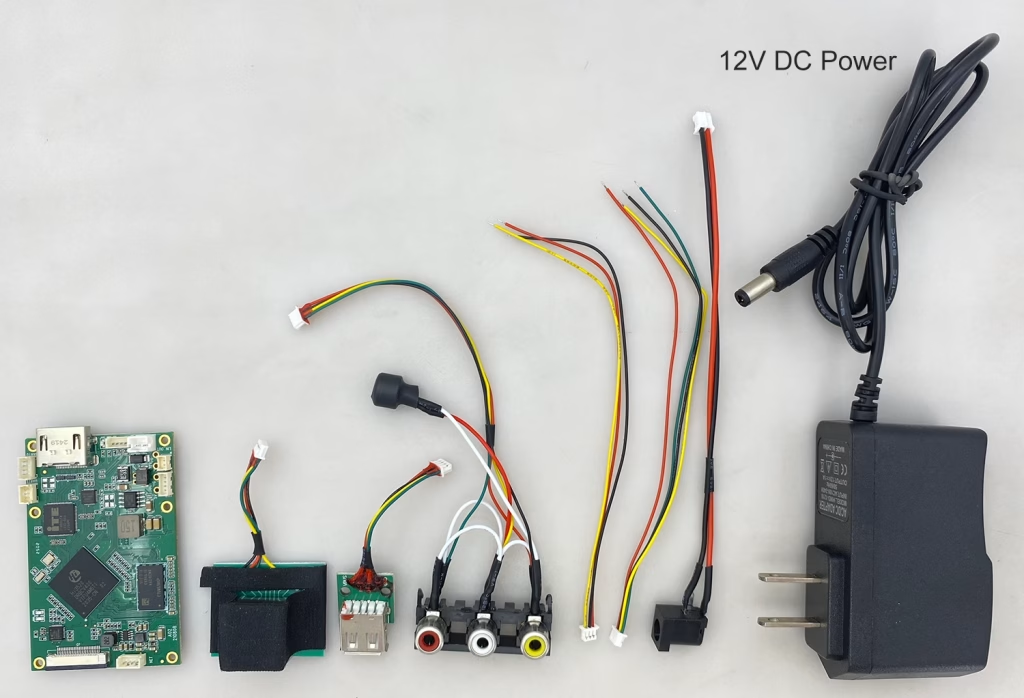
Q: Does your USB UVC camera to IP RTSP video encoder board have a simple connection and DC power adapter?
Yes, we can add a 12V DC power adapter for you. The conneciton is very simple, 12電源輸入電壓, ethernet output to your network or computer, USB input need to connect your USB camera.
編碼器模組板









解碼器模組板




可客製化
新編碼器產品
| 不. | 產品名稱 | 配置 | 主要特點 | 地位 |
|---|---|---|---|---|
| 1 | 雙聲道 USB UVC 可見光視訊編碼器 | 2× USB 輸入 | 支援雙USB攝影機視訊編碼, 和 RTSP 串流媒體; 本地CVBS/HDMI輸出; 可切換顯示模式 | 量產 |
| 2 | 雙通道編碼器 (1× USB 可見光 + 1× USB熱像儀) | 2× USB 輸入 | 支援雙USB攝影機 (可見的 + 熱的) 捕獲, 編碼, 和 RTSP 串流媒體; 本地CVBS/HDMI輸出; 可切換顯示模式 | 量產 |
| 3 | RTSP 解碼器 HDMI/CVBS 顯示模組 | HDMI + CVBS輸出 | 最高支援4×1080P@30fps RTSP碼流解碼; 支援視訊串流協議轉發; HDMI/CVBS輸出顯示 | 提供樣品 |
| 4 | RTSP 解碼器 HDMI/CVBS 顯示模組 4.3"/5" 液晶顯示器 | HDMI輸出 + 液晶螢幕 | 最高支援4×1080P@30fps RTSP碼流解碼; 協議轉發; HDMI/CVBS輸出顯示 | 偵錯 |
| 5 | 雙通道編碼器 (1× USB 可見光 + 1× CVBS 模擬) | 1× CVBS + 1× USB UVC 輸入 | 雙視頻 (USB + CVBS), 編碼和 RTSP 串流媒體; 本地CVBS/HDMI輸出; 可切換顯示模式 | 偵錯 |
| 6 | 雙通道編碼器 (1× USB UVC + 1× AHD 模擬) | 1× AHD + 1× USB UVC 輸入 | 雙視訊擷取 (USB + AHD), 編碼和 RTSP 串流媒體; 本地CVBS/HDMI輸出; 可切換顯示模式 | 偵錯 |
| 7 | 雙通道編碼器 (1× CVBS + 1× AHD 類比視頻) | CVBS + AHD 2 視訊輸入 | 雙類比視訊擷取, 編碼和 RTSP 串流媒體; 本地CVBS/HDMI輸出; 可切換顯示模式 | 偵錯 |
| 8 | 雙通道編碼器 (1× CMOS 相機 + 1× USB熱像儀) | 1× USB 介面 | 支援CMOS + USB熱像儀捕捉, 編碼和 RTSP 串流媒體; 本地CVBS/HDMI輸出; 可切換顯示模式 | 量產 |
對於我們產品中未列出的客製化視訊輸入/輸出轉換解決方案, 請聯絡我們以取得 OEM/ODM 支持. 我們可以根據您的要求開發客製化產品.
Ask A Question
感謝你的回應。 ✨