






How to add add a wireless video relay into a drone video data air uinit and ground unit
FAQ: voeg een draadloos videorelais toe voor drone-communicatieverbindingen met lange afstanden of belemmerd terrein
Een klant vroeg, Ik wilde de mogelijkheid onderzoeken om één eenheid als relais te gebruiken. Op de locatie waar we onze drone willen laten vliegen, er is hoog terrein, wat de communicatie verstoort. Kunnen we een derde eenheid gebruiken die als relais fungeert??


Wireless Video Transmission
1740-1840MHz 2WPA 30 km lange afstand drone video -zender en ontvanger met SBUS TTL

Wireless Video Transmission
8 watt power versterker 100 km drone videogegevens radiogink
Q1: Kan een van de eenheden worden gebruikt als relais om terreinobstakels te overwinnen en het communicatiebereik te vergroten??
EEN: Ja, het is mogelijk om een van de eenheden te configureren als een relaisknooppunt om de communicatie te verbeteren in gebieden met hoog terrein of andere obstakels die de directe zichtlijn tussen de drone en het grondcontrolestation blokkeren.
Q2: Hoe werkt de relaisopstelling??
EEN: The relay setup method depends on the software version installed on your device. There are two different versions:
- Point-to-Point Version
- Point-to-Multipoint Version
Each version uses a different configuration method for relay setup.
To determine which version your device is using, Controleer de Web UI interface style of your firmware. The layout and design of the Web UI will indicate whether your firmware is the optionele afstandsgraad of optionele afstandsgraad versie.
Once you identify the firmware version through the Web UI style, follow the corresponding relay setup instructions for that version.
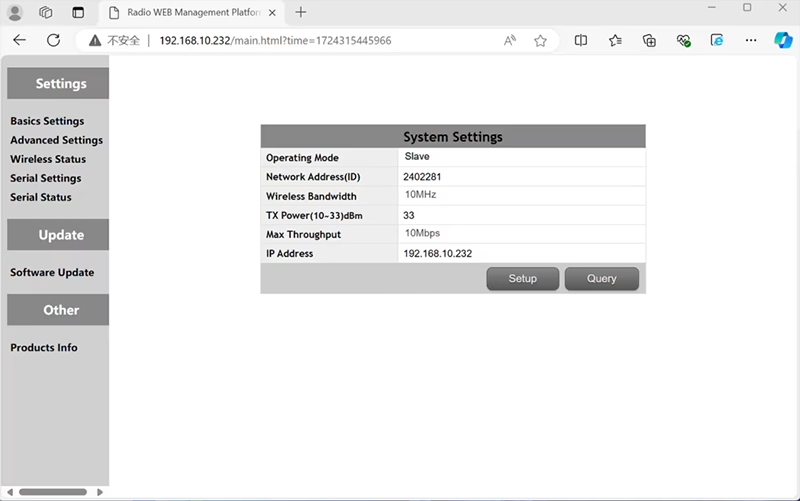

In the standard Point to Point (P2P) configuratie:
- De Grondcontrolestation (GCS) fungeert als de hoofdknooppunt (meester).
- De drone (luchteenheid) fungeert als de subknooppunt (slaaf).
Om relaisfunctionaliteit in te schakelen, de netwerktopologie moet worden aangepast:
- Converteer de origineel grondcontrolestation (hoofdknooppunt) in een relais knooppunt.
- Toevoegen nog een subknooppunt om te dienen als nieuwe terminal voor het grondcontrolestation.
De nieuwe opzet zal daarom hebben drie knooppunten:
- Knooppunt 1 (dar) - Slave node (in de lucht)
- Knooppunt 2 (Relais) - Repeater node (vast op de grond, meestal geplaatst op hoog terrein of in het midden)
- Knooppunt 3 (Grondcontrolestation) - Hoofdknooppunt knooppunt (kant van de operator)
- Drone Unit 8W – 192.168.10.252 (Slaaf)
- Relay Unit 8W- 192.168.10.250 (Repeater)
- Ground Unit 2W – 192.168.10.124 (Meester)
In the standard Point to Multi-Points configuration:
- De Grondcontrolestation (GCS) fungeert als de hoofdknooppunt (meester).
- De drone (luchteenheid) fungeert als de subknooppunt (slaaf).
Om relaisfunctionaliteit in te schakelen, de netwerktopologie moet worden aangepast:
- Converteer de origineel grondcontrolestation (hoofdknooppunt) in een relais knooppunt.
- Toevoegen nog een subknooppunt om te dienen als nieuwe terminal voor het grondcontrolestation.
De nieuwe opzet zal daarom hebben drie knooppunten:
- Knooppunt 1 (dar) - Slave node (in de lucht)
- Knooppunt 2 (Relais) - Hoofdknooppunt (vast op de grond, meestal geplaatst op hoog terrein of in het midden)
- Knooppunt 3 (Grondcontrolestation) - Slave node (kant van de operator)
Met deze configuratie kunnen signalen van de drone naar het relais reizen, en vervolgens van het relais naar de operator, zorgen voor een stabiele en ononderbroken verbinding, zelfs als het directe pad wordt geblokkeerd door heuvels of gebouwen.
Q3: Wat zijn de voordelen van deze relaisopstelling?
- Verlengt de effectieve transmissieafstand.
- Behoudt een stabiele drone-communicatieverbinding, zelfs op complex terrein.
- Vermindert signaalverlies en video-onderbrekingen.
- Maakt flexibele plaatsing van relais mogelijk om de dekking te optimaliseren.
Q4: Welke aanpassingen of configuraties zijn vereist?
Wijzig de bedrijfsmodus naar relais. De ID's van alle drie de apparaten moeten hetzelfde zijn. Ons technische team kan de firmware en parameters aanpassen om de relaisfunctie in te schakelen. U hoeft ons alleen maar op de hoogte te stellen van uw beoogde opstelling (Bijv., afstanden, soort terrein, montage hoogte), en wij zorgen voor de juiste configuratiebestanden en het aansluitschema.
V5: Kan de relaiseenheid draagbaar zijn of op een voertuig worden gemonteerd??
Ja. Het relaisknooppunt kan zijn:
- Vast gemonteerd (Bijv., op een heuveltop of toren), of
- draagbaar (per voertuig vervoerd, of gemonteerd op een statief met voeding).
We kunnen de relaisbehuizing en de voedingsinterface aanpassen aan uw toepassingsscenario.
V6: Zorgt het relais voor extra vertraging??
De extra latentie is minimaal (doorgaans minder dan 10–20 ms) en heeft weinig invloed op de realtime video- en besturingsprestaties.
V7: Kan ik de relaismodus zelf instellen of schakelen??
We raden u aan contact op te nemen met ons technische ondersteuningsteam voor de initiële configuratie om te zorgen voor een correcte knooppuntadressering en frequentieplanning. Na het instellen, schakelen tussen de normale modus en de relaismodus kan worden gedaan via configuratiesoftware of vooraf gedefinieerde profielen.
Q8: Why can’t I connect to the relay node?
EEN: If the relay and slave nodes are roughly the same distance from the master node, and the master node receives roughly the same amount of power, the relay node might not be able to join the network. When the master node determines that the received power of the two nodes is similar, it will prioritize connecting directly to the slave node.
Vraag 9: The three nodes cannot connect to each other. It is necessary to check the wireless transmit/receive status of each node to identify potential issues.
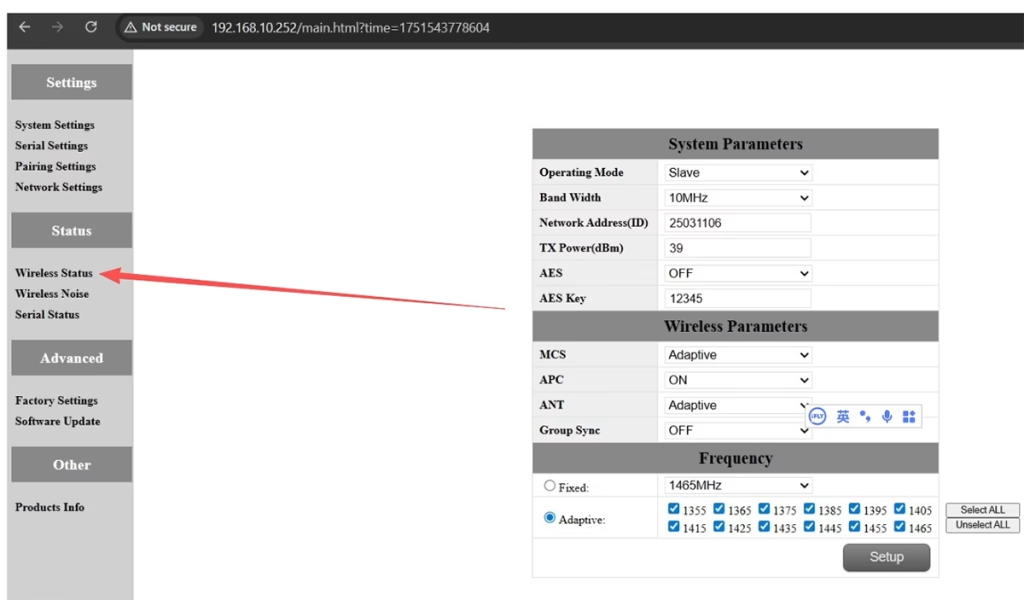
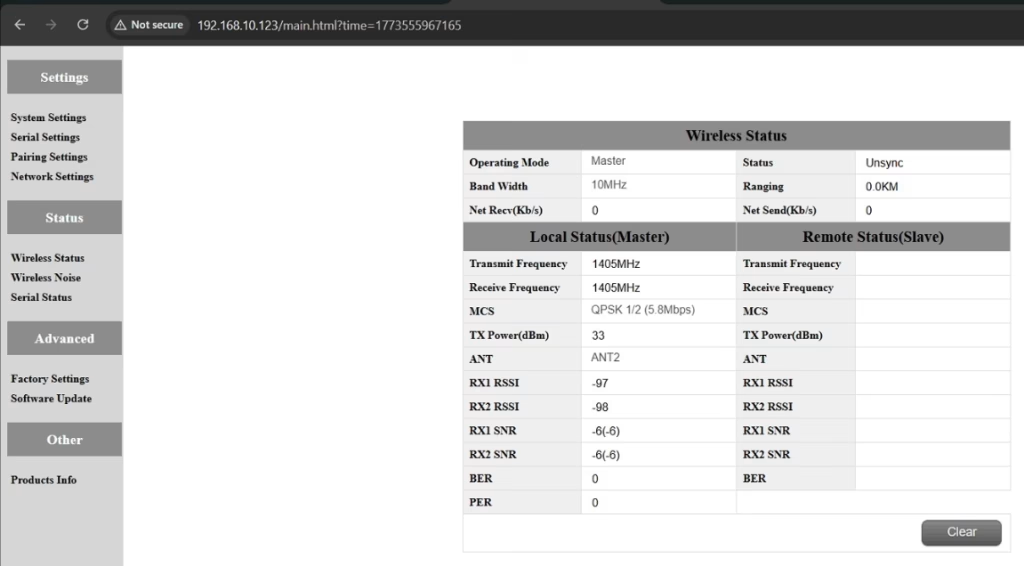
EEN: Please do the below test firstly.
Attempt Remote Access
Try to access each node through the management interface or remote tool to check the wireless status.
If remote access fails, proceed to step 2.
Connect Directly via Ethernet
Use an Ethernet cable to connect your computer directly to each node.
Access the node’s management interface or wireless status page.
Check Wireless Transmit/Receive Status
Review the current wireless transmit/receive status, including signal strength, Linkstatus, and any error indicators.
Take a screenshot of the current status for each node, ensuring all relevant information is visible.
Send Screenshots to Engineers
Organize the screenshots and send them to the engineering team.
Engineers will analyze the wireless transmit/receive data to determine which node may have an issue.
Opmerkingen::
Label each screenshot with the corresponding node for easy comparison.
Ensure screenshots include key data such as signal strength, connection status, en kanaalinformatie.
Q10: Does the relay unit only require antennas and power to operate? Is an Ethernet connection necessary?
EEN: Nee. The relay unit only requires the antennas and a power supply to operate. It does niet require an Ethernet connection. The relay automatically forwards data between the aircraft side and the ground side, enabling seamless communication without the need for a network port connection.
Q11: what is this sync unsync on the wireless status?
EEN: These are the parameters seen on the relay node. De “synchroniseren” at the beginning indicates the connection status between the master node and the relay node, which is currently connected. De “unsync” at the end indicates the connection status between the relay node and the slave node, which is currently not connected.
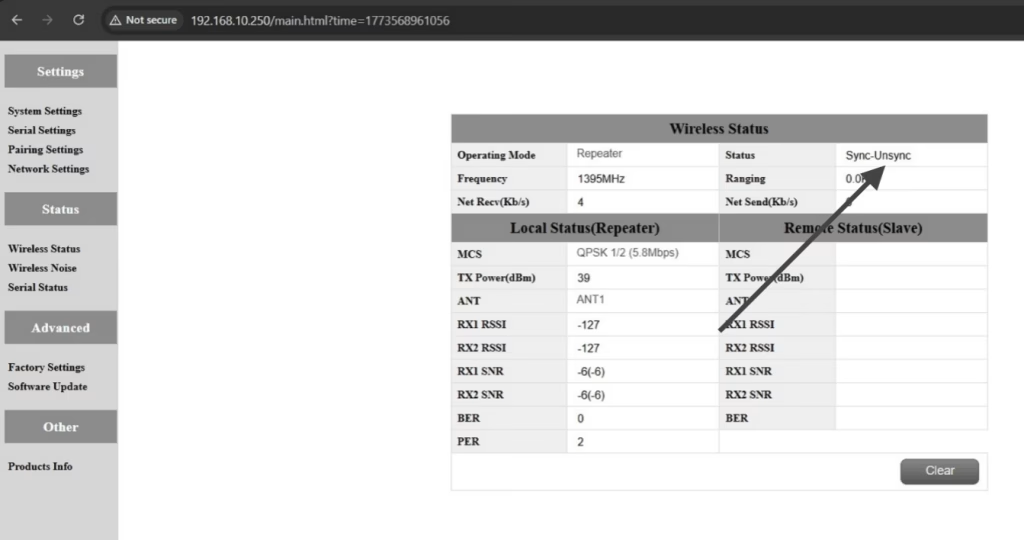
Q12: Why can’t my Slave, Repeater, or Master nodes connect? How to fix it?
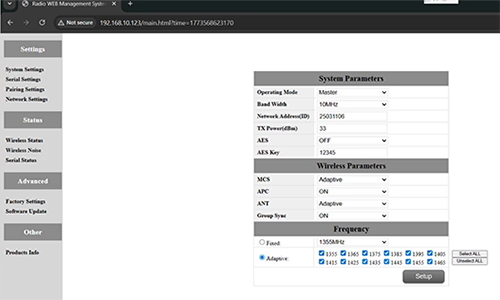
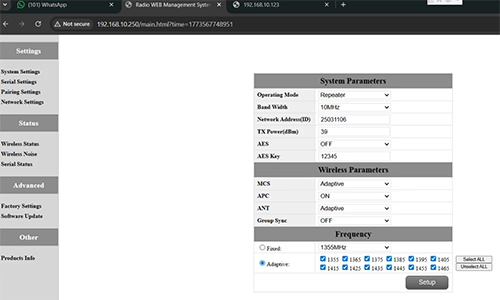
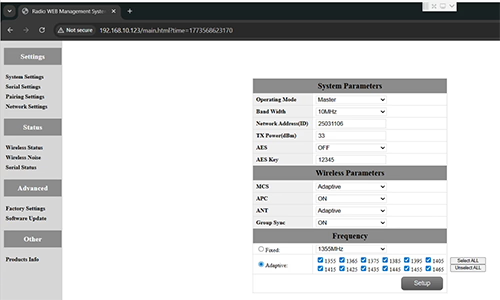
EEN: This usually happens when nodes are not properly configured or the Group Sync settings are inconsistent.
- Connect each node directly to a computer using an Ethernet cable.
- Open the system parameter settings page and take a screenshot to share with technical support if needed.
- Controleer de Group Sync instellingen:
- Als Group Sync Master is On, en Slave Node en Repeater are Off, reeks Group Sync tot Uit for all nodes.
- After all nodes are connected successfully, you can enable Master / Slaaf / Repeater Group Sync as needed.
Resultaat:
Following these steps has successfully resolved connection issues for other customers.
Vraag 13: In what order should these three devices be powered on?
EEN: The correct power-on sequence is critical to ensure proper system connectivity and prevent equipment damage. Follow these steps:
- Power on the Ground Unit first
- This includes the master control station or ground control equipment.
- Ensure all communication interfaces and power supplies are stable.
- volgende, power on the Repeater Node (Relay Unit)
- Wait for the repeater to complete self-checks and establish a connection with the ground unit.
- Verify connection success via status indicators or LEDs.
- Tenslotte, power on the Drone or Slave Node
- Make sure the ground unit and repeater node are fully ready before powering the drone.
- Na het inschakelen, check the communication status between the drone and the repeater/ground units.
⚠️ Notes:
- Always follow the sequence Ground → Repeater → Drone to avoid initialization failures.
- If there are multiple slave nodes or repeaters, power on one at a time and confirm each connection before proceeding.
- Avoid powering all nodes simultaneously to prevent bus conflicts or voltage spikes.
Samenvatting:
✅ Relaisfunctie – ondersteunde
✅ Vereist aanpassing – Ja, één knooppunt opnieuw geconfigureerd als relais
✅ Aanbevolen aantal knooppunten – 3 (dar / Relais / GCS)
✅ Latentie toegevoegd – <20 Mevrouw
✅ Geschikt voor – Bergachtige gebieden, langeafstandsoperaties, of NLOS -voorwaarden
Een vraag stellen
Bedankt voor je reactie. ✨