




One customer reported a problem that the TX900 wireless video data link will be interrupted after flying for a period of time.
After the transmitter and receiver were restarted, the wireless video data link was able to connect again.
Our engineers guessed that the air terminal unit (Sender) was installed in a confined space on the drone, and the failure was caused by overheating after working for a period of time. The link is interrupted, the drone stops working, and the temperature slowly drops. When the power is turned on again, the link can be reconnected.
In addition to checking whether the temperature of the transmitter is too high, we can also analyze the specific cause of the failure by obtaining the log file of the wireless video data RC link.
How to get the log file of TX900 Wireless Video Data RC Link Modem, ELOG & AP LOG capture
- Enable ELOG, AP LOG capture
Log in to the web server of the air terminal and the ground terminal respectively, enter the debug page, and send AT^ELFUN=1 und AT^ELCFGUL=1, which are respectively used to „start ELOG function“ und „start ELOG file FTP server“; send AT^APLFUN=1. It is used to „start the AP LOG function“. (Insgesamt 3 AT commands need to be sent)

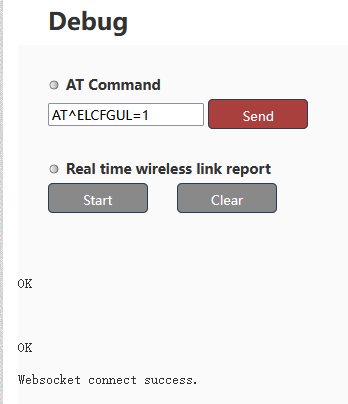

Beachten:
1) It is recommended to issue the above AT command, restart the module, and then start to reproduce the problem and catch ELOG.
2) The LOG will be covered periodically for about 10~20 minutes. After the test, please send AT^ELFUN=0 to close the ELOG and AT^APLFUN=0 to close the APLOG immediately through the Web UI webpage, and then export the log.
3) If you want to grab the log again for the second time, please close the ELOG and AP LOG first
AT^ELFUN=0
AT^ELCFGUL=0
AT^APLFUN=0
After restarting once, turn on the ELOG and AP LOG functions.
AT^ELFUN=1
AT^ELCFGUL=1
AT^APLFUN=1
Start grabbing the log, and export the log after reproducing the problem.
- Export LOG information
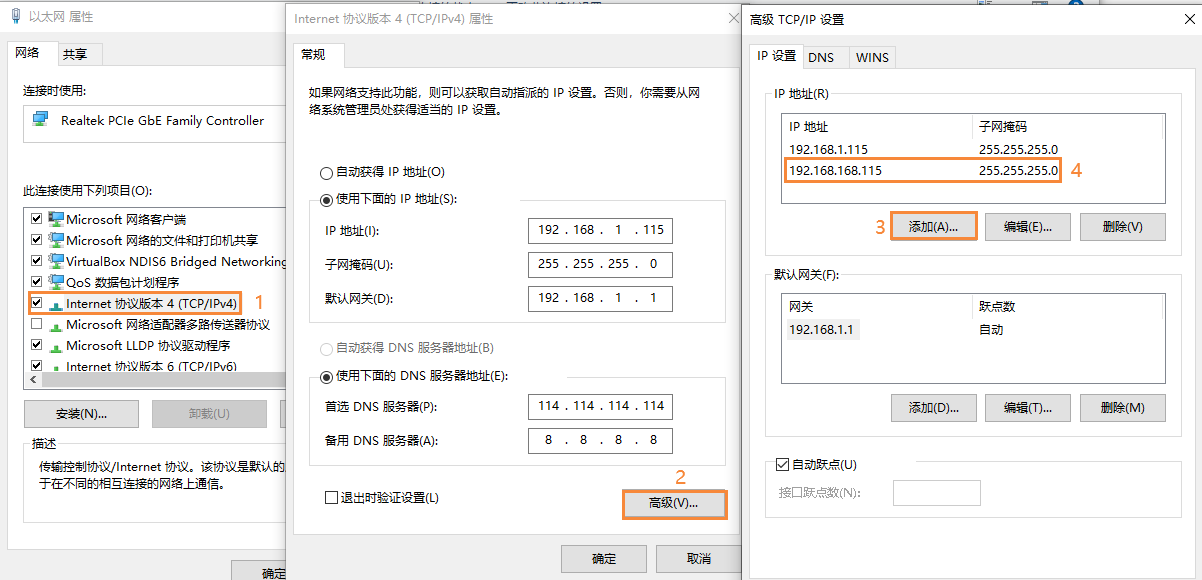
- The IP of the wireless module is 192.168.168.x (Zum Beispiel 192.168.168.12), the customer needs to add the 192.168.168.x network segment IP under the PC first, before accessing the wireless module and exporting the LOG, The detailed operation can refer to the figure below
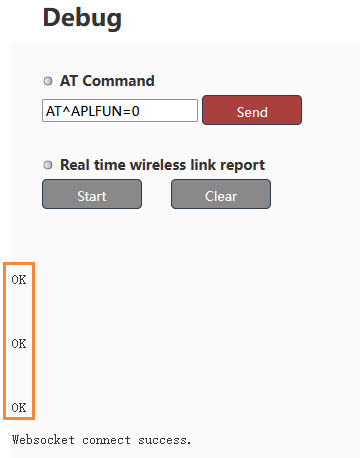
- After reproducing the problem, the first webserver sends AT^ELFUN=0, AT^ELCFGUL=0, und AT^APLFUN=0, Stop grabbing LOG information, Ansonsten, turning on this function for a long time will reduce the flash life of the module!


- Use the FTP tool to connect to the IP of the module (Zum Beispiel: 192.168.168.12), The port number: Ist 200, and the user name and password are both empty.

Customers can put log folder All exported to our company, the log folder already contains ELOG and AP LOG files.
If you encounter any problems or difficulties during the above operations, Bitte denken Sie daran, uns zu kontaktieren, and I will provide an operation video for your reference.
Free Inquiry, Kostenloses Angebot, Free Support, Free sample demo.



What is a Log file?
A log file records an event that occurred at a specific time and may include metadata that contextualizes it.
Log files provide a historical record of everything that occurs within a system, including transactions, mistakes, and intrusions. That data can be conveyed in a variety of formats, including organized, semi-structured, and unstructured data.
A log file’s basic structure consists of the following elements:
The timestamp – the precise time when the event was recorded
Information about the user
Event details – What action was taken?
The file will, Jedoch, contain a plethora of important data depending on the type of log source. Server logs, Zum Beispiel, will include the referred webpage, HTTP status code, bytes served, user agents, and other information.
Stelle eine Frage
Vielen Dank für deine Antwort. ✨