






How to add add a wireless video relay into a drone video data air uinit and ground unit
التعليمات: إضافة مرحل فيديو لاسلكي لرابط اتصال الطائرة بدون طيار مع التضاريس طويلة المدى أو المعسرة
سأل أحد العملاء, كنت أرغب في التحقق من إمكانية استخدام وحدة واحدة كمرحل. في الموقع الذي نريد أن نطير فيه بطائرتنا بدون طيار, هناك تضاريس عالية, مما يعطل الاتصالات. هل يمكننا استخدام وحدة ثالثة لتكون بمثابة مرحل?


نقل فيديو لاسلكي
1740-1840MHZ 2WPA 30km الطائرات بدون طيار طويلة المدى جهاز إرسال ومستقبل مع SBUS TTL

نقل فيديو لاسلكي
Q1: هل يمكن استخدام إحدى الوحدات كمرحل للتغلب على عوائق التضاريس وتوسيع نطاق الاتصال?
ا: نعم فعلا, من الممكن تكوين إحدى الوحدات كعقدة ترحيل لتحسين الاتصال في المناطق ذات التضاريس العالية أو العوائق الأخرى التي تمنع خط الرؤية المباشر بين الطائرة بدون طيار ومحطة التحكم الأرضية.
Q2: كيف يعمل إعداد التتابع?
ا: The relay setup method depends on the software version installed on your device. There are two different versions:
- Point-to-Point Version
- Point-to-Multipoint Version
Each version uses a different configuration method for relay setup.
To determine which version your device is using, يرجى التحقق من Web UI interface style of your firmware. The layout and design of the Web UI will indicate whether your firmware is the درجة المسافة الاختيارية أو درجة المسافة الاختيارية الإصدار.
Once you identify the firmware version through the Web UI style, follow the corresponding relay setup instructions for that version.
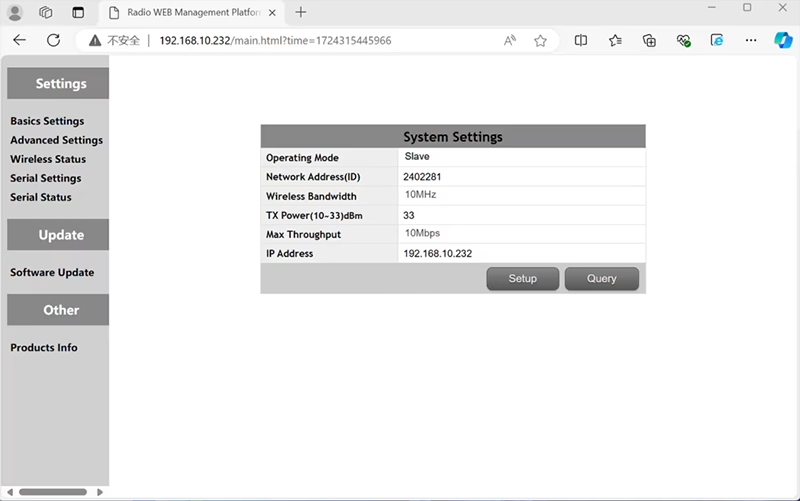

In the standard Point to Point (P2P) إعدادات:
- ال محطة التحكم الأرضية (GCS) بمثابة العقدة الرئيسية (رئيسي - سيد).
- ال طائرة بدون طيار (وحدة الهواء) بمثابة العقدة الفرعية (عبد).
لتمكين وظيفة التتابع, تحتاج طوبولوجيا الشبكة إلى التعديل:
- تحويل محطة التحكم الأرضية الأصلية (العقدة الرئيسية) في عقدة التتابع.
- إضافة عقدة فرعية أخرى ليكون بمثابة محطة محطة التحكم الأرضية الجديدة.
وبالتالي فإن الإعداد الجديد سيكون له ثلاث عقد:
- العقدة 1 (أزيز) - Slave node (محمول جوا)
- العقدة 2 (درجة المسافة الاختيارية) - Repeater node (ثابتة على الأرض, يتم وضعها عادة على التضاريس العالية أو نقطة المنتصف)
- العقدة 3 (محطة التحكم الأرضية) - العقدة الرئيسية العقدة (جانب المشغل)
- Drone Unit 8W – 192.168.10.252 (عبد)
- Relay Unit 8W- 192.168.10.250 (مكرر)
- Ground Unit 2W – 192.168.10.124 (يتقن)
In the standard Point to Multi-Points configuration:
- ال محطة التحكم الأرضية (GCS) بمثابة العقدة الرئيسية (رئيسي - سيد).
- ال طائرة بدون طيار (وحدة الهواء) بمثابة العقدة الفرعية (عبد).
لتمكين وظيفة التتابع, تحتاج طوبولوجيا الشبكة إلى التعديل:
- تحويل محطة التحكم الأرضية الأصلية (العقدة الرئيسية) في عقدة التتابع.
- إضافة عقدة فرعية أخرى ليكون بمثابة محطة محطة التحكم الأرضية الجديدة.
وبالتالي فإن الإعداد الجديد سيكون له ثلاث عقد:
- العقدة 1 (أزيز) - Slave node (محمول جوا)
- العقدة 2 (درجة المسافة الاختيارية) - العقدة الرئيسية (ثابتة على الأرض, يتم وضعها عادة على التضاريس العالية أو نقطة المنتصف)
- العقدة 3 (محطة التحكم الأرضية) - Slave node (جانب المشغل)
يسمح هذا التكوين للإشارات بالانتقال من الطائرة بدون طيار إلى المرحل, ثم من التتابع إلى المشغل, ضمان اتصال مستقر ومستمر حتى عندما يكون المسار المباشر مسدودًا بالتلال أو المباني.
Q3: ما هي مزايا هذا الإعداد التتابع?
- يمتد مسافة انتقال فعالة.
- يحافظ على رابط اتصال مستقر بدون طيار حتى في التضاريس المعقدة.
- يقلل من فقدان الإشارة وانقطاع الفيديو.
- يسمح بوضع مرن للمرحل لتحسين التغطية.
Q4: ما هي التعديلات أو التكوينات المطلوبة?
تغيير وضع التشغيل للتتابع. يجب أن تكون معرفات الأجهزة الثلاثة هي نفسها. يمكن لفريقنا الهندسي ضبط البرامج الثابتة والمعلمات لتمكين وظيفة الترحيل. ما عليك سوى إبلاغنا بالإعداد المقصود (على سبيل المثال, المسافات, نوع التضاريس, ارتفاع التركيب), وسوف نقدم ملفات التكوين المناسبة ومخطط الاتصال.
س 5: هل يمكن أن تكون وحدة الترحيل محمولة أو مثبتة على السيارة?
نعم فعلا. يمكن أن تكون عقدة التتابع:
- مثبتة (على سبيل المثال, على قمة تل أو برج), أو
- المحمول (تحملها السيارة, أو مثبتة على حامل ثلاثي الأرجل مزود بمصدر طاقة).
يمكننا تخصيص غلاف التتابع وواجهة الطاقة وفقًا لسيناريو التطبيق الخاص بك.
س 6: هل يقدم التتابع تأخيرًا إضافيًا?
الكمون الإضافي هو الحد الأدنى (عادة أقل من 10-20 مللي ثانية) وله تأثير ضئيل على أداء الفيديو والتحكم في الوقت الفعلي.
Q7: هل يمكنني إعداد أو تبديل وضع الترحيل بنفسي?
نوصيك بالاتصال بفريق الدعم الفني لدينا للحصول على التكوين الأولي لضمان معالجة العقدة الصحيحة وتخطيط التردد. بعد الإعداد, يمكن التبديل بين الوضع العادي ووضع الترحيل من خلال برنامج التكوين أو ملفات التعريف المحددة مسبقًا.
Q8: Why can’t I connect to the relay node?
ا: If the relay and slave nodes are roughly the same distance from the master node, and the master node receives roughly the same amount of power, the relay node might not be able to join the network. When the master node determines that the received power of the two nodes is similar, it will prioritize connecting directly to the slave node.
س9: The three nodes cannot connect to each other. It is necessary to check the wireless transmit/receive status of each node to identify potential issues.
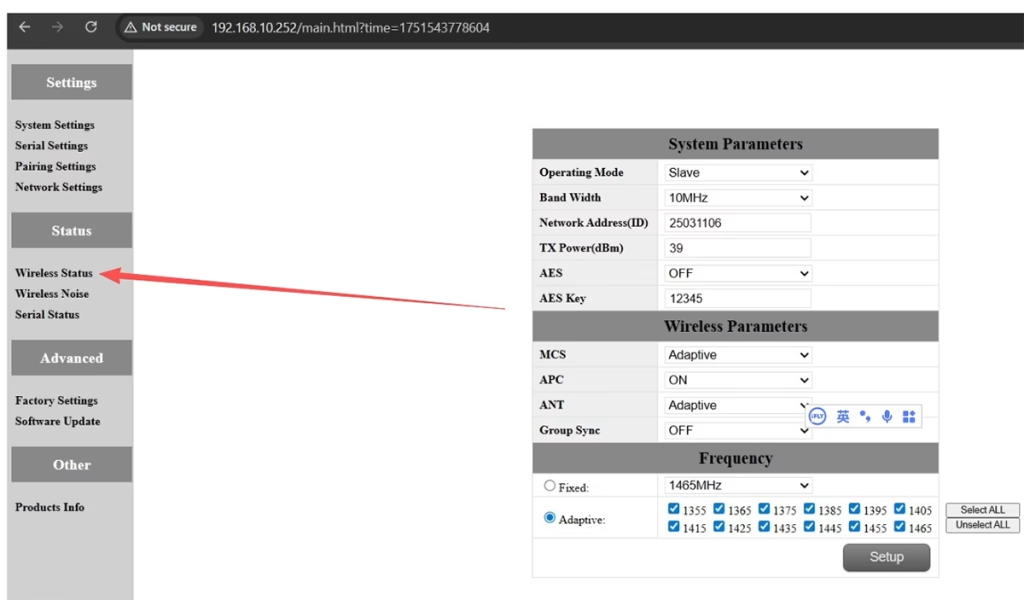
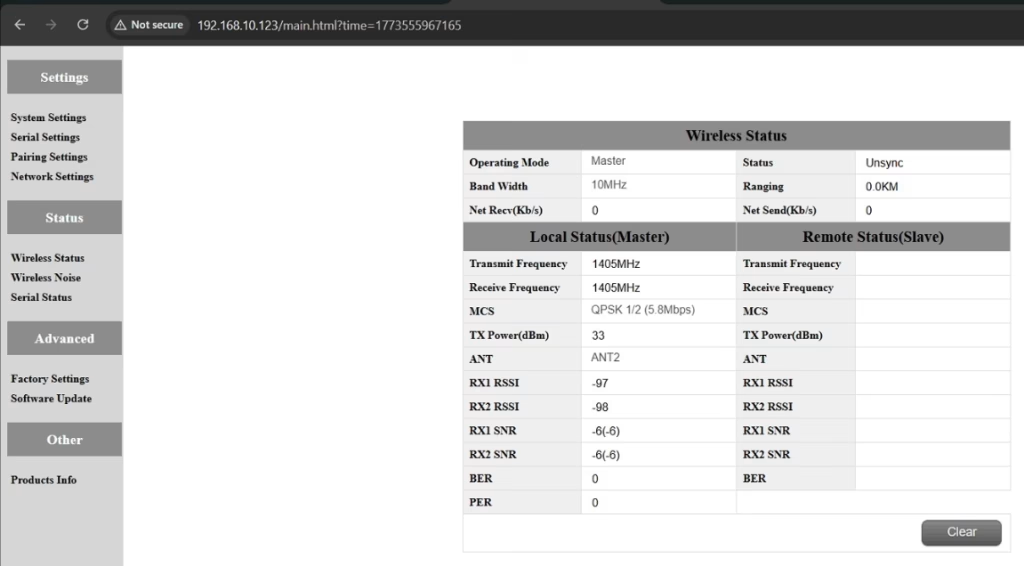
ا: Please do the below test firstly.
Attempt Remote Access
Try to access each node through the management interface or remote tool to check the wireless status.
If remote access fails, proceed to step 2.
Connect Directly via Ethernet
Use an Ethernet cable to connect your computer directly to each node.
Access the node’s management interface or wireless status page.
Check Wireless Transmit/Receive Status
Review the current wireless transmit/receive status, including signal strength, حالة الارتباط, and any error indicators.
Take a screenshot of the current status for each node, ensuring all relevant information is visible.
Send Screenshots to Engineers
Organize the screenshots and send them to the engineering team.
Engineers will analyze the wireless transmit/receive data to determine which node may have an issue.
ملحوظات:
Label each screenshot with the corresponding node for easy comparison.
Ensure screenshots include key data such as signal strength, connection status, ومعلومات القناة.
س10: Does the relay unit only require antennas and power to operate? Is an Ethernet connection necessary?
ا: لا. The relay unit only requires the antennas and a power supply to operate. إنه كذلك ليس require an Ethernet connection. The relay automatically forwards data between the aircraft side and the ground side, enabling seamless communication without the need for a network port connection.
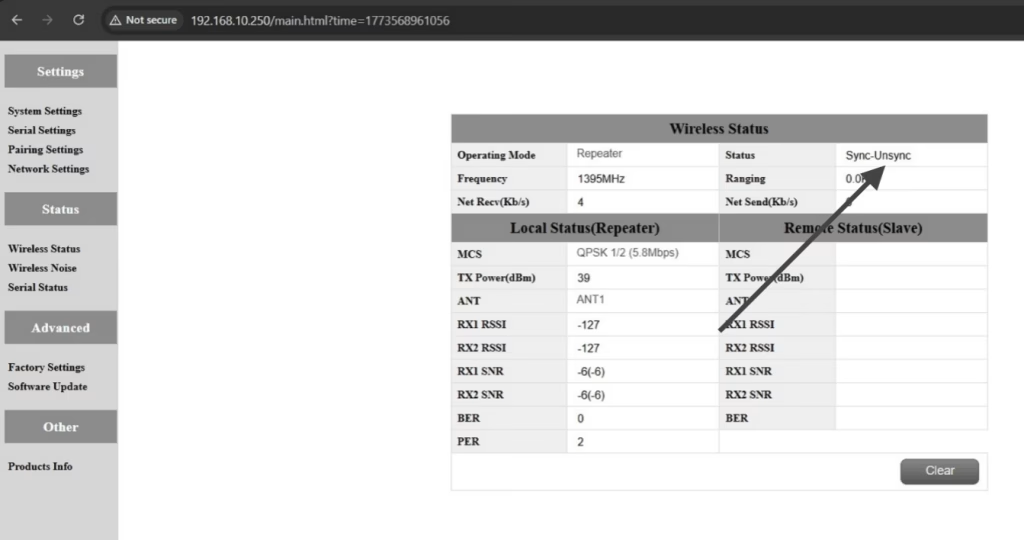
س11: what is this sync unsync on the wireless status?
ا: These are the parameters seen on the relay node. ال “المزامنة” at the beginning indicates the connection status between the master node and the relay node, which is currently connected. ال “unsync” at the end indicates the connection status between the relay node and the slave node, which is currently not connected.
س12: Why can’t my Slave, مكرر, or Master nodes connect? How to fix it?
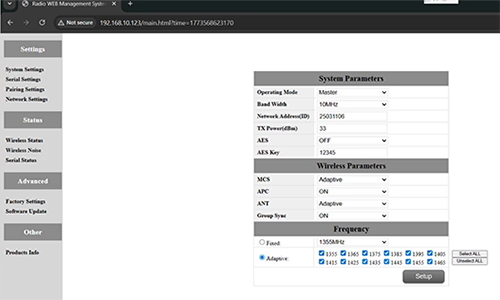
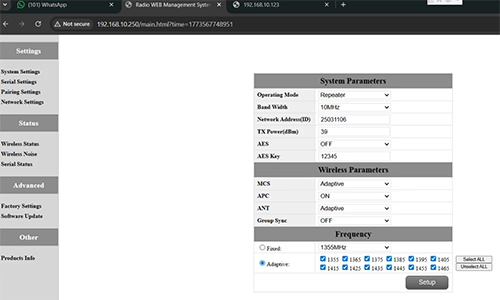
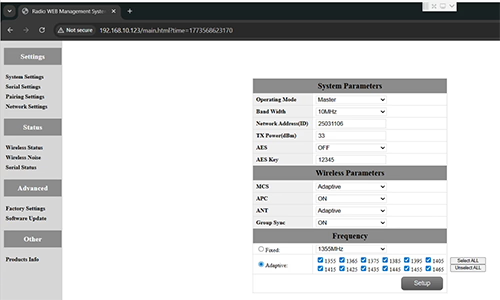
ا: This usually happens when nodes are not properly configured or the Group Sync settings are inconsistent.
- Connect each node directly to a computer using an Ethernet cable.
- Open the system parameter settings page and take a screenshot to share with technical support if needed.
- تحقق من Group Sync إعدادات:
- لو Group Sync Master is On, و Slave Node و مكرر are Off, جلس Group Sync إلى إيقاف for all nodes.
- After all nodes are connected successfully, you can enable Master / عبد / Repeater Group Sync as needed.
نتيجة:
Following these steps has successfully resolved connection issues for other customers.
س13: In what order should these three devices be powered on?
ا: The correct power-on sequence is critical to ensure proper system connectivity and prevent equipment damage. Follow these steps:
- Power on the Ground Unit first
- This includes the master control station or ground control equipment.
- Ensure all communication interfaces and power supplies are stable.
- التالى, power on the Repeater Node (Relay Unit)
- Wait for the repeater to complete self-checks and establish a connection with the ground unit.
- Verify connection success via status indicators or LEDs.
- أخيراً, power on the Drone or Slave Node
- Make sure the ground unit and repeater node are fully ready before powering the drone.
- بعد التشغيل, check the communication status between the drone and the repeater/ground units.
⚠️ Notes:
- Always follow the sequence Ground → Repeater → Drone to avoid initialization failures.
- If there are multiple slave nodes or repeaters, power on one at a time and confirm each connection before proceeding.
- Avoid powering all nodes simultaneously to prevent bus conflicts or voltage spikes.
ملخص:
✅ وظيفة التتابع – أيد
✅ يتطلب التعديل – نعم فعلا, عقدة واحدة أعيد تكوينها كمرحل
✅ العدد الموصى به من العقد – 3 (أزيز / درجة المسافة الاختيارية / GCS)
✅ الكمون المضافة - <20 الآنسة
✅ مناسب لـ – المناطق الجبلية, عمليات لمسافات طويلة, أو شروط NLOs
طرح سؤال
شكرًا لردكم ✨