






目录
什么是覆盖用户定义的OSD菜单?
使用COFDM无线视频发射器和接收器模块时, 用户可能需要在视频屏幕上叠加一些OSD信息:
- 发送端的飞行控制信息 (全球定位系统, 飞行线高度, 速度, 电池电量, 等等);
- 接收器信息 (信号强度, 电池水平, 等等)
在考虑多功能性和易用性的同时,满足用户的上述两个需求, 我们提供了以下解决方案:

- 我们的COFDM无线视频发射器和接收器模块提供1向单向串行端口透明传输, 允许用户通过串行端口透明地将发射机数据传输到接收器.
- 我们COFDM接收模块的透明串行端口不仅支持发射机透明传输数据的输出,而且还支持OSD覆盖数据的接收.
- 用户需要在连接到发送模块的MCU上完成独立协议或连接到接收模块的MCU, 转换然后通过接收模块的透明传输接口发送到系统以完成用户OSD信息的覆盖.
用户定义的OSD菜单H是用户想要在屏幕上显示的字符, 例如飞行数据, 通过发送AT指令. (3引脚串行端口, 字符模式传输, 波特率与3pin透明串口相同)
在覆盖用户定义的OSD菜单的命令中
| 格式 | ATOS$(字体), $(X),$(和),$(海峡) _例如: ATOSD1,40,20,高度: 100米_ |
| 范围 | 字体: 整数值 (值越大, 字体越大) x 坐标: 0~1919 纵坐标:0~1079 海峡: 在对应坐标处显示的字符串 (空格符号用于清除显示) |
| 使用 | 用于在视频屏幕上叠加用户 OSD 信息 |
| 返回值 | 没有 |
| 备注 | 1. 此命令为 OSD 独有. 客户需要通过OSD界面向系统发送命令. 具体波特率和校验方式由ATST命令决定,可以通过ATGT命令获取. 2. 用户根据最大1920指定OSD显示的x和y坐标×1080 像素, 系统会根据实际显示情况修正坐标. 3. str参数不能包含’_’ 特点 |
视频操作指南
上述视频中的说明.
您知道如何通过COFDM无线视频编码器和解码器板发送OSD菜单飞行数据?
在这个视频中, 我将向您展示操作详细信息. 现在,使用HDMI编码器拿一个发射器. 通过电缆连接接收器解码器板. 然后发射器需要HDMI信号源, 连接到这台计算机的HDMI电缆, 然后有一个显示播放器播放视频. 现在,计算机充当此相机的HDMI视频源. 计算机输出视频已发送到此发射器.
信号通过一根电缆发送到解码器接收器板, 然后,解码器板通过HDMI输出显示. 因此,现在您可以看到两个屏幕显示相同, 信号源在右边, 解码显示在左侧.
然后同时, 编码板, 这个3针透明的串行端口, 然后是串行端口数据, 它连接到这台计算机, 这些数据一直在发送, 然后在解码器板上, 还有一个3针串行端口, 它将透明地传输到另一台笔记本电脑, 您可以看到数据已透明地传输.
请注意,显示为十六进制模式,因为发送侧也位于十六进制中, 你可以看看, 在这里发送的是十六进制, 然后,需要更改此处的发送到字符模式.
发送此OSD命令, 例如, 如果您想在x上显示这群字符:400 和:200, 好的, 让我们先看一下左上角, 我像您一样专门打开了系统的OSD, 只要我们点击发送此处, 让我们看看他收到用户的 OSD 后会发生什么, 他会关闭该系统的OSD, 然后在用户指定的XY坐标处, 显示对应的值, 那么我们来尝试改变这一点, 我会修改它的XY坐标并再次发送, 现在你可以看到两个, 这是刚刚发送的两个用户 OSD 命令, 立场不同, 内容是一样的.
升级固件以获得用户定义的OSD 菜单功能
下载升级固件
https://drive.google.com/file/d/1RP1qk-fLK1JQK9b-aD_UDStENIUhdCy2/view?usp=drive_link
视频中提到的产品.

中国人物支持
满足汉字叠加的需要, 该 “阿托斯杜” 命令已添加, 而且参数和原来的差不多 “ATOSD” 命令:
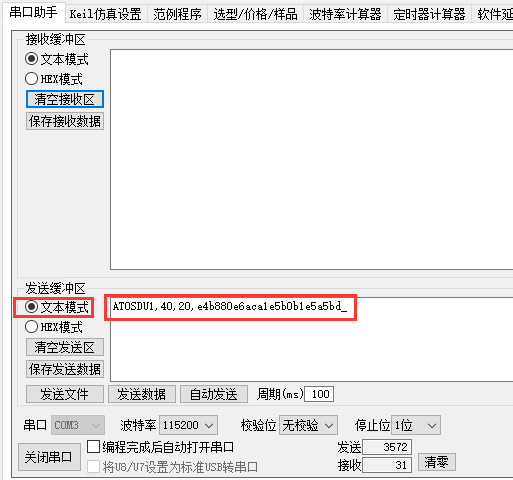
| 格式 | ATOSDU$(字体), $(X),$(和),$(海峡) _例如: ATOSDU1,40,20,e4b880e6aca1e5b0b1e5a5bd_ |
| 范围 | 字体: 整数值 (值越大, 字体越大) x 坐标: 0~1919 纵坐标:0~1079 海峡: 在对应坐标处显示的字符串 (UTF-8 编码的 ascii 表示) |
| 使用 | 用于在视频屏幕上叠加用户 OSD 信息 (支持中英文字符) |
| 返回值 | 没有 |
| 备注 | 1. 此命令为 OSD 独有. 客户需要通过OSD界面向系统发送命令. 具体波特率和校验方式由ATST命令决定,可以通过ATGT命令获取. 2. 用户根据最大1920指定OSD显示的x和y坐标×1080 像素, 系统会根据实际显示情况修正坐标. 3.str 参数采用 UTF-8 编码的 ASCII 表示形式 |
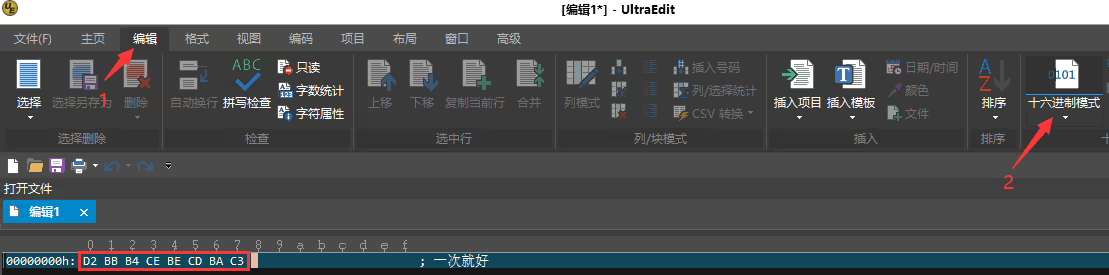
关于如何获得要显示的汉字的UTF-8编码, 您可以使用Ultraedit软件:
- 打开Ultraedit软件 (建议新版本), 并创建一个新文件. 在底部的状态栏下, 选择 “统一字符标准 - > UTF-8” 从编码下拉菜单中:

- 在新文件中, 键入需要显示的中文字符串, 如: “只有一次”:
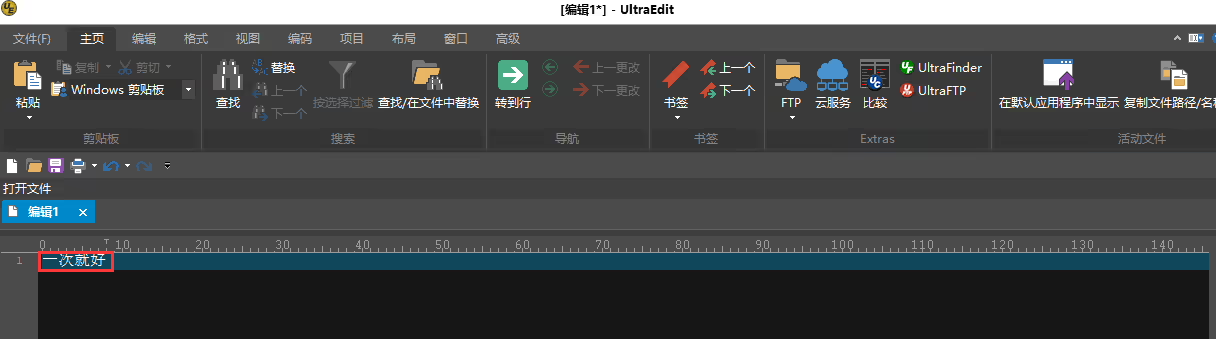
- 选择 “编辑” 在菜单栏中, 然后选择 “十六进制模式” 获取相应的UTF-8编码字符:
- 通过串行端口终端, 发送ATOSDU命令并传递上面获得的字符 (ASCII形式):
[VF-202411]
问一个问题
感谢您的回复。 ✨