





如何製作無線視訊接收器的SD升級卡?
目錄
一: Make the SD upgrade card
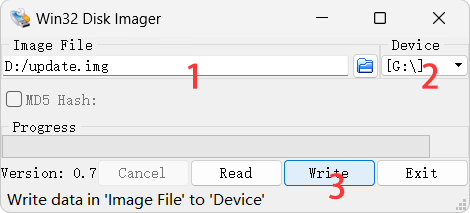
- 下載 Win32 Disk Imager.exe 和 update.img firstly.
- 按兩下 “Win32DiskImager.exe” to run it.
- Select the image “update.img” for the SD card upgrade.
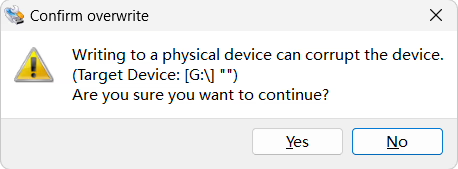
- 點選 “寫” and wait for the flash to complete, as shown below.

Two: Copy the upgrade image file to the SD upgrade card
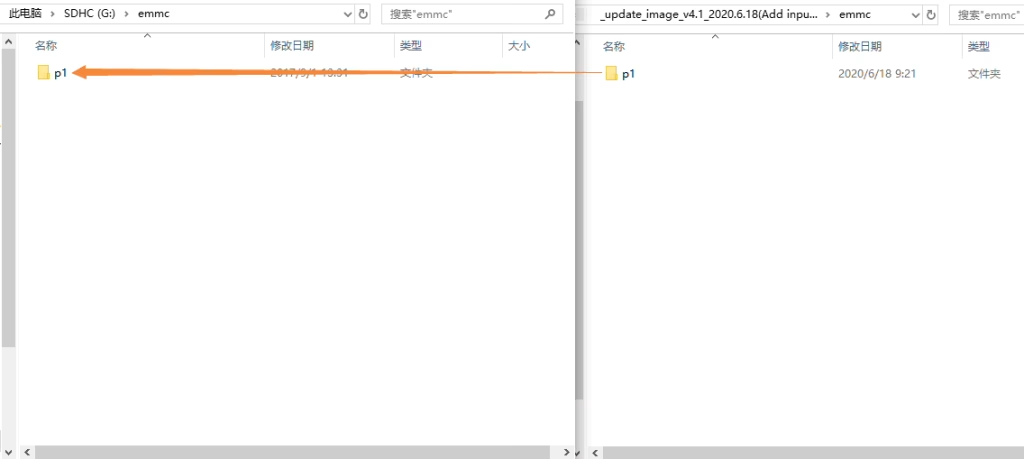
Unzip the “update_image_xx_yy.zip” file and overwrite all the files within with the files of the same name in the same directory on the SD upgrade card you just created.
三: Updating the New Firmware to wireless video receiver Using the Upgrade Card
- Insert the SD upgrade card into the Micro SD card port of the wireless video receiver board. Power on the receiver board. Once the system boots up, both green lights on the board will illuminate.
- Wait a few seconds until both green lights on the board flash simultaneously, indicating the update is complete. Remove the Micro SD card.
問一個問題
感謝你的回應。 ✨