





Complete Explanation of COFDM Video Transmitter Parameters
目錄
Understanding FREQ, 體重, FEC, 胃腸道, 地圖, 安泰信, 串口, EVNE, and Channel Lock
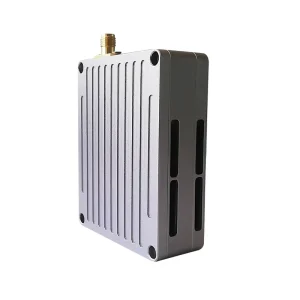
When customers receive a COFDM video transmitter, they often notice a set of technical parameters displayed on the screen or OSD (螢幕顯示). A typical example might look like this:
FREQ: 830MHz
BW: 2MHz
FEC: 2/3
GI: 1/32
MAP: QPSK
ATTEN: 0dB
UART: 19200
EVNE
Channel Lock
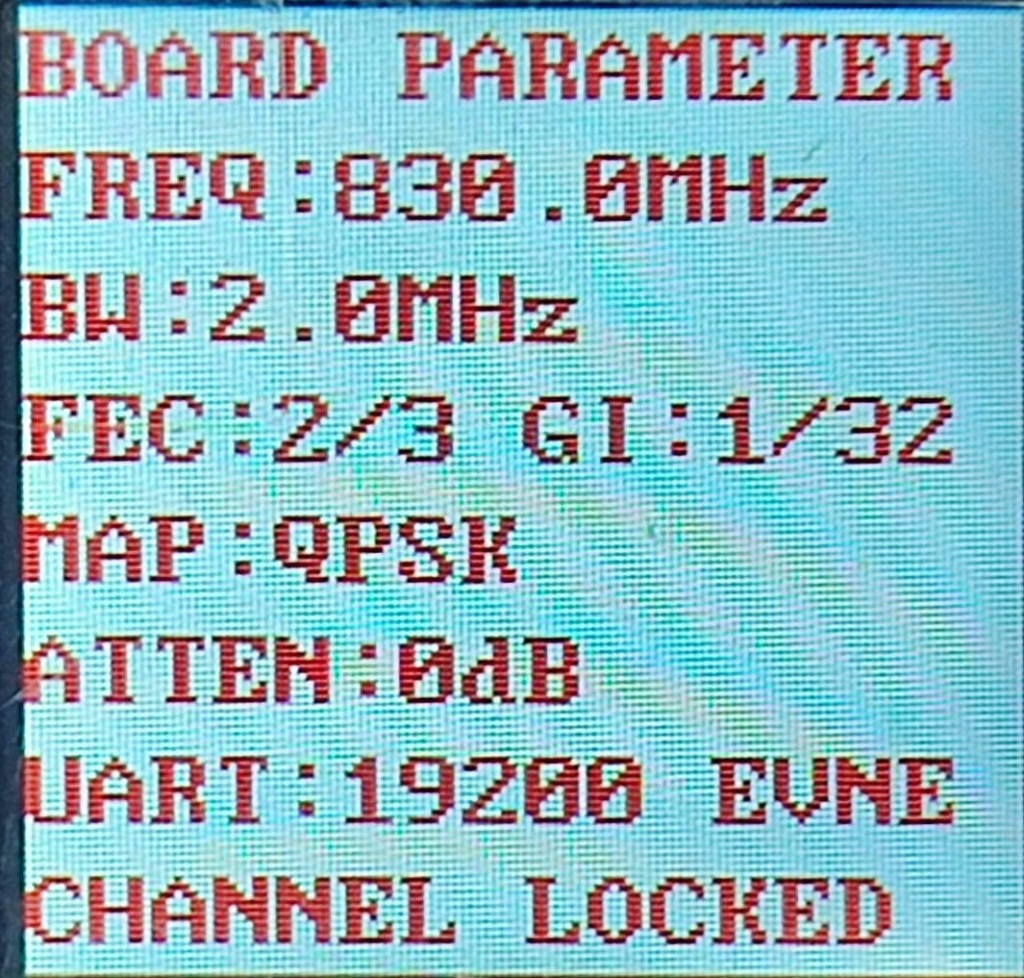
For many users, especially those who are not radio engineers, these values look confusing. 然而, each of them plays a crucial role in how the COFDM transmitter sends stable, low-latency video over long distances.
This article explains all these parameters in detail, what they stand for, and how to adjust them correctly for your application — whether you are using COFDM transmitters for drones, 車輛, or tactical video systems.
FREQ — Frequency
Full Name: 工作頻率
例子: FREQ: 830MHz
This shows the RF center frequency used by the transmitter. It defines where in the radio spectrum the video signal is transmitted.
How it works:
The transmitter modulates the digital video signal into an RF carrier. The receiver must tune to the exact same frequency to demodulate and decode the video.
Typical frequency ranges:
- 300–900 MHz for long-range, 更好地穿透障礙物.
- 1.2 百萬赫, 2.4 百萬赫, 或者 5.8 GHz for short-distance, higher data rate transmission.
Impact:
- Lower frequency (例如, 700–900 MHz): Better penetration and longer range, ideal for drones or mobile units in urban areas.
- Higher frequency (例如, 5.8 百萬赫): 更高的吞吐量, but shorter range and more easily blocked by buildings.
Practical Tip:
Always make sure the transmitter and receiver use exactly the same frequency. Even a 1 MHz difference will cause the receiver to lose lock.
BW — Bandwidth
Full Name: 頻道頻寬
例子: BW: 2MHz
Bandwidth defines how wide the transmitted signal is on the frequency spectrum. It determines how much data (影片 + 控制) can be transmitted at once.
Common values: 1 兆赫, 2 兆赫, 4 兆赫, 8 兆赫.
Explanation:
- 一個 wider bandwidth allows more data throughput, enabling higher-resolution or higher-frame-rate video.
- 一個 narrower bandwidth uses less spectrum and provides longer range and stronger penetration, but at the cost of data speed.
Example comparison:
| 帶寬 | 數據速率 | 範圍 | Suitable For |
|---|---|---|---|
| 1 兆赫 | 低的 | 最長 | Low bitrate or SD video |
| 2 兆赫 | 中等的 | 長的 | HD video over long distance |
| 4 兆赫 | 高的 | 中等的 | High-quality HD or low-latency video |
| 8 兆赫 | 非常高 | 短的 | Close-range or line-of-sight applications |
Practical Tip:
For drone or tactical applications, 2 兆赫 is often the best balance between range and quality.
FEC — Forward Error Correction
Full Name: 前向糾錯
例子: FEC: 2/3
FEC adds redundant information to the transmitted signal so that the receiver can detect and correct errors caused by noise, 干涉, or weak signal conditions.
Typical ratios: 1/2, 2/3, 3/4, 5/6.
Interpretation:
- 1/2 → Strong error protection (half of the data is error correction).
- 5/6 → Weaker error protection but higher throughput.
Effect on performance:
- Lower FEC ratio = more reliable link, less data rate.
- Higher FEC ratio = faster data rate, needs strong signal.
例子:
For long-distance drone transmission, FEC = 1/2 或者 2/3 is ideal.
For short-range, high-quality streaming, 你可以使用 3/4 或者 5/6.
Practical Tip:
If your video occasionally freezes or breaks under weak signal, try lowering FEC to 1/2.
GI — Guard Interval
Full Name: 保護間隔
例子: GI: 1/32
A guard interval is a short pause inserted between COFDM symbols to prevent inter-symbol interference caused by reflections or multipath signals.
Why it matters:
In real-world environments, radio signals bounce off walls, 車輛, or the ground, creating multiple delayed copies of the same signal. Without a guard interval, these reflections would overlap and corrupt the next symbol.
Typical values: 1/4, 1/8, 1/16, 1/32.
Effect:
- Longer GI (例如, 1/4): Better resistance to echoes, ideal for urban or complex terrain, but slightly reduces data rate.
- Shorter GI (例如, 1/32): Higher speed, suitable for open field or direct line-of-sight links.
例子:
If you’re transmitting through buildings or around corners, set GI to 1/8 或者 1/16.
If it’s a clear open field, 1/32 works fine.
MAP — Mapping (調製類型)
Full Name: Constellation Mapping 或者 調製類型
例子: MAP: QPSK
MAP defines how binary data (0s and 1s) are mapped onto the carrier wave — essentially, which modulation scheme is used.
Common modulation types:
- QPSK (Quadrature Phase Shift Keying): Transmits 2 bits per symbol; very stable, suitable for weak signals and long range.
- 16QAM: Transmits 4 bits per symbol; higher throughput, but needs strong signal.
- 64QAM: Transmits 6 bits per symbol; maximum data rate but most sensitive to noise.
Effect:
| 調製 | Bits/Symbol | 數據速率 | Signal Tolerance |
|---|---|---|---|
| QPSK | 2 | 低的 | 出色的 |
| 16QAM | 4 | 中等的 | 緩和 |
| 64QAM | 6 | 高的 | 低的 |
Practical Tip:
For long-range, 移動的, or drone systems, QPSK is the best option.
If your system is fixed and the signal is strong, 16QAM can improve throughput.
ATTEN — Attenuation
Full Name: Transmit Power Attenuation
例子: ATTEN: 0dB
This parameter adjusts the output RF power of the transmitter.
Attenuation simply means how much the signal is reduced before transmission.
How it works:
- 0 分貝 = full output power (no reduction).
- Higher dB value = signal power reduced by that amount.
Effect:
- Lower attenuation (例如, 0 分貝): maximum power, longest range.
- Higher attenuation (例如, 10 分貝): reduced power, useful for short-range testing or avoiding interference.
例子:
When testing indoors, set ATTEN to 10–20 dB to prevent saturating the receiver.
For actual flight or field use, 使用 0 分貝 to maximize range.
UART — Universal Asynchronous Receiver/Transmitter
例子: UART: 19200
UART refers to the serial communication interface used to configure or control the COFDM module through a data cable or host controller.
19200 represents the 波特率 — the communication speed between the transmitter and the controlling device.
Common baud rates: 9600, 19200, 38400, 115200.
目的:
- 參數配置 (頻率, 力量, 頻寬, 等等)
- Firmware upgrades
- Status feedback (訊號強度, 溫度, 等等)
Practical Tip:
When connecting to a PC or microcontroller, ensure both ends use the same baud rate and parity settings (see “EVNE” below).
EVNE — Even Parity
例子: EVNE 或者 EVEN
This refers to the parity bit used in UART communication. It’s a simple form of error detection that ensures data integrity.
選項:
- EVEN (EVNE): 奇偶校驗
- ODD: Odd parity
- 沒有任何: No parity bit
功能:
Parity bits help detect transmission errors during serial communication.
If the parity doesn’t match between the transmitter and the connected device, data may appear as random symbols.
Practical Tip:
Set the same parity (EVEN/ODD/NONE) on both devices to ensure stable communication.
Channel Lock
Display Example: “Channel Lock” or “Lock OK”
This message indicates that the receiver has successfully locked onto the transmitter’s COFDM signal — meaning all parameters (頻率, 頻寬, FEC, 胃腸道, and modulation) match correctly.
If it shows “Unlocked” or “No Lock”:
- Check that both devices have the same 頻率, 頻寬, FEC, 胃腸道, 和 modulation.
- Verify antennas are properly connected.
- Ensure signal strength is above the threshold.
Once “Channel Lock” appears, the receiver can decode the video and output stable image.
Summary Table
| 範圍 | Full Name | 例子 | 功能 | Key Effect |
|---|---|---|---|---|
| 頻率 | 頻率 | 830 兆赫 | Sets RF operating frequency | Must match TX/RX |
| 體重 | 帶寬 | 2 兆赫 | Defines channel width | Affects data rate & 範圍 |
| FEC | 前向糾錯 | 2/3 | Adds redundancy for reliability | Balances speed & 穩定 |
| 胃腸道 | 保護間隔 | 1/32 | 減少多路徑幹擾 | Shorter GI = higher speed |
| 地圖 | Modulation Mapping | QPSK | Sets modulation scheme | Impacts throughput & signal robustness |
| 安泰信 | 衰減 | 0 分貝 | Adjusts transmit power | Higher ATTEN = lower power |
| 串口 | Serial Interface | 19200 | Communication port | Used for control & 設定 |
| EVNE | Even Parity | EVEN | UART parity setting | Prevents serial errors |
| Channel Lock | — | Locked/Unlocked | RF synchronization status | Must lock before video output |
常見問題解答 (常問問題)
Q1. Why do my transmitter and receiver show different FEC or GI values?
They must be identical; 否則, the receiver cannot demodulate the signal. Always confirm FEC, 胃腸道, 頻寬, and modulation match on both ends.
Q2. How can I get longer transmission range?
使用 lower frequency, narrower bandwidth (例如, 2 兆赫), QPSK modulation, FEC = 1/2 或者 2/3, 和 GI = 1/8 或者 1/16. Keep ATTEN = 0 dB for full power.
Q3. My screen shows “No Lock” — what should I do?
Check that TX and RX frequencies match, antennas are firmly connected, and power is sufficient. Also make sure both units use the same bandwidth and modulation.
第四季. Can I increase bandwidth to get better video quality?
是, but this will shorten the range and require higher signal strength. For long-distance, narrow bandwidth is more reliable.
Q5. What’s the best setting for drone COFDM transmission?
For long-range flight:
帶寬: 2 兆赫
調製: QPSK
FEC: 2/3
胃腸道: 1/16
安泰信: 0 分貝
This ensures excellent stability with ultra-low latency.
Q6. What does UART 19200 EVNE mean?
It means the transmitter communicates at 19200 波特率, 使用 偶校驗 for error detection. You must set the same values in your serial control software.
Q7. Is higher modulation always better?
未必. 16QAM or 64QAM give higher speed, but they require strong, clean signals. In weak signal environments, QPSK performs far better.
結論
Understanding these COFDM parameters is essential for getting the best performance from your wireless video system.
Each setting—FREQ, 體重, FEC, 胃腸道, 地圖, 安泰信, 串口, EVNE—affects how your transmitter balances between 範圍, 穩定, 和視頻品質.
For most long-range drone and tactical video applications, the following configuration is recommended:
- 頻率: within 700–900 MHz
- 體重: 2 兆赫
- FEC: 2/3
- 胃腸道: 1/16
- 地圖: QPSK
- 安泰信: 0 分貝
With correct configuration and antenna alignment, COFDM technology can provide robust, 低延遲, non-line-of-sight video transmission in challenging environments.



問一個問題
感謝你的回應。 ✨