





Certain customers prefer using Ethernet ports for data transmission instead of the TX900’s three data ports. This article provides instructions on how to do that.
This document applies to the models below, vân vân.
-
 10W PA 150KM trên không liên kết dữ liệu video tầm xa UAV truyền dẫn không dây thu phát băng thông rộng chiến thuật cầm tay
 -
22km 55km 80km 100km 150km 150km Transment Transciver Transceiver Transceiver Transceiver PA 2W 5W 10W
-
Hai chiều Dữ Liệu Video Không Dây UAV RC Liên Kết Điều Khiển mô-đun tầm xa hai chiều thu phát Bộ Phát-Thu Vcan1681



The TX900 has three serial ports, two of which (D2 and D3) are used for wireless network access through IP addresses. The system includes a built-in serial port server allowing D2 and D3 ports to convert serial data over networks using TCP or UDP protocols. The D2 and D3 serial ports on the TX900 are identified by their port numbers.
Using the TCP protocol, the external device (máy tính) needs to create a TCP client, which can be used after connecting to the target TX900. The external device (máy tính) sends TCP data to the target TX900, which converts this data into serial port data and sends it out. The target TX900 will actively send this data to the TCP client upon receiving the serial port data.
Using the UDP protocol, external devices (computers) need to create a UDP service, and the local and remote port numbers of the UDP service need to correspond one-to-one with the “target port” và “listening port” of the target TX900. The external device (máy tính) sends UDP data to the target TX900, which converts this data into serial port data and sends it out. When the target TX900 receives serial port data, it actively sends this data to the “target port” of the “target IP”, where the “target IP” must be the IP address of the external device (máy tính).
TX900 configuration
Ghi chú: Changing TX900 parameters in the web UI requires restarting TX900 to take effect.
Ví dụ 1: Cổng nối tiếp 2 của TX900-Access Node (IP address: 192.168.1.12) is required to communicate with the TCP khách hàng of the computer (IP address: 192.168.1.50) connected to the remote network port, as shown in the following figure.

In the web UI of TX900-Access Node (địa chỉ IP 192.168.1.12), set the network IP parameters:
IP cục bộ: TX900-Access Node’s own IP address (ví dụ. 192.168.1.12)
Target IP: không bắt buộc

In the web UI of TX900-Access Node, select Serial Port->Serial Port 2->Protocol Select “TCP”, and then click “ĐƯỢC RỒI”.
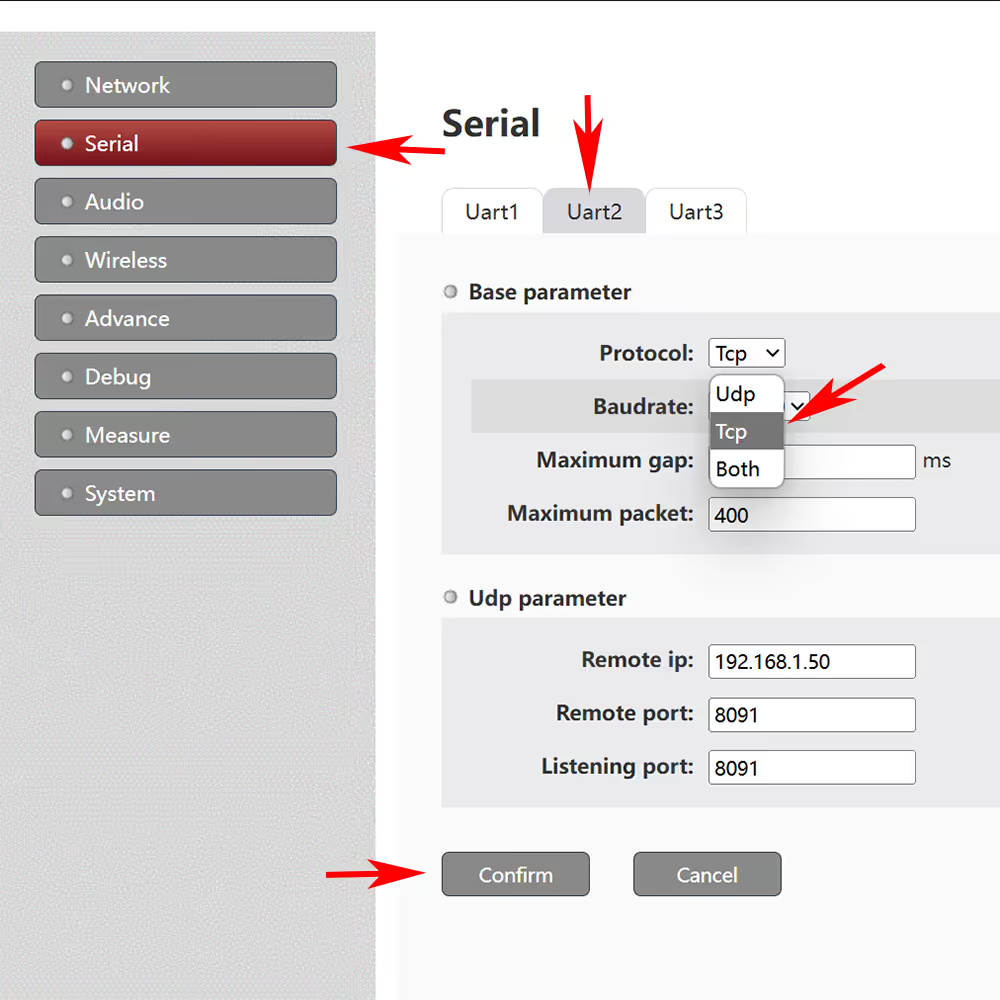
After clicking “ĐƯỢC RỒI”, the interface will display:

When creating a TCP client for a computer connected to a remote network (192.168.1.50), its remote IP address needs to be configured as the IP address of TX900-Access Node (192.168.1.12), and the port number needs to be configured as the TCP parameter “listening port” (chẳng hạn như 2002) corresponding to the serial port of TX900-Access Node (such as serial port 2). Example of remote computer TCP client configuration:
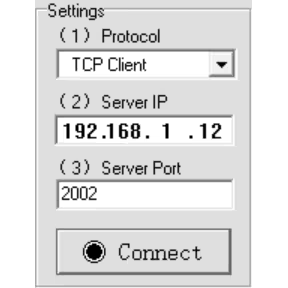
Ví dụ 2: The computer (IP address: 192.168.1.51) that requires cổng nối tiếp 3 của TX900-Access Node to connect to the remote network port công dụng UDP protocol for communication, as shown in the following figure.

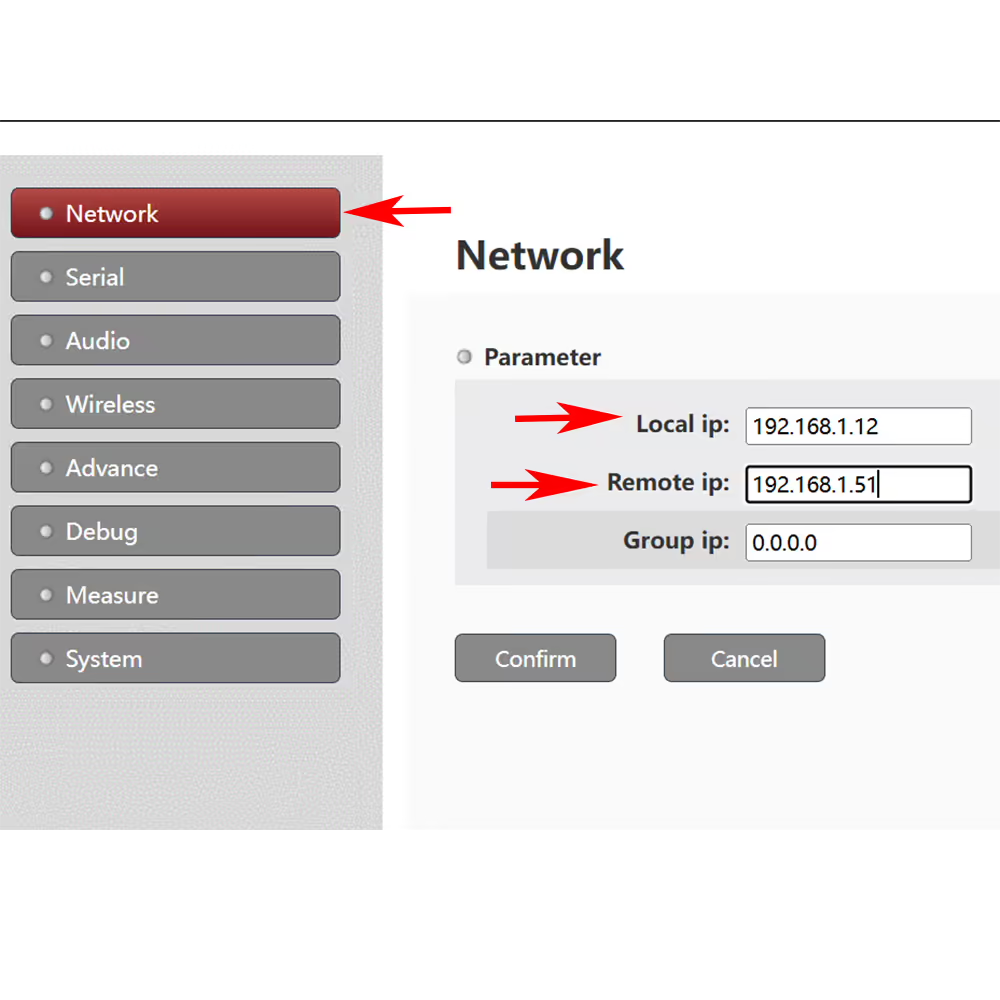
In the web UI of TX900-Access Node, set the network IP parameters:
IP cục bộ: TX900-Access Node’s own IP address (ví dụ. 192.168.1.12)
Target IP: The IP address of the computer connected to the remote network port (ví dụ. 192.168.1.51), which can also be left unconfigured. Configure the target IP address in the specific configuration of serial port 3 dưới.
In the web UI of TX900-Access Node, select Serial Port->Serial Port 3->Protocol Select UDP, and then click OK.
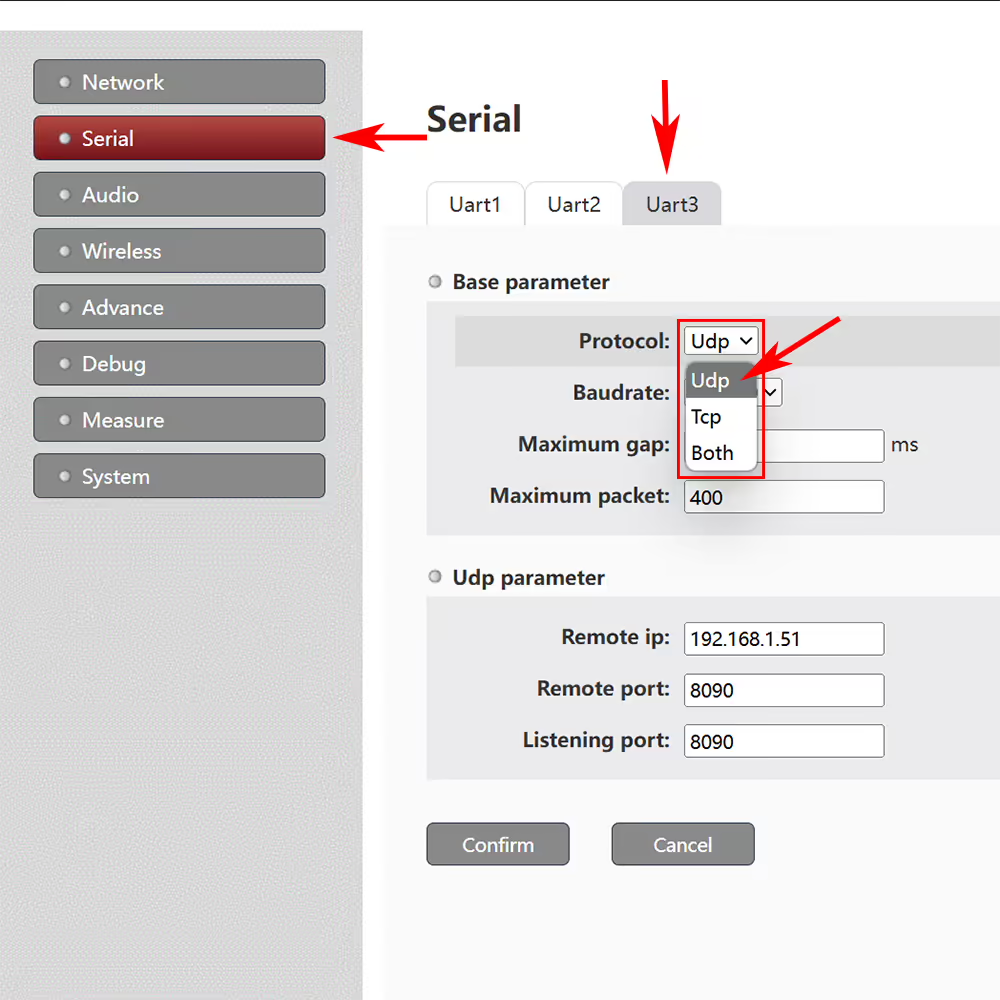
After clicking “ĐƯỢC RỒI”, the interface will display:
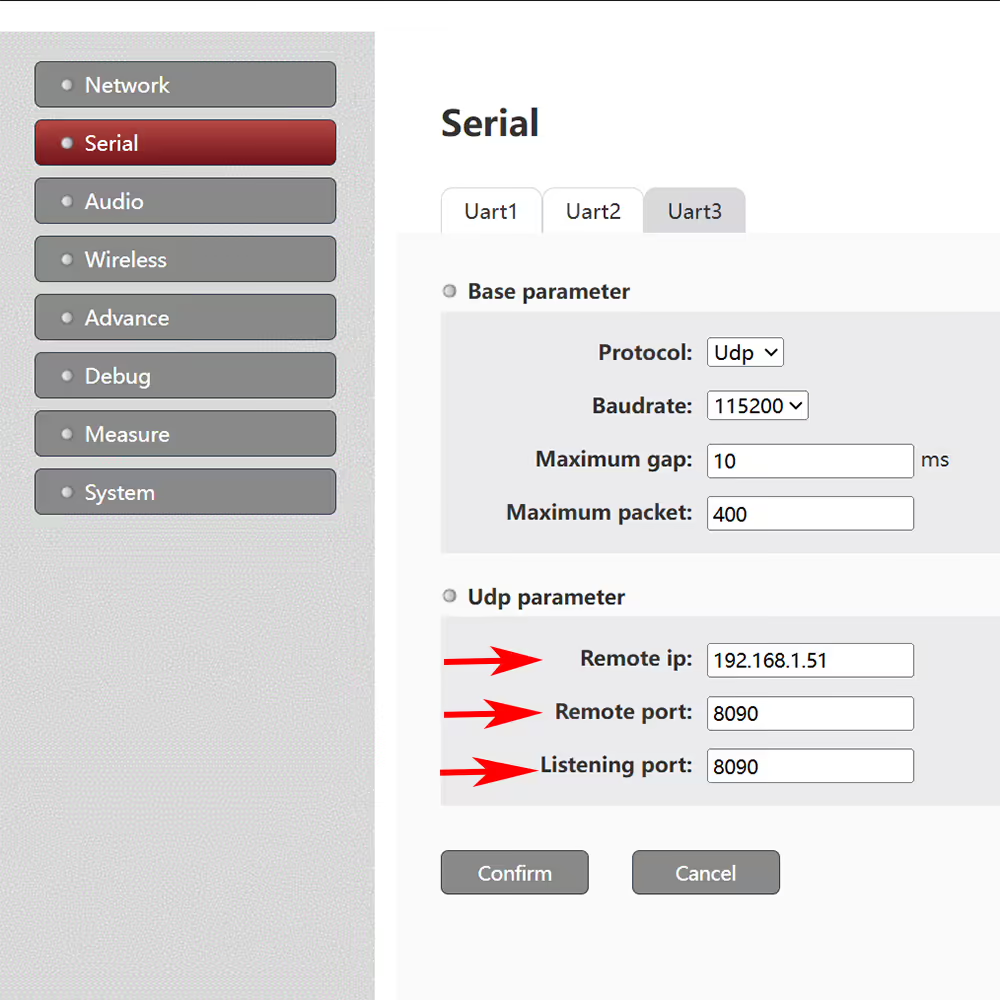
Fill in the IP address of the target computer in sequence (assuming 192.168.1.51), the target port is the UDP local port number of the target computer (assuming 8090), and the listening port is the UDP remote port number of the target computer (assuming 8090).
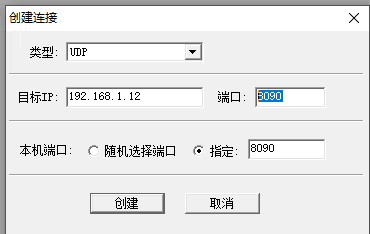
When creating a UDP client on the target computer (192.168.1.51), its target IP address needs to be configured as the IP address of Access Node (192.168.1.12), the remote port number needs to be configured as the listening port of Access Node (assuming 8090), and the local port number needs to be configured as the target port of Access Node (assuming 8090). As shown in the following example:
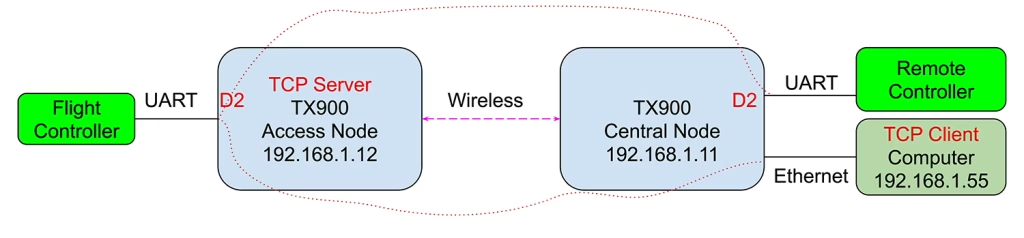
Ví dụ 3: A computer (IP address: 192.168.1.55) that requires cổng nối tiếp 2 của TX900-Access Node to communicate with the remote network port via TCP khách hàng, while also communicating với cổng nối tiếp 2 của xa TX900-Center Node, as shown in the following figure:
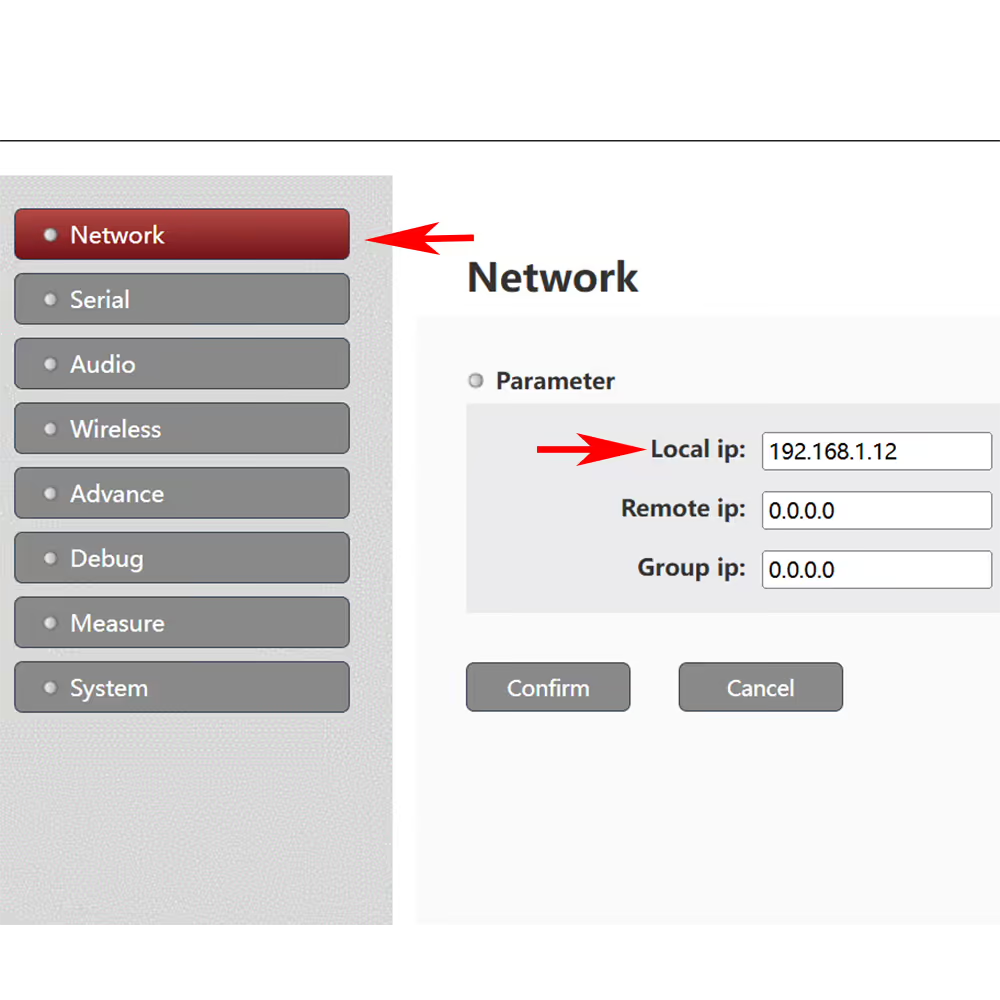
In the web UI of TX900-Access Node, set the network IP parameters:
IP cục bộ: TX900-Access Node’s own IP address (ví dụ. 192.168.1.12)
Target IP: không bắt buộc
In the web UI of TX900-Access Node, select Serial Port->Serial Port 2->Protocol Select “Cả hai”, and then click “ĐƯỢC RỒI”.
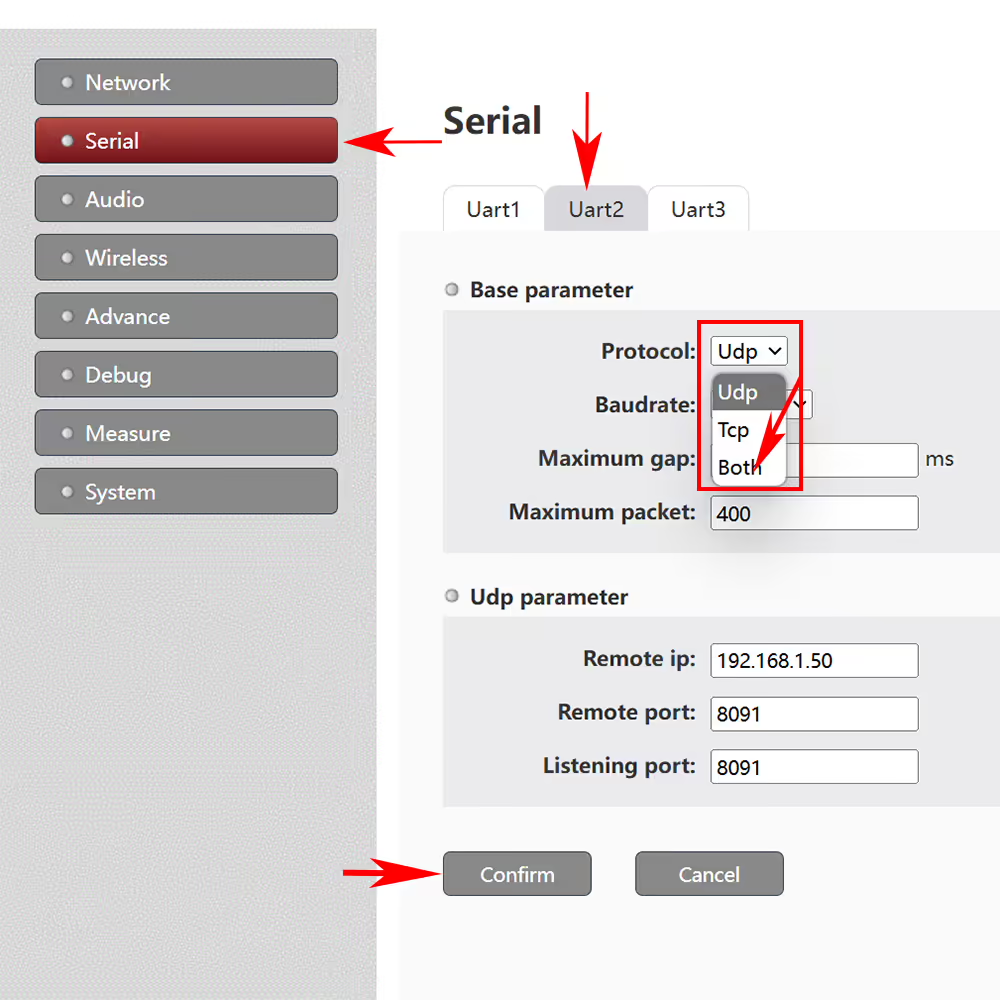
After clicking “ĐƯỢC RỒI”, the interface will display:
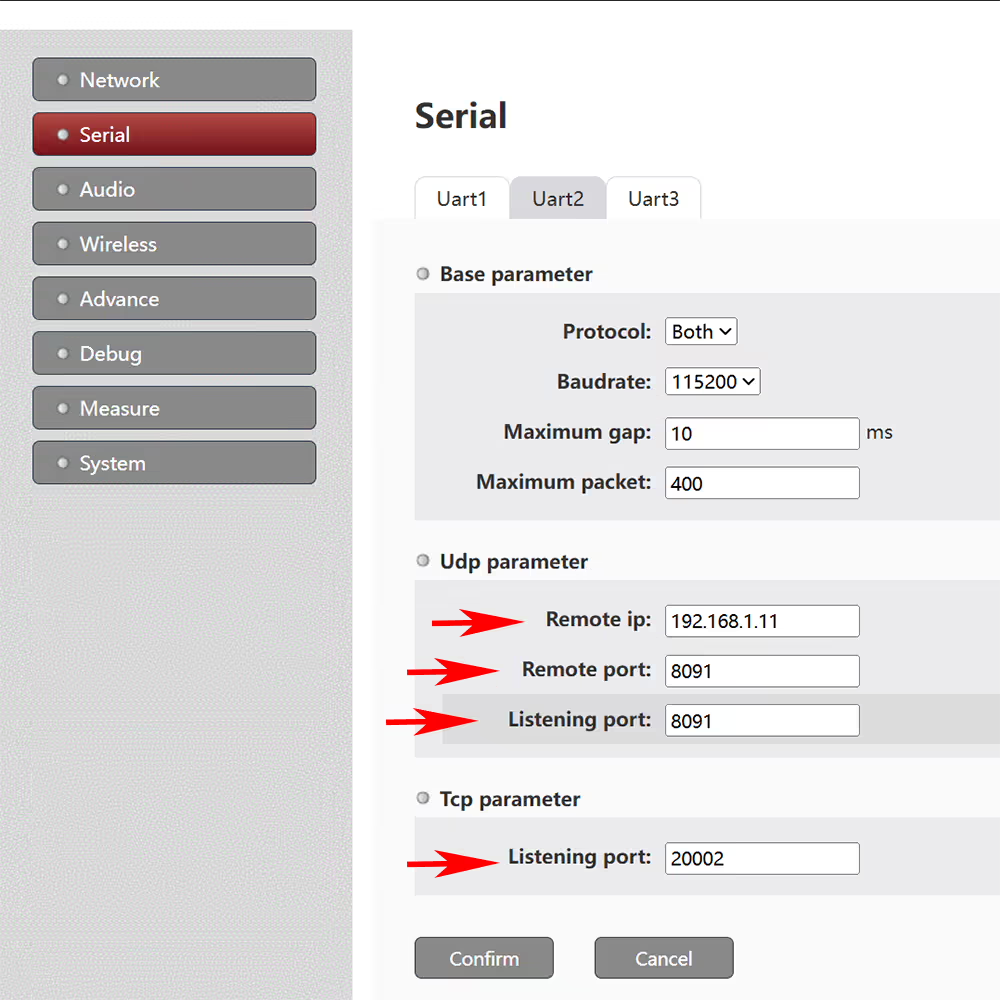
The target IP in the UDP parameters is set to the IP address 192.168.1.11 of the remote TX900-Central Node. The target port is set to be consistent with the D2 serial port listening port of the remote TX900-Central Node, and the listening port is set to be consistent with the D2 serial port target port of the remote TX900-Central Node.
The configuration of serial port 2 for remote TX900-Central Node (192.168.1.11) is as follows, corresponding to TX900-Access Node:
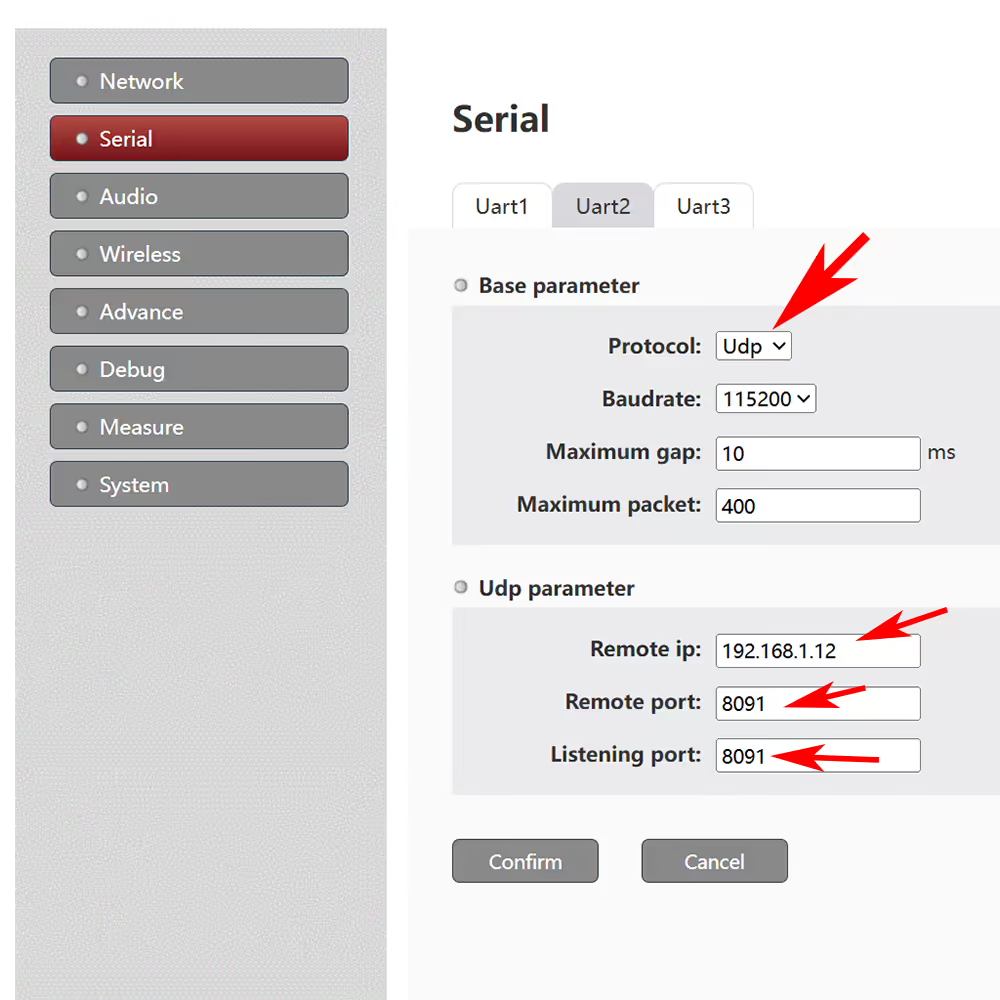
When creating a TCP client for a computer connected to a remote network (192.168.1.55), its remote IP address needs to be configured as the IP address of TX900-Access Node (192.168.1.12), and the port number needs to be configured as the TCP parameter “listening port” (chẳng hạn như 2002) corresponding to the serial port of TX900-Access Node (such as serial port 2).
Đặt một câu hỏi
Tin nhắn của bạn đã được gửi