






สารบัญ
เครื่องรับวิดีโอ FPV
ในวิดีโอนี้, I will show the connection between the FPV VTX transmitter and receiver.
The transmitter parameter configuration tool needs an extra 12V power input. The transmitter also needs a 12V power input.
The programmer screen shows the current transmitter parameter. Through the transmitter’s programmer, you can modify the transmitter’s frequency, แบนด์วิดธ์, รหัสผ่าน, ฯลฯ. If you use it for the first time, you don’t need to change any parameters. The default setting is already the best and tested in the factory.
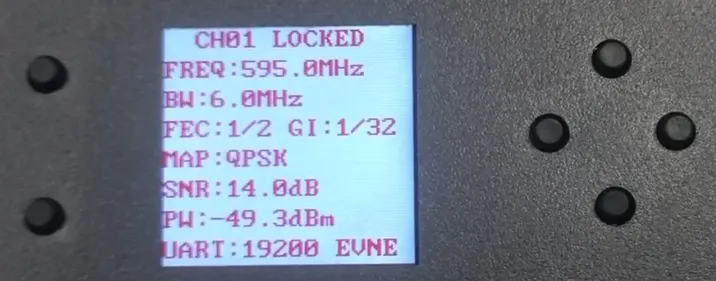
Here is the receiver, which already has a small screen and buttons. The parameters here are the same as the transmitter. There are also SNR and PW values, SNR is signal quality and PW is signal strength.
SNR and PW values are very important. You need to check these parameters frequently.
The programmer and video input on the transmitter share the same input interface. So we first disconnect the power supply of the programmer. Remove the programmer and connect the video input cable. เมื่อใช้งาน, please remember to disconnect the power cord of the transmitter and do not operate it while it is powered on.
Now we give the transmitter a video input signal. Then connect the power to the transmitter. We put the transmitter on a metal sheet to speed up the heat dissipation of the transmitter. บนโดรน, you can use the propeller to dissipate heat towards the transmitter.
Wait a few seconds, and the video signal to appear on the FPV video receiver’s display. The transmitter supports SD 720P video input, และตัวรับสัญญาณรองรับเอาต์พุตวิดีโอ HDMI 1080P. เครื่องส่งไม่ได้ใช้อินพุต HDMI เนื่องจาก SD มีเวลาแฝงต่ำกว่าและมีความเร็วการเข้ารหัสที่เร็วกว่า. เป็นเครื่องส่งสัญญาณ FPV, เวลาแฝงต่ำมีความสำคัญมากกว่าคุณภาพของภาพ 1080P.
เราได้เปลี่ยนสัญญาณวิดีโอด้วยกล้องแล้ว. ภาพวิดีโอมีความเสถียรและสะอาดตามาก, ไม่มีเกล็ดหิมะหรือโมเสก.
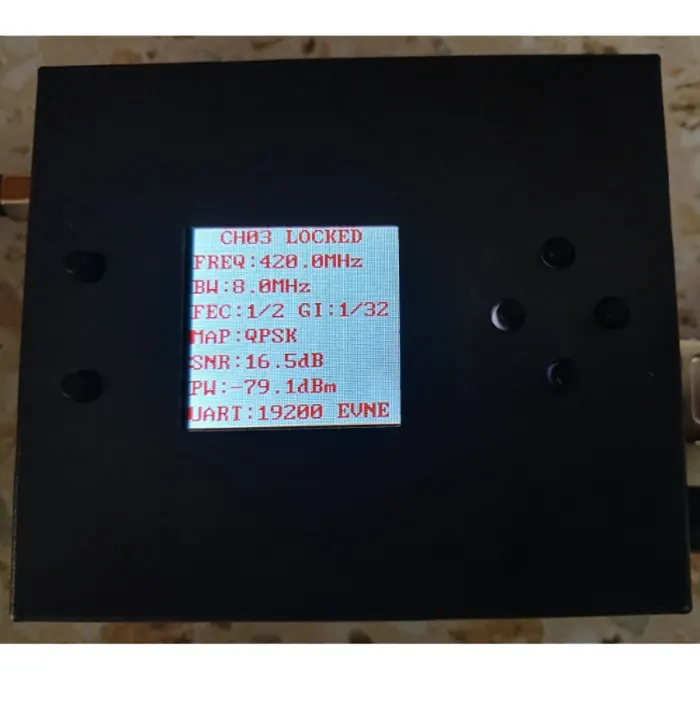

SNR
ค่า SNR แสดงถึงคุณภาพของสัญญาณไร้สายจากเครื่องส่งไปยังเครื่องรับ.
ยิ่งค่า SNR มากเท่าไร, ยิ่งสัญญาณปัจจุบันดีขึ้นเท่านั้น. ค่าที่ต่ำกว่าคือ, ยิ่งสัญญาณปัจจุบันแย่ลงเท่านั้น. เมื่อ SNR ต่ำกว่า 5 ไปยัง 6, the signal from the transmitter to the receiver will be interrupted and the receiver’s picture will stagnate. Or mosaic appears.
ณ ขณะนี้, the height of the receiver’s antenna should be adjusted or the position of the receiver should be moved to overcome some obstacles so that the signal reception is better and the SNR value returns to above 6~7.
The SNR value will only be displayed after the transmitter is powered on. โดยทั่วไป, the SNR value is around 15dB, and the video signal is very stable. If the SNR value is less than 6dB, the video signal will freeze or disappear.
ปวส
Regarding the PW value of the receiver, this parameter can check whether the receiver has interference at the current frequency. There is no need to turn on the transmitter. You only need to connect the receiver antenna and power it on to observe the PW value. If the PW value is -80, the current environment interferes with the receiver antenna. If the PW value is -90, the current environment is very clear and there is no interference to the receiver antenna.
If the PW value is less than -80, it may be because the transmitter is too close. ณ ขณะนี้, you should adjust the distance between the transmitter and the receiver appropriately.
ถามคำถาม
ข้อความของคุณถูกส่งแล้ว