





Spis treści
USB camera video encoder board
Dzisiaj, one client asked me to show him the UVC to the RTSP video encoder board. So in the below video, I show the USB camera work with our video encoder, HDMI CVBS UVC USB to IP ethernet RTSP UDP video encoder, and output living stream.

The web camera is input through USB to the video encoder board, and the video stream is output via the net cable to a computer. On the computer, we use Easyplayer as the RTSP player. Our HDMI / CVBS / USB video input, through the RTSP / UDP video stream output encoder board, also supports the VLC player, but this is universal software, so the delay will be larger.
Our video encoder board also supports the UDP protocol. Besides running an RTSP player on the computer, we also run a UDP player, Rozpylacz. W filmie, we can see that the Splayer that supports the UDP protocol has lower latency. Oczywiście, this delay is at the millisecond level, and the difference is only a few tens of milliseconds. If our decoder board and encoder board are used together, the delay is about 80-100 milisekundy.
Let’s take another look at a USB camera connected to our ultra-low latency encoder board as a video source. The video stream is output to the computer through the network cable and played in real time by using the Easyplayer, which supports the RTSP protocol and the Splayer, which supports the UDP protocol.
For this test, we use a regular USB webcam whose latency was not optimized. If you have a special camera, you can also tell us the camera chip and lens model, and we can also test the real-time delay together.
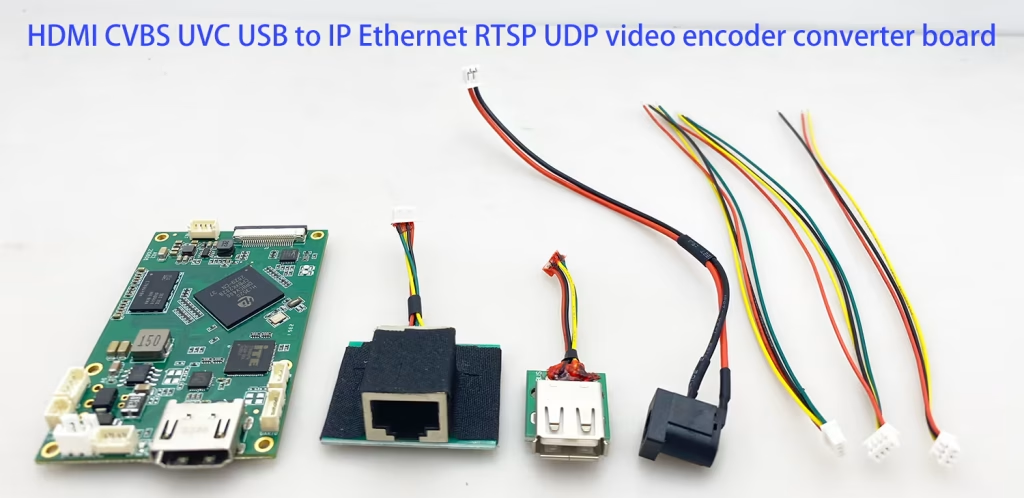
This is another USB camera model. Here is the video input to our video encoder board. The ethernet cable connects our video encoder board and the computer. To the computer, via an RJ45 Network port.
On the computer, we run the LVC player this time. LVC player also supports the RTSP protocol. From the Media menu, select open network stream, and enter the RTSP URL of our default video encoder board.
The primary advantage of UVC to RTSP encoders is their low latency capabilities. Our lower latency video encoder board can achieve latency as low as 60-90 milliseconds for CVBS inputs. 90-130 milliseconds for HDMI inputs, making them suitable for real-time applications such as surveillance and live broadcasting.
Our UVC HDMI CVBS to IP RTSP UDP converter encoders support a variety of input formats, allowing for flexibility in camera selection, for surveillance systems, streaming live broadcasts, videoconferencing, and industrial monitoring.
FAQ
Pytanie 1: I’m working on your encoder. I’m able to get rtsp stream at VLC player and udp stream at Splayer. But i want to receive mpeg-ts udp packet at vlc running on ubuntu.
A1: If the customer does not have special requirements for the firmware when placing order, we will use a custom protocol, which is optimized based on the MPEGTS protocol, has higher bandwidth utilization, supports serial port transparent transmission and AES encryption and decryption, so the DVB-T receivers on the market are not compatible. If you use the VLC player, you can only use the RTSP protocol to get audio and video streams. This firmware also supports the UDP protocol and needs to be played with the Rozpylacz.
If the customer agrees to upgrade the standard MPEG-TS protocol, they can also use the VLC player’s UDP protocol to play.
Jednakże, this standard protocol loses the AES encryption and serial port transparent transmission functions after the upgrade, and cannot be played using the Splayer. VLC player can be used on both Windows and Ubuntu Linux systems.
Pytanie 2: Why does the client need UDP to play MPEGTS streams with VLC?
A2: We need to use the udp stream so that it can work simplex link. How we can use the udp stream to receive on Ubuntu? Please share something from which we can receive the udp stream on Ubuntu PC.
Want to download the standard MPEG-TS protocol firmware for Vcan1746?https://drive.google.com/file/d/1YFhPQM6GcofvjtBWgpe3rY0Gwh7Da3mB/view?usp=drive_link
Jak zaktualizować oprogramowanie układowe karty enkodera?
Please strictly follow the instructions of the webpage upgrade introduction document to complete the two-step upgrade. Do not perform additional operations (such as pressing the upgrade button multiple times) during the upgrade process. Do not turn off the power during the upgrade process.
The usage of VLC player is the same in Windows and Ubuntu, so there is no need to emphasize the system. If you are sure that you must use VLC player’s UDP to play video streams, then you should upgrade the standard MPEG-TS firmware.
- Follow the upgrade instructions above and upgrade to the standard MPEGTS protocol firmware through the web page. Whether the upgrade is successful can be confirmed by accessing the system page of the web server.

- How to get audio and video streams in vlc player: Log in to the webserver of Vcan1746 encoder board, change the remote IP to the IP of PC, and change the protocol to both (to facilitate the demonstration of udp and rtsp protocols at the same time)

- How does VLC player obtain audio and video streams via UDP?

- How does the VLC player obtain audio and video streams via RTSP?

- The usage of VLC player is the same in Windows and Ubuntu.
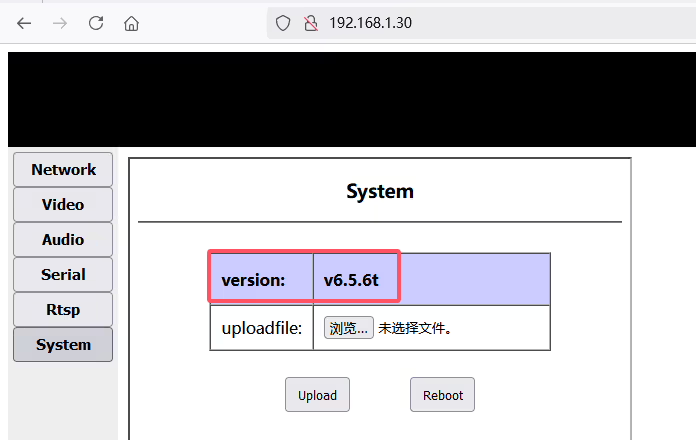
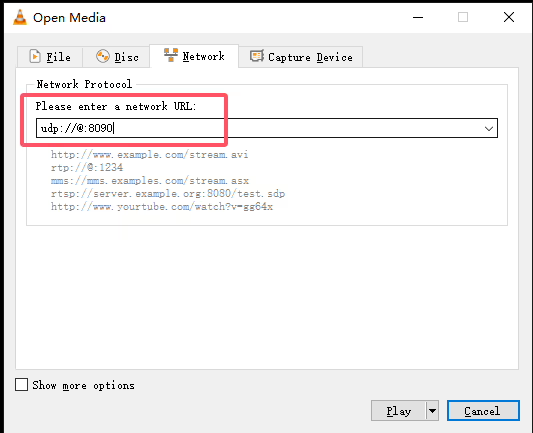
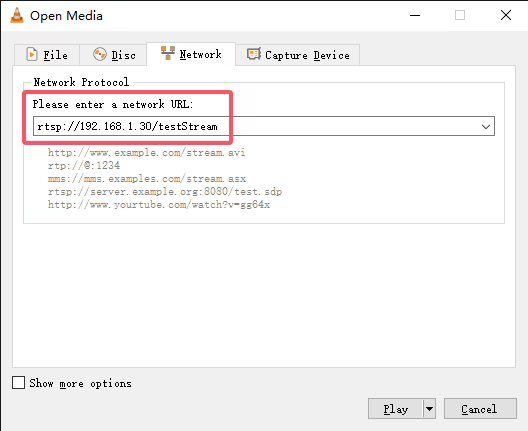
Pytanie 3: I have compiled and run dvb_demux_test app in Linux. I can see that this app setting a thread and receiving udp packets at port 1234. I want to know what it is doing with these packets after that. What dbv functions do with these packets?
A3: Which port number to use depends on the settings of the customer’s encoding board. Na przykład, if the default port number used UDP is 8090, the customer should modify the test program and use 8090 Zamiast.

- Remote IP should be set to the IP address of the PC
- Port can be set by the client, jak na przykład 1234, or the default 8090;
- Protocol should be UDP, lub oba
Pytanie 4: How can I develop a Linux version of the Splayer based on the example you provided?
A4: In parse_pal, the timestamp and nal_type of the video frame nal are analyzed, and it is already a complete video nal.
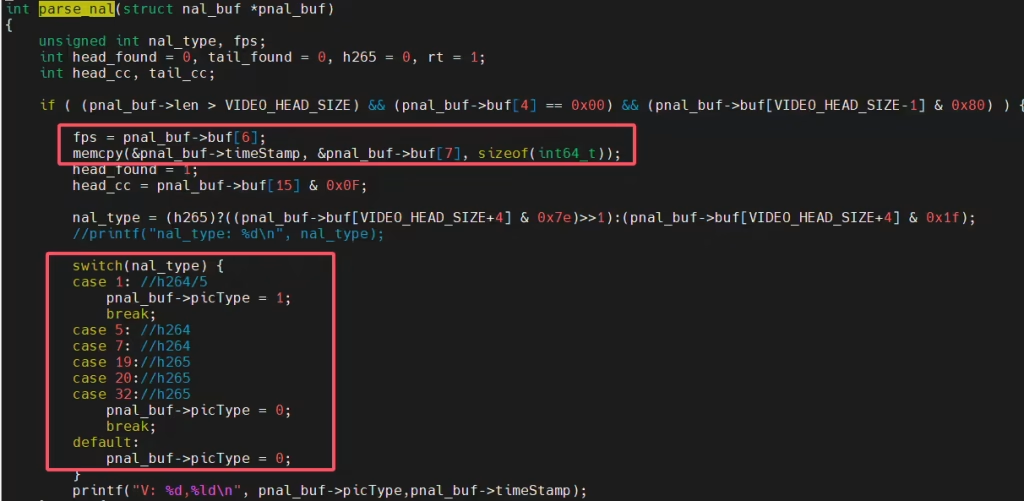
The customer can then call the decoding library he wrote (such as ffmpeg) to decode it.

Możesz odwołać się do naszego splay player SDK (based on Windows system).
dvb_demux_test implements the front-end processing in the Splayer player. A complete player requires the following parts: demux, decode, wyświetlacz, nagrywać. dvb_demux_test implements demux.
Except for demux, which involves our custom protocol and requires us to provide a library, the other parts are open and transparent and can be implemented in different ways. Customers can use ours, such as our Splayer under Windows, or they can use their own (Na przykład, they have written their own player), or even find other individuals and companies that make players to develop them.
Because many customers, even if they develop their own players, may actually call ffmpeg/vlc to implement it, which is just a disguise. W tym przypadku, they can hardly handle the protocols that ffmpeg/vlc does not support (such as our custom protocols) (because they will not develop a player from scratch). Switching to the standard mpegts protocol is feasible for such customers. dvb_demux_test, suitable for customers who want to develop a player from scratch.
Płytki modułów enkoderów









Płytki modułów dekodera




Dostępne do personalizacji
Nowe produkty kodujące
| Nie. | Nazwa produktu | Konfiguracja | Kluczowe cechy | Status |
|---|---|---|---|---|
| 1 | Dwukanałowy koder wideo USB UVC w świetle widzialnym | 2× Wejście USB | Obsługuje kodowanie wideo z podwójnej kamery USB, i strumieniowanie RTSP; lokalne wyjście CVBS/HDMI; przełączalne tryby wyświetlania | Produkcja masowa |
| 2 | Enkoder dwukanałowy (1× Światło widzialne USB + 1× Kamera termowizyjna USB) | 2× Wejście USB | Obsługuje podwójną kamerę USB (widoczny + termiczny) schwytać, kodowanie, i strumieniowanie RTSP; lokalne wyjście CVBS/HDMI; przełączalne tryby wyświetlania | Produkcja masowa |
| 3 | Dekoder RTSP Moduł wyświetlacza HDMI/CVBS | HDMI + Wyjście CVBS | Supports up to 4×1080P@30fps RTSP stream decoding; Obsługa przesyłania protokołu przesyłania strumieniowego wideo; Wyświetlacz wyjścia HDMI/CVBS | Próbka dostępna |
| 4 | Dekoder RTSP Moduł wyświetlacza HDMI/CVBS z 4.3"/5" LCD | Wyjście HDMI + Ekran LCD | Supports up to 4×1080P@30fps RTSP stream decoding; przekazywanie protokołu; Wyświetlacz wyjścia HDMI/CVBS | Debugowanie |
| 5 | Enkoder dwukanałowy (1× Światło widzialne USB + 1× CVBS Analog) | 1× CVBS + 1× Wejście USB UVC | Podwójne wideo (USB + CVBS), kodowanie i strumieniowanie RTSP; lokalne wyjście CVBS/HDMI; przełączalne tryby wyświetlania | Debugowanie |
| 6 | Enkoder dwukanałowy (1×USB UVC + 1× Analog AHD) | 1× AHD + 1× Wejście USB UVC | Podwójne przechwytywanie wideo (USB + AHD), kodowanie i strumieniowanie RTSP; lokalne wyjście CVBS/HDMI; przełączalne tryby wyświetlania | Debugowanie |
| 7 | Enkoder dwukanałowy (1× CVBS + 1× Wideo analogowe AHD) | CVBS + AHD 2 wejście wideo | Podwójne analogowe przechwytywanie wideo, kodowanie i strumieniowanie RTSP; lokalne wyjście CVBS/HDMI; przełączalne tryby wyświetlania | Debugowanie |
| 8 | Enkoder dwukanałowy (1× Kamera CMOS + 1× Kamera termowizyjna USB) | 1× Interfejs USB | Obsługuje CMOS + Przechwytywanie obrazu z kamery termowizyjnej USB, kodowanie i strumieniowanie RTSP; lokalne wyjście CVBS/HDMI; przełączalne tryby wyświetlania | Produkcja masowa |
W przypadku niestandardowych rozwiązań konwersji wejścia/wyjścia wideo, które nie są wymienione w naszych produktach, skontaktuj się z nami, aby uzyskać wsparcie OEM/ODM. Możemy opracować produkty dostosowane do Twoich wymagań.
Zadać pytanie
Twoja wiadomość została wysłana