







USB (UVC) to Analog Video (CVBS) Converter Board
Kamera USB w systemie NTSC / PAL Composite Video Output
Spis treści
Przegląd
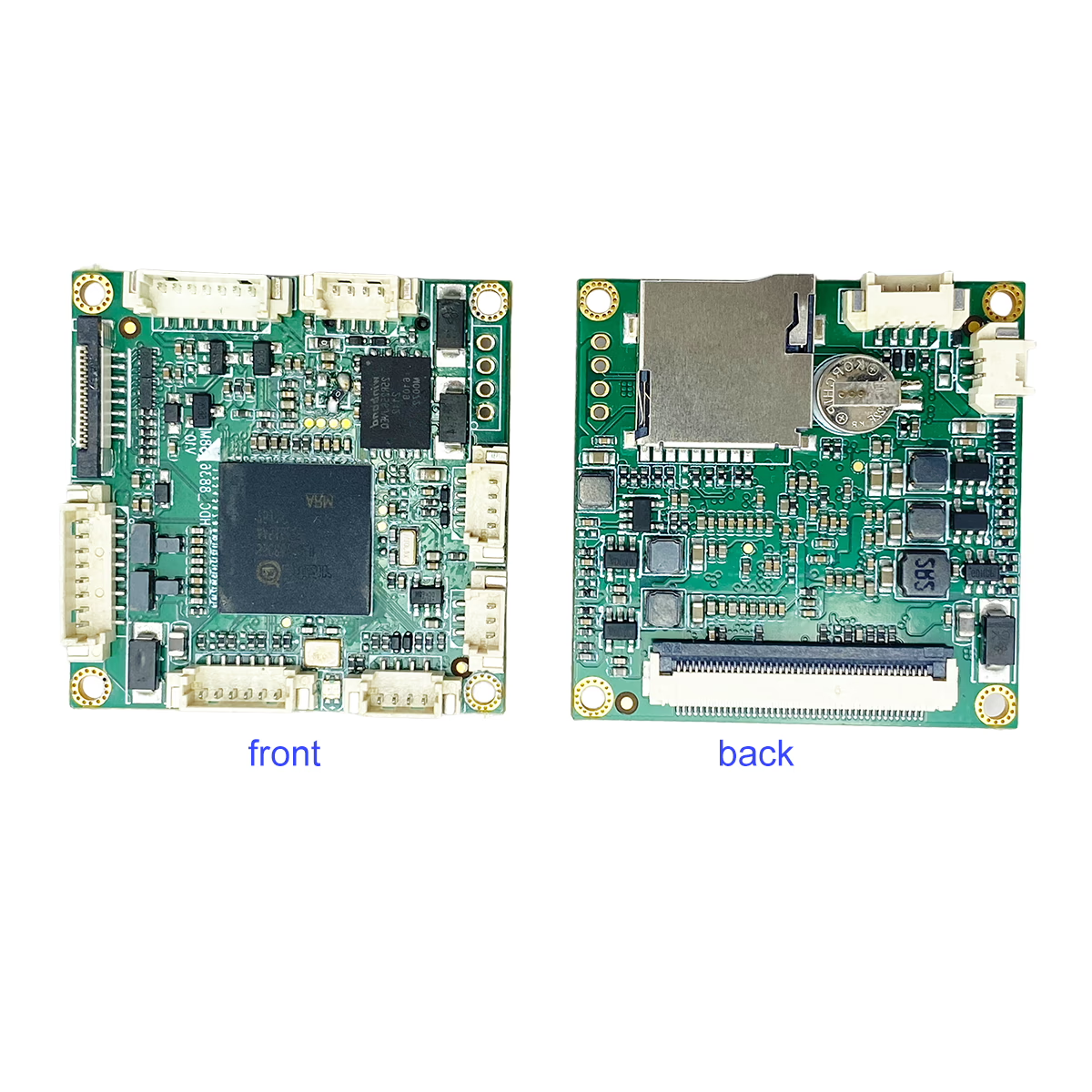
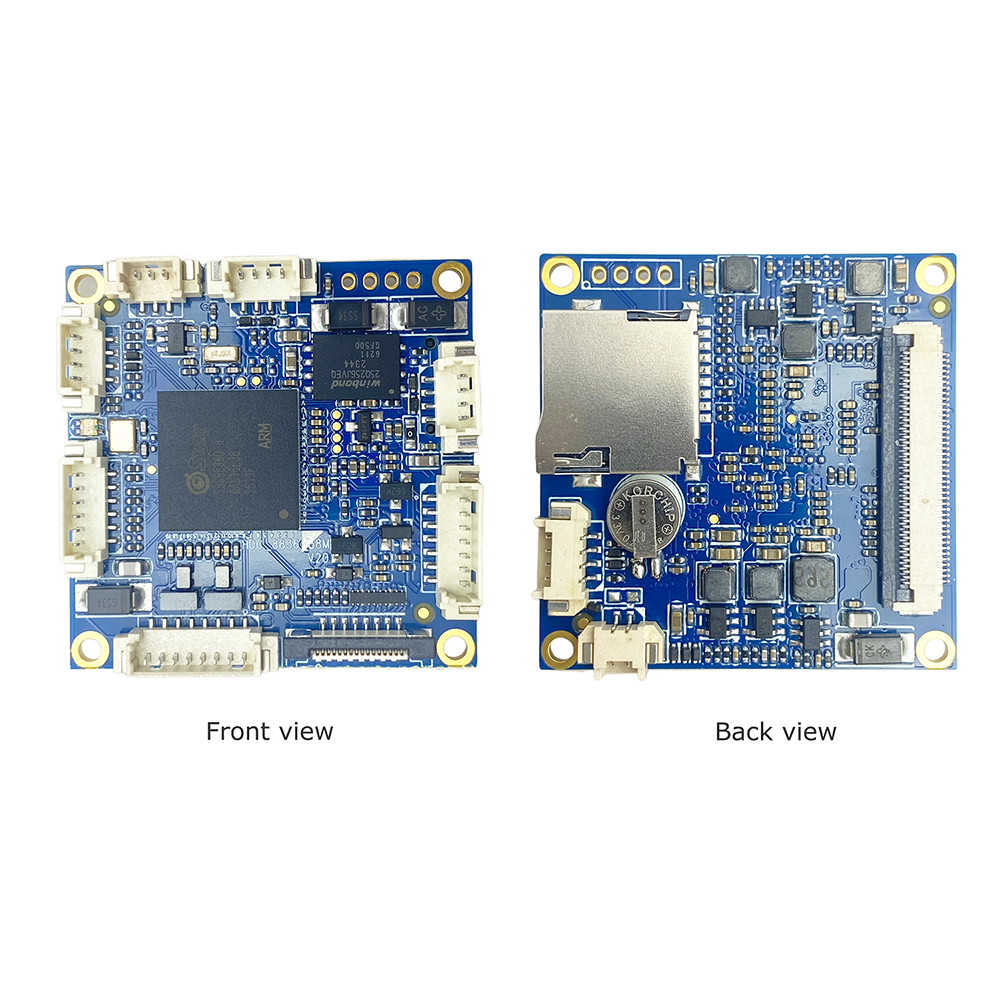
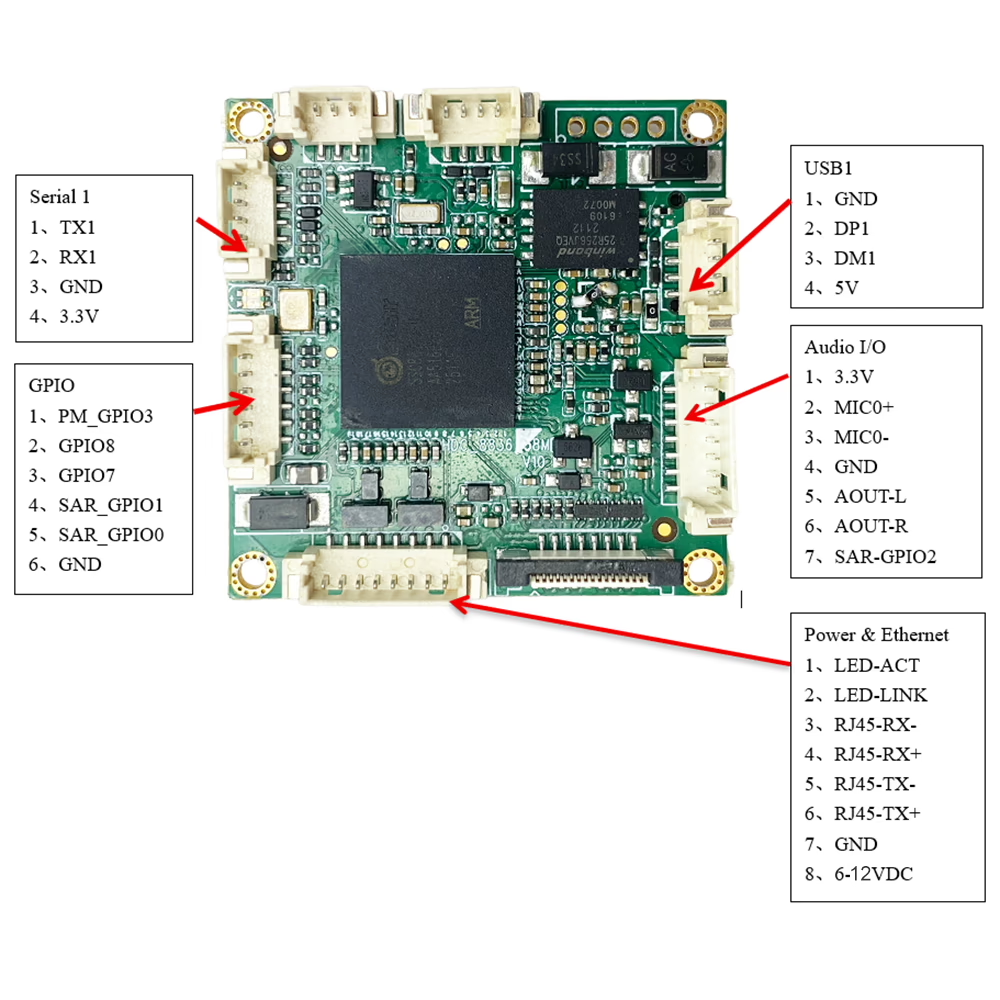
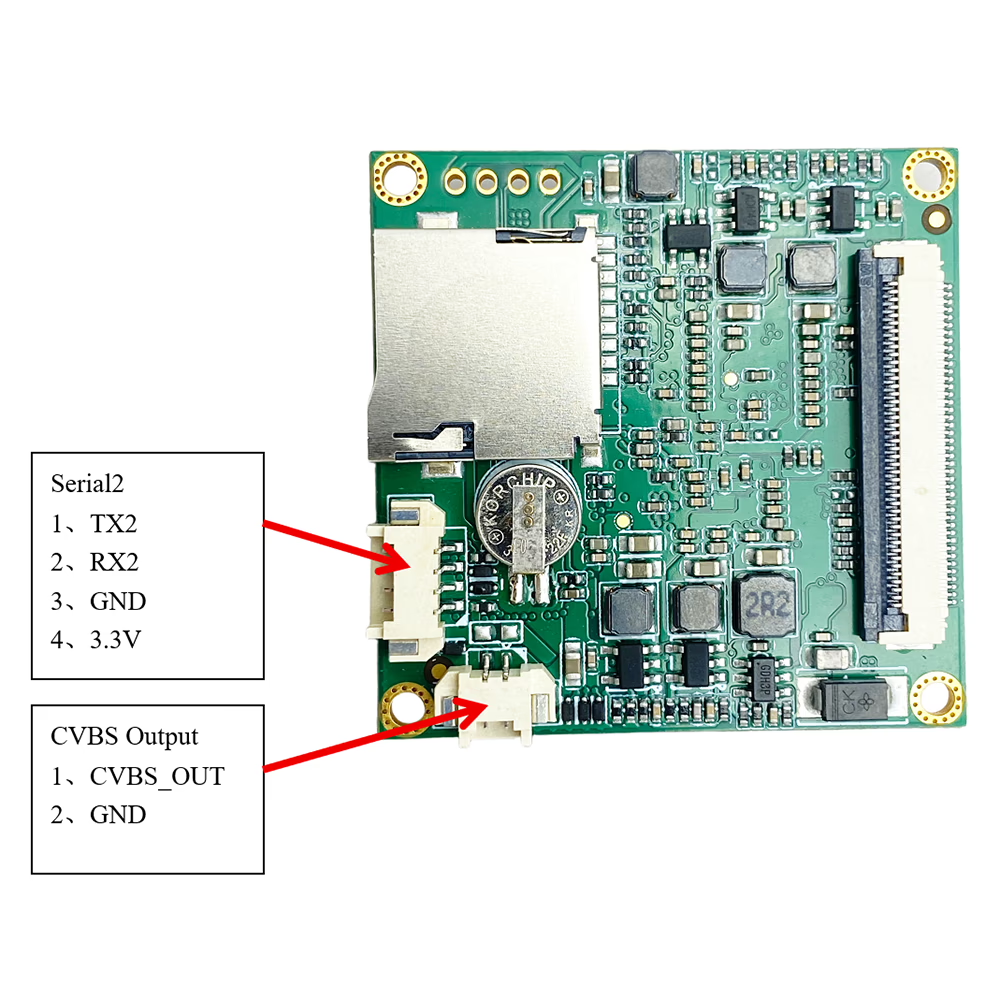
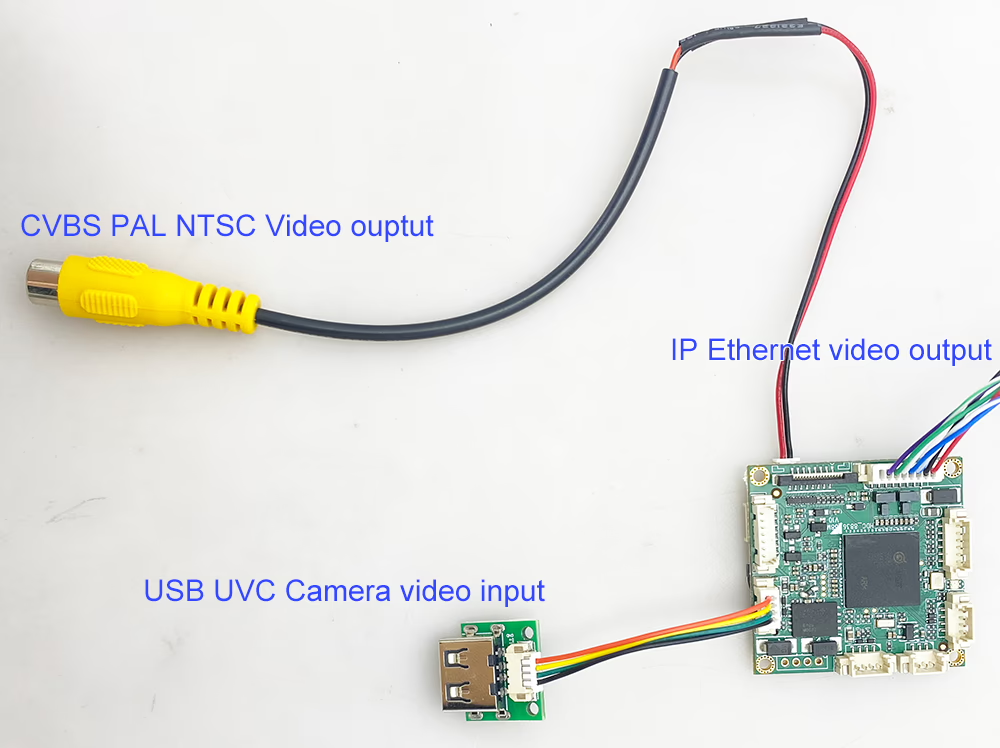
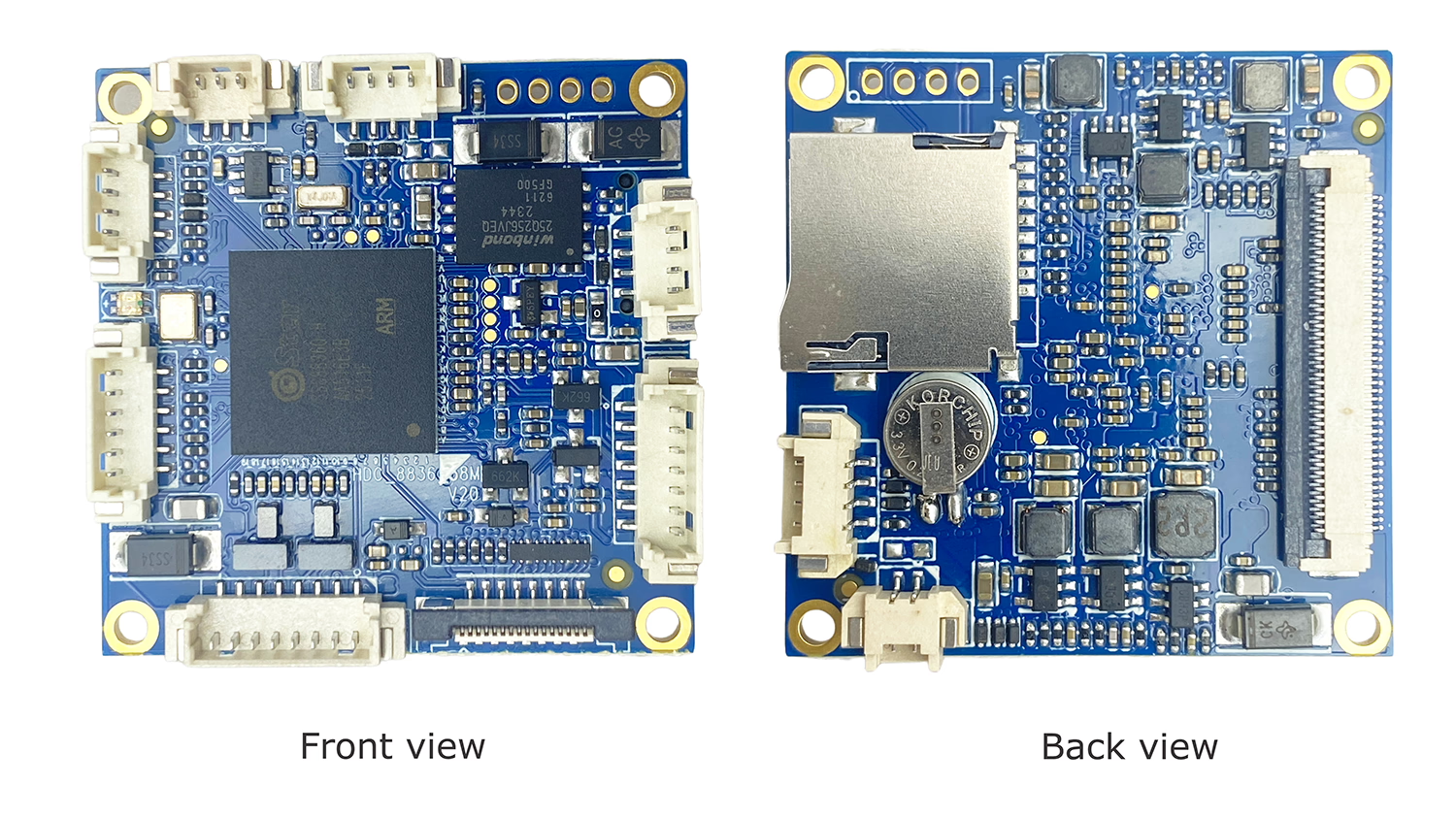
Plik USB (UVC) to Analog Video (CVBS) Converter Board is a compact and reliable video conversion module designed to convert UVC-compliant USB camera video into standard analog composite video (CVBS) wyjście.
This module enables modern USB cameras to be used with legacy analog video systems, supporting both NTSC i PAL standardy. It is ideal for FPV drones, analog monitors, DVR systems, industrial equipment, and embedded platforms where analog video input is required.
With plug-and-play UVC compatibility, low latency processing, and stable CVBS output, this converter board provides a simple and cost-effective solution for USB-to-analog video integration.
Cechy
-
USB (UVC) to CVBS Conversion
Converts UVC USB camera video directly into analog composite video output. -
NTSC / PAL Supported
Supports standard NTSC and PAL CVBS formats for global compatibility. -
Real-Time Video Output
Low-latency USB to analog conversion suitable for FPV and real-time monitoring. -
USB Camera Compatibility
Supports standard UVC USB cameras (visible light and compatible thermal cameras). -
CVBS Video Output Interface
Dedicated AV / CVBS video output connector for easy integration with analog devices. -
Plug and Play Operation
No special drivers required for UVC cameras. -
Kompaktowa konstrukcja
Mały współczynnik kształtu, suitable for embedded systems and space-limited installations. -
Flexible Power Input 6-12V
Designed for stable operation in mobile and industrial environments.
specyfikacje
Model: UVC-CVBS-Converter
Video Input:
-
1 × USB UVC camera input
-
Supports up to 1080P USB camera input (downscaled for CVBS output)
Video Output:
-
1 × CVBS (Composite Video)
-
Output standards: NTSC / KUMPEL
-
Analog video format: CVBS (Z)
Przetwarzanie wideo:
-
Real-time digital-to-analog video conversion
-
Automatic format adaptation for USB camera input
Utajenie:
-
Ultra-low latency suitable for FPV and monitoring applications
Zasilanie:
-
Wejście prądu stałego (customizable based on project requirements)
Temperatura pracy:
-
-20°C do +70°C
Wymiary:
-
Compact embedded board design (OEM customizable)
Aplikacje
-
FPV Drones and UAV Systems
USB camera to analog FPV monitor or video transmitter. -
Analog Monitors and Displays
Enables USB cameras to work with legacy AV displays. -
DVR and Recording Systems
Provides CVBS input compatibility for existing analog DVRs. -
Industrial and Embedded Systems
USB vision devices integrated into analog control platforms. -
Security and Inspection Equipment
Analog video output required for existing infrastructure.

FAQ
Q: Why does the image of my USB video to CVBS PAL video encoder board stay green?
ZA: A green image usually indicates no signal input or that the device is in standby mode. Please check the following:
- Ensure that your source device is powered on and properly connected.
- Verify that the signal cable (np., USB) is not too long or damaged, as excessive length may cause signal interruption.
- Try using a shorter or different cable to see if the issue persists.
- Test via network output: Our USB to CVBS encoder board also supports network video streaming. You can connect it to a network cable and use a VLC player to view the video stream. If the video stream is normal, the issue is likely in the CVBS output or connection. If the stream is still green, the problem is likely with the input signal.
Q: What frame rate does the USB to CVBS converter board use when opening the camera?
ZA: Domyślnie, the board opens the camera at 1920 × 1080 resolution with 30 fps (1080P przy 30 klatkach na sekundę).
If the camera’s maximum supported resolution is lower than 1080P, the board will automatically open the camera at the highest resolution supported by the camera.
Q: Does the board generate log files that customers can upload for troubleshooting?
ZA: The board does not generate detailed log files for upload.
For troubleshooting and debugging, możesz connect through the serial port (UART) to obtain the boot/startup logs, which can then be shared with our support team for analysis.
Q: What should I pay attention to during firmware upgrade? Can the device be recovered if the upgrade fails?
ZA:The device must remain continuously powered during the entire firmware upgrade process. Any interruption—such as power loss, cable disconnection, or system shutdown—may result in firmware corruption and cause the device to stop functioning.
Due to the built-in hardware security mechanism (encrypted authentication), firmware recovery in such cases is extremely difficult and may not be possible without original factory-level tools and authorization. Replacing or reprogramming the chip will not resolve the issue. To avoid this risk, please ensure a stable power supply and do not interrupt the upgrade process under any circumstances.
Q: Can this board support MIPI camera input with CVBS output?
ZA: The board includes a MIPI interface and can be customized to support MIPI camera input with CVBS output. Jednakże, this function is not standard and requires custom hardware configuration as well as dedicated driver and image processing software development based on the specific camera module. To proceed, we must know the exact MIPI camera model you intend to use (including sensor type, rezolucja, and MIPI interface specifications), as the driver must be developed specifically for that camera.
Q: What type of USB cameras are supported?
ZA: The converter supports UVC-compliant USB cameras, including standard visible-light USB cameras and compatible thermal imaging cameras.
Pytanie 2: What analog video formats are supported?
ZA: The board outputs CVBS (Composite Video) i obsługuje oba NTSC i PAL standardy.
Pytanie 3: Does it require drivers or software?
ZA: Nie. Standard UVC cameras are automatically recognized, and video is converted to CVBS output in real time.
Q4: Can I switch between NTSC and PAL?
ZA: tak. The output video standard can be selected based on system or regional requirements.
Pytanie 5: Can I connect more than one USB camera?
ZA: Nie. System obsługuje only one USB camera input. USB hubs or multiple camera switching are not supported.
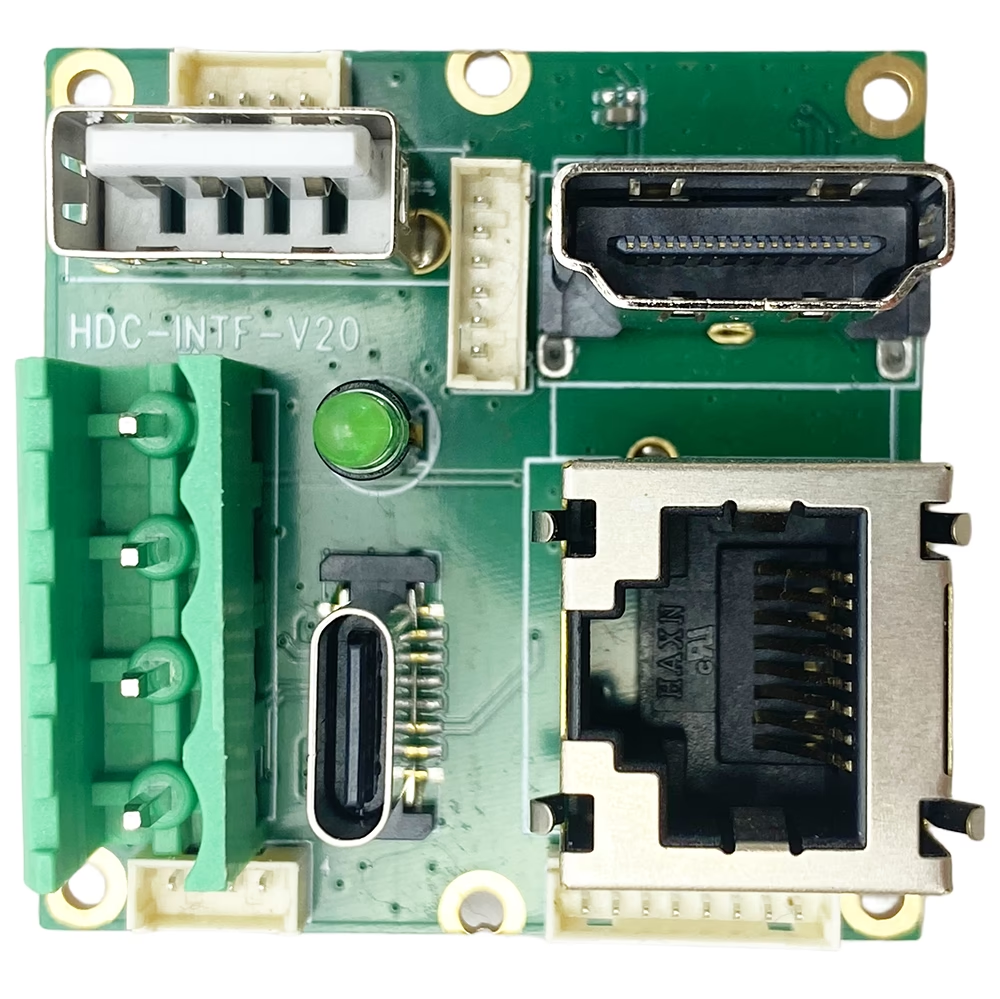
Pytanie 6: Can this module output HDMI or IP video?
ZA: This model is designed specifically for USB to analog CVBS and IP Ethernet video conversion.
If you require Wyjście HDMI, we can provide an additional HDMI output expansion board.
Q7: Is this suitable for FPV applications?
ZA: tak. The low-latency CVBS output makes it suitable for FPV drones, nadajniki analogowe, and real-time monitoring systems.
Pytanie 8: Can the CVBS output connector be customized?
ZA: tak. The CVBS output interface and connector type can be customized for OEM or ODM projects.
Pytanie 9: What is the main purpose of this converter?
ZA: It allows modern USB cameras to be used with legacy analog video equipment that requires NTSC or PAL CVBS input.
Pytanie 10: What is the working temperature range of this USB to CVBS converter?
ZA: The standard operating temperature of this USB to CVBS converter board has been tested and verified to be -20°C do +50°C. This ensures reliable performance for USB camera to analog video conversion in most environmental conditions, including industrial, FPV drone, and embedded system applications.
Obecnie, operation beyond -20°C or above +50°C has not been fully verified. If you require a wider temperature range, please contact us to discuss possible opcje dostosowywania.
Q: What is the video delay (utajenie) of this USB to CVBS converter?
ZA: The video delay of this USB to CVBS converter board is approximately 100 milisekundy. This ultra-low latency ensures smooth and real-time analog video output from a USB camera, making it ideal for applications such as drony FPV, monitoring przemysłowy, DVR systems, and embedded video solutions.
Q: Does the USB-to-CVBS module provide vibration damping or image stabilization for vehicle applications?
ZA: Nie. This module is only a USB video to CVBS conversion board. To prawda not perform any image processing.
Specifically:
-
The module outputs exactly the same image it receives from the USB camera.
-
No vibration damping, no electronic image stabilization (EIS), i no image correction are applied.
-
If the camera image contains vibration or shaking (Na przykład, when installed on a moving vehicle), this vibration will also appear in the CVBS output.
If vibration reduction is required, it must be handled by:
-
ZA USB camera with built-in optical or electronic stabilization, lub
-
Jakiś external image processing system before the USB video is fed into this module.
The USB-to-CVBS board itself functions purely as a video format converter, not an image enhancement or stabilization device.
Q: What remote access and software customization options are supported?
ZA: The device supports Telnet access, but does not support SSH. SDK-based secondary development is not supported, and customer-side software development is not open.
Dla general software requirements or standard functional modifications, customers only need to provide detailed specifications. Nasz engineering team will implement the required changes directly after technical evaluation. No SDK development or programming is required from the customer.
Q: How to upgrade the firmware?
ZA: To install or apply the update, use our IPC Search Windows Tool by following these steps:
- Install and launch IPC Search on a Windows PC.
- Connect the device to the same network as the PC.
- Use IPC Search to detect the device.
- Load the provided upgrade package into the tool.
- Execute the upgrade process via IPC Search.
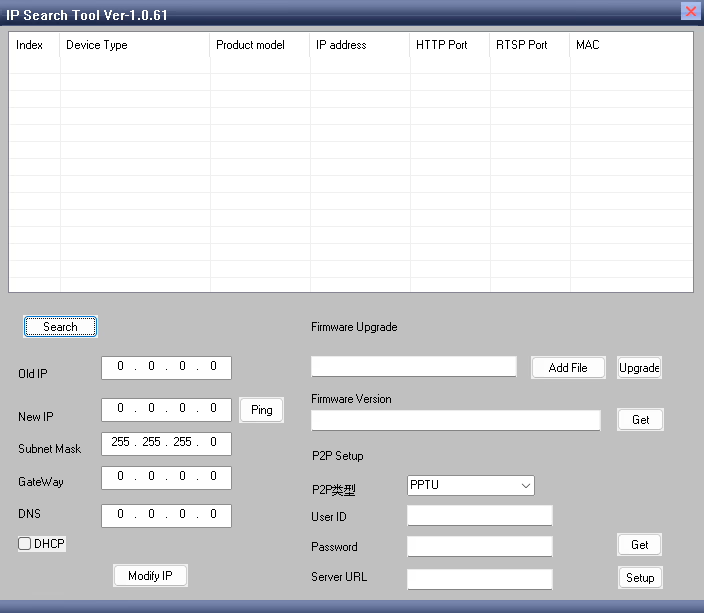
Download link, Narzędzie do wyszukiwania adresów IP no Linux, only Windows OS.
You can use this software to perform various functions, w tym: Setting the gateway, Modifying the IP address, Configuring the P2P server, Performing software upgrades, And other device management tasks.
Q: Why can my USB to CVBS encoder be discovered by the IPC search tool, but I still cannot open the web management page in the browser even after entering the correct IP address?
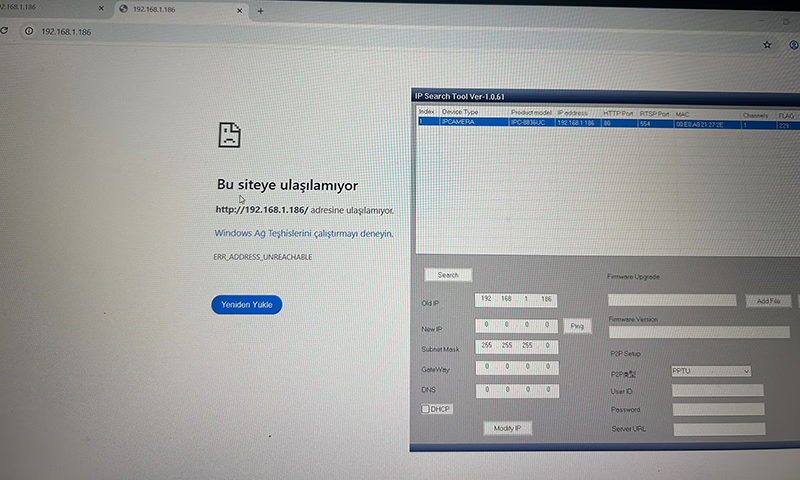
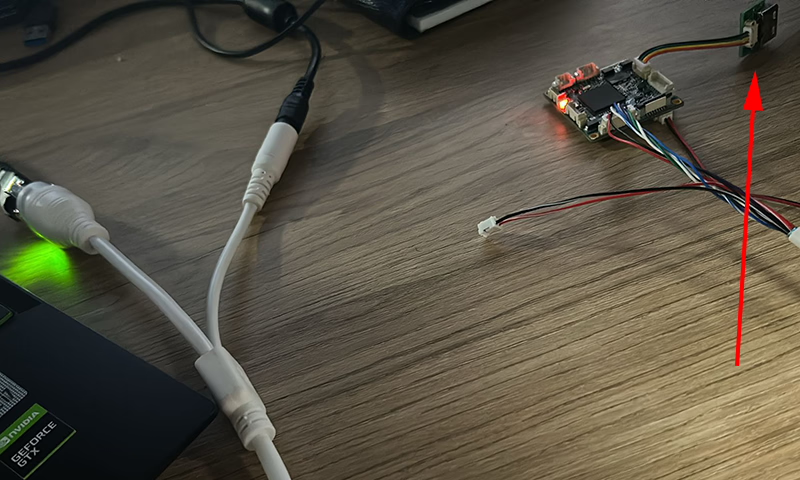
ZA: Based on the images you provided, the USB input is not connected to a camera. When there is no valid USB video source connected, the encoder cannot detect an input signal. W rezultacie, the device will continuously reboot while attempting to identify a USB signal source.
Please connect a USB camera to the encoder. Once a valid video input is detected, the device will operate normally and you will be able to access the web management page through the browser to modify parameters.
Q: How can I remove the time watermark displayed in the top-right corner of the network video stream?
ZA: Please log in to the web management page of the encoder.
Go to the Audio and Video tab, then find OSD Settings.
w Display Time opcja, uncheck the box to disable it.
After saving the settings, the time watermark will no longer be displayed in the video stream.
Płytki modułów enkoderów









Płytki modułów dekodera




Dostępne do personalizacji
Nowe produkty kodujące
| Nie. | Product Name | Konfiguracja | Kluczowe cechy | Status |
|---|---|---|---|---|
| 1 | Dwukanałowy koder wideo USB UVC w świetle widzialnym | 2× Wejście USB | Obsługuje kodowanie wideo z podwójnej kamery USB, i strumieniowanie RTSP; lokalne wyjście CVBS/HDMI; przełączalne tryby wyświetlania | Produkcja masowa |
| 2 | Enkoder dwukanałowy (1× USB Visible Light + 1× Kamera termowizyjna USB) | 2× Wejście USB | Obsługuje podwójną kamerę USB (widoczny + termiczny) schwytać, kodowanie, i strumieniowanie RTSP; lokalne wyjście CVBS/HDMI; przełączalne tryby wyświetlania | Produkcja masowa |
| 3 | Dekoder RTSP Moduł wyświetlacza HDMI/CVBS | HDMI + Wyjście CVBS | Obsługuje dekodowanie strumienia RTSP do 4×1080p przy 30 klatkach na sekundę; Obsługa przesyłania protokołu przesyłania strumieniowego wideo; Wyświetlacz wyjścia HDMI/CVBS | Próbka dostępna |
| 4 | Dekoder RTSP Moduł wyświetlacza HDMI/CVBS z 4.3"/5" LCD | Wyjście HDMI + Ekran LCD | Obsługuje dekodowanie strumienia RTSP do 4×1080p przy 30 klatkach na sekundę; przekazywanie protokołu; Wyświetlacz wyjścia HDMI/CVBS | Debugowanie |
| 5 | Enkoder dwukanałowy (1× USB Visible Light + 1× CVBS Analog) | 1× CVBS + 1× Wejście USB UVC | Podwójne wideo (USB + CVBS), kodowanie i strumieniowanie RTSP; lokalne wyjście CVBS/HDMI; przełączalne tryby wyświetlania | Debugowanie |
| 6 | Enkoder dwukanałowy (1×USB UVC + 1× Analog AHD) | 1× AHD + 1× Wejście USB UVC | Podwójne przechwytywanie wideo (USB + AHD), kodowanie i strumieniowanie RTSP; lokalne wyjście CVBS/HDMI; przełączalne tryby wyświetlania | Debugowanie |
| 7 | Enkoder dwukanałowy (1× CVBS + 1× Wideo analogowe AHD) | CVBS + AHD 2 wejście wideo | Podwójne analogowe przechwytywanie wideo, kodowanie i strumieniowanie RTSP; lokalne wyjście CVBS/HDMI; przełączalne tryby wyświetlania | Debugowanie |
| 8 | Enkoder dwukanałowy (1× Kamera CMOS + 1× Kamera termowizyjna USB) | 1× Interfejs USB | Obsługuje CMOS + Przechwytywanie obrazu z kamery termowizyjnej USB, kodowanie i strumieniowanie RTSP; lokalne wyjście CVBS/HDMI; przełączalne tryby wyświetlania | Produkcja masowa |
W przypadku niestandardowych rozwiązań konwersji wejścia/wyjścia wideo, które nie są wymienione w naszych produktach, skontaktuj się z nami, aby uzyskać wsparcie OEM/ODM. Możemy opracować produkty dostosowane do Twoich wymagań.
Q: What is IR_CUT mode?
ZA: IR_CUT mode supports external IR LED lights. Our encoder board can control external infrared LEDs to enhance the camera’s illumination, improving visibility in low-light or nighttime conditions. It also enables automatic switching between color (day) and infrared (noc) tryby, allowing the camera to provide clear images in both bright and dark environments.
Q: Besides the USB to CVBS card, what other analog video outputs are supported? Does it support AHD?
ZA: Obecnie, this device only supports CVBS (PAL/NTSC) output and IP Ethernet RTSP video streaming. AHD, TVI or other analog video outputs are not supported.




iVcan.com –
This USB to CVBS converter exceeded my expectations in both performance and ease of use. The device seamlessly converts USB camera feeds to NTSC/PAL composite video, which was perfect for my FPV drone system. Video quality is excellent, and the latency is extremely low, allowing real-time monitoring without delay. Setup was quick and intuitive, and the compact design made installation very convenient. I highly recommend this converter board for anyone who wants a stable, wysokiej jakości, and efficient solution for integrating USB cameras with analog video equipment.