





GStreamer를 이용한 RTSP 스트리밍 – 실제 고객 Q&사례 (UDP 대 TCP)
This article documents a real customer support conversation regarding RTSP streaming from our 열화상 카메라 사용하여 G스트리머.
We are sharing it in a 큐&A dialog format so other customers facing similar issues can quickly follow the troubleshooting process.
목차
1. RTSP Stream Address
Customer:
안녕하세요, we received your thermal cameras, everything works fine, 감사합니다, but we can’t seem to find the address for the RTSP stream. What is the /stream/sub?
지원하다:
Our camera RTSP stream URL is:
rtsp://192.168.2.254:554/live
2. RTSP Latency Concern
Customer:
We tested the RTSP stream and noticed considerable latency compared to the management panel preview.
지원하다:
This is expected behavior. The web management preview uses an internal optimized pipeline, while RTSP depends on network conditions and client buffering.
3. UDP Streaming Requirement
Customer:
The RTSP stream also doesn’t work on my player that expects UDP. How can I get a UDP stream?
지원하다:
May I know what player you are using? VLC?
Customer:
My player is GStreamer integrated in an Android app.
4. UDP Unicast vs UDP Multicast
지원하다:
If the GStreamer client accesses the device using UDP 멀티캐스트, this is currently 지원되지 않음.
We need to clarify whether you are using UDP unicast 또는 UDP 멀티캐스트.
Customer:
My GStreamer pipeline uses rtspsrc ~와 함께 udp set in the protocols 매개변수.
I did not use the udp-mcast value, so it should be UDP unicast.
5. Platform Clarification
지원하다:
Is this GStreamer running on Windows, 리눅스, or Android?
Our software engineer would like to test on our side.
Customer:
My app uses GStreamer on Android, 하지만 rtspsrc can also be tested on Linux.
6. Known Linux GStreamer Issue (Reference Case)
지원하다:
We found a similar issue discussed in a Chinese technical forum.
해결책:
Uninstall the following plugin:
sudo apt-get remove gstreamer1.0-plugins-ugly
This plugin may send RTSP headers that some cameras cannot recognize, resulting in a denial-of-service error.
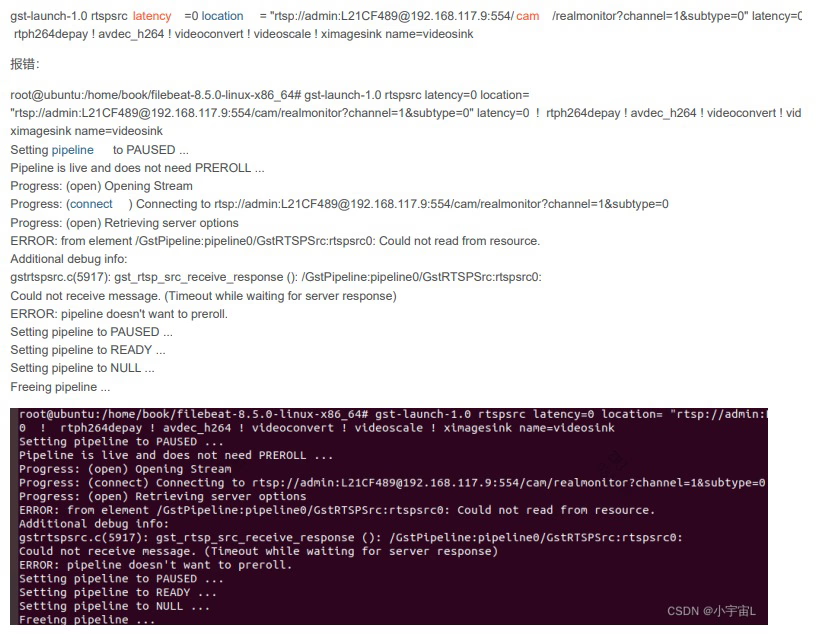
Reference:
https://forums.developer.nvidia.com/t/rtsp-gstreamer-simple-recieve-and-store-in-file/157535/14
Could you provide your rtspsrc pipeline (Linux preferred)? An app version is also acceptable for testing.
7. RTSP DESCRIBE Header Compatibility
지원하다:
Another possible reason is that if the RTSP DESCRIBE request does not contain:
application/sdp
the device may refuse the service.
This validation logic may be too strict, and we plan to relax this condition in future firmware updates.
8. Android GStreamer Version Confirmation
Customer:
On Android, I am using:
- gstreamer-1.0-android-universal-1.26.8
It does not include ugly plugins. My Makefile contains:
GSTREAMER_PLUGINS := \
    coreelements \
    playback \
    typefindfunctions \
    rtsp \
    rtp \
    rtpmanager \
    udp \
    tcp \
    videoparsersbad \
    androidmedia \
    opengl
9. Suggested GStreamer Runtime Parameters
지원하다:
We recommend trying short-header=true ...에서 rtspsrc.
Customer:
Is that header for UDP?
지원하다:
It is an RTSP header option and often improves compatibility.
Examples:
gst-launch-1.0 rtspsrc location=rtsp://<ip>:<port>/<path> short-header=true
gst-launch-1.0 rtspsrc location=rtsp://<ip>:<port>/<path> do-rtcp=false short-header=true
10. Internal Test Results (리눅스)
지원하다:
Our engineer tested the RTSP stream using G스트리머 1.0 on Linux, and it worked correctly.

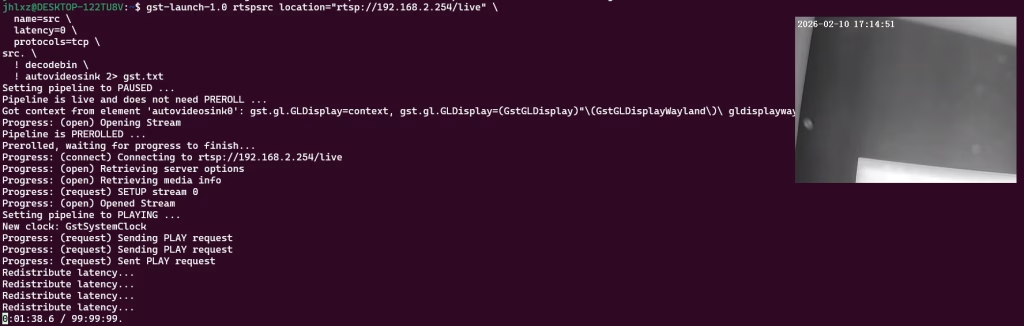
TCP example:
gst-launch-1.0 rtspsrc location="rtsp://192.168.2.254/live" \
  name=src \
  latency=0 \
  protocols=tcp \
src. \
  ! decodebin \
  ! autovideosink
UDP example (remove protocols=tcp):
gst-launch-1.0 rtspsrc location="rtsp://192.168.2.254/live" \
  name=src \
  latency=0 \
src. \
  ! decodebin \
  ! autovideosink
The internal logic between Linux and Android GStreamer is the same, so behavior should be consistent across platforms.
11. 결론
This case highlights several important points when using RTSP with GStreamer:
- RTSP URL:
rtsp://<camera_ip>:554/live - UDP unicast 지원됩니다; UDP multicast is not
- Avoid problematic plugins (Linux only)
- 노력하다
short-header=truefor better compatibility - Linux test results can generally be applied to Android
If you encounter similar issues, please provide your GStreamer pipeline or test client, and our engineering team will assist further.
질문하기
응답해 주셔서 감사합니다. ✨