





HDMI AV IP 스트림 RTSP UDP 출력을 갖춘 COFDM DVB-T 다이버시티 무선 비디오 수신기

목차
특색
-
Dibcom 9090 Demodulator Tuner Chipset
-
지원 diversity reception for improved stability and signal quality.
-
호환 가능 DVB-T COFDM standard 오직 (하다 ~ 아니다 support DVB-T2).
-
-
비디오 출력 옵션
-
지원 HDMI digital video output.
-
지원 CVBS analog video output for legacy devices.
-
-
네트워크 스트리밍
-
통합 RJ45 이더넷 인터페이스.
-
지원 RTSP and UDP video streaming for IP network applications.
-
DiBcom and Sony tuner chipset support diversity, but stopped to produce. So the cost is not cheaper.
사용자 정의 가능한 옵션
-
Video Output Configuration
-
Choice between HDMI digital output, CVBS analog output, 아니면 둘 다.
-
Resolution and frame rate settings for HDMI output.
-
-
Network Streaming Options
-
Enable or disable RTSP streaming.
-
Enable or disable UDP streaming.
-
Custom network port configuration for RTSP/UDP streams.
-
-
조율사 & Reception Settings
-
Frequency band selection within DVB-T range.
- Add frequency down converter to support 860-6000MHz.
-
Adjustable RF gain or sensitivity settings.
-
Diversity reception options (single vs. dual antenna configuration).
-
-
물리적 & 인터페이스 옵션
-
Housing type and size (예를 들어, 콤팩트, rack-mount).
-
Connector types for HDMI, CVBS, and Ethernet.
-
Optional external antenna connectors for enhanced reception.
-
-
펌웨어 & 소프트웨어 맞춤화
-
Custom GUI or web interface branding.
-
Pre-configured channel lists or scanning behavior.
-
Integration with existing IP monitoring or NVR systems.
-
-
전원 옵션
-
Voltage range customization (예를 들어, 5V, 12V, POE support).
-
Power-saving modes or remote power control.
-
자주하는 질문
- Why doesn’t the second LED flash?
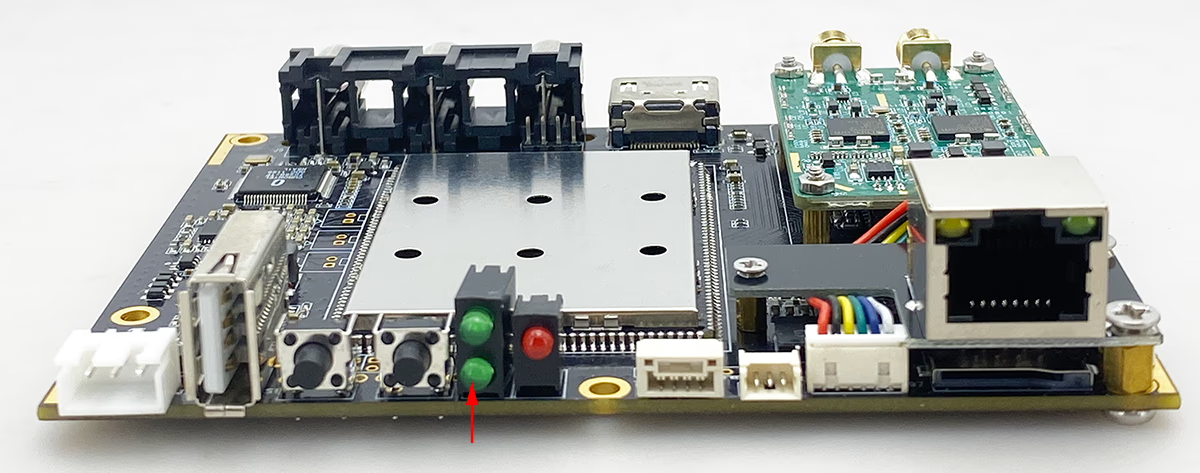
The light at the bottom is the recording LED. Earlier firmware versions used fast flashing and slow flashing to indicate recording status. Customer feedback suggested this wasn’t clear enough, so we’ve switched to off and on to indicate recording status. This LED only indicates the recording status; don’t overly focus on it; 대신에, pay attention to the working status indicator above.
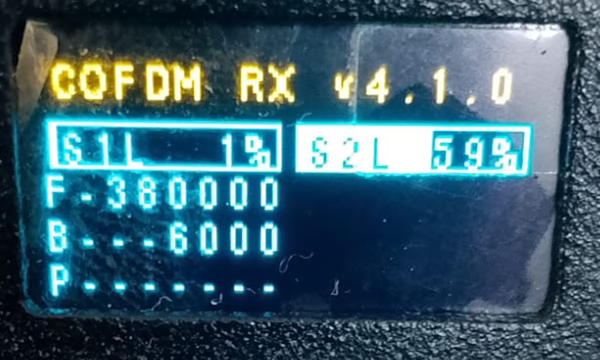
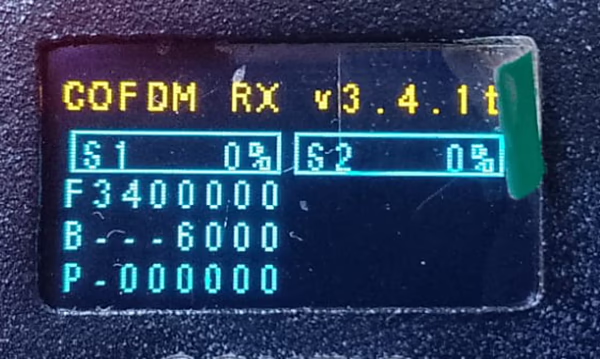
2nd LED of COFDM DVB-T Diversity wireless video receiver - Why does one of my two COFDM wireless video receivers work fine, while the other one doesn’t receive any channels?Please observe carefully. The operating frequency of the second HDMI wireless video receiver is not 340MHz. It is actually changed to 3400MHz, which is equivalent to 3.4GHz. Please change it to 340MHz. The frequency is within the range supported by COFDM and it should work normally.

380MHz wireless video receiver dual antenna diversity COFDM RX 
340MHz wireless video receiver dual antenna diversity COFDM RX - Why does it take 5 minutes from powering on the machine to seeing the boot logo on HDMI ( Fighter Jet)?
The engineer said that if there is a problem with the power supply, there is a watchdog on our board that will detect an unstable power supply and will repeatedly try to restart. It is likely a power-on startup problem. You can observe whether the red light on the board is flashing. Or take a video for us. A working COFDM video receiver takes only 10 seconds from booting up to seeing the HDMI and CVBS boot screens. https://youtu.be/H1tpzDId45o - What is the COFDM DVB-T Diversity Wireless Video Receiver?
It is a professional-grade wireless video receiver using the Dibcom 9090 Demodulator Tuner Chipset, supporting DVB-T COFDM standard with diversity reception for stable, 장거리, 저지연 비디오 전송. - Does this wireless video receiver support DVB-T2?
아니, it supports DVB-T COFDM only, not DVB-T2. - What is diversity reception, and why is it important?
Diversity reception uses dual antennas to improve signal stability, reduce dropouts, and enhance video quality in challenging environments. - What video outputs are available?
It supports HDMI digital output, CVBS analog video output, and RJ45 output ethernet video stream by RTSP or UDP, making it compatible with both modern and legacy devices. - Can it output video over IP networks?
예, it supports RTSP and UDP streaming via Ethernet (RJ45 인터페이스), ideal for IP-based applications. - What video resolution does the receiver support?
It supports up to 1080P@60 real-time decoding with low latency H.265/H.264 decoding. - What kind of audio and video inputs does it support?
It can handle HDMI and AV input encoding from the transmitter, and provides audio decoding output. - Can it process two video inputs simultaneously?
예, it can optionally encode HDMI + AV inputs at the same time, though the default is single input (HDMI 또는 AV). - How is the device configured?
You can configure it via Web UI, UART 직렬 포트, or AT commands. - What is the supported working frequency range?
It supports 160MHz~860MHz, with configurable center frequency. With the support of down-conversion, 160-6000MHz can also be supported. - Is the wireless bandwidth adjustable?
예, the bandwidth is fully configurable, supporting different transmission requirements. - What is the sensitivity of the dual antenna reception?
The sensitivity is -100±1dBm (QPSK, 8MHz 대역폭). - Can the device display wireless status on screen?
예, via OSD (온스크린 디스플레이), showing parameters like signal strength, 비트 전송률, 빈도, 대역폭, 등. - What kind of latency does the receiver achieve?
Video latency can be as low as 60–130ms, depending on resolution and bitrate. - Does it support video decryption?
예, it can decrypt video streams if the transmitter uses encryption. - Can I record video directly on the receiver?
예, it supports recording to TF card or USB disk. - Does it support transparent serial data transmission?
예, it provides a data serial port for transparent transmission, allowing command/control data to pass through. - How much power does the receiver consume?
Power consumption is about 230mA @ 12V. - What power input does it support?
The receiver accepts 6V~15V DC input. - What are the device dimensions and weight?
It measures 115 엑스 90 x 34mm and weighs 243 그램. - What antenna connectors are used?
It uses SMA external threaded inner hole connectors. - What indicators are available on the device?
It has Power (PWR), 링크, and REC indicators. - How does the REC indicator work?
It flashes slowly when recording video and quickly when idle. - What is the maximum wireless range of this receiver?
With optimal conditions, it can achieve up to 16km transmission distance (using UAV and 1W transmitter). - How does the environment affect transmission distance?
Factors such as interference, 장애물, 빈도, and antenna gain affect performance. - What video codecs are supported?
It supports H.264 and H.265 decoding. - Can I connect the receiver to a mobile phone or tablet?
예, via USB output, it can stream to smartphones and tablets for decoding. - Can I adjust the encoding bitrate?
예, the video bitrate is dynamically configurable. - Does it support audio output?
예, both HDMI and CVBS (AL/AR) support audio output. - Can the OSD display be turned off?
예, you can enable/disable OSD with the OSD button or output via serial port. - What happens if the signal is lost?
The receiver will display “Disconnected, no signal” until the link is restored. - Does it support AES encryption?
예, it supports AES encryption/decryption, depending on transmitter settings. - Can the receiver upgrade firmware?
예, via TF card interface for software updates. - Can the receiver output video simultaneously to multiple devices?
예, it supports HDMI, CVBS, and USB simultaneous outputs. - What is the air interface rate (공기)?
It is the wireless transmission data rate, displayed in real time on OSD. - Can I monitor BER (비트 오류율)?
예, BER per antenna is displayed on OSD or via serial port. - Is it suitable for UAV drone video transmission?
예, it is commonly used for drone and ground station applications. - Can I use it for vehicle-mounted video transmission?
예, it works for mobile video links, even in urban environments. - Is this receiver good for long-range surveillance?
예, it supports stable, 장거리, low-latency wireless surveillance video. - Does it support low latency live video streaming?
예, it is optimized for real-time, low-latency video applications. - What kind of users typically need this device?
It is ideal for UAV operators, 방송 전문가, 감시, and robotics applications. - Can it be integrated with IP video platforms?
예, via RTSP/UDP network streaming, it integrates easily with NVRs and IP video systems. - Does the device have a built-in web interface?
예, it provides a Web UI for remote configuration. - Can I use serial port commands for advanced settings?
예, via UART AT commands. - What accessories are typically used with this receiver?
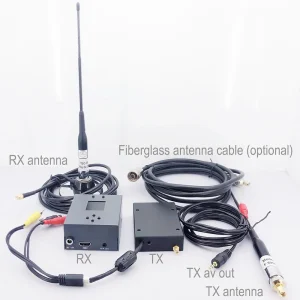
Optional common accessories include fiberglass omnidirectional antennas, Yagi antennas, and input / output cable. - Is the receiver portable?
예, with its compact 243g design, it is lightweight and portable. - Does it support both fixed and mobile applications?
예, it is suitable for both stationary ground receivers and mobile vehicle/UAV operations. - How do I know if the receiver is recording video?
The REC LED indicator flashes to show recording status. - Can I customize the frequency and bandwidth?
예, you can configure working frequency, 대역폭, and other wireless parameters. - Why should I choose this receiver over others?
Because it combines DVB-T COFDM diversity reception, HDMI/AV/IP outputs, 초저지연, 녹음, 암호화, and UAV compatibility—all in a compact, professional-grade design. - I have 1776-Rx with no CVBS and HDMI out. Would you send the schematic so I can verify the voltage?
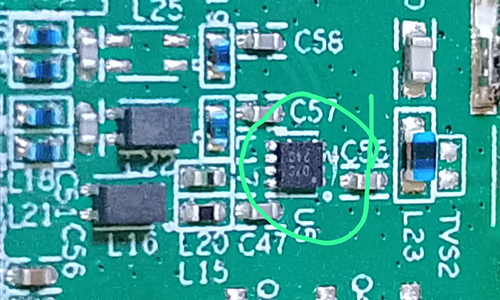
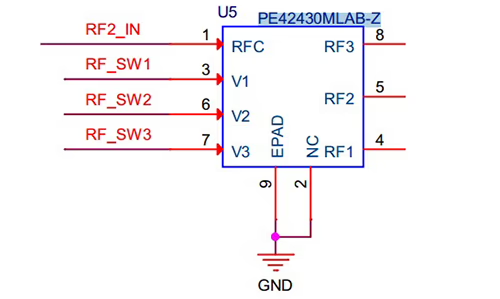
You should also look at other potential issues. Is the transmitter functioning correctly, and is it receiving video input while powered on? What is the current of Rx when it is turned on? 확인하시기 바랍니다 Vcan1776-RX schematic here. SMTT SMTB - How do I replace the broken IC chip on the back of the wireless video transmitter?




iVcan.com –
I have been using the COFDM DVB-T Diversity wireless video receiver for several weeks, 그리고 내 기대를 뛰어넘었어. The diversity reception ensures extremely stable and high-quality video signals, 까다로운 환경에서도. HDMI and CVBS outputs make it versatile for both modern and legacy devices. I particularly appreciate the built-in RJ45 Ethernet interface, which allows seamless RTSP and UDP streaming for network applications. 설정은 간단했습니다, and the signal reliability is impressive. 전반적인, this receiver is a professional-grade solution for anyone needing stable wireless video transmission with flexible output options.