





HDMI input to IP encoder web ui is a system for our HDMI video input transfer the IP living stream ethernet RJ45 output. The default IP address of our HDMI input to the IP encoder module board is http://192.168.1.30. If your computer can ping to this address successfully, Please open this IP address in the browser. You can view the current parameter configuration or modify it according to application needs.
Nota: To change any configuration parameters through the Web UI, the hardware system must be restarted for the changed configuration to take effect.
HDMI input to IP encoder web UI setting
1. Network Menu Page
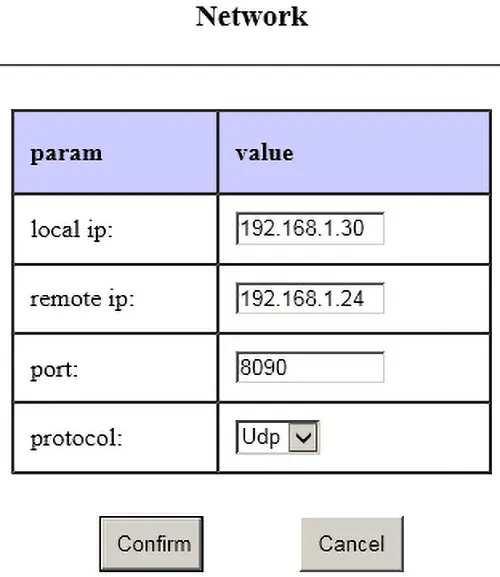
IP locale: the default IP address of the HDMI input to IP encoder module board;
IP remoto: the IP address of the remote supporting decoding system delivered through the network. The video data encoded by the encoding board and the serial port data and audio data collected by the encoding board (the encoding board generally has a serial data port and an audio input interface) will be sent to the decoding system at the far end of the network through the Ethernet port. The serial port data of the encoding system will be transmitted to the serial port of the decoding board of the remote IP.
The remote IP setting is only available if you bought one pair of boards including the trasmettitore e ricevitore.
Porta: The port number to which the encoded data is sent through UDP (the port number configured on the decoder side should be the same as the port number configured on the encoder side).
Protocollo: Configure the transport protocol used by the encoding system. Per impostazione predefinita, the UDP protocol minimizes the delay, and it supports and decodes the point-to-point UDP-TS stream transmission of video data between systems. The RTSP protocol supports the decoding end to perform RTSP on-demand (similar to the IP Camera method). Both mean that the video streaming is carried out with the UDP protocol and the RTSP protocol at the same time.
2. Video Menu Page
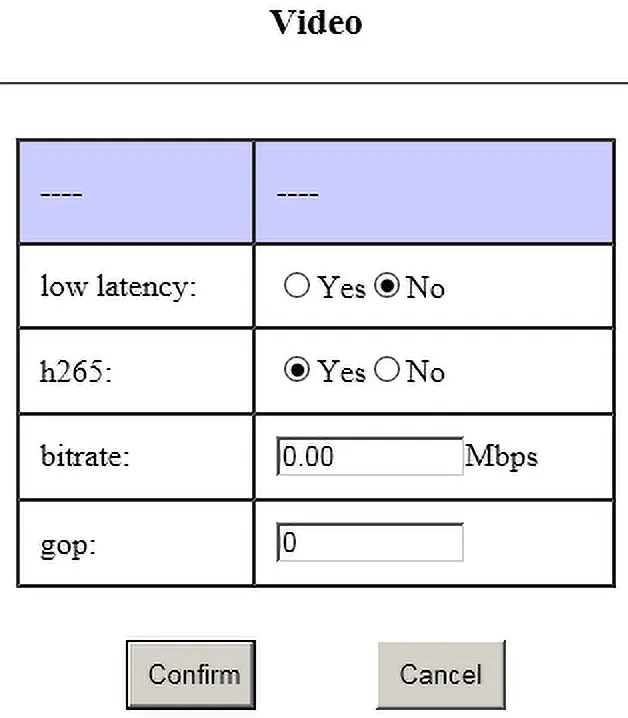
Bassa latenza: low latency encoding mode option. Only when the H264 low-latency decoding system is connected (the corresponding decoding system is also set to “bassa latenza”), Yes can be checked here. To connect to any other H265 and H264 decoding systems, check No here. (L'attributo a bassa latenza è applicabile solo ai modelli che supportano codec a bassa latenza, si prega di consultare l'azienda per i dettagli).
H265: Se è richiesta la codifica H265 (solo per i modelli che supportano la codifica H265, si prega di consultare l'azienda per i dettagli), controlla Sì qui. Selezionando No si intende la decodifica H264.
Velocità in bit: Impostazione del bitrate massimo per la codifica video. 0 significa utilizzare le impostazioni predefinite del sistema (il flusso massimo di codifica video predefinito del sistema è 3,12 Mbps).
GOP: Codifica video Impostazione dell'intervallo dei fotogrammi, 0 indica l'impostazione predefinita del sistema.
3. Pagina del menu audio
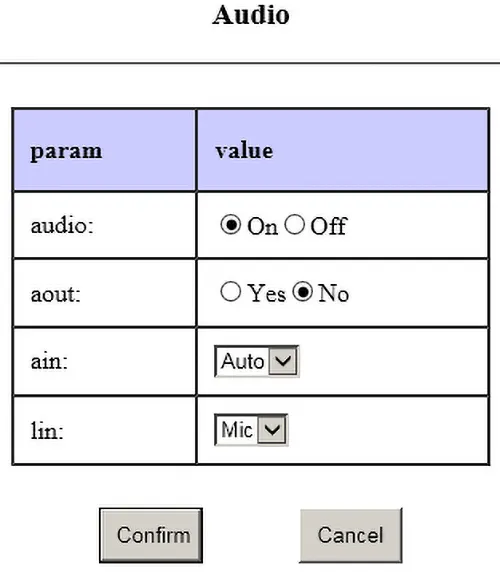
Audio:
SU —- attivare la funzione di acquisizione e codifica dell'ingresso audio;
spento —- disattivare la funzione di acquisizione e codifica dell'ingresso audio.
agosto: Il sistema di codifica può ricevere i dati audio inviati dal sistema di decodifica remota attraverso la rete per la decodifica e l'output.
sì —-Abilita l'uscita di decodifica audio;
NO—-Disabilita la funzione di uscita di decodifica audio.
Ain:
Auto—-Il sistema cattura automaticamente l'audio dall'interfaccia di ingresso video corrente; Per esempio, quando il canale di ingresso video corrente è HDMI, selezionare Auto per acquisire l'audio digitale dall'interfaccia HDMI; quando il canale di ingresso video corrente è AV, selezionare Auto per acquisire l'audio digitale dall'interfaccia HDMI. Cattura l'audio analogico dall'interfaccia AV.
Ang—-Il sistema cattura solo l'audio analogico dall'interfaccia AV.
Nota: Quando è richiesto il supporto vocale inverso (il decoder video invia la voce al codificatore video), l'ingresso audio (sì) qui deve essere configurato in modalità Anlg.
Lin:
microfono —- Cattura l'audio analogico dall'interfaccia AV in modalità Mic in. (The hardware connection of the encoding system must also be in Mic in mode)
Lin —- Collect analog audio from the AV interface in Line in mode. (The hardware connection of the encoding system must also be in Line in mode)
4. Serial Menu Page
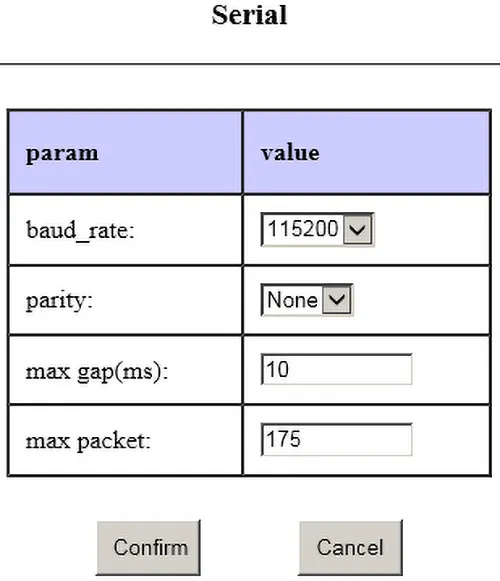
Our HDMI to IP encoding board has one data serial port. When the serial port data collected by the encoder board needs to be transmitted to the corresponding serial port of the remote decoder board through the network, the serial port communication parameters are set here. If the serial port of the encoding board is not used, the settings here have no effect on other functions of the system.
Velocità di trasmissione: Set the baud rate of the data serial port of the encoding board.
Parità: Set the parity mode of the data serial port of the encoding board.
None/odd/Even correspond to: no parity/odd parity/even parity mode.
Max gap(ms): Set the maximum transmission interval of serial port data (to ensure real-time performance).
Max packet: Set the maximum packet size of the serial port data (if it is transmitted through a wireless link, it should be avoided that the transmission IP packet is too large).
5. RTSP Menu Page
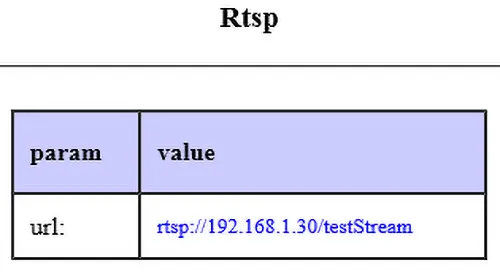
When the encoding module transmission protocol is set to use Rtsp in the Network menu item, you can view the real-time video stream access URL of the encoding system through this page. The RTSP Client (VLC, ecc.) può accedere al flusso video RTSP del sistema di codifica tramite questo URL.
(Tieni presente che le lettere maiuscole e minuscole non possono essere sbagliate)
6. Pagina del menu di sistema
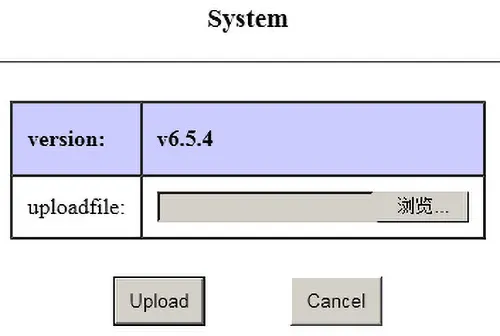
Questo menu viene utilizzato per verificare la versione del firmware del software del sistema della scheda di codifica e aggiornare il firmware del software tramite l'interfaccia utente Web.
Fai una domanda
Grazie per la risposta. ✨