





Sommario
Domanda: I can find the mini CVBS network video encoder on the search tool software and see the test video signal there. Tuttavia, when I try to play the RTSP address in VLC media player, it fails. Come posso risolvere questo problema??
Risposta: This issue usually occurs due to an incorrect RTSP URL format, incorrect stream channel configuration, or mismatched video codecs. Please try using our standard, fully-qualified RTSP URL format below to test in VLC:
rtsp://192.168.1.168:8557/PSIA/Streaming/channels/2?videoCodecType=H.264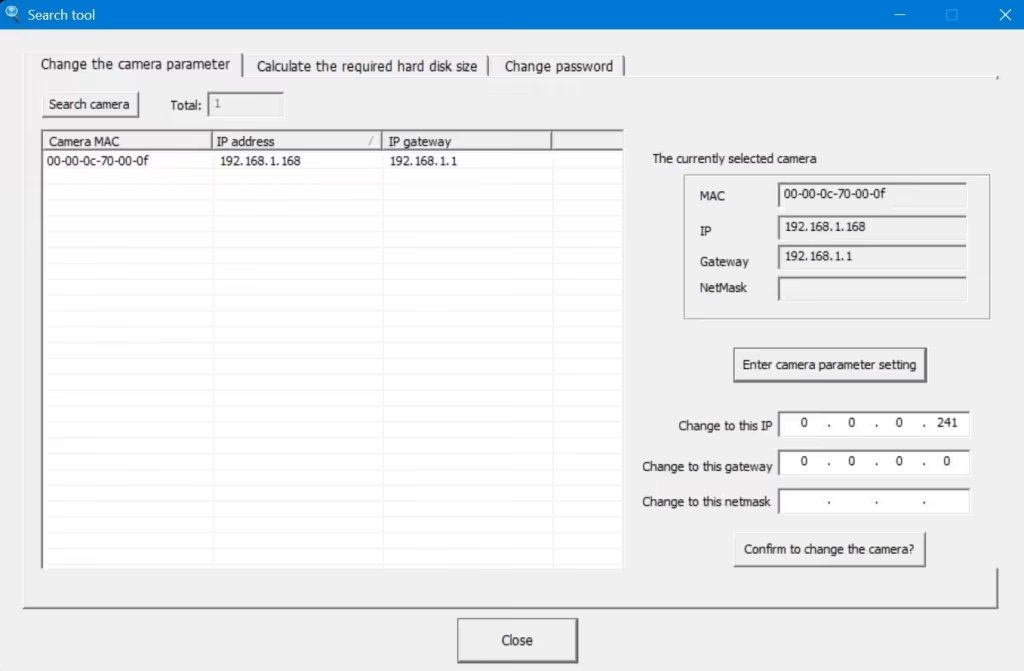


SearchTool_EN.rar / HDIPCameraToo.exe Download link
https://ivcan.com/wp-content/uploads/SearchTool_EN.rar
Domanda: How can I stream/translate the CVBS video over UDP protocol to a specific IP address and port?
Risposta: To achieve point-to-point, ultra-low latency video transmission over UDP (or unicast/multicast UDP), it requires a dedicated hardware-level handshake and protocol match. Perciò, both the encoder board and the decoder board must be from our product line. Standard software players (like VLC) or third-party hardware may not properly decode the raw, low-latency UDP stream generated by the board alone.
To solve this, we offer a complete, pre-configured Codificatore + Decoder Pair specifically designed for this application:
👉 Product Link: iVcan FPV CVBS/AV Encoder & Decoder Video Stream Pair

How the UDP Video Transmission System Works:
By using our paired solution, you can easily point the video stream to any specific target IP and port within your network:
[Analog Camera/CVBS] ──► [Our CVBS Encoder Board] ──►( UDP Unicast/Multicast to Specific IP:Port )──► [Our IP Decoder Board] ──► [Monitor / Display]
- The Encoder Side: You log into the web GUI of the encoder board and input your target destination IP (per esempio.,
192.168.1.200) and the specific UDP port (per esempio.,8001). - The Decoder Side: You configure our decoder board to listen to that exact same port.
- The Result: The system establishes a direct, hardware-accelerated UDP video pipeline. This bypasses the heavy overhead of TCP/RTSP, delivering the lowest possible latency—ideal for drones, FPV, UAV ground stations, and real-time remote monitoring.
Fai una domanda
Grazie per la risposta. ✨