





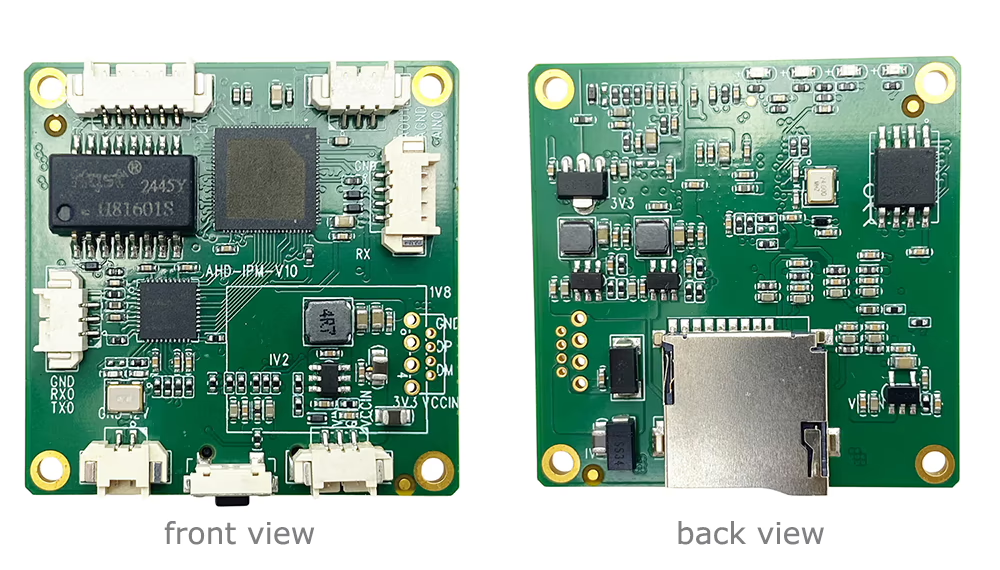
Dalam pengawasan video dunia nyata dan sistem tertanam, A CVBS to IP video converter is often more than just an encoder. Many projects require it to act as a control hub, integrating external hardware such as IR illuminators, relays, and UART-controlled devices.

Dalam artikel ini, we’ll walk through a real customer inquiry, analyze the technical requirements, and explain how these features can be implemented through custom development.
Pertanyaan Pelanggan (Original Message)
A customer using our CVBS encoder board raised the following questions:
1. Alarm/control output via GPIO:
I would like to use the alarm output (GPIO) to control an external flashlight/IR illuminator. I need to be able to turn it on by sending a command (via any supported interface — HTTP API, MQTT, atau yang lainnya), and have it remain on until I send another command to turn it off. Is this feature supported? Is there any documentation or API reference for remote control of the alarm output?
2. UART-controlled video selector:
I can see that the web interface has a “UART Settings” section with a “UART Test” fungsi. I am planning to connect a UART-controlled video selector to the board. All cameras connected to the selector output video in the same format (CVBS), so the board itself will not need to handle any format switching — UART commands will only change the active input on the selector.
Is it possible to remotely send UART commands to the selector (via HTTP API, MQTT, or any other supported method)? Is there any documentation for this use case?Daftar isi
Papan Modul Encoder
Papan Modul Dekoder
Tersedia untuk Kustomisasi
Produk Encoder Baru
TIDAK. Product Name Konfigurasi Key Features Status 1 Encoder Video Cahaya Tampak USB UVC Saluran Ganda 2× masukan USB Supports dual USB camera video encoding, dan streaming RTSP; keluaran CVBS/HDMI lokal; mode tampilan yang dapat dialihkan Produksi Massal 2 Encoder Saluran Ganda (1× Lampu Tampak USB + 1× USB Thermal Imaging camera) 2× masukan USB Mendukung kamera USB ganda (bisa dilihat + panas) capture, pengkodean, dan streaming RTSP; keluaran CVBS/HDMI lokal; mode tampilan yang dapat dialihkan Produksi Massal 3 Modul Tampilan HDMI/CVBS Dekoder RTSP HDMI + keluaran CVBS Mendukung decoding aliran RTSP hingga 4×1080P@30fps; Mendukung penerusan protokol streaming video; Tampilan keluaran HDMI/CVBS Sampel Tersedia 4 Modul Tampilan HDMI/CVBS Dekoder RTSP dengan 4.3"/5" LCD keluaran HDMI + layar LCD Mendukung decoding aliran RTSP hingga 4×1080P@30fps; penerusan protokol; Tampilan keluaran HDMI/CVBS Men-debug 5 Encoder Saluran Ganda (1× Lampu Tampak USB + 1× CVBS Analog) 1× CVBS + 1× Masukan UVC USB Video ganda (USB + CVBS), pengkodean dan streaming RTSP; keluaran CVBS/HDMI lokal; mode tampilan yang dapat dialihkan Men-debug 6 Encoder Saluran Ganda (1× USB UVC + 1× AHD Analog) 1× AHD + 1× Masukan UVC USB Pengambilan video ganda (USB + AHD), pengkodean dan streaming RTSP; keluaran CVBS/HDMI lokal; mode tampilan yang dapat dialihkan Men-debug 7 Encoder Saluran Ganda (1× CVBS + 1× Video Analog AHD) CVBS + AHD 2 masukan video Pengambilan video analog ganda, pengkodean dan streaming RTSP; keluaran CVBS/HDMI lokal; mode tampilan yang dapat dialihkan Men-debug 8 Encoder Saluran Ganda (1× Kamera CMOS + 1× USB Thermal Imaging camera) 1× Antarmuka USB Mendukung CMOS + Pengambilan kamera termal USB, pengkodean dan streaming RTSP; keluaran CVBS/HDMI lokal; mode tampilan yang dapat dialihkan Produksi Massal Untuk solusi konversi input/output video khusus yang tidak tercantum dalam produk kami, silakan hubungi kami untuk dukungan OEM/ODM. Kami dapat mengembangkan produk yang disesuaikan berdasarkan kebutuhan Anda.













Technical Requirement Analysis
This request goes beyond basic video encoding. The customer is essentially trying to build a network-controlled embedded system with the following capabilities:
1. Remote GPIO Control (Digital Output)
The customer wants:
- Remote ON/OFF control of a GPIO pin
- Control via network interfaces (HTTP, MQTT, dll.)
- Persistent state (not just a trigger pulse)
This means the GPIO must function as a latched digital output, similar to a relay.
Kasus penggunaan umum meliputi:
- IR illuminator control
- Alarm devices
- External lighting systems
2. UART over Network (Transmisi Transparan)
The second requirement is more advanced.
System architecture:
Multiple Cameras → Video Selector (UART controlled) → CVBS → Encoder → IP Stream
The encoder does not switch video inputs itself. Alih-alih:
- SEBUAH UART-controlled video selector determines which camera is active
- The encoder must forward remote commands to UART
This requires a network-to-UART bridge kemampuan.
3. API and Integration Expectations
The customer clearly expects:
- HTTP API or MQTT interface
- Command-based control
- Documentation for integration
This indicates the customer is likely:
- A system integrator
- Developing a scalable or commercial solution
What the Customer Really Needs
Summarizing the request:
- GPIO as a remotely controlled switch
- UART as a remote command channel
- The encoder acting as a control gateway, not just a video device
Dengan kata lain:
SEBUAH CVBS to IP video converter with remote control capabilities
Our Solution
We confirmed with our engineering team that:
✔ GPIO Remote Control
- Supported via custom firmware
- ON/OFF state can be maintained
- Can be controlled via network commands
✔ UART Remote Command Transmission
- Supported via custom firmware
- Remote commands can be sent to UART devices
- Suitable for controlling video selectors or other peripherals
Implementation Approach
To enable these features, kami menyediakan custom firmware development, which includes:
- GPIO control API
- UART data transmission interface
- Protocol definition (HTTP or other)
- Integration documentation
Commercial Terms
Because these features are project-specific, a one-time development effort is required.
- Development Cost: USD X,000
- Refund Policy: Fully refundable when total order reaches 1,000 unit
This model ensures:
- Fast customization for your project
- Cost efficiency for large-scale deployment
Why Custom Development Matters
Off-the-shelf products often cannot meet advanced integration needs such as:
- Hardware control logic
- Protocol bridging
- System-level automation
Custom firmware allows your encoder to become:
- SEBUAH smart edge device
- SEBUAH control interface hub
- SEBUAH scalable solution for deployment
Kesimpulan
This case highlights an important trend:
Modern video systems are no longer just about streaming — they are about kontrol, integrasi, and intelligence.
With the right customization, A CVBS to IP video converter can serve as:
- A video encoder
- A hardware controller
- A communication bridge
Hubungi kami
If you have similar requirements for GPIO control, UART integration, or remote device management, feel free to reach out.
We are happy to support your project from concept to mass production.
FAQ
Q: I need to send binary numbers and control commands in both directions. Can your converter board support this?
SEBUAH: iya nih, our converter (pembuat enkode) board fully supports bidirectional communication of binary data and control commands.
Bagaimana cara kerjanya:
- The board is equipped with a standard serial interface:
terima kasih (Mengirimkan), RX (Menerima), and GND (Tanah). - It can be connected to a remote computer via an Ethernet cable (LAN).
- Through this connection, the system enables two-way transmission of serial data, including binary values and control commands.
Persyaratan:
- Serial Communication Software
You will need to run a serial communication tool on your computer (misalnya, a terminal or custom software) to send and receive commands. - IP Address Configuration
- The converter board and the computer must be configured with each other’s alamat IP.
- Proper network setup ensures reliable communication between both devices.
Key Features:
- Mendukung dupleks penuh (dua arah) komunikasi
- Kompatibel dengan binary data and command-based protocols
- Easy integration with existing serial systems
- Remote communication over standard network infrastructure
Kasus Penggunaan Khas:
- Remote device control
- Industrial automation systems
- Data acquisition and monitoring
- Embedded system communication
Q: Why is the board receiving data but TCP communication is not working correctly?
SEBUAH: Please check your TCP Server IP setting. The browser address (for example, 192.168.1.188) is the encoder board’s IP address, but the TCP Server IP should be your computer’s IP address instead. Using the same IP for both may cause communication failure or IP conflicts.

Berikan pertanyaan
Terima kasih atas tanggapan Anda. ✨