






Мені потрібно підключити комутатор Ethernet до передавача за допомогою кабелю Ethernet. Дивіться малюнок нижче. Передавач має тільки 4 точки для Ethernet: Т+ Т- R+ R-. Але 8 кабелі в CAT6. Будь ласка, попросіть інженера сказати мені, які чотири використовувати залежно від кольору
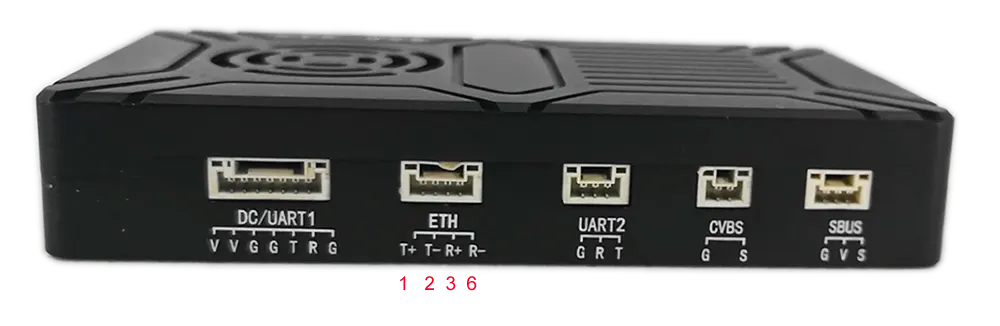
Будь ласка, перевірте зображення нижче.
T+: Немає. 1 Помаранчевий/білий
Т-: Немає. 2 Помаранчевий
RX+: Немає. 3 Зелений/білий
RX-: Немає. 6 зелений
Ethernet Cable Color Pin Definition for Wireless Video Transmitter and Receiver
When connecting a wireless video transmitter to an Ethernet switch, it is important to understand the pin configuration and how it relates to the standard Ethernet cable wiring. Most standard Ethernet cables, such as CAT5, CAT5e, or CAT6, consist of eight individual wires grouped in four twisted pairs. Each wire has a specific color code and is used for transmitting or receiving data signals.
In a standard RJ45 Ethernet connector, the wire pairs are typically assigned as follows:
- Пара 1: Orange/White and Orange
- Пара 2: Green/White and Green
- Пара 3: Blue/White and Blue
- Пара 4: Brown/White and Brown
проте, some wireless video transmitters, particularly professional models, do not require all eight wires for communication. Натомість, they operate on a 2-pair Ethernet configuration, using only four wires for differential transmit (Техас) і отримувати (RX) сигнали. The remaining four wires are not used in this configuration.
For your wireless video transmitter, the Ethernet interface has only four points labeled T+, Т-, R+, і Р-, which correspond to transmit positive, transmit negative, receive positive, and receive negative, відповідно. Based on the engineer’s instructions and standard Ethernet wiring conventions, the connections should be made as follows:
- T+ (Transmit Positive): шпилька 1 – Orange/White
- T- (Transmit Negative): шпилька 2 – Orange
- R+ (Receive Positive): шпилька 3 – Green/White
- R- (Receive Negative): шпилька 6 – Green
This means that when you are using a CAT6 Ethernet cable to connect the transmitter to an Ethernet switch, you only need to use four of the eight wires, specifically the two pairs responsible for transmit and receive. The other two pairs (Blue/White & Синій, Brown/White & Коричневий) are not connected and remain unused.
Step-by-Step Connection Instructions:
- Prepare the Ethernet Cable: Strip the outer insulation carefully without damaging the inner wires. Separate the four wires needed for connection: Помаранчевий/білий, Помаранчевий, Зелений/білий, and Green.
- Verify Transmit and Receive Wires: Confirm that Orange/White and Orange are used for transmitting data from the transmitter, while Green/White and Green are used for receiving data.
- Connect to the Transmitter: Solder or insert the wires into the transmitter’s Ethernet pins according to the mapping:
- шпилька 1: Orange/White → T+
- шпилька 2: Orange → T-
- шпилька 3: Green/White → R+
- шпилька 6: Green → R-
- Connect to the Ethernet Switch: On the switch side, use standard Ethernet wiring to connect the cable. Most switches automatically detect which wires are used for data transmission, so the 2-pair connection will operate correctly without any additional configuration.
- Test the Connection: Once the wires are connected, power on the transmitter and switch to verify network communication. Use a network testing tool or monitor the transmitter for proper link status.
Важливі зауваження:
- Using only the specified four wires ensures compatibility with the transmitter’s 2-pair Ethernet interface.
- Do not attempt to connect additional pairs (Blue/White & Синій, Brown/White & Коричневий), as these are unused in this configuration.
- Make sure to maintain proper pairing (Twisted Pair) to minimize crosstalk and signal interference. Помаранчевий/білий & Orange and Green/White & Green must remain twisted pairs.
- Proper termination and secure connections are crucial to maintain signal integrity, especially for high-bandwidth wireless video transmission.
By following this color-coded pin definition and wiring method, you can reliably connect your wireless video transmitter to an Ethernet switch using a standard CAT6 cable, ensuring stable and efficient network communication. This configuration is commonly used in professional wireless video transmission systems where the transmitter and receiver operate over Ethernet interfaces with minimal wiring.
задавати питання
Дякуємо за вашу відповідь. ✨