






TX900 D3 serial port configuration
The default shipping configuration of the D3 serial port is a transparent serial port. If a customer needs to modify it for AT command interaction, they can send an AT command under the webserver to modify the role of the D3 serial port.
1. Log in to the debug page of the webserver
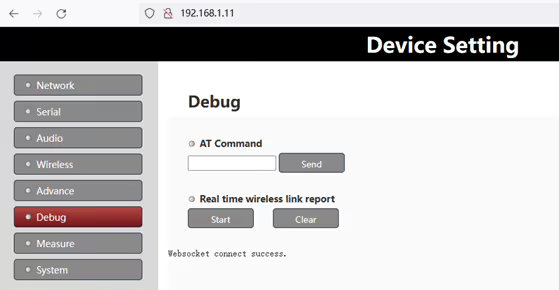
2. Enter “AT^CONFIG?” command in the “At Command” column to query internal configuration parameters of the system。
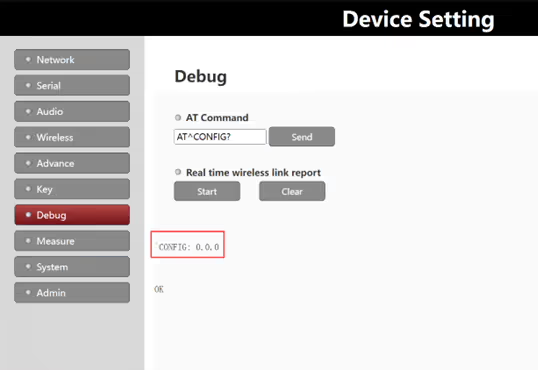
หมายเหตุ:
- The first parameter is used to control the mode of D3 serial port: 0 is transparent mode; 1 is the configuration mode
- The second parameter is used to set the PA gain, which is used to compensate for the display requirements
- The third parameter is used to set whether to lock the frequency band: 0 is the unlocked frequency band; 1 is the locked frequency band
3. Enter the “AT^CONFIG=1,0,0” command in the “At Command” column, and if successful, ก “OK” prompt will be returned
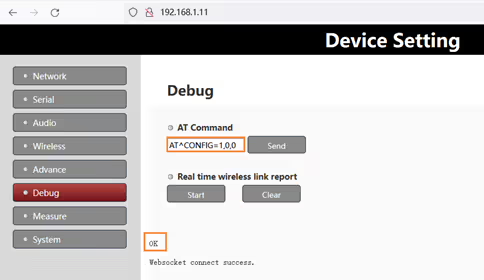
หมายเหตุ:
- Users need to refer to parameter 2 and parameter 3 read out in step two above to set them. The above example assumes that parameter 2 and parameter 3 are both 0, the same applies below
- For equipment with PA, it is recommended to configure parameter 2 for PA gain and parameter 3 for frequency locking
4. Enter “AT^CONFIG?” command in the “At Command” column, check to confirm whether the configuration is successful
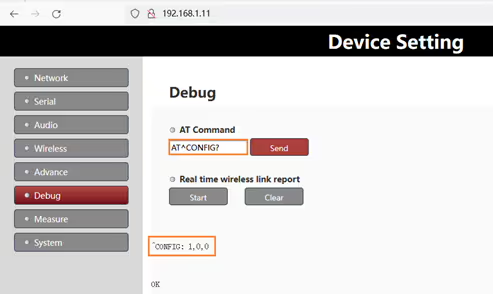
PS:
- After modification, it needs to be powered off and powered on again to take effect
- If you need to modify D3 to a transparent serial port again, just replace the AT command above with “AT^CONFIG=0,0,0“
D3 serial port using for AT command port
1. Connect
Connect the device’s D3 serial port (Uart3) to a PC (ตัวอย่างเช่น, through an external USB serial port module).
2. Power on the device
After the device is powered on, the power indicator lights up and the device starts working
3.Wait for device initialization
About 10 seconds after the device is powered on, the status indicator light (blue light) will light up (where the ground side will always light up and the sky side will flash), indicating that the device has successfully initialized.
4.Serial port configuration
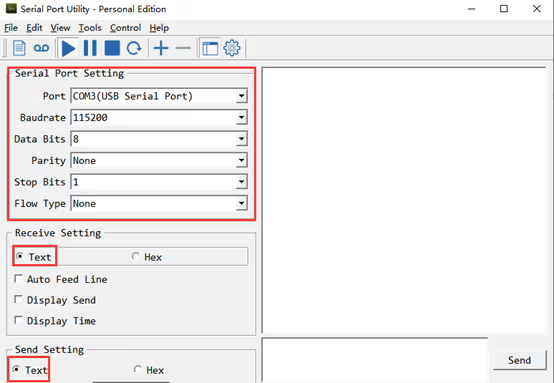
Using a serial port tool(ตัวอย่างเช่น: Serial Port Utility) on the pc, set the baud rate to 115200bps, the data bit to 8, the stop bit to 1, no check bit, no flow control, text mode, and open the serial port, as shown in the following figure:
5.Enter AT commands
Enter the corresponding AT command and wait for the device to return “OK”, indicating that the command was successfully sent.
As shown in the following figure, enter the command “AT^DUBR?” and send it, you can get the baud rate of the D1 serial port
The device returns “OK”, indicating that the modification was successful. If “ERROR” is returned, it indicates that the command input is incorrect or the parameter is illegal.

PS:
The AT command need the carriage return(<CR><LF>) as the end flag. Some serial debug tool will not automatically add the ending carriage return, which requires the user to supplement it himself, like below:

ถามคำถาม
ข้อความของคุณถูกส่งแล้ว