





IP 이더넷 UDP 및 ASI 비디오 출력을 갖춘 다이버시티 듀얼 RF 입력 DVB-T2 디코더 수신기
목차
특색
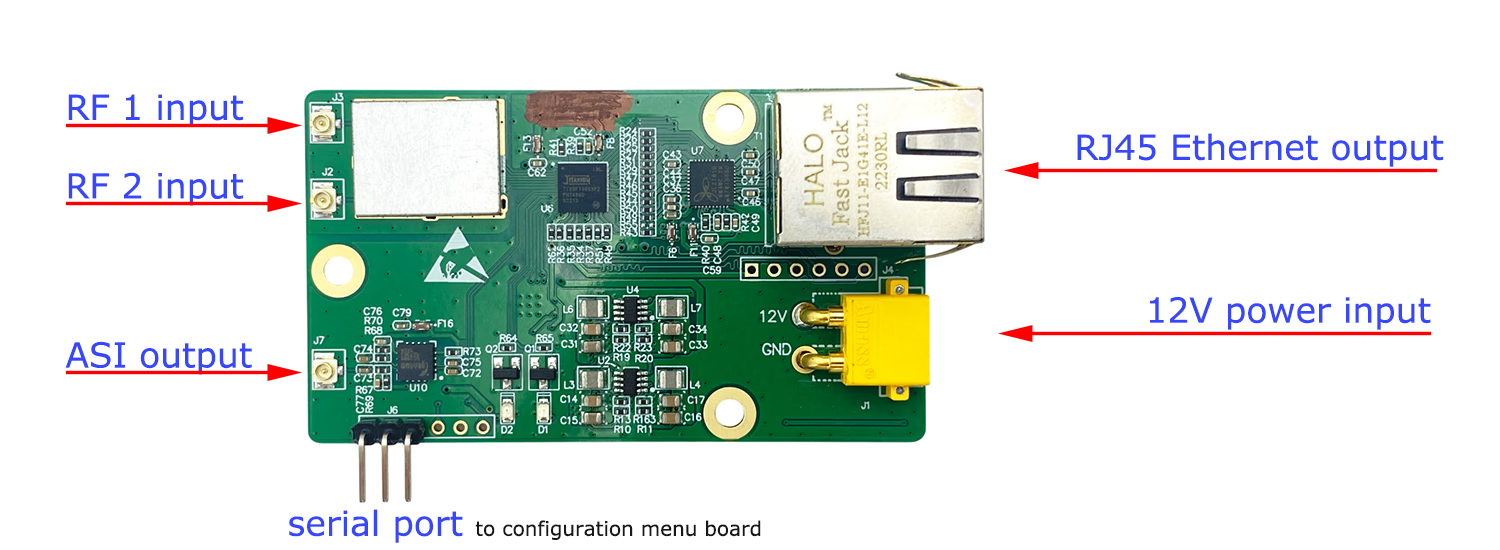
- Support diversity two RF antenna input
- Support RJ45 Ethernet UDP Video stream output
- Support VLC player UDP stream play
- Support ASI video output (we also offer you the ASI input DVB-T2 transmitter if you need)
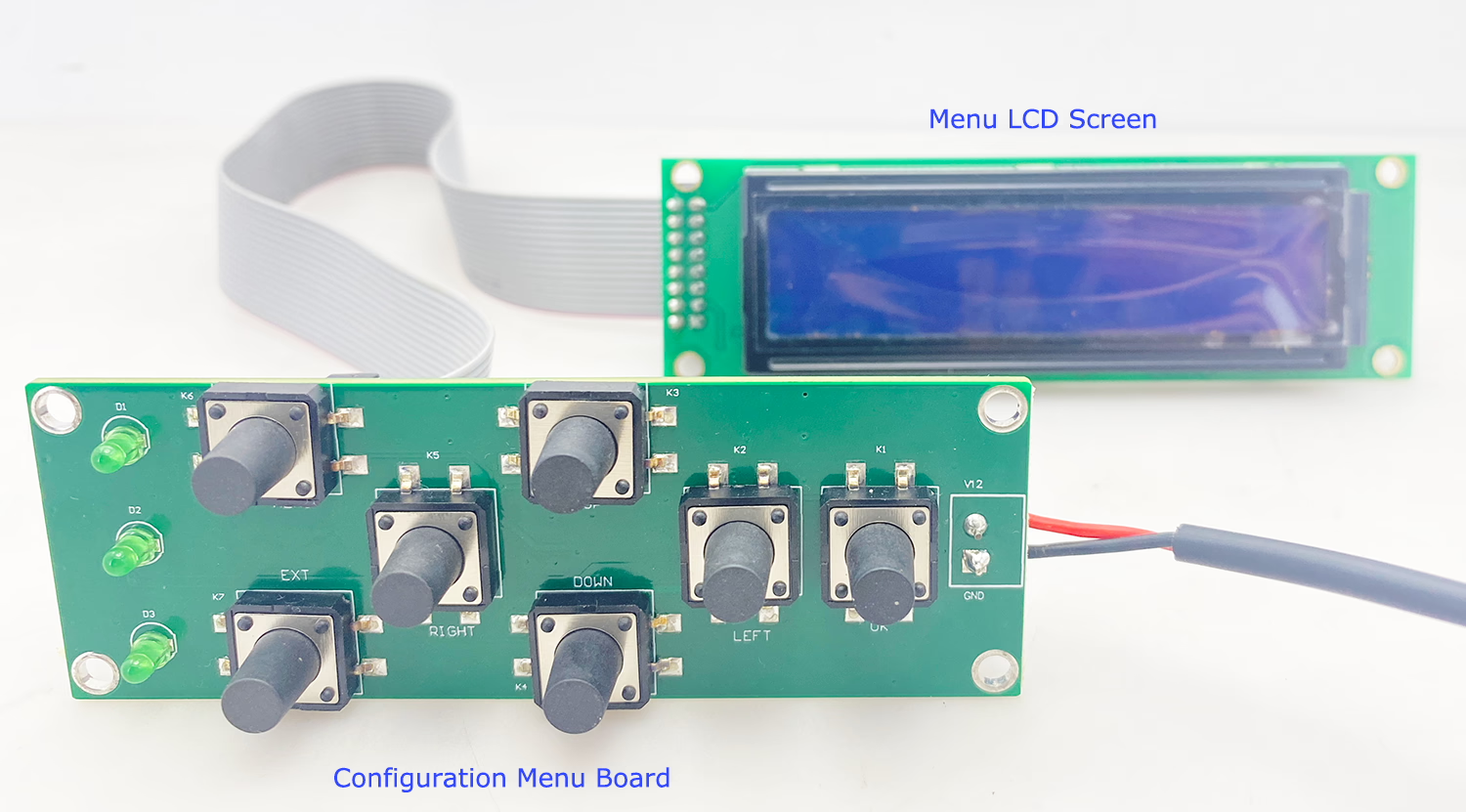
- Support configuration menu board to modify the parameter
- RF receivering frequency
- 대역폭
- Designed for standard DVB-T2 digital tv broadcasting.
- Can get TS (Video Transport Stream file)
- Create your local video broadcasting.
입력 출력
Configuration Menu Board
종범
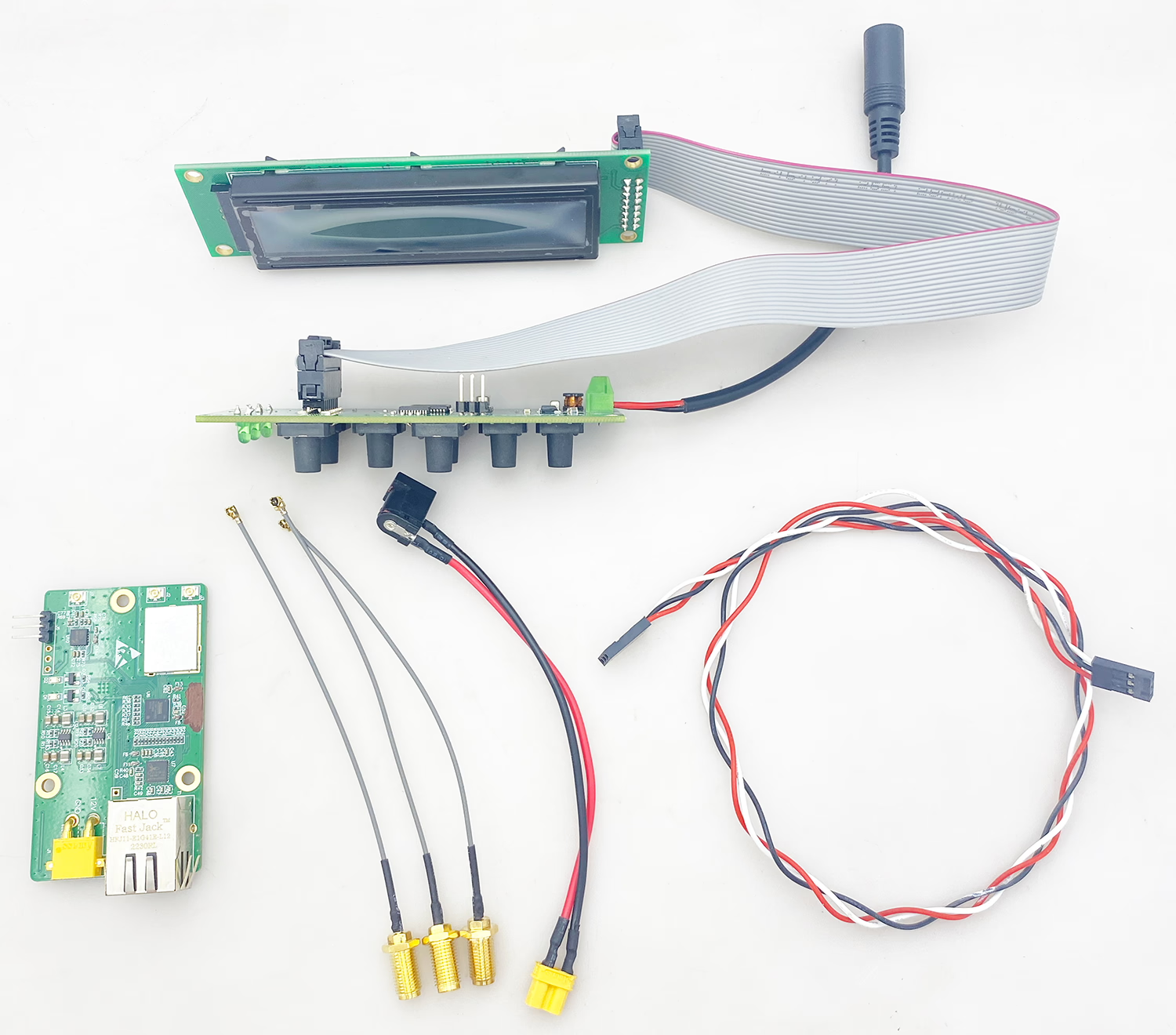
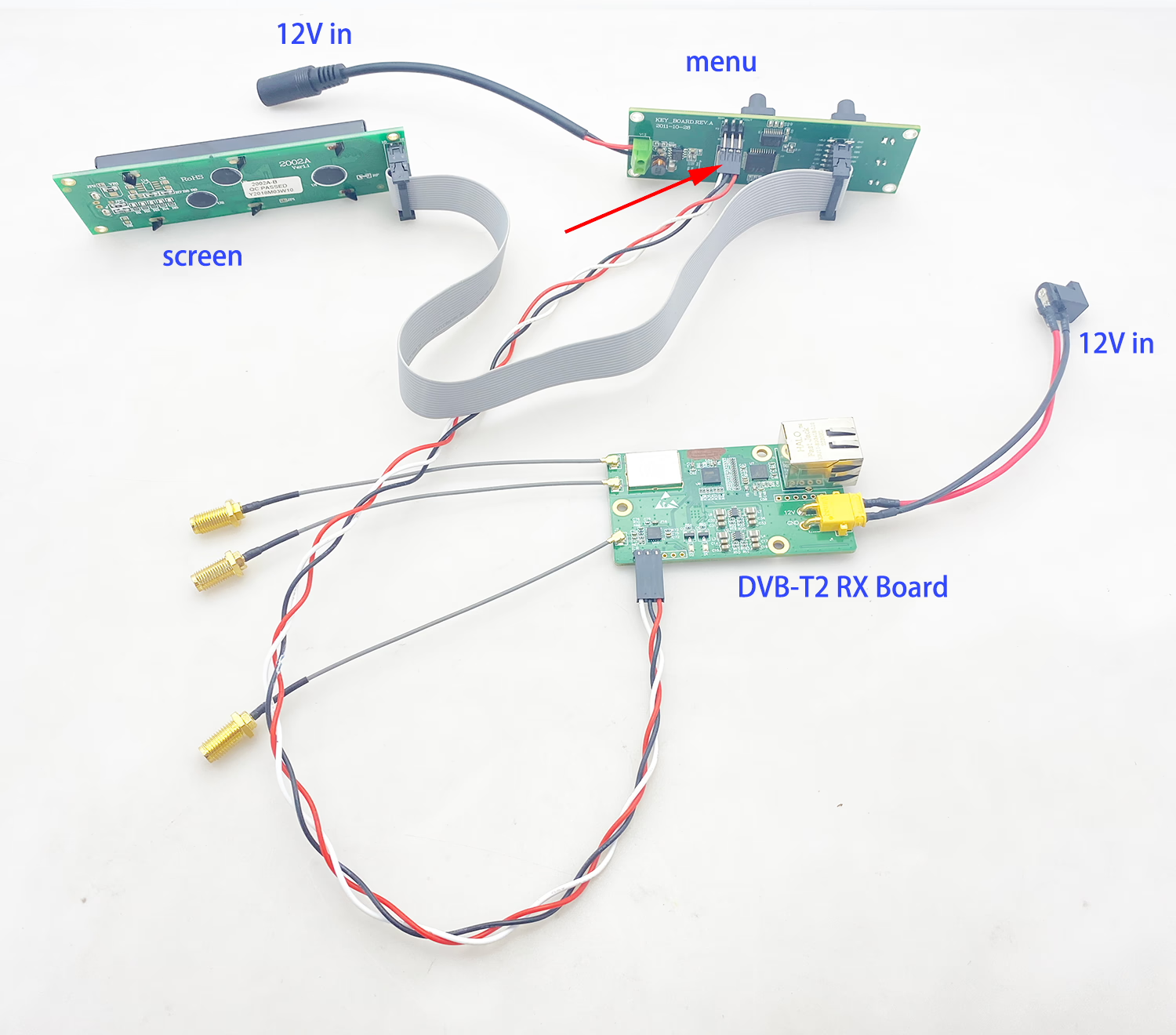
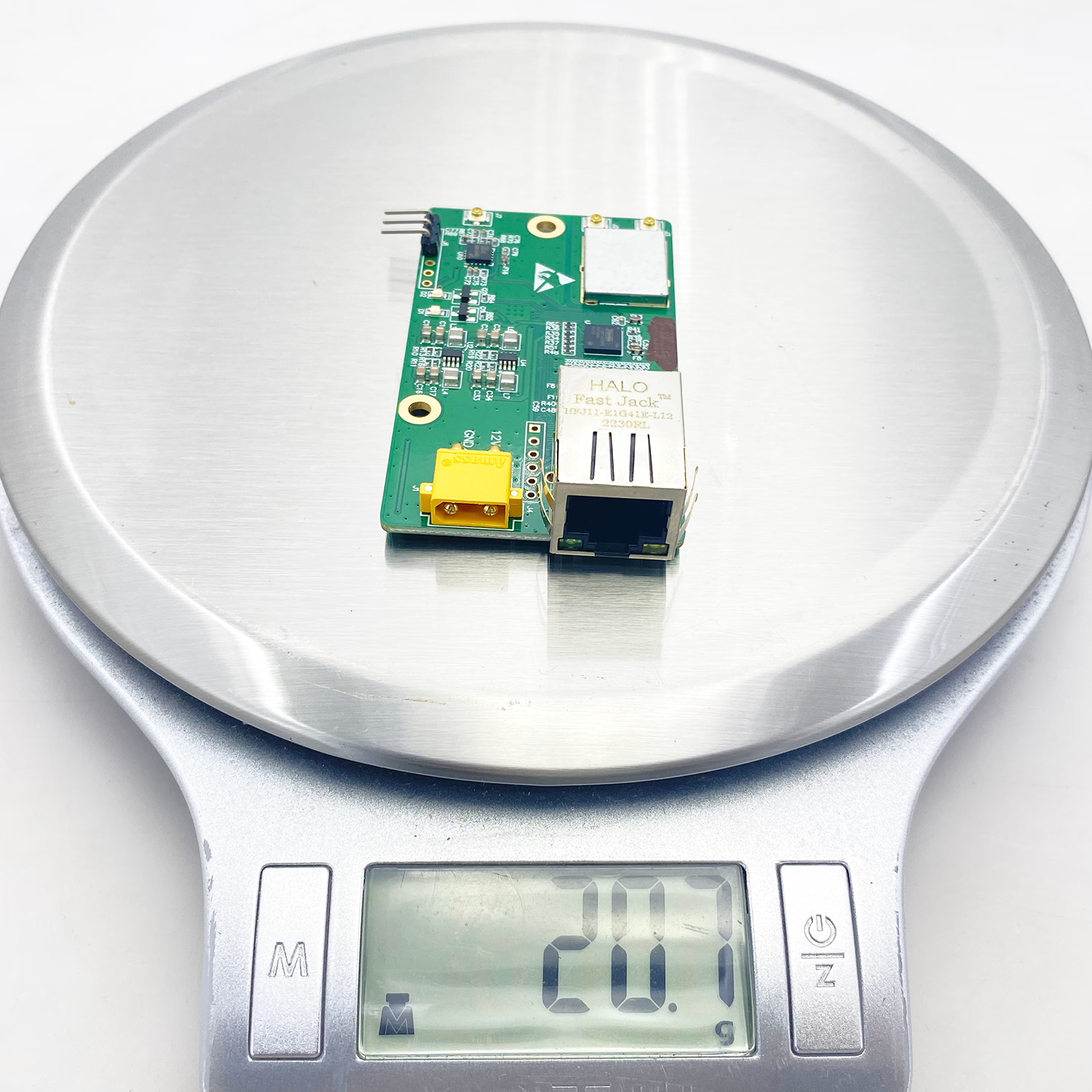
무게
동영상


How to set UDP
If you don’t modify the default setting, then you need to modify your computer ip address to 192.168.1.110.
VLC player net stream address should be UDP://@:6001
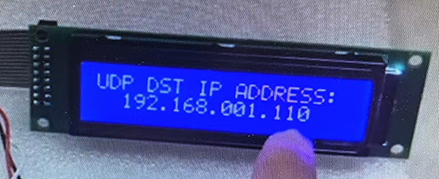
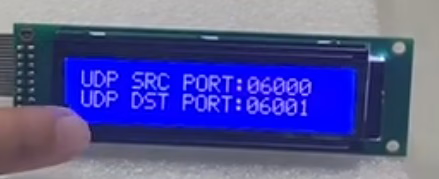
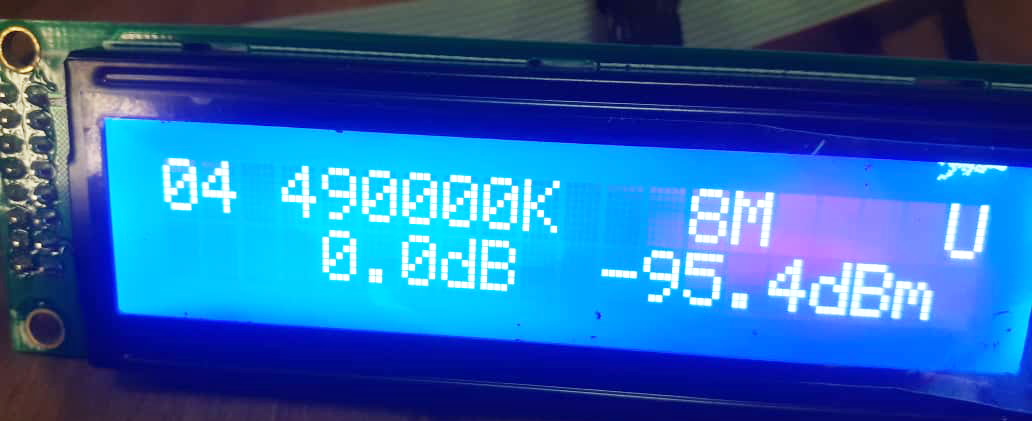
On the screen, if you see U, that current DVB-T2 receiver board does not get the signal, maybe you need check the frequency. L means lock the signal.
상대적인
This device is a professional-grade broadcast receiver designed for robust digital television signal reception and distribution. Here’s a breakdown of its key features and purpose:
-
DVB-T2 Decoder Receiver:
-
DVB-T2: The latest and most advanced standard for terrestrial (over-the-air) digital television broadcasting. It offers significantly higher data capacity and better resilience to interference compared to older DVB-T.
-
Decoder/Receiver: It tunes into DVB-T2 signals transmitted over the air, demodulates them, and decodes the digital streams (동영상, 오디오, 데이터) contained within the multiplex.
-
-
Diversity Dual RF Input:
-
Dual RF Input: Has two separate coaxial antenna input connectors.
-
Diversity: This is the crucial feature. Instead of just switching to the “더 나은” 안테나, true diversity receivers combine the signals from both antennas intelligently:
-
Maximal Ratio Combining (MRC): The most sophisticated method. The receiver continuously analyzes the signal quality (예를 들어, 신호 강도, 신호 대 잡음비 – SNR) and phase from 둘 다 안테나. It then weights and combines the signals mathematically to maximize the overall SNR and minimize errors (베르 – 비트 오류율). This provides the most robust reception, especially in challenging conditions like multipath interference or mobile reception.
-
-
목적: Dramatically improves reception reliability, especially in areas prone to signal reflections (다중 경로), 간섭, or when the receiver is moving (예를 들어, in a broadcast truck).
-
-
출력:
-
IP Ethernet UDP: Provides the decoded TV channels as digital streams over an Ethernet network.
-
IP (인터넷 프로토콜): The fundamental protocol for network communication.
-
이더넷: The physical and data link layer standard for wired networking.
-
UDP (사용자 데이터그램 프로토콜): A transport protocol often used for live video/audio streaming because it’s fast and connectionless. It typically sends streams as 멀티캐스트 UDP packets, allowing multiple devices on the network to efficiently receive the same stream simultaneously. This is ideal for distributing channels within a facility (headend, 사진관, campus).
-
-
하지만 (Asynchronous Serial Interface) 비디오 출력:
-
A very common, 건장한, and simple professional broadcast video transport standard.
-
Uses a coaxial cable (typically 75-ohm BNC connector).
-
Carries a single MPEG Transport Stream (TS) containing one or more TV channels/programs.
-
목적: Directly feeds into traditional broadcast equipment like encoders, multiplexers (muxes), modulators, or playout servers that expect an ASI input. Essential for integration into existing broadcast infrastructure.
-
-
What It Does & 사용되는 이유:
This device is built for mission-critical reception and distribution of DVB-T2 signals:
-
Superior Reception: 그만큼 Dual RF Diversity (MRC) ensures the most stable and error-free reception possible, even in difficult signal environments or on moving platforms.
-
Flexible Outputs:
-
IP/UDP Output: Enables distribution of channels over standard IP networks for modern IP-based workflows (IPTV headends, OTT contribution, monitoring systems, cloud processing, KVM extenders).
-
ASI Output: Provides compatibility with traditional broadcast SDI/HD-SDI infrastructure and equipment. Offers a simple, dedicated, and often lower-latency path.
-
-
핵심 기능: Receives terrestrial DVB-T2 broadcasts, decodes the transport stream, and makes the content available simultaneously via both modern IP networking and legacy professional video interfaces.
일반적인 응용 분야:
-
Broadcast Headends: Receiving off-air signals for re-distribution via cable, 위성, or IPTV.
-
Outside Broadcast (OB) Vans & SNG Trucks: Reliable mobile reception for live events.
-
Contribution Links: Receiving feeds from remote locations transmitted via DVB-T2.
-
Cable TV Operators: Receiving terrestrial channels for inclusion in their cable lineup.
-
IP Migration: Facilities transitioning from ASI/SDI to IP can use both outputs during the transition.
-
모니터링 & Measurement: Monitoring terrestrial broadcast quality at transmission sites or network operation centers.
-
Corporate/Enterprise AV: Distributing broadcast TV within large buildings or campuses over the IP network.
본질적으로, it’s a high-performance, flexible bridge: It captures fragile over-the-air DVB-T2 signals with maximum reliability (다양성) and delivers the decoded content to modern IP-based systems and/or traditional broadcast infrastructure simultaneously. 그만큼 “Diversity Dual RF Input” is key to its robustness, while the dual outputs (IP & 하지만) ensure broad compatibility.**
Buyer demand details
I need it for DVB-T2 tuner receiving for get ts output. I need to create my local video broadcasting, send also my own data with tv by my own coding. I transmite dvb-t2, but the compressed video is my own standard, my operation frequency is uhf. Codding and decoding perform in my own board.
Based on your requirements, here’s a structured analysis and response confirming our product is an ideal fit:
Analysis of Your Requirements:
-
Core Need:
*”I need a DVB-T2 tuner receiver to get Transport Stream (TS) output.”*
→ 열쇠: TS stream output is mandatory. -
애플리케이션:
“Create local video broadcasting + send my own data with TV.”
→ 열쇠: Requires raw TS output to inject custom data/video. -
Custom Workflow:
-
“I use my own coding/compressed video standard.”
-
“Coding/decoding performed on my own board.”
→ 열쇠: 당신은 필요 raw, unprocessed TS output (not decoded video).
-
-
Technical Specs:
-
*”Transmit DVB-T2 in UHF frequency.”*
-
*”Only need DVB-T2 tuner receiver (no built-in decoding).”*
-
-
Urgency:
“Do you have in stock with TS stream output?”
→ 열쇠: Requires immediate availability.
Our Product’s Matching Features:
생성물:
Diversity Dual RF Input DVB-T2 Receiver with IP/UDP & ASI Output
How It Fits Your Needs:
| Your Requirement | Our Product’s Feature |
|---|---|
| 1. TS Stream Output | ✅ Dual TS Outputs: – ASI Output: Direct baseband TS stream (MPEG-TS over BNC). – IP/UDP Output: TS over Ethernet (Multicast/Unicast). |
| 2. Raw TS for Custom Work | ✅ Unmodified TS: Outputs the original broadcast stream without decoding – ready for your custom encoding/processing. |
| 3. UHF DVB-T2 Reception | ✅ DVB-T2 Tuner: Supports UHF bands (470-862MHz) with superior signal reception. |
| 4. No Internal Decoding | ✅ TS-Only Mode: Bypasses internal decoding; outputs pure TS for your external board. |
| 5. Add Custom Data | ✅ IP/UDP Output: Inject your data into the TS stream via Ethernet for local broadcasting. |
| 6. 다양성 수용 | ✅ Dual RF Inputs: Maximal Ratio Combining (MRC) ensures reliable signal in challenging environments. |
Direct Response to You:
“Thank you for your requirements! 우리의 Diversity Dual RF Input DVB-T2 Receiver is designed exactly for your use case:
1. TS Outputs Supported:
ASI Output: Delivers baseband MPEG-TS via BNC (standard in broadcast).
IP/UDP Output: Streams TS over Ethernet for local networks (supports multicast).
2. Fully Compatible with Custom Workflows:
출력 raw, unmodified Transport Streams (TS) – ready for your proprietary encoding/processing.
No internal decoding interferes with your custom video/data.
3. UHF DVB-T2 Ready:
Tuner range: 470–862 MHz UHF (supports global DVB-T2 bands).
4. In Stock Today:
예! Units with TS output (하지만 + IP/UDP) ~이다 available for immediate shipment.
*This receiver is used by broadcast engineers for exactly your scenario: capturing OTA DVB-T2 signals, outputting clean TS streams, and integrating custom data/video for private broadcasting.*”
자주하는 질문
Q1: Can I get the Transport Stream (TS) output through serial, TTL, or other interfaces instead of UDP?
아니. The TS (전송 스트림) output of this DVB-T2 decoder is available only via the Ethernet port using UDP protocol. This model does not support TS output through serial (UART), TTL, or other low-speed interfaces.
2분기: Why is TS output not available through serial or TTL?
A DVB-T2 Transport Stream typically has a high data rate, often reaching tens of Mbps, depending on the broadcast configuration.
연속물 (UART) or TTL interfaces are designed for low-speed data communication such as control commands or configuration. Their bandwidth is usually limited to:
-
Standard UART: 일반적으로 아래 1 Mbps의
-
Even high-speed TTL serial: still far below the required TS bitrate
Because of these physical bandwidth limitations, serial or TTL interfaces are not suitable for transmitting a full real-time MPEG Transport Stream.
이더넷, 반면에, provides sufficient bandwidth and stable transmission performance, which is why TS output is supported via UDP over Ethernet.
Q3: Can this DVB-T2 decoder board be controlled via RS232?
예. This DVB-T2 decoder control board supports RS232 serial control. Users can send commands through the RS232 interface to configure and control the device.
4분기: Do you provide the RS232 control protocol documentation?
We do not provide a separate written RS232 protocol specification document. 하지만, 우리는 제공할 수 있습니다 C source code of our control panel software, which demonstrates how the board communicates via RS232. By reviewing the C source code, customers can understand:
- The serial communication structure
- 명령 형식
- Control commands and response handling
- Initialization and configuration procedures
Q5: Do you provide technical support for RS232 software development?
We provide the C source code as a reference example.However, we do not provide additional technical support for:
- Custom RS232 protocol development
- Third-party software integration
- Application-layer software modification
Customers are expected to develop and integrate the RS232 control function into their own systems based on the provided reference code.
Q6: What is the purpose of the RS232 interface?
The RS232 interface is designed for:
- Device configuration
- 매개변수 조정
- 채널 전환
- Status monitoring
- Remote system integration
It is not intended for high-speed data transmission such as Transport Stream (TS) 산출.
What is a Diversity Dual RF Input DVB-T2 Decoder Receiver?
It is a professional broadcast device designed to receive DVB-T2 signals using dual antenna inputs, ensuring reliable reception even in challenging environments.
How does dual RF input improve DVB-T2 reception?
Dual RF inputs use Maximal Ratio Combining (MRC) to intelligently combine signals from two antennas, reducing errors and enhancing signal quality.
What frequencies does this DVB-T2 receiver support?
The device supports UHF DVB-T2 frequencies ranging from 470 MHz ~ 862 메가 헤르츠.
Can this receiver output raw Transport Stream (TS)?
예, it provides raw TS output via both ASI and IP/UDP interfaces, suitable for custom encoding and local broadcasting.
What is ASI video output used for?
ASI output delivers MPEG-TS over coaxial cable, allowing direct integration with professional broadcast equipment like modulators and playout servers.
How does the IP Ethernet UDP output work?
It streams decoded TS over Ethernet using UDP, supporting multicast and unicast for local network video distribution.
Can I play UDP streams with VLC Player?
예, VLC Player can play UDP streams using the format udp://@:6001.
Does this receiver support standard DVB-T2 broadcasting?
예, it is fully compatible with DVB-T2 terrestrial digital TV broadcasting standards.
Can I inject my own data into the TS stream?
예, the raw TS output allows injection of custom data and video for private broadcasting.
What is the configuration menu board used for?
The menu board allows adjustment of parameters such as frequency, 대역폭, and output settings via a serial port.
Is the device compatible with custom video compression standards?
예, it outputs unprocessed TS streams without internal decoding, making it compatible with custom coding workflows.
Does the receiver show signal lock status?
예, the screen displays “L” for lock and “U” for unlock, indicating signal reception status.
Can this receiver work in moving environments like OB vans?
예, dual RF diversity ensures stable reception even when the device is mobile.
What is the maximum range for DVB-T2 reception?
Range depends on transmitter power, antenna setup, 그리고 지형, but dual diversity improves reliability in weak-signal areas.
Is it suitable for creating a local TV broadcast?
예, the receiver allows capturing DVB-T2 signals and re-streaming them locally via IP/UDP or ASI outputs.
Does the receiver include necessary accessories?
예, it comes with antenna connectors, serial cables for configuration, and power adapters.
Can I modify the UDP destination IP and port?
예, the destination IP and port number can be configured through the menu board.
What is the default UDP port number?
The default UDP port is 6001, which can be customized in the configuration menu.
Does the receiver support VLC for monitoring?
예, VLC Player can monitor UDP streams in real time.
Can it handle multiple TV channels simultaneously?
예, it decodes full Transport Streams containing multiple channels or programs.
What type of antennas are compatible?
Standard UHF DVB-T2 antennas with 75-ohm coaxial connectors are compatible.
Is this receiver professional-grade?
예, it is used in broadcast headends, OB vans, and SNG trucks.
Can I monitor signal quality?
예, the device displays lock/unlock status and allows analysis of SNR and BER.
Does it support multicast streaming?
예, IP/UDP output supports multicast streaming to multiple devices on a network.
Can it output both ASI and IP/UDP simultaneously?
예, both outputs are active and simultaneous.
Is it compatible with DVB-T receivers using ASI input?
예, ASI output ensures integration with standard broadcast receivers.
How do I connect the receiver to my network?
Connect the RJ45 Ethernet port to a network switch or router and configure IP/UDP settings.
What is the weight of the device?
The receiver is compact and lightweight, ideal for rack or mobile installation.
Does it support Forward Error Correction (독립 단기 치료소)?
예, it complies with DVB-T2 standards, including FEC for error correction.
Can I capture TS for archival purposes?
예, the TS output can be recorded for storage or later processing.
Is real-time streaming possible?
예, UDP streaming offers low-latency, real-time video distribution.
Can it be used for enterprise AV applications?
예, IP/UDP output allows distributing TV across enterprise networks.
Does the receiver support firmware upgrades?
예, firmware updates are possible through the serial configuration interface.
What video formats are supported?
It outputs MPEG Transport Streams compatible with DVB-T2 standards.
Is it suitable for IP migration from ASI to IP workflows?
예, dual outputs facilitate smooth transition from traditional ASI to modern IP networks.
Can the device operate 24/7?
예, it is designed for mission-critical, 지속적인 작동.
How does diversity help in urban areas with multipath interference?
Dual RF inputs combine signals intelligently to reduce errors caused by reflections or interference.
Can I assign a static IP for UDP streaming?
예, static IP assignment is possible via the configuration menu.
Does it require external software for configuration?
아니, the serial menu board allows complete configuration without extra software.
What type of connector is used for ASI output?
A 75-ohm BNC coaxial connector is used for ASI output.
Can it work with standard IP routers and switches?
예, the device is compatible with typical Ethernet infrastructure.
Is the receiver suitable for frequency scanning?
예, you can scan and select DVB-T2 frequencies through the menu interface.
Can I set up a private TV network using this receiver?
예, TS output and IP streaming enable local or campus-wide broadcasting.
Does it support multicast and unicast streaming simultaneously?
예, both streaming modes are supported.
How reliable is the device in low-signal conditions?
Dual RF diversity ensures maximum reception reliability even with weak signals.
Is it compatible with external encoders or modulators?
예, ASI output allows connection to external broadcast encoders.
Can I remotely monitor the UDP stream?
예, by connecting to compatible IP devices, remote monitoring is possible.
Is it plug-and-play for basic setup?
예, default settings allow immediate operation; advanced configuration is optional.
Can I customize local frequency settings?
예, RF parameters including frequency and bandwidth are fully adjustable.
Where can I buy the Diversity Dual RF DVB-T2 Decoder Receiver?
It is available through professional broadcast equipment suppliers and specialized online distributors.



iVcan.com –
This DVB-T2 receiver transformed our broadcast setup! Dual RF diversity eliminates signal drops in our mountainous area. We pull raw TS streams via ASI for our custom encoder and multicast IP/UDP feeds across campus. Rock-solid UHF reception, zero decoding lag, and dual outputs made our hybrid system effortless. A game-changer for professional workflows!