






미니 비디오 송신기
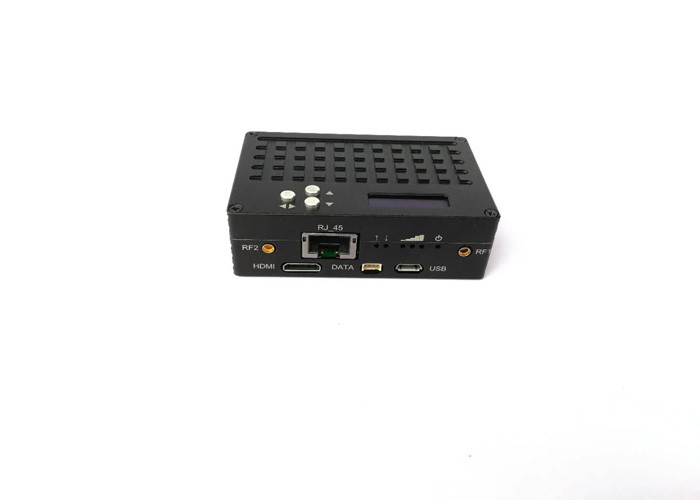
| 대역폭: | 2MHZ/4MHz/8MHz | 암호화: | 128 비트 AES |
|---|---|---|---|
| 보정 메커니즘: | 32 CRC 비트, ARQ | 조정: | TDD_COFDM |
| 데이터 전송: | RS232/RS485/RS422 | 전원 입력: | DC 7~17V |
| RF 인터페이스: | MMCX | 비디오 인코딩: | H.264 |
| 하이 라이트: | 미니 무선 송신기, 소형 비디오 송신기 |
Real-time mini Cofdm transmitter extra low latency full duplex data transceiver
미니 비디오 송신기 소개:
H.264 TDD_COFDM 본 제품은 당사에서 출시한 최신 제로 레이턴시 H.264 1080P HD 무선 전송 장비입니다., the uses advanced time division processing technology and leading COFDM modulation technology, 완전한 양방향 데이터 전송 채널 제공 (AES_128 암호화 지원), 매우 낮은 대기 시간 (20MS) 고화질 비디오 전송 채널, 실시간의 완벽한 구현, 고속 모바일 데이터, 오디오 및 비디오 전송.
응용 프로그램:
UAV 시스템을 위한 폭넓은 적용, 고속철도, 소방, 보안, 정보 통제, 및 기타 복잡한 환경.
Mini Video Transmitter features:
초저지연 제공 (20MS) 풀 HD 1080P 비디오 전송
최대 20Mbps 데이터 흐름 지원, 적응형 동적 스트림 할당 기술
다중 대역폭 규정 지원 (2M/4M/8/), 적응 변조, 및 수동 변조 모드 선택
다이버시티 안테나 수신기 지원
128비트 AES 암호화 지원
투명한 PTP 지원&PMD 네트워크 전송 기술
비시선 지원 (NLOS), 고속 모바일 전송
표준 RS-232 제공 & RS-485 + RJ45 + 미니 HDMI 인터페이스
High-definition OLED panel digital display, 조작하기 쉬운 간단한 인터페이스
작은 크기, 가벼운, 저전력 소비
기술적 인 매개 변수:
| 선택적 거리 등급 | DC 7~17V |
| 전력 소비 | 9W |
| 흐름 | 12V_1A (최대 부하 최대 출력 전력) |
| 이더넷 | 10/100 베이스T, 자동 MDI/X, IEEE 802.3 TCP, UDP, TCP/IP, ARP, ICMP, DHCP, HTTP, SNMP, FTP, DNS |
| 비디오 입력 | 미니 HDMI 인터페이스, RJ45 |
| 그런 다음 네트워크 포트 데이터가 전송됩니다. | RS-232&RS-485 RJ45 |
| 출력 주파수 | 2405MHz-2470MHz,1MHz 단계 조절 가능 |
| 출력 파워 | 0DBM,20dBm-30dBm |
| RF 안테나 인터페이스 | MMCX |
| 대역폭 | 2.0 MHz /4.0MHz/8.0MHz |
| 암호화 | 128 비트 AES |
| 수정 메커니즘 | 32 CRC 비트, ARQ |
| 조정 | TDD-COFDM, 시분할 이중 모드 |
| 비디오 인코딩 | H.264 |
| 매개변수 제어 | OLED 제어판의 매개변수를 조정하여 |
| 치수 | 77mm*51mm*24mm |
| 무게 | 120지 |
How to buy a best-done mini video transmitter and receiver for a UAV camera?
- 올바른 주파수를 선택하십시오: When selecting a drone video transmitter, it is important to choose one that operates on the right frequency for your application. Different frequencies have different advantages and disadvantages, so it is important to select the one that best suits your needs.
- Use an Antenna: An antenna is an essential component of any drone video transmitter. It helps to increase the range of the signal and improve the quality of the transmission. Make sure to select an antenna that is compatible with your transmitter and that is designed for the frequency you are using.
- Use a High-Gain Antenna: High-gain antennas are designed to increase the range of the signal and improve the quality of the transmission. They are more expensive than standard antennas, but they are worth the investment if you need to transmit video over long distances. https://ivcan.com/price-list-for-wireless-video-transmitter-and-receiver-antenna/
- Use a High-Power Transmitter: High-power transmitters are designed to send a stronger signal over greater distances. They are more expensive than standard transmitters, but they are worth the investment if you need to transmit video over long distances.
- Use a Directional Antenna: Directional antennas are designed to focus the signal in a specific direction. This can help to reduce interference and improve the quality of the transmission.
- Use a Low-Noise Amplifier: Low-noise amplifiers are designed to reduce interference and improve the quality of the transmission. They are more expensive than standard amplifiers, but they are worth the investment if you need to transmit video over long distances.
- Use a Quality Video Encoder: A quality video encoder is essential for transmitting high-quality video. Make sure to select an encoder that is compatible with your transmitter and that is designed for the frequency you are using.
- Use a Quality Video Compression Algorithm: A quality video compression algorithm is essential for transmitting high-quality video. Make sure to select an algorithm that is compatible with your transmitter and that is designed for the frequency you are using.
- Use a Quality Video Streaming Protocol: A quality video streaming protocol is essential for transmitting high-quality video. Make sure to select a protocol that is compatible with your transmitter and that is designed for the frequency you are using.
For more details about Mini Video Transmitter, 방문하시기 바랍니다 https://ivcan.com/c/video-transmission/ 또는 저희에게 연락하십시오.
OFDM information at https://en.wikipedia.org/wiki/Orthogonal_frequency-division_multiplexing
-
 최고의 FPV 비디오 송신기 모듈 FPV 카메라 3W PA 50km용 170-860Mhz 무선 RF 오디오 비디오 송신기
 -
 IP Mesh 100MBPS 무선 비디오 데이터 트랜시버 2x5W PA 16 깡충깡충 뛰다
 -
 장거리 비디오 데이터 무선 원격 측정을 위한 드론 링크 UAV와 지상 제어 스테이션 간의 무선 전송
 -
 UAV 드론 비디오 데이터 링크 모듈 무선 비디오 송신기 및 수신기 카메라 장거리 TDD 트랜시버 양방향 vcan1401
 -
 HDMI 출력 FPV의 COFDM 비디오 송신기-수신기 AV, 무선 10km-15km-30km 장거리 저렴하고 긴 COFDM-912T
 -
 1740-1840MHZ 2WPA 30km 장거리 드레인 비디오 송신기 및 SBUS TTL과 수신기
 -
 30Km 장거리 COFDM HDMI 무선 비디오 송신기 수신기 UAV Drone 1080P 908T 용 풀 세트 오디오 비디오 TX RX
 -
 양방향 UAV 무선 비디오 데이터 RC 제어 링크 모듈 장거리 양방향 트랜시버 송신기-수신기 Vcan1681
 -
 드론 UAV 로봇 용 장거리 무선 비디오 데이터 송신기 및 수신기
 -
 카메라용 무선 비디오 송신기 및 수신기, HDMI HD H265 264 인코더 1W/2.5W PA 1080P60 Vcan1726
 -
 22km 55km 80km 100km 150km 장거리 무선 비디오 송신기 수신기 전송 트랜시버 PA 2W 5W 10W
 -
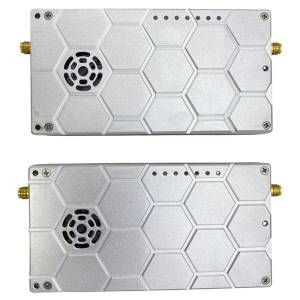 드론 비디오 데이터 원격 측정 송신기-수용자 UAV 라디오 링크 TDD 트랜시버
 -
 10W PA 150KM 공중 비디오 데이터 링크 장거리 UAV 무선 전송 송신기 수신기 광대역 전술 손잡이
 -
 30-밀리초 드론 UAV HDMI 무선 비디오 송신기 초저 대기 시간 무선 전송 시스템 Vcan1729
 -
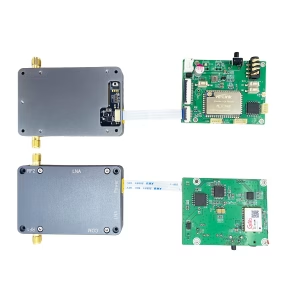 로봇 UAV 드론을위한 양방향 오디오 IIP 보드가 포함 된 IP Mesh Manet Transceiver
 -
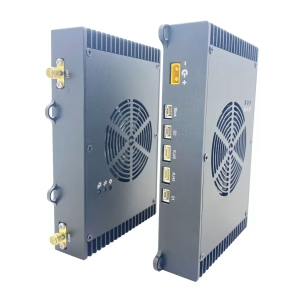 150KM 100MPBS 주파수 2ands UAV 라디오 링크 높은 전송 속도 및 반 인터뷰에서 호핑
 -
 드론 메쉬 무선 비디오 데이터 링크 150-200km 장거리 센터리스 임시 네트워크 트랜시버
 -
 COFDM 변조기 복조기 모듈 인코더 디코더 HDMI CVBS AV 입력 AES 256 FHD RF 스트리밍
질문하기
응답해 주셔서 감사합니다. ✨