





COFDM Mobile Video Wireless Transmission users manual for COFDM-908T and COFDM-912T
Users Manual for COFDM Mobile Video Wireless Transmission
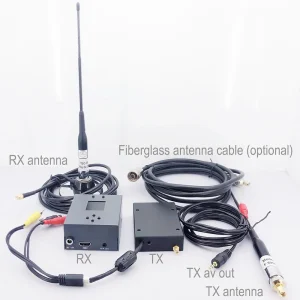
This is a manual for COFDM-912T and COFDM-908T. If the HD input is mentioned in the text, it refers to the COFDM-908T model. If the SD input is mentioned in the text, it refers to the COFDM-912T model. Please Pay attention to the distinction.
목차
1. 풍모
- 고도로 통합된, 모듈식 디자인
- COFDM 변조 기술 채택, H.264 image coding technology
- Can transmit one 1080P HDMI signal and one unidirectional data up to 230400Kbps
- 낮은 대기 시간, the minimum end-to-end latency is 350ms
- 전방위 커뮤니케이션, 벽을 쌓는 것을 두려워하지 않는다
- High-speed travel-to-travel communication,
- 송신기 방열판형 알루미늄 케이스, 충격 방지 및 충격 방지
- 비가시선 (NLOS) 모바일 전송, the transmission distance of 2W power is not less than 30 kilometers under the condition of no interference, the transmission distance of 5W power is not less than 50 킬로미터, and the transmission distance of 10W power is not less than 80 킬로미터
- 최대 이동 속도는 600Km/hour에 도달할 수 있습니다. (measured)
- 오디오 및 비디오 신호의 동시 수신, 고화질 HDMI1080P 멀티 포맷 옵션, 표준 화질 출력 DVD 이미지 품질
- 수신기는 비디오 녹화 및 백업 기능을 실현할 수 있습니다.
- 128-비트 AES 암호화 및 암호 해독
- Can provide full customization
2. 애플리케이션
This product is mainly used in technical reconnaissance and evidence collection of public security and safety inspection departments, real-time picture transmission of drones and unmanned ships, radio and television broadcasting, broadcasting live broadcasting: 방송분야, sports broadcasting, 소셜 뉴스、공중 라이브、사진관, mountaineering expeditions and more. 도시 지역 등 다양한 복합 환경에서 고품질 영상의 실시간 모바일 전송에 적합합니다., 바다, 그리고 산.
3: Parameter Indicators
1: Transmitter (표준화된 사진만, 커스터마이징을 제외하고)


제품 매개변수:
| 조정 | COFDM |
| 작동 전압 | DC11V~DC17V |
| 작동 전류 | 1W:≤1.3A DC12V,5W:≤2.5A DC12V,10W:≤5.2A DC12V, |
| 제어 인터페이스 | 표준 RS232 인터페이스, 8 데이터 비트, 1 정지 비트, 짝수 패리티, 전송 속도: 19200 |
| 투명한 데이터 인터페이스 | 단방향 투명 직렬 포트 전송, 8 데이터 비트, 1 정지 비트, 홀수 패리티 지원, 짝수 패리티, wireless parity, 전송 속도: 1200, 2400, 4800, 9600, 19200, 38400, 57600, 115200 、230400 |
| 암호화 | 128비트 암호화 지원 |
| 변조 매핑 | QPSK(4QAM)、16QAM、64QAM |
| 순방향 오류 정정 | 1/2 2/3 3/4 5/6 7/8 |
| 가드 간격 | 1/32 1/16 1/8 1/4 |
| 운송업체 수 | 2케이 |
| 주파수 대역폭 | 2/3/4/5/6/7/8M 조절 가능 |
| 전송 스트림 | 2000kbs~20000kbs 조정 가능 |
| 힘을 전달하다 | 1승/5와트/10와트 |
| 전송 주파수 | Any frequency can be customized, the frequency is continuously adjustable, the adjustable range is ±20MHz, and the step is 1MHz |
| 전력 평탄도 | 10MHz 대역에서 0.2dB 미만 |
| 어깨 비율 | The shoulder-to-shoulder ratio is better than -28dB at full power output |
| 두 번째 고조파 | ≤-45dB |
| MORE | 32데시벨 |
| 입력 비디오 | 720×480 60나(NTSC), 720×576 50나(단짝), 720 50피, 720 60피, 1080 50나, 1080 60나, 1080 24피, 1080 25피, 1080 30피, 1080 50피, 다양한 모드가 적응 가능. |
| HD 인터페이스 | HDMI |
| 비디오 인코딩 형식 | H.264 |
| 보호기준 | 전체가 알루미늄 라디에이터 유형 섀시, 부식 방지, 충격 방지 디자인 |
| 전체 사이즈 | 102*80*30mm(1w)/102*90*30mm(5W)/188*47*34mm(10W)/228*55*40mm(20W) |
| 총 중량 | ≤0.20KG (1W) / ≤0.27KG (5W) ≤1.5KG (10W) ≤2KG (20W) |
2: 수화기
제품 매개변수:
| Portable multi-bandwidth HD receiver parameters | |
| 수신 주파수 범위 | 170-860MHz VHF&UHF |
| 주파수 대역폭 | 2/3/4/5/6/7/8메가 헤르츠, 선택 과목 |
| RF 입력 레벨 | -94dBm~-15dBm (8M 대역폭에서)/-98dBm~-15dBm (2M 대역폭에서) |
| RF 입력 임피던스 | 50 옴 |
| RF 입력 커넥터 | N head |
| 복조 방식 | COFDM |
| 별자리 방식 | QPSK, 16QAM, 64QAM (선택 과목) |
| 순방향 오류 정정 | 1/2,2/3,3/4,5/6,7/8 (선택 과목) |
| 운송업체 수 | 2케이, |
| 가드 간격 | 1/32,1/16,1/8,1/4 (선택 과목) |
| 비디오 디코딩 | MPEG-2MP@ML/H.264 |
| 화면 종횡비 | 4:3 16:9 |
| Video output image | 720*576@8MHz 1080P@60P、50피、50나、30피、 |
| 오디오 출력 모드 | Stereo unbalanced 300/ 200mv |
| 오디오 출력 | 2오디오 출력 + 2비디오 출력 |
| 작동 전압 | AC220V/DC12V <0.4A |
| 작동 온도 | -20℃~+50℃ |
| physical dimension | 136*115*35mm non-standard all-aluminum shell |
| 장비 무게 | 0.35kg |
4: Instructions for use
1: Transmitter
- Functional area description
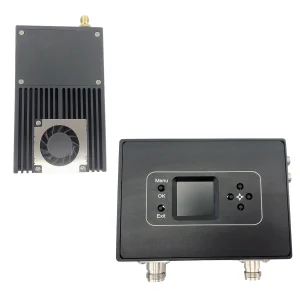
“개미”: 송신 안테나 인터페이스, 전원을 켜기 전에 안테나를 연결하십시오
“HDMI”: 고화질 비디오 입력 인터페이스, 1080/50P 이하 입력
“Ctrl 키”: Transmitter tuner connection interface
“DC 12V”: DC12V 전원 입력 포트. “+” 전원 공급 장치의 양극입니다., “-” 전원 공급 장치의 음극입니다.
“DC” ~이다: 전원 표시등, when the light is always on, 이는 전송 모듈의 전원 입력이 정상임을 의미합니다.
“TS”: 비디오 입력 감지 표시등, this light is always on to indicate video input and normal encoding
- Parameter Configuration Description
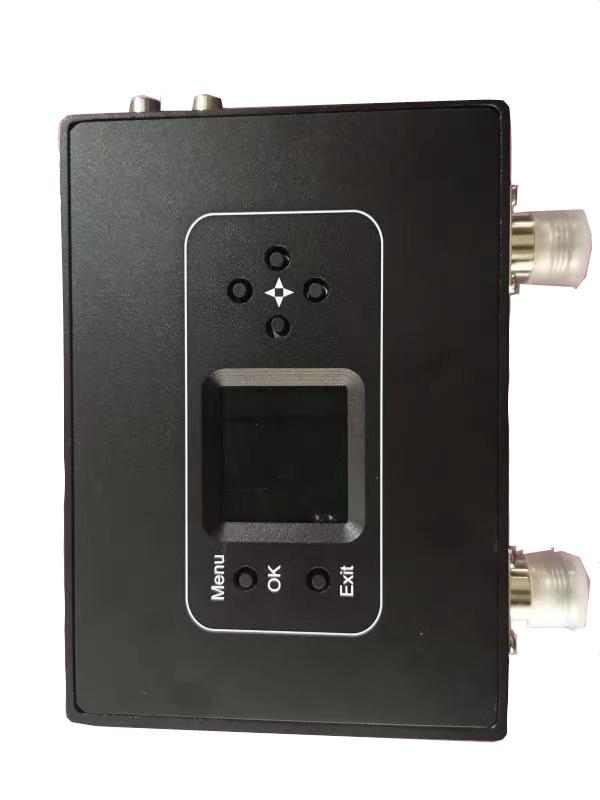
Connect the transmitter parameter adjuster, 누르다 “메뉴/확인” key to enter the menu, the encryption key and data serial port parameters are displayed first, press the left or right key to move the cursor, and the up and down keys to adjust the parameters
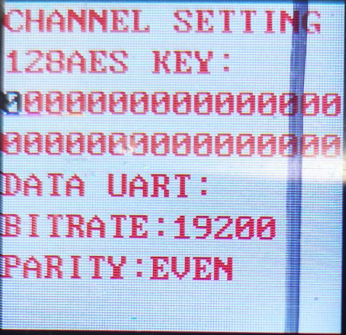
After the parameter setting is completed, 누르다 “메뉴/확인” to enter the next menu, and the interface is displayed as shown in the figure
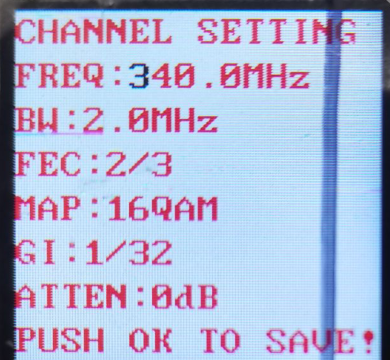
Press the left or right key to move the cursor, press the up or down key to adjust the required parameters, the interface prompts as shown in the figure
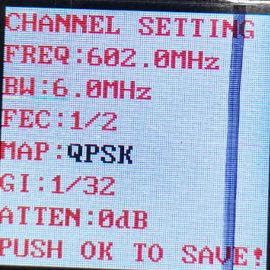
After all parameter settings are completed, 누르다 “메뉴/확인” 확인하는 열쇠, and the display will be as shown in the figure.
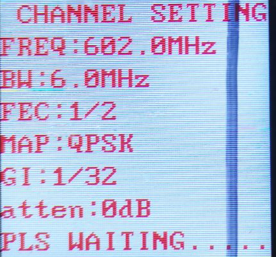
설정이 완료된 후, 매개변수가 성공적으로 기록되었습니다., 디스플레이는 그림과 같습니다.

- General Troubleshooting
에이: The light is off after the power is turned on: Check whether the power input meets the standard
비: “TS” indicator light is off: Check the video input connection cable, check whether the video input format conforms, and check whether the camera is interfered with (you can judge by holding the antenna with your hand).
기음: The temperature of the transmitter is very low: check whether the current is normal (the deviation can be ±0.2A within the standard current).
디: Three lights are always on, and one of them is super bright: it means that the transmitter has failed the detection, and you can try to power off and restart (uncommon)
2: 수화기
- Functional area description
“RF 입력1” “RF 입력2”: 수신 안테나 인터페이스, it is recommended to connect the antenna and then turn on the power switch, because the static electricity of the human body may cause the receiver to crash.
“HDMI”: 비디오 출력 인터페이스, 출력 비디오 형식은 다음을 통해 조정할 수 있습니다. “HDMI” 제어판의 메뉴.
“DC 12V”: 전원 입력 인터페이스, 전원 공급 장치 전압 요구 사항을 엄격히 따르십시오., and overvoltage input is strictly prohibited
“켜기/끄기”: power switch.
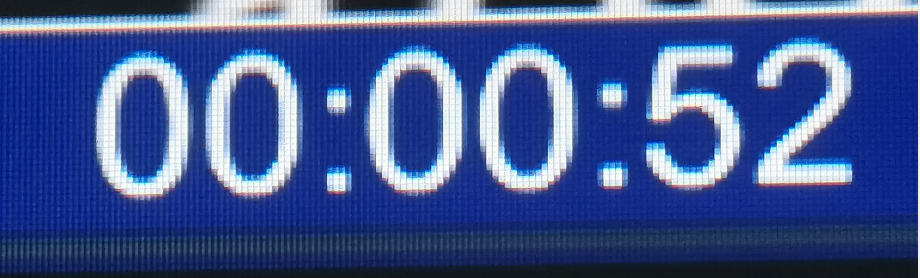
“USB”: video storage interface, when the U disk is inserted, 누르다 “출구” button to start the video recording, after the recording is successful, the video display will display the video recording time, and the stored file name is “TS”.
- LCD parameter description
에이:CH01 잠금 해제됨(LCK됨)
“CH01” means the channel number of the receiver, “잠금 해제됨” means the received signal is unlocked, 과 “LCKED” means the signal is locked. “CH00” of the receiver is the initial writing channel, 송신기의 정상적인 작동에 해당하는 기본 채널은 다음과 같습니다. “CH001”
비: 주파수:602.0메가 헤르츠
“602.0메가 헤르츠” 수신기의 수신 주파수는, this frequency must be consistent with the frequency set by the transmitter, otherwise the receiver will not search or receive the signal from the transmitter
기음: 흑백:6.0메가 헤르츠
“흑백” 대역폭, 그림에 표시된 것처럼, “흑백: 메가 헤르츠” is understood as the RF bandwidth is 6MHz, this bandwidth must be consistent with the bandwidth set by the transmitter, otherwise the receiver will search for or cannot receive the signal from the transmitter
디: 독립 단기 치료소:1/2
“독립 단기 치료소: 1/2” is the channel error correction, this parameter synchronizes the parameters set by the transmitter, and the receiver cannot be modified
이자형: 미군 병사:1/32
“미군 병사:1/32” 채널 가드 간격입니다, this parameter is set by the transmitter synchronously, and the receiver cannot be modified
에프:지도: QPSK
“지도: QPSK” 변조 매핑입니다, this parameter number is set by the transmitter synchronously, and the receiver cannot be modified
지: SNR:0.0데시벨(SNR:15.0데시벨)
“SNR: 15.0데시벨” is the signal quality (즉, the signal-to-noise ratio, 값이 클수록, 더 나은). 언제 “0.0데시벨” 표시됩니다, the signal quality is 0, and the receiver will not be able to lock
“(SNR:15.0데시벨)” means the receiving signal-to-noise ratio is greater than 15dB. In the “QPSK” modulation mapping state, as long as the signal-to-noise ratio is greater than 6dB, the receiver can lock
시간: PW:-72.1dBm(PW:-72.1)
PW is the received signal strength, (reference level value), the farther the transceiver end is relative to the distance, the weaker the signal strength is, and the larger the displayed value is, when the transmitter is not turned on, if the signal strength of the receiver is greater than -90dBm (such as -79.7dBm), it can be considered as adjacent frequency interference
- Parameter Configuration Description
Power on the receiver, and press the “메뉴/확인” 메뉴에 들어가는 버튼, the first display is the menu of adjustable parameters, if you search for a specified frequency, directly press the “메뉴/확인” 메뉴에 들어가는 버튼; if you want to remove the channel, press Press down to select “ListanbulChannel”, and then press “메뉴/확인” to enter the menu operation; if you need to change the video output format, move the cursor to the “HDMI Mode” menu, 누르다 “메뉴/확인” to enter, and select the video to be output After formatting, 누르다 “메뉴/확인” 확인하는 열쇠.
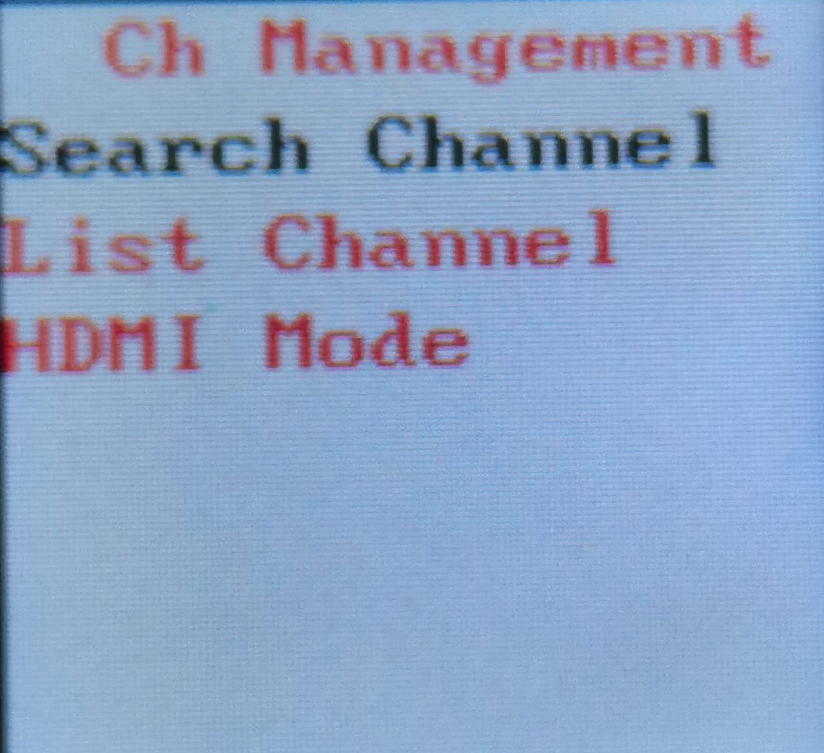
주파수 탐색 방법은 다음과 같습니다. 주파수 설정 메뉴 진입 후, 그림과 같이 인터페이스가 표시됩니다.. Press the left or right key to move the cursor, press the up or down key to adjust the frequency, RF 대역폭, 송신기와 일치하는 비밀 키, and press the “MENU /OK” key to search. 이때 송신기를 켜야 합니다., 그렇지 않으면, the receiver will not be able to lock because it cannot find the signal.
COFDM Mobile Video Wireless Transmission with a cheap price is including a transmitter and receiver for China directly
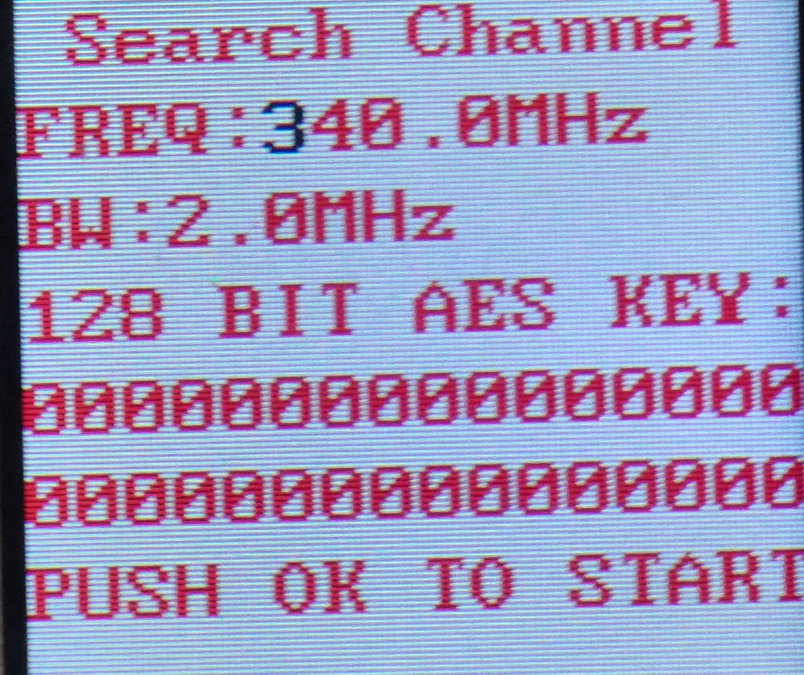
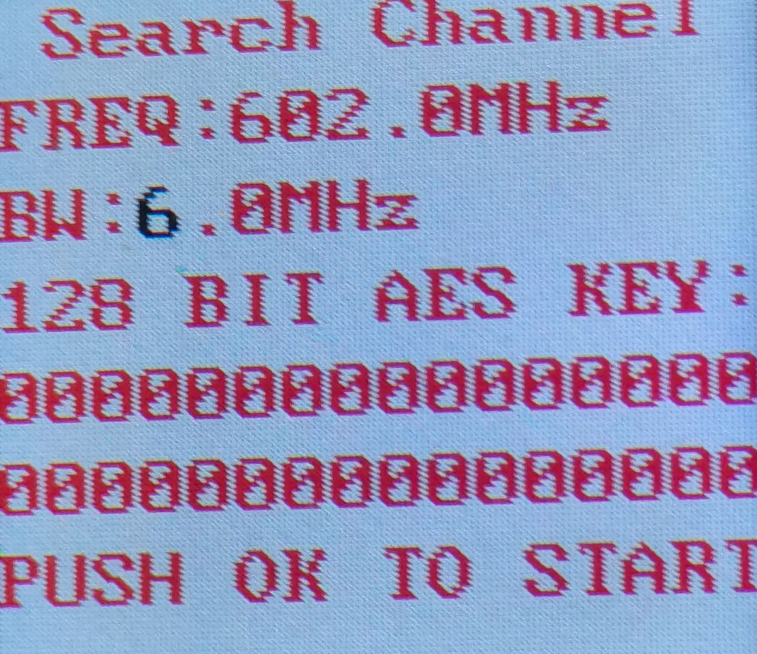
검색이 완료되면, 누르다 “메뉴/확인” 확인하기, and the channel is saved in the register of the assistant board, 그림에 표시된 것처럼. To save the channel to the receiver register, 누르다 “메뉴/확인” 키와 오른쪽 키를 동시에.
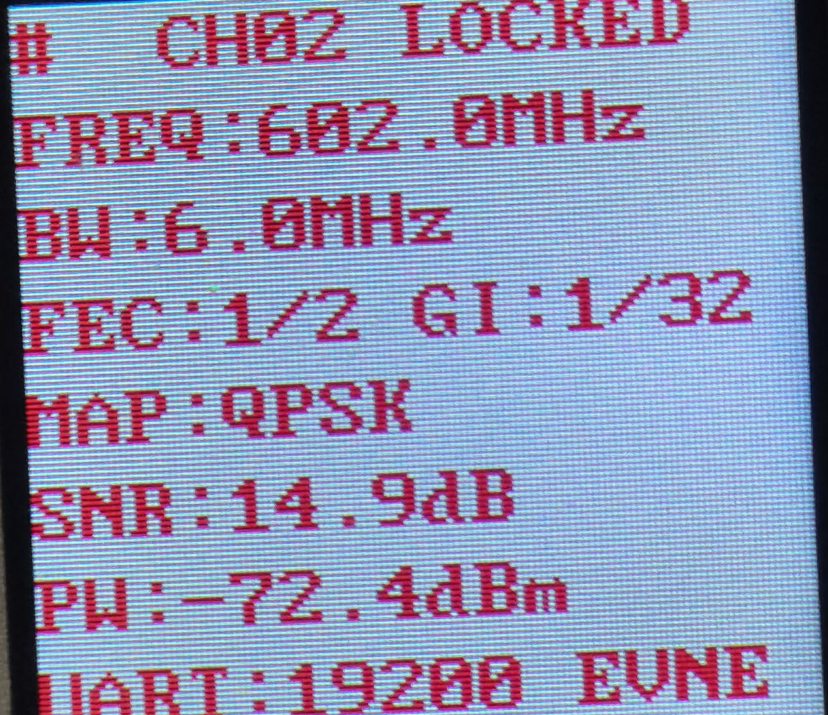
수신기 매개변수 설정이 완료된 후, the functions of the panel keys are as follows
“↑""↓“: each individually selectable receiver channel “CH**”
“←""→“: 수신기의 숨겨진 매개변수를 보도록 선택할 수 있습니다.
“출구”: 녹음 시작 및 중지
- Video function
Insert the storage device into the “USB” interface of the receiver, 누르다 “출구” button to start recording, and a blue recording time box will appear on the upper left corner of the video display as shown below
- General Troubleshooting
에이: The value after the receiver displays “-” is very low (Tx is not turned on): It means that the current channel has serious electromagnetic interference, and the normal value is -90- -100.
비: Cannot record video: check the U disk or replace the U disk.
기음: No signal received: Check whether the channel frequency is consistent with the transmitter.
디: 비디오 출력 없음: Check the connection line, 전원 끄기, and restart to check whether there is a boot interface.
질문하기
응답해 주셔서 감사합니다. ✨