






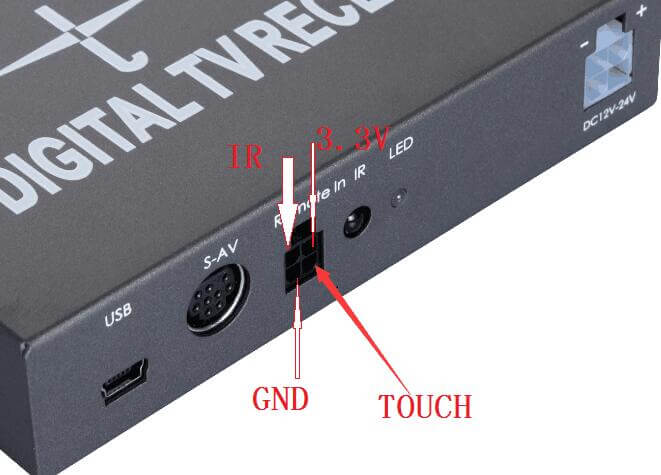
Q1: TV 박스를 헤드유닛에 어떻게 연결하나요?, then it can control by touch screen, not by remote control?
에이: Our tv box support IR protocol and control by your head unit touch screen. Please check the below technology file, or show it to your head unit factory engineer, who can help you to complete this function.
Or please send your head unit to us, we will connect the cable to come true this function for you. We need your head unit for test and to ensure that these two different factories device can work together well.
IR and UART Application Program Interface for DTV module
This document is designed as IR and UART Application Program Interface for DTV module menu control applications.
원격 (및) interface control
리모콘
CUSTOM CODE 0x807F
힘 (0x14)
TV/RADIO (0x46)
수색 (0x18)
MUTE (0x57)
1(0x09) 2(0x1d) 3(0x1f) 4(0x19) 5(0x1b) 6(0x11) 7(0x17) 8(0x12)9(0x59)0(0x55)
RECALL(0x50)
정보(0x41)
SUB(0x08)
좋아하는 것(0x03)
UP/CH_UP(0x05)
EPG(0x0d)
TXT(0x4a)
LEFT/VOL-(0x07
OK/LIST(0x40)
RIGHT/VOL+(0x02)
오디오(0x15)
메뉴(0x47)
DOWN/CH_DOWN(0x0f)
출구(0x48)
빨간색(0x0a)
GREEN(0x1e)
YELLOW(0x0e)
BLUE(0x1a)
Add function key:
VOL_UP : 0x06
VOL_DOWN: 0x5e
//CH_UP: 0x92
//CH_DOWN: 0x93
//PAGE_UP: 0x97
//PAGE_DOWN: 0x98
Function brief description:
메뉴: Menu or Exit menu
출구: Exit Menu or exit function
UP/CH_UP: Channel up or Up
DOWN/CH_DOWN: Channel Down or Down
LEFT/VOL-: Volume down or Left
RIGHT/VOL+: Volume up or Right
OK/LIST: Menu OK or Channel List
수색: Auto scan
SUB: Subtitle or CC(Close Caption) on/off
MUTE: Mute On/Off
오디오: 왼쪽(기본)/권리(Sub)/스테레오 (Main+Sub)/language selection
EPG: EPG 기능
정보: Channel infomation
0~9: Number key for LCN
RECALL: review last Channel (예약하다)
좋아하는 것: FAV a LIST (예약하다)
VOL_UP: Volume up
VOL_DOWN: Volume down
CH_UP: Channel up
CH_DOWN: Channel down
빨간색: Auxiliary function (예약하다)
GREEN: Auxiliary function (예약하다)
YELLOW: Auxiliary function (예약하다)
BLUE: Auxiliary function (예약하다)
힘: Power On or Power Off
NO-TOUCH PANEL UART INTERFACE
속도:115200 bps. (for public version)
데이터 형식:1 Start bit
8 Data bits
1 중지하십시오
No Touch Panel key input. The following will be a 1-byte command code.
데이터 형식: 0x01+0x88+0x00+0x01+command(one byte)+0x03+0x00+0x00
Data Detail: command=key code.
Key Name Command Code
NUMERIC_0 0x00
NUMERIC_1 0x01
NUMERIC_2 0x02
NUMERIC_3 0x03
NUMERIC_4 0x04
NUMERIC_5 0x05
NUMERIC_6 0x06
NUMERIC_7 0x07
NUMERIC_8 0x08
NUMERIC_9 0x09
POWER 0x0a
MUTE 0x0b
MUTI_UP 0x0c
MUTI_DOWN 0x0d
MUTI_LEFT 0x0e
MUTI_RIGHT 0x0f
SELECT 0x10
MENU 0x17
EXIT 0x18
ZOOM 0x19
RECALL 0x1a
RED 0xlb
GREEN 0xlc
YELLOW 0x1d
BLUE 0x1e
LIST 0x1f
FAV 0x20
EPG 0x21
AUDIO 0x22
SUBTITLE 0x24
CHANNEL_LIST 0x2e
VOLUME_MINUS 0x30
VOLUME_PLUS 0x31
SCAN 0x33
LEFT 0x34
RIGHT 0x35
UP 0x36
DOWN 0x37
CHANNEL_PLUS 0x38
CHANNEL_MINUS 0x39
UART Interface for X/Y Coordinate (For Touch Panel UI)
Touch Panel location(X-Y) 입력. The following will be command code.
데이터 형식:
0x01+0x88+0x02+0x02+Byte1+Byte2+0x03+0x00+0x00
Data detail :
Byte1 = Touch Location X;
Byte2 = Touch Location Y;
노트:
The full-screen X/Y coordinate range is 0~255; The screen left top corner
Coordinate is (0,0).
IR Interface For X/Y Coordinate
(For Touch Panel UI and NEC format)
Custom Code :0xaa55;
Data Code: 높은 8 bits is X coordinate, 낮은 8 bits is Y coordinate.
노트:
The full-screen x/y coordinate range is 0~ 255; The screen left top corner coordinate is (0,0).
This is an ATSC TV box for head unit touch control IR Protocol, if you need more technology support from us, 연락주세요.

질문하기
응답해 주셔서 감사합니다. ✨