






विषयसूची
हमें इनपुट के रूप में एसडीआई और पीएएल और आउटपुट के रूप में ईथरनेट स्ट्रीम वाले उत्पाद की आवश्यकता है, H.265 डिकोडिंग के साथ.
1. Vcan1681 supports SDI and PAL.
https://ivcan.com/p/hdmi-to-ip-encoder-modulator-module-board-cvbs-hdmi/
2. We have two firmware to support H265 and H264 encoder and decoder.
क्या आपका वीडियो एनकोडर डिकोडर एचडी-एसडीआई का समर्थन करता है? 1080पी या 1080i.
1. Max supports 1080P.
2. HDMI input supports 4k.
क्या आपका एनकोडर किसी h264/h265 डिकोडर के साथ संगत है?. एनवीडिया जेटसन डिकोडर आदि
We need to ask the engineer, please tell us the details of the video decoder if you have.
We also have video encoder and decoder board, if you both us ours, then it is no problem.
4k या 1080p वीडियो के लिए ईथरनेट डेटा दर क्या होगी?
The video bitrate is configurable by the customer (उपयोगकर्ता).
हम आपके वीडियो एनकोडर बोर्ड का उपयोग दो इनपुट के साथ करेंगे (एचडीएमआई और पीएएल) और 12V एलिमेंटेशन के साथ. क्या यह ठीक है?
क्या आपका मतलब HDMI या AV इनपुट से है? (support two video types), या क्या आपको एक साथ दो इनपुट का समर्थन करने के लिए HDMI और AV की आवश्यकता है??
क्यू: We need to have HDMI and AV to support two simultaneous inputs.
ए: ठीक है. Our firmware engineer will some days to make a new firmware to meet this function you need. I will upgrade it and show you the test video. https://youtu.be/izdFa1nw7u8
आईवीकैन: कृपया यह पुष्टि करने में सहायता करें कि एचडीएमआई और सीवीबीएस एक ही समय में समर्थित हो सकते हैं, लेकिन ऑडियो केवल दोनों में से एक का चयन किया जा सकता है (सिस्टम वीडियो एक्सेस स्थिति के अनुसार एचडीएमआई ऑडियो/एनालॉग ऑडियो का चयन करता है), क्या यह आप के लिए ठीक है?
ग्राहक: हमें ऑडियो की जरूरत नहीं है, इसलिए वही करें जो आपके लिए सबसे अच्छा हो.
आईवीकैन: हमारे सॉफ्टवेयर इंजीनियर ने आपके लिए एक सॉफ्टवेयर बनाया है. कृपया अनुलग्नकों में दिए गए चित्रों की जाँच करें.
अब यह एचडीएमआई कैमरा और सीवीबीएस कैमरा को सपोर्ट करता है.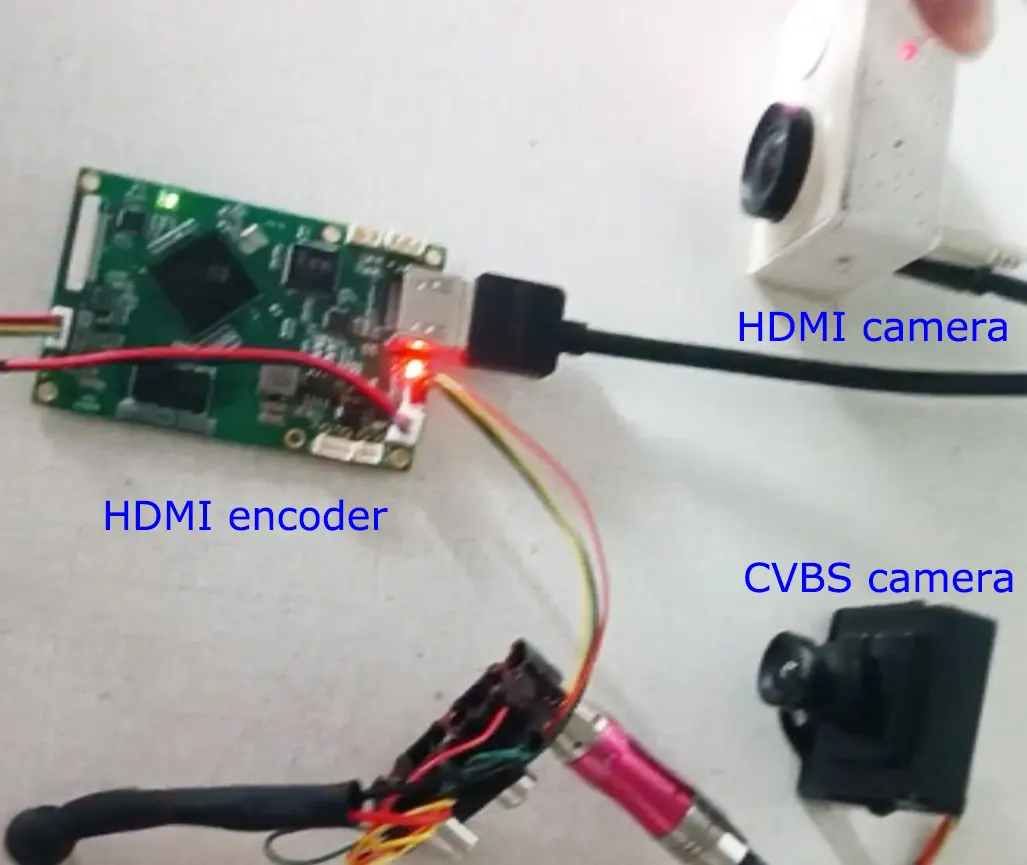
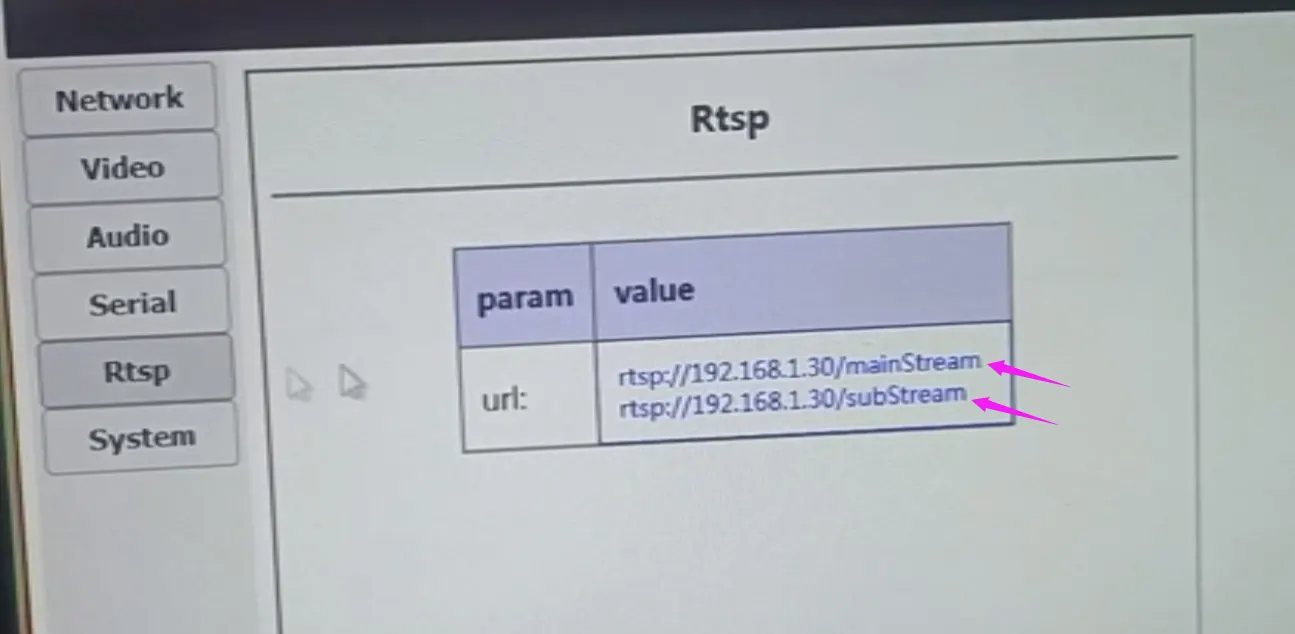
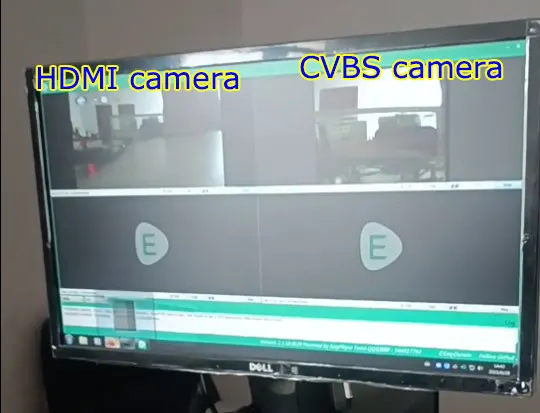
ग्राहक:
मैंने हमारे सिस्टम के साथ आपके एनकोडर का कई बार परीक्षण किया है. यह कुल मिलाकर ठीक काम कर रहा है.
लेकिन हमारे पास इसके उपयोग को मान्य करने में सक्षम होने का एक बड़ा मुद्दा है :
जब भी हम सिस्टम कैमरा और एनकोडर को एक साथ चालू करते हैं तो हम पढ़ने में असमर्थ होते हैं “मुख्य धारा”, हम केवल पढ़ सकते हैं “सबस्ट्रीम”.
हमें करना ही होगा “रीबूट” इसे काम करने के लिए वेब इंटरफ़ेस के माध्यम से एनकोडर: रिबूट के बाद हम सीधे मेनस्ट्रीम पढ़ सकते हैं.
हमने VLC और GStreamer दोनों के साथ प्रयास किया.
हम स्टार्टअप पर दोनों धाराओं को पढ़ने योग्य बनाने के लिए क्या प्रयास कर सकते हैं ?
आईवीकैन:
हमारे इंजीनियरों की राय में, यह या तो कैमरा पहचान की समस्या है या ग्राहक के उपयोग की समस्या है.
मुझे संदेह है कि बोर्ड कार्ड ने ग्राहक के एचडीएमआई कैमरे को नहीं पहचाना.
इसे सत्यापित करना आसान है (यदि आप उप-धारा तक नहीं पहुंच सकते हैं, इसे सत्यापित करना कठिन होगा).
एनकोडर बोर्ड के वेब सर्वर में लॉग इन करें और आप वीडियो पेज पर कैमरा पहचान स्थिति देख सकते हैं.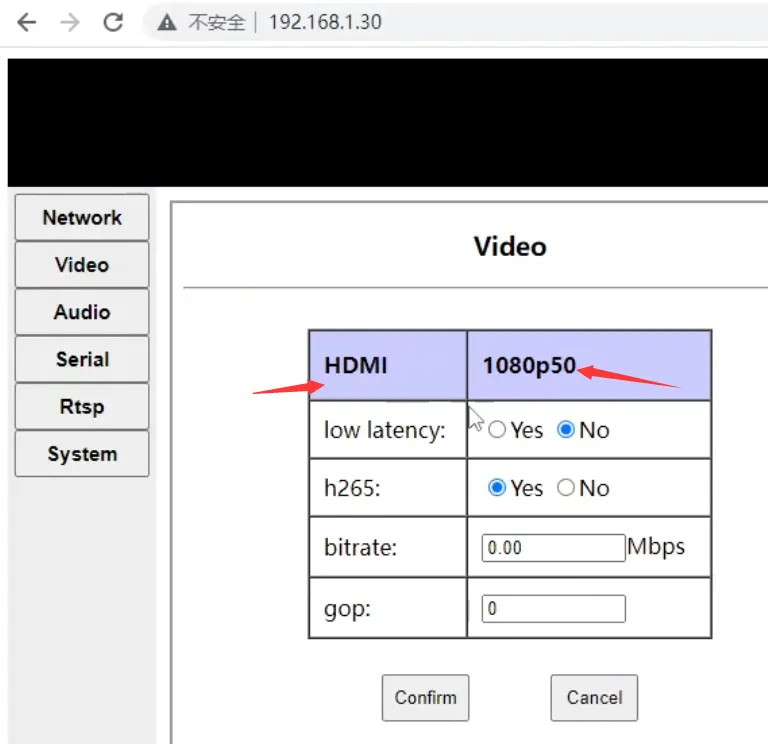
आईवीकैन:
वीडियो पेज केवल एक कैमरे की पहचान स्थिति प्रदर्शित करेगा. यदि HDMI और AV कैमरे एक ही समय में कनेक्ट और पहचाने जाते हैं, वीडियो पेज एचडीएमआई कैमरे की पहचान स्थिति प्रदर्शित करेगा (जैसे 1080p60):
जब तक एचडीएमआई कैमरा इसे सामान्य रूप से पहचान सकता है, मुख्यधारा तक सामान्य रूप से पहुँचा जा सकता है.
यदि एचडीएमआई कैमरा सामान्य रूप से पहचाना नहीं जाता है, कृपया बोर्ड पर एचडीएमआई वायरिंग और पावर की दोबारा जांच करें (ध्यान दें कि यह एक शक्ति चक्र है, वेब पेज पर कोई सॉफ़्टवेयर पुनरारंभ नहीं है)
इसके साथ - साथ, बोर्ड एक यादृच्छिक मैक पते का उपयोग करता है, इसलिए जब भी हम इसे पुनः आरंभ करेंगे तो मैक का पता बदल जाएगा.
ARP कैश वाले उपकरणों के लिए (जैसे कि एक पीसी), पुनः आरंभ करने के बाद, यह अस्थायी होगा (कुछ सेकंड) नेटवर्क से बोर्ड तक पहुंचने में असमर्थ. , हम इसे तब तक एक्सेस नहीं कर सकते जब तक कि टाइमआउट के बाद एआरपी अनुरोध दोबारा शुरू नहीं किया जाता (प्रदर्शन यह है कि कोडिंग बोर्ड को पुनरारंभ करने के बाद कई सेकंड तक पिंग नहीं किया जा सकता है)
इसलिये, मुझे लगता है कि एक और संभावना यह है कि जब ग्राहक मुख्यधारा तक पहुंचता है, उपरोक्त कारणों से इसे एक्सेस नहीं किया जा सकता है. फिर जब ग्राहक उप-स्ट्रीम तक पहुंचता है, एआरपी कैश ताज़ा हो जाता है और ग्राहक उस तक पहुंच सकता है, लेकिन ग्राहक फिर से मुख्य धारा में नहीं आता है.
“जब भी हम सिस्टम कैमरा और एनकोडर को एक ही समय पर चालू करते हैं, हम "मेनस्ट्रीम" नहीं पढ़ सकते, हम केवल "सबस्ट्रीम" पढ़ सकते हैं.“
आईवीकैन:
यहां आपके विवरण से पता चल रहा है, ऐसा लगता है कि आपका कैमरा हमारे एन्कोडिंग बोर्ड के बाद चालू हुआ है. कृपया पहले अपना कैमरा प्रारंभ करें, और फिर इसे आज़माने के लिए पावर ऑन करें और हमारे एन्कोडिंग बोर्ड को प्रारंभ करें. हो सकता है कि यह उसी समय चालू न हो. पावर्ड-ऑन ऑर्डर भी मायने रखता है. उदाहरण के लिए, आपके कैमरा स्टार्टअप की आवश्यकता है 10 सेकंड, लेकिन हमारे एनकोडर बोर्ड स्टार्टअप को केवल इसकी आवश्यकता है 5 सेकंड.
क्योंकि मुझे यकीन नहीं है कि पावर-ऑन के बाद आपका कैमरा प्रारंभ होने में बहुत धीमा है या नहीं.
क्योंकि हमारा एनकोडर बोर्ड बहुत जल्दी शुरू हो जाता है, ऐसा हो सकता है कि हमारे एन्कोडर बोर्ड को चालू करने के बाद कैमरे को प्रारंभ नहीं किया गया हो, जिससे कुछ अप्रत्याशित समस्याएं पैदा हो सकती हैं. यह यह भी समझा सकता है कि "हमें इसे काम करने के लिए वेब इंटरफ़ेस के माध्यम से एनकोडर को "रीबूट" क्यों करना पड़ता है: रिबूट के बाद हम सीधे मेनस्ट्रीम पढ़ सकते हैं।", क्योंकि जब आपका वेब पेज एनकोडर बोर्ड को पुनरारंभ करता है, कैमरा पहले ही प्रारंभ किया जा चुका है.
इसलिये, अंतिम सुझाव इस प्रकार हैं (मैंने मन में आने वाली हर चीज़ को सूचीबद्ध करने की पूरी कोशिश की और आपको उनका अलग से परीक्षण करने दिया);
वेब सर्वर के वीडियो पेज को देखें और पुष्टि करें कि एचडीएमआई कैमरा सामान्य रूप से पहचाना गया है या नहीं (आप हमें स्क्रीनशॉट भेज सकते हैं). जब तक कैमरा सामान्य रूप से पहचाना जाता है, मुख्यधारा तक पहुंचा जा सकता है;
यह अनुशंसा की जाती है कि आप पहले कोडिंग बोर्ड को cmd के अंतर्गत पिंग करें, और फिर गलती से यह सोचने से बचने के लिए वीएलसी के तहत मेनस्ट्रीम और सबस्ट्रीम तक पहुंचें कि रैंडम मैक समस्याओं के कारण मेनस्ट्रीम तक नहीं पहुंचा जा सकता है.
आइए पहले आप अपना कैमरा शुरू करें (कुछ सेकंड के लिए), फिर चालू करें और प्रयास करने के लिए हमारे एन्कोडिंग बोर्ड को प्रारंभ करें (ऊपर वर्णित कारण देखें)
"एक ही समय में सिस्टम कैमरा और एनकोडर चालू करें" के अपने मूल ऑपरेशन का पालन करें. जब समस्या "हम "मुख्यधारा" को पढ़ने में असमर्थ हैं, हम केवल "सबस्ट्रीम" पढ़ सकते हैं। पुनरुत्पादित किया जाता है, वेब पेज के माध्यम से एन्कोडिंग बोर्ड को पुनः आरंभ न करें, लेकिन अपने कैमरे और एन्कोडिंग बोर्ड के बीच एचडीएमआई केबल को हॉट-स्वैप करें. मुझे लगता है कि यह केवल एक हॉट-स्वैप ऑपरेशन है (क्योंकि मुझे संदेह है कि यह एक प्लग-इन डिटेक्शन समस्या है जिसके कारण कैमरा एन्कोडिंग बोर्ड से कनेक्ट नहीं हो पाता है. HDMI सिग्नल भेजें).
ग्राहक:
मैं हमेशा सबस्ट्रीम पढ़ सकता हूं. रिबूट के बाद ही मेनस्ट्रीम.
आईवीकैन:
तब हमारा एनकोडर बोर्ड आपके कैमरे का पता लगा सकता है.
कृपया एक परीक्षण करें.
आइए पहले आप अपना कैमरा शुरू करें (कुछ सेकंड के लिए), फिर चालू करें और प्रयास करने के लिए हमारे एन्कोडिंग बोर्ड को प्रारंभ करें.
इंजीनियर को इस बात की चिंता है कि आपके कैमरा स्टार्टअप को क्या चाहिए 10 सेकंड, लेकिन हमारे एनकोडर बोर्ड स्टार्टअप को केवल इसकी आवश्यकता है 5 सेकंड.
अलग-अलग स्टार्टअप समय की संभावना को दूर करने के लिए कृपया यह परीक्षण करें.
आईवीकैन:
जब आप परीक्षण कर रहे हों, सेटिंग को वापस समायोजित करना बेहतर है (लाल शब्द) या नीचे दी गई तस्वीर देखें.
ग्राहक:
एनकोडर बोर्ड और कैमरा दोनों एक ही समय पर चालू होते हैं. यह संभावना है कि कैमरा स्टार्टअप में एनकोडर बोर्ड की तुलना में थोड़ा अधिक समय लगता है.
मैं पुष्टि करता हूं कि स्टार्टअप पर कैमरा पहचाना नहीं जा रहा है “सीवीबीएस दोस्त” शीर्ष पर प्रदर्शित होता है.
मैं दोनों धाराओं को पढ़ने का प्रयास करने से पहले बोर्ड को ठीक से पिंग कर सकता हूँ
जब मैं सबसे पहले अपना कैमरा चालू करता हूँ (कुछ सेकंड के लिए), फिर बिजली चालू करें (15 सेकंड बाद) और एन्कोडिंग बोर्ड प्रारंभ करें, मैं स्ट्रीम को ठीक से पढ़ सकता हूं.
अगर मुझे “एक ही समय में सिस्टम कैमरा और एनकोडर चालू करें". और फिर एचडीएमआई को हॉट प्लग करें (15 सेकंड बाद), मैं स्ट्रीम को ठीक से पढ़ सकता हूं.
मैं इन चीजों को किए बिना मुख्य धारा को पढ़ने में सक्षम होने के लिए क्या कर सकता हूं? ? मेरे सॉफ़्टवेयर के साथ एक http अनुरोध रीबूट भेजें, स्टार्टअप के कुछ सेकंड बाद ?
आईवीकैन:
कुंआ, यह मेरे अनुमान को सही साबित करता है. हमारे अन्य ग्राहकों के लिए, कैमरा और हमारा एन्कोडिंग बोर्ड सभी एक ही समय में चालू होते हैं. कैमरे हमारे एन्कोडिंग बोर्ड को सामान्य रूप से पहचान सकते हैं और एचडीएमआई सिग्नल भेज सकते हैं. केवल कुछ ही ग्राहकों को अपने अनुकूलित एचडीएमआई कैमरों का उपयोग करते हुए ऐसी समस्याओं का सामना करना पड़ा है. निम्नलिखित का समाधान ग्राहकों द्वारा स्वयं किया जाता है (अपनी कैमरा सेटिंग संशोधित करना/कैमरा बदलना).
ग्राहक:
क्या आपके पास हमारे लिए विकसित सॉफ़्टवेयर का संस्करण है?? हम इसे अपने पीओ में स्पष्ट करेंगे.
आईवीकैन: आपके डिवाइस के लिए फर्मवेयर संस्करण v6.5.5a है.
हमारे पास वीडियो एन्कोडर की खराबी है, मुझे क्या करना चाहिए?
1. आपके द्वारा दिखाए गए फोटो से, हमने पाया कि निचले बाएँ कोने में कैपेसिटर और प्रारंभ करनेवाला बाहरी बल के कारण क्षतिग्रस्त हो गए थे. शायद पैकेजिंग और परिवहन के दौरान उन्हें हटा दिया गया था, और आपकी कंपनी ने ऑपरेशन के दौरान गलती से उन्हें बंद कर दिया.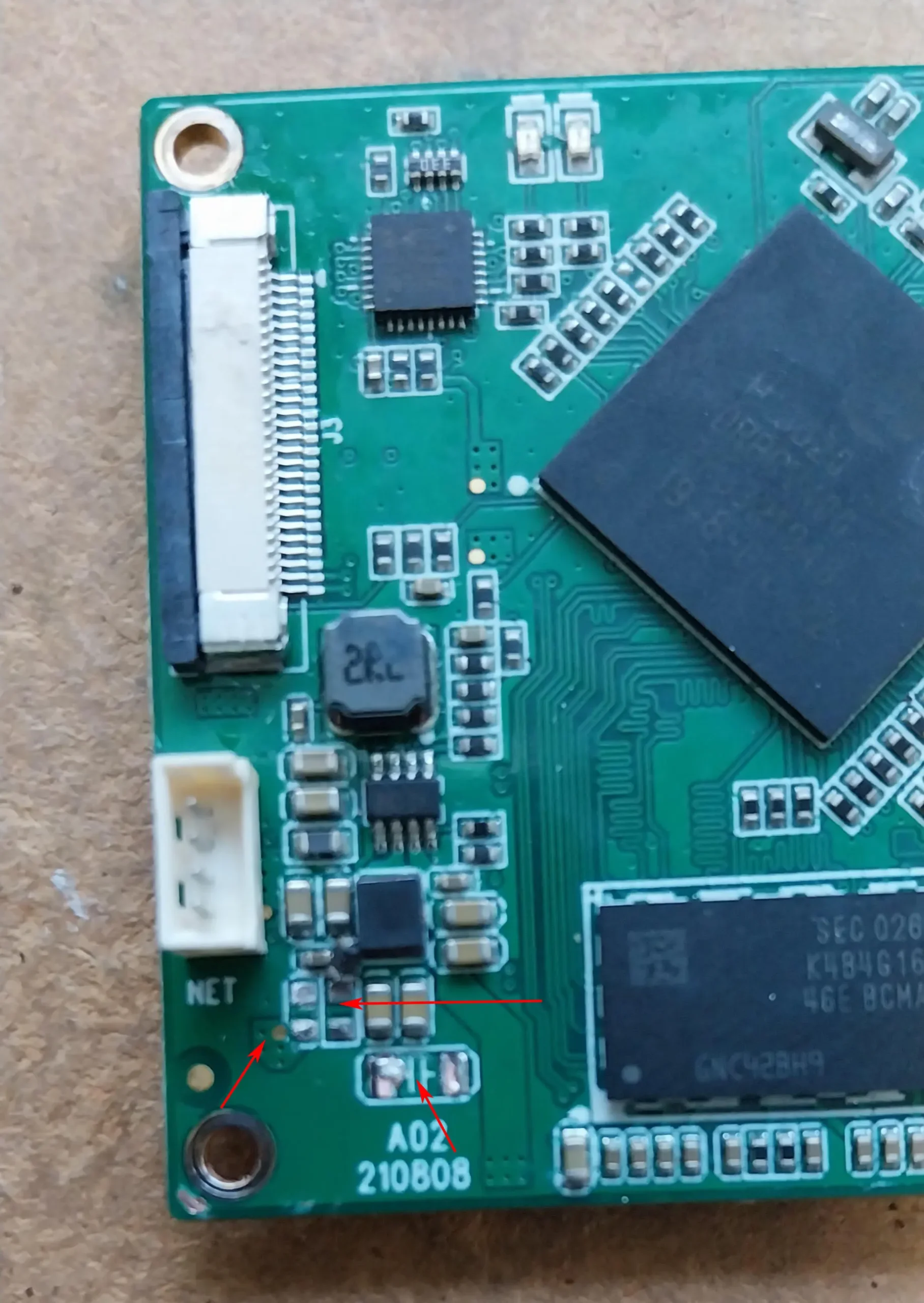
हाइलाइट किए गए उपकरण गायब हैं, जो हैं:
1、C176:टोपी,10एनएफ,+/-10%,X7R,1000वी,एसएमडी1206
2、सी21:टोपी,22यूएफ,+/-20%,X5R,6.3वी,SMD0603
3、आर34:अमेरिकन प्लान,120आर@100एम,+/-25%,3ए,SMD0603 (चुंबकीय मोती)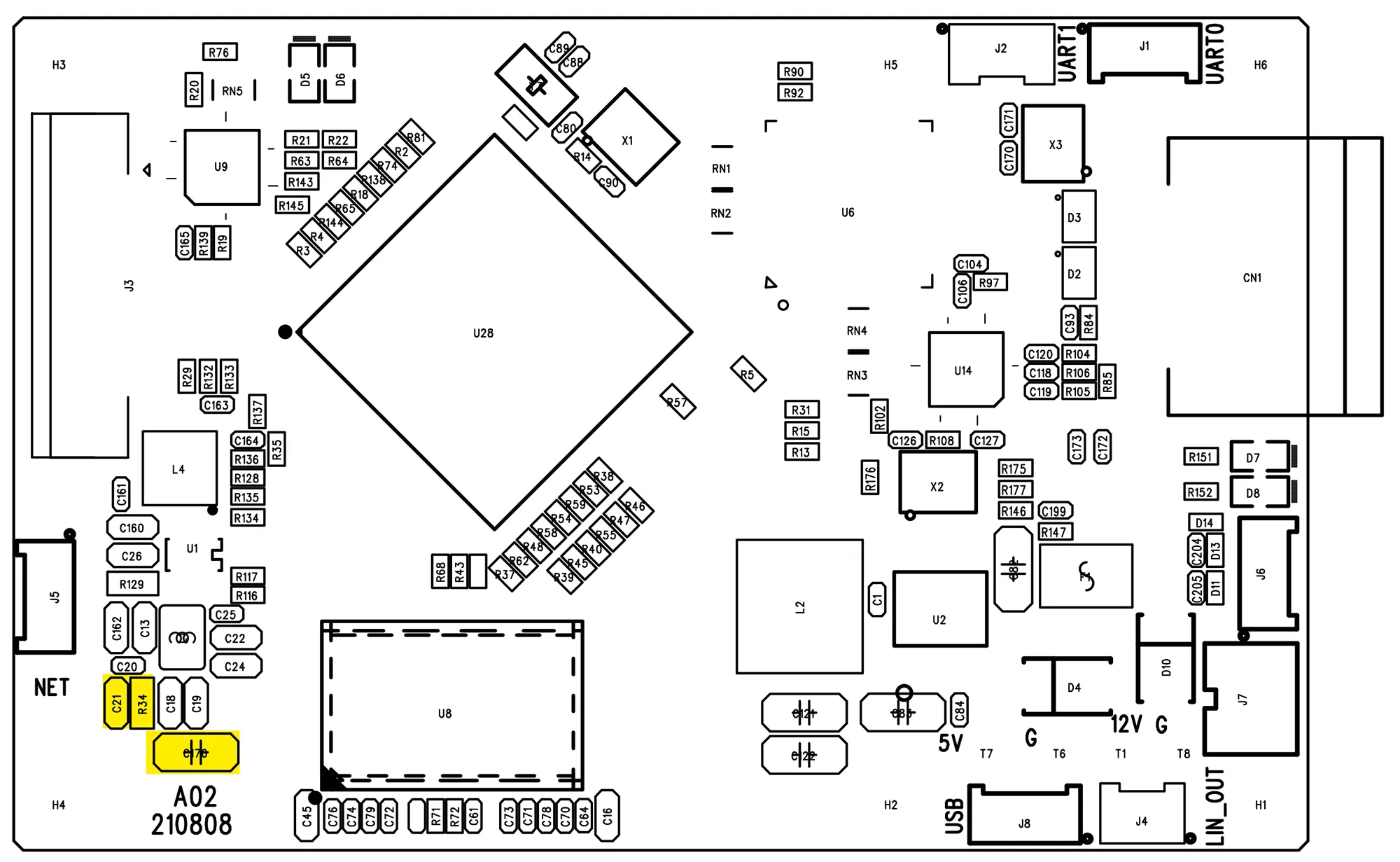
कृपया उन्हीं भागों को खोजने का प्रयास करें, उन्हें बदलें और फिर ध्यान से जांचें कि कहीं कोई अन्य भाग गायब तो नहीं है.
यदि आपके पास अभी भी प्रश्न हैं, कृपया हमसे सम्पर्क करें.
ग्राहक:
इस दोषपूर्ण भाग का उपयोग किस सर्किट को संचालित करने के लिए किया जाता है?
आईवीकैन:
1.5वी बिजली की आपूर्ति, डीडीआर को सशक्त बनाना, कृपया नीचे दी गई तस्वीर की जाँच करें.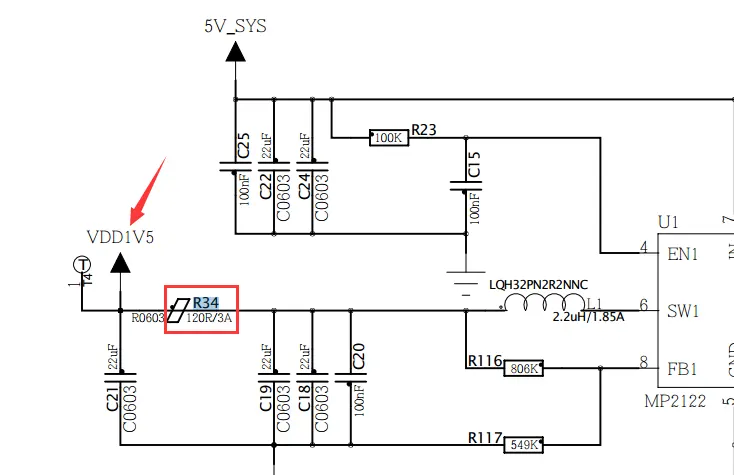
ग्राहक:
हमने आपकी सलाह के अनुसार घटकों को बदल दिया, एन्कोडर कार्यशील नहीं है.
इसके साथ - साथ, हमने वेल्ड के साथ अन्य गुणवत्ता संबंधी समस्याओं पर ध्यान दिया, कई मैन्युअल पुनर्कार्य.
हम वारंटी के तहत मानक एक्सचेंज के साथ कैसे आगे बढ़ सकते हैं?
आईवीकैन:
इसके बारे में चिंता मत करो, कृपया इसे हमें वापस भेजें, और हम आपके लिए एक नया परिवर्तन करेंगे.
क्या आपका HDMI + CVBS वीडियो एनकोडर बोर्ड ONVIF को सपोर्ट करता है?
इंजीनियर ने कहा कि ONVIF प्रोटोकॉल पूरी तरह से समर्थित नहीं है. यह आपकी विशिष्ट आवश्यकताओं पर निर्भर करता है.
वीडियो प्लेयर RTSP को सपोर्ट करता है, वीएलसी, आसान खेल, और प्रोटोकॉल यूडीपी प्लेयर का समर्थन करता है.
क्या मैं एचडीएमआई स्ट्रीम और सीवीबीएस स्ट्रीम का एक साथ उपयोग कर सकता हूं??
हमारा वीडियो एन्कोडिंग बोर्ड एक ही समय में वीडियो के दो चैनलों का समर्थन करता है, एक है एचडीएमआई वीडियो स्ट्रीम और सीवीबीएस वीडियो स्ट्रीम एन्कोडिंग.
क्या आपके पास कोई एलवीडीएस से आईपी एनकोडर बोर्ड है?
अभी नहीं.
प्रश्न: आपका डीवीबी-टी मॉड्यूलेटर किस समय की विशेषता बताता है (ट्रांसमीटर) पास होना? यदि हम DVB-T मानक ETSI EN को देखें तो हम नीचे देख सकते हैं 300 744.

लेकिन आपके DVB-T TX मॉड्यूल में कौन से समय हैं?
हमें इसकी आवश्यकता है क्योंकि हम वीडियो स्ट्रीमिंग के दौरान तेजी से बदलती आवृत्ति के बारे में सोच रहे हैं, इसलिए हमें इस विधा के वास्तविक समय को समझने की आवश्यकता है. हम क्यूपीएसके का उपयोग करते हैं, सीआर=1/2, जीआई=1/32, बैंडविड्थ = 8 मेगाहर्ट्ज.
उत्तर: हमारे DVB-T मॉड्यूलेटर में, प्रेषित प्रतीक समय और गार्ड समय दोनों समान हैं, साथ में 400 744 विनिर्देश
आईपी में सीवीबीएस कनवर्टर, ईथरनेट में एवी सिग्नल कनवर्टर, एसडीआई सीवीबीएस एनकोडर,
क्यू: यदि मैं दो कैमरे कनेक्ट करूँ तो विलंबता कितनी होगी? (HDMI + CVBS)?
मेरे पास दो कैमरे हैं, एक एचडीएमआई कैमरा है, और दूसरा CVBS कैमरा है. मैं इस बोर्ड द्वारा दोनों वीडियो स्ट्रीम को आईपी ईथरनेट में परिवर्तित करूंगा और विपरीत रिसीवर पक्ष एक कंप्यूटर होगा.
ए:
वीडियो एन्कोडिंग बोर्ड की देरी को एन्कोडिंग और डिकोडिंग को ध्यान में रखना चाहिए. अकेले एन्कोडिंग बोर्ड से सटीक विलंब का परीक्षण करना असंभव है.
आमतौर पर, डिकोडर बोर्ड के कारण होने वाली देरी अधिक है.
विभिन्न सॉफ़्टवेयर प्लेयरों के साथ, विलंबता बहुत भिन्न होती है. उदाहरण के लिए, हमारा उपयोग कर रहे हैं स्प्लेयर विलंब लगभग 100ms है, और VLC का उपयोग करने पर विलंब 300ms तक हो सकता है.
सीवीबीएस कैमरे की देरी को सटीक रूप से मापना मुश्किल है. 100ms से नीचे की देरी को स्टॉपवॉच से मापना मुश्किल है. इसके साथ - साथ, Vcan1681 की देरी का परीक्षण करना आसान नहीं है. डिकोडर बोर्ड के बिना, आप छवि भी नहीं देख सकते. इसकी गणना स्टॉपवॉच का उपयोग करके नहीं की जा सकती, और इसे ऑसिलोस्कोप से मापने का कोई तरीका नहीं है.
ग्राहक द्वारा एन्कोडिंग बोर्ड खरीदने के बाद, उसे निश्चित रूप से डिकोड करने के लिए एक खिलाड़ी की आवश्यकता होगी. फिर ग्राहक से यह पूछना बेहतर होगा कि वह डिकोडिंग के लिए किस प्रकार के प्लेयर का उपयोग करने की योजना बना रहा है (हमारा, ग्राहक का अपना, या कोई तीसरा पक्ष), ताकि हम बेहतर जान सकें कि कोडिंग बोर्ड ग्राहकों की आवश्यकताओं को पूरा कर सकता है या नहीं (कार्य और प्रदर्शन) या नहीं.
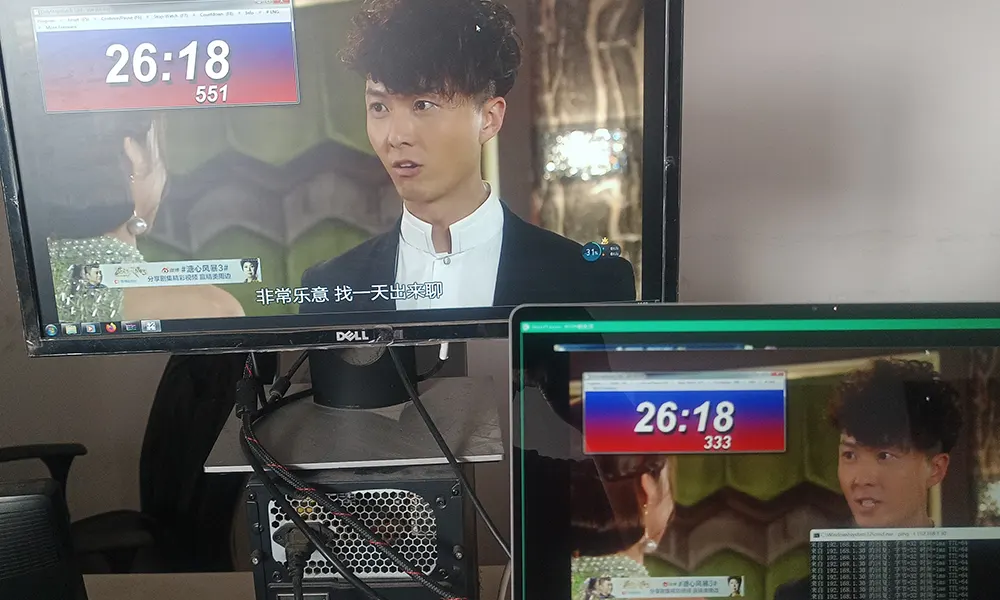
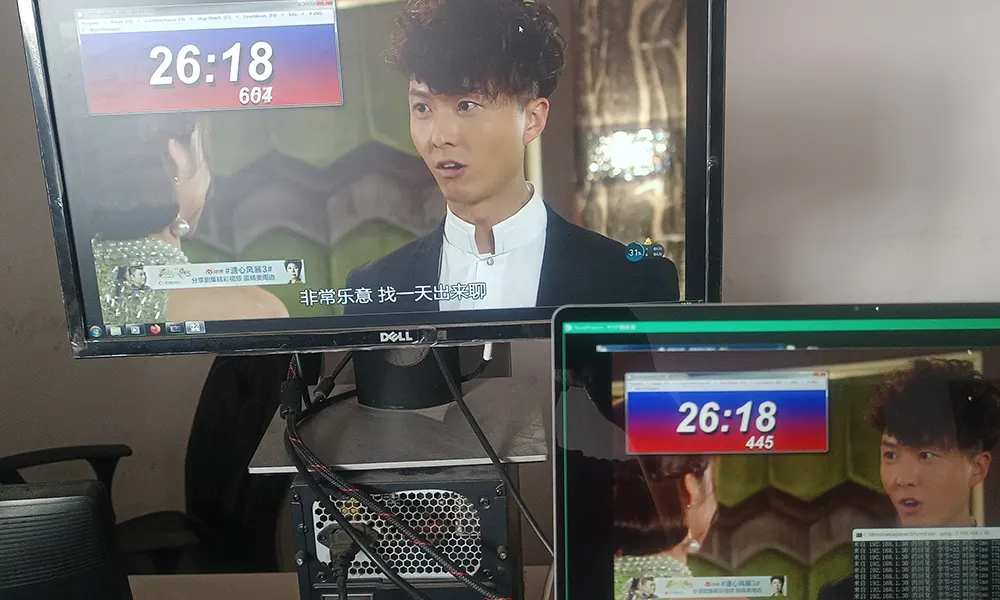
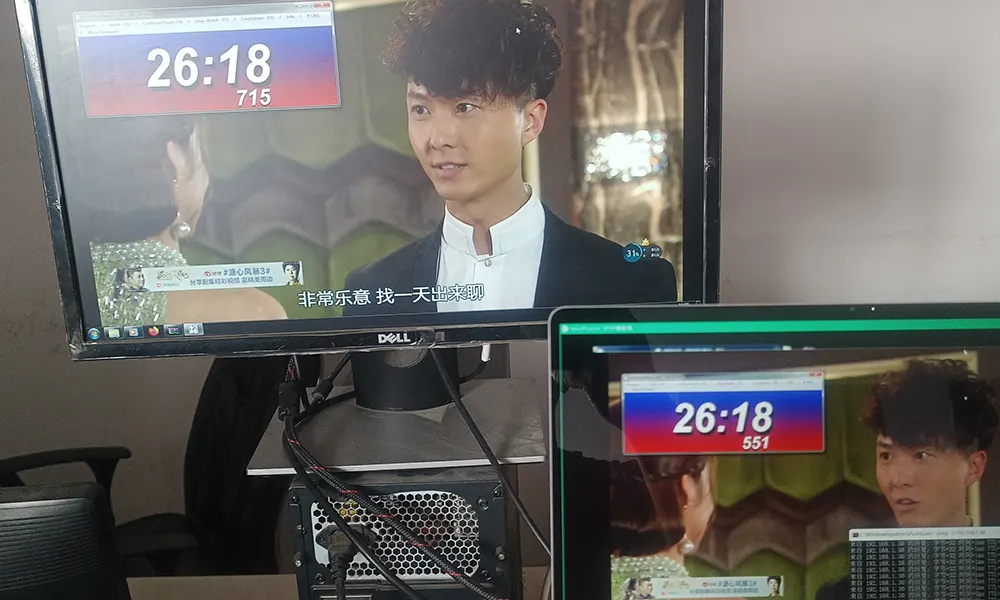
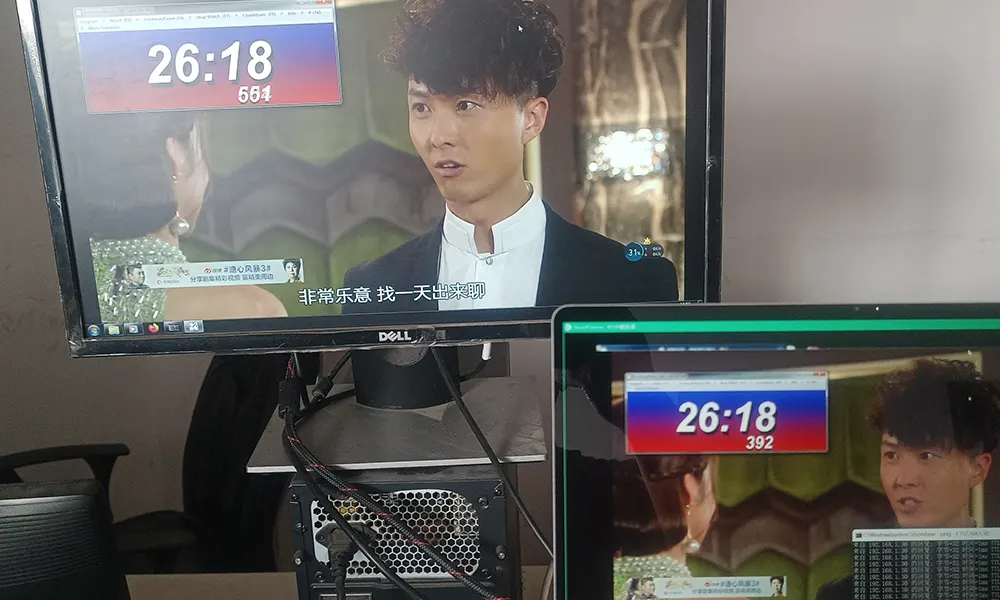
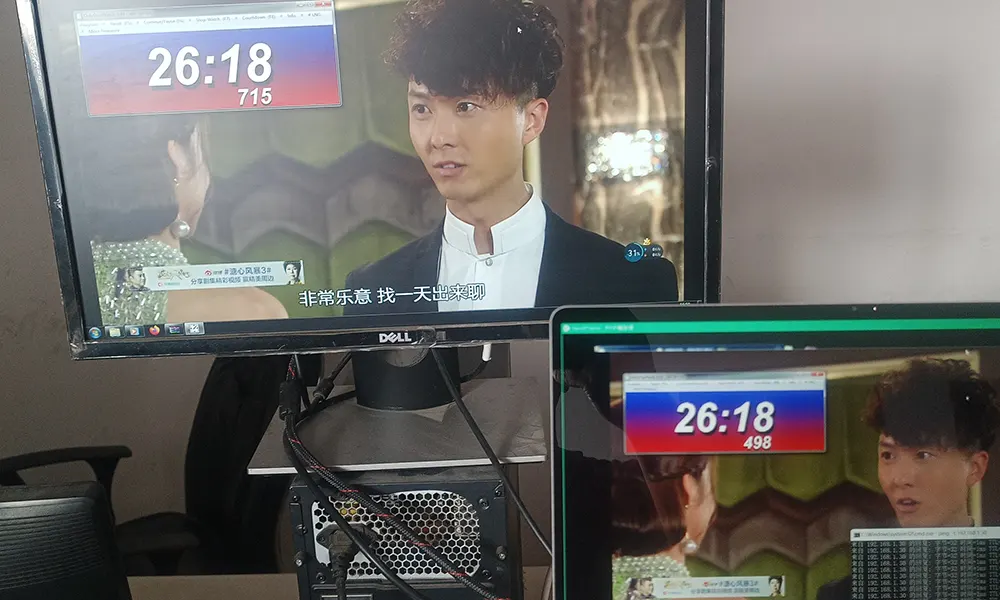
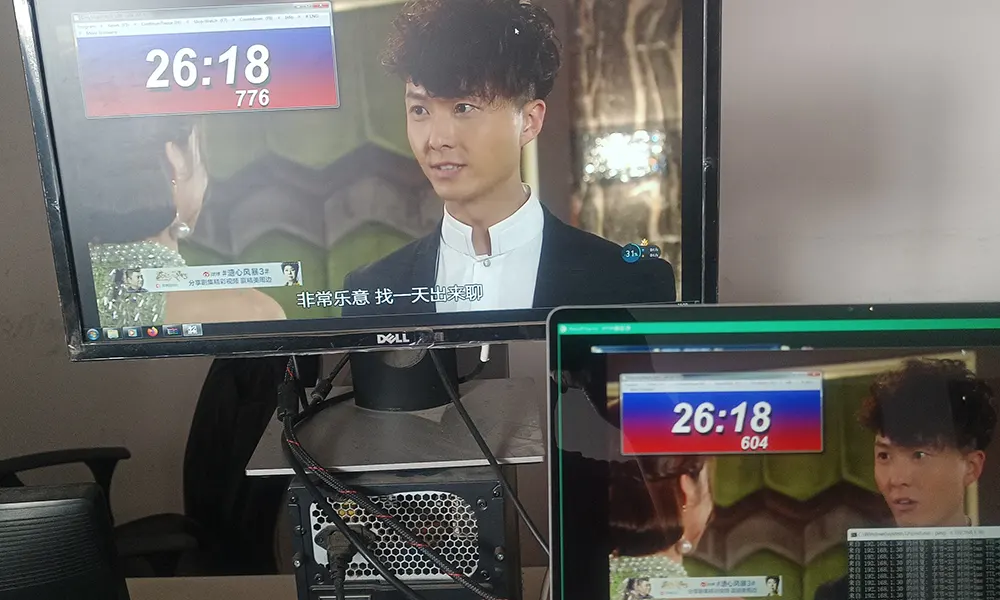
वीडियो एन्कोडर बोर्ड विलंबता का परीक्षण कैसे करें?
- मैंने कैमरे को अपने कंप्यूटर स्क्रीन पर स्टॉपवॉच की ओर इंगित किया.
- एक अन्य कंप्यूटर वर्तमान एन्कोडिंग बोर्ड से भेजे गए वीडियो को चलाता है और स्टॉपवॉच को कंप्यूटर स्क्रीन पर भी प्रदर्शित करता है.
- आपको दो बार कम करने की आवश्यकता है, अर्थात् कैमरे से मॉनीटर तक विलंब. (जिसमें कैमरा और स्क्रीन विलंब भी शामिल है)
- कृपया नीचे दी गई तस्वीरें जांचें
क्यू: यदि मैं आपके एनकोडर और डिकोडर बोर्ड का उपयोग करूं तो विलंबता कितनी होगी??
ए: हमारे एनकोडर और डिकोडर बोर्ड का उपयोग करना बेहतर है. एनकोडर और डिकोडर बोर्ड की कीमतें समान हैं. नीचे दिया गया विलंबता परीक्षण परिणाम केवल आपके संदर्भ के लिए है, इसमें कैमरा विलंब शामिल नहीं है.
- हमारे एनकोडर बोर्ड पर सीवीबीएस इनपुट—–एचडीएमआई आउटपुट के साथ हमारा डिकोडर बोर्ड, विलंब 60~90ms है
- हमारे एनकोडर बोर्ड पर एचडीएमआई इनपुट—–एचडीएमआई आउटपुट के साथ हमारा डिकोडर बोर्ड, विलंब 90~130ms है
- HDMI 720P इनपुट हमारे एनकोडर बोर्ड——–एचडीएमआई आउटपुट के साथ हमारा डिकोडर बोर्ड, 80~100ms के बीच विलंब
- HDMI 1080P इनपुट हमारे एनकोडर बोर्ड——–एचडीएमआई आउटपुट के साथ हमारा डिकोडर बोर्ड, 100~130ms के बीच विलंब
कम विलंबता के लिए, आप हमारे वीडियो एनकोडर और वीडियो डिकोडर बोर्ड का भी उपयोग कर सकते हैं. यह आपके कंप्यूटर पर वीएलसी प्लेयर के माध्यम से वीडियो स्ट्रीमिंग चलाने से कहीं बेहतर होगा.
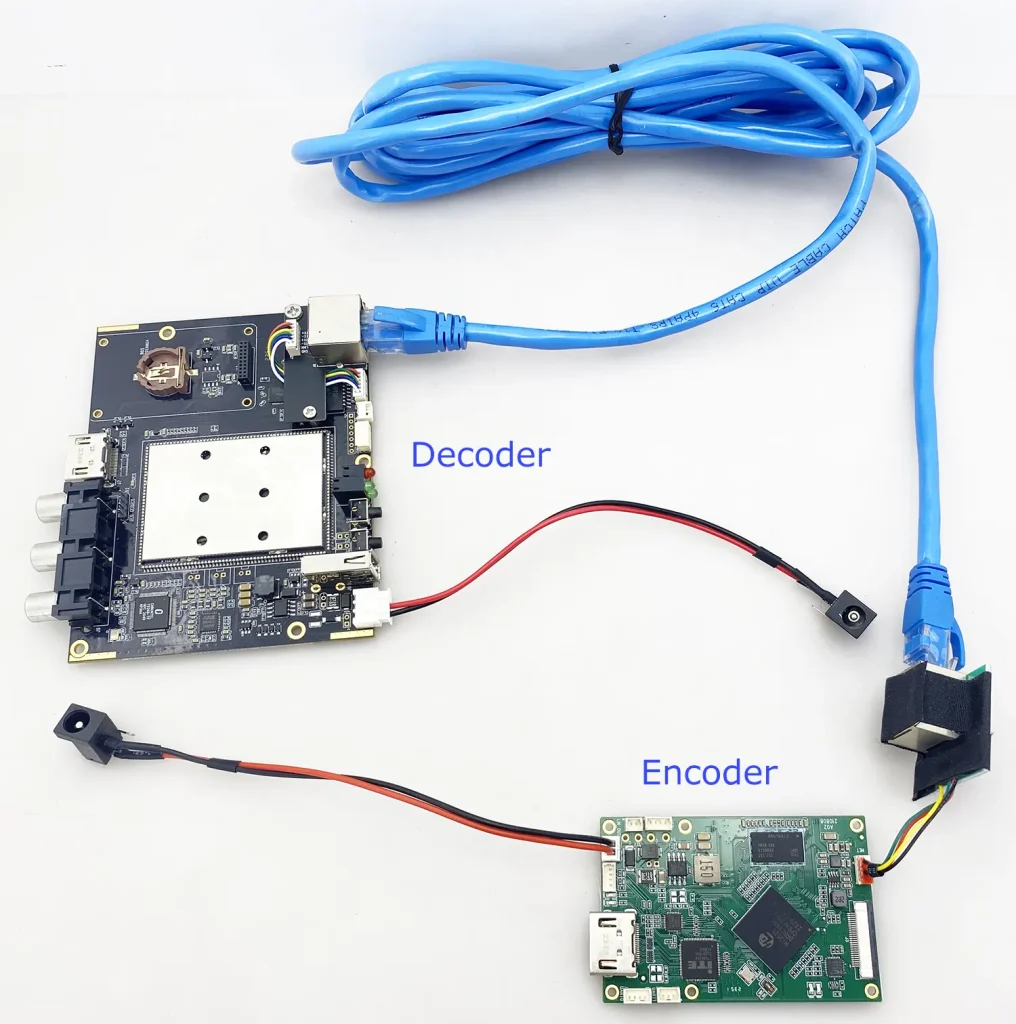
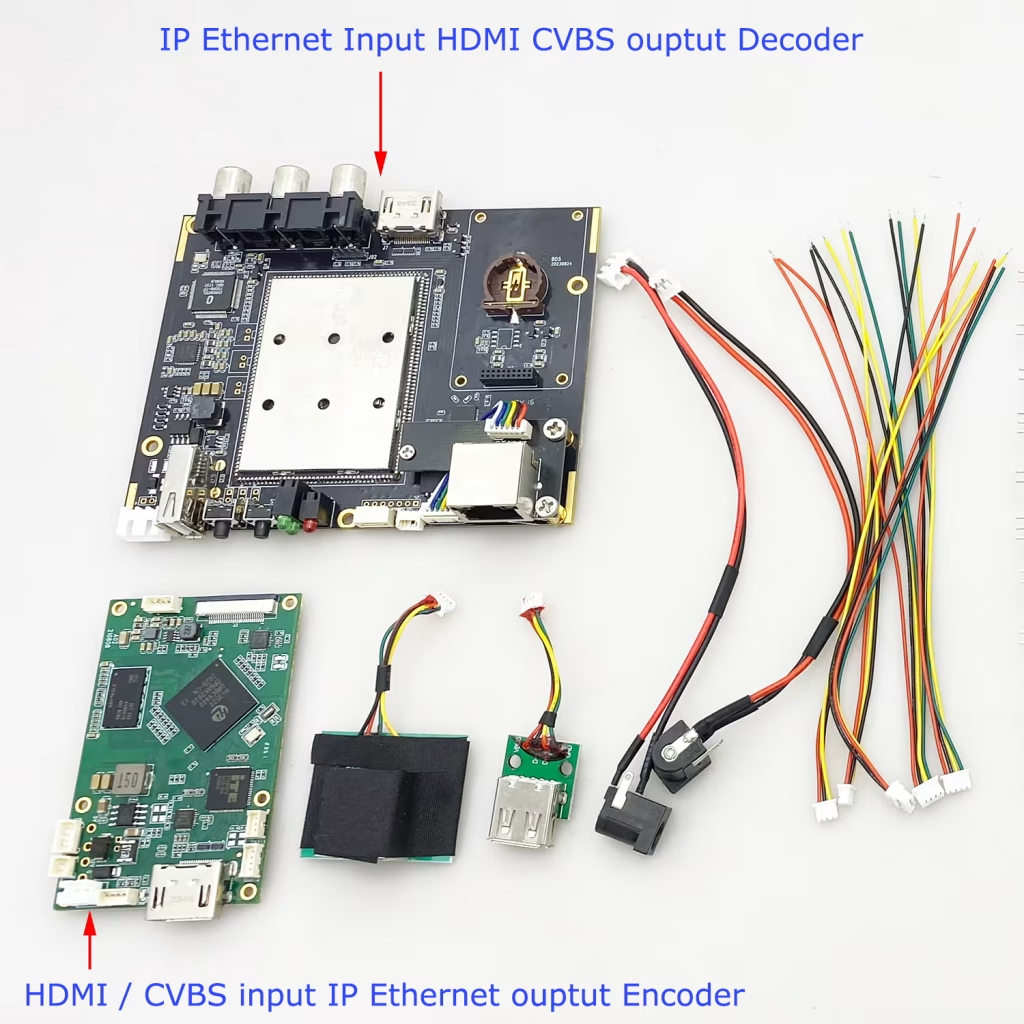
क्यू: कौन सा वीडियो डिकोडर बोर्ड H264 H265 और सुपर-लो लेटेंसी को सपोर्ट करता है?
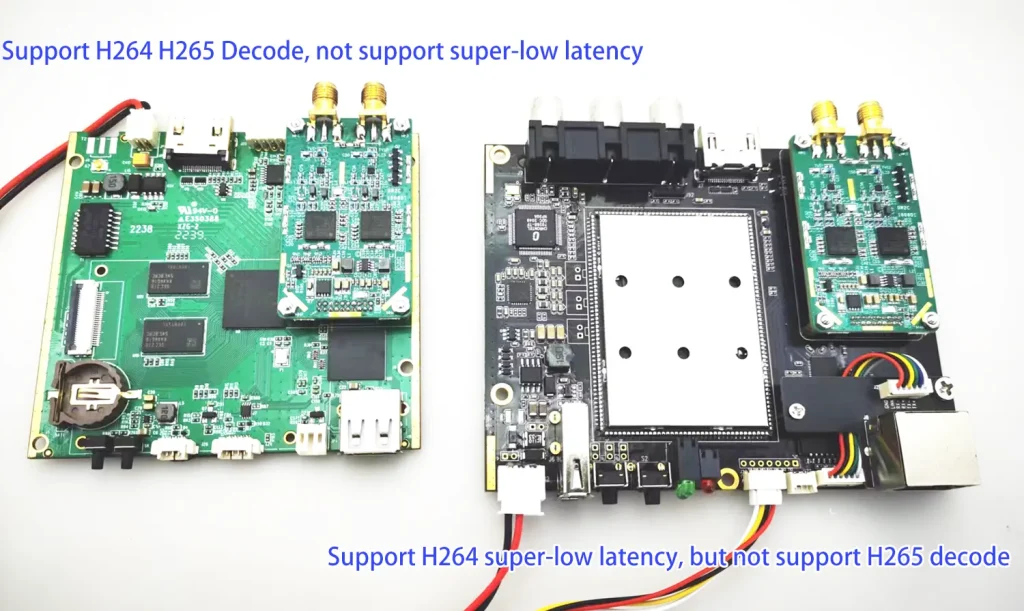
बाईं ओर का नीला डिकोडर बोर्ड H265 और H264 डिकोडिंग का समर्थन करता है लेकिन कम-विलंबता डिकोडिंग का समर्थन नहीं करता है. (सैमसन चिपसेट)
दाईं ओर का ब्लैकबोर्ड H264 डिकोडिंग का समर्थन करता है लेकिन H264 कम-विलंबता डिकोडिंग का समर्थन करता है. (Hisilicon)
क्यू: We are looking for an ultra-low-delay fpv video transmission system.
हमें एक TX मॉड्यूल की आवश्यकता है + एक एफपीवी ड्रोन के लिए कैमरा और ईथरनेट के साथ एक आरएक्स मॉड्यूल (आईपी) उत्पादन. आप क्या अनुशंसित करना चाहेंगे?
ए: हमने Vcan1746 और Vcan1777 की अनुशंसा की,
क्यू: Does your USB UVC camera to IP RTSP video encoder board have a simple connection and DC power adapter?
हाँ, हम आपके लिए एक 12V DC पावर एडाप्टर जोड़ सकते हैं. कनेक्शन बहुत सरल है, 12वी पावर इनपुट, आपके नेटवर्क या कंप्यूटर पर ईथरनेट आउटपुट, USB इनपुट को आपके USB कैमरे से कनेक्ट करने की आवश्यकता है.
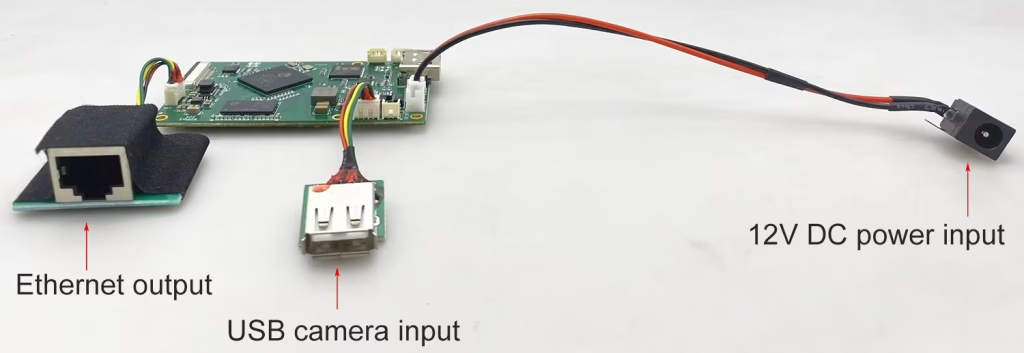
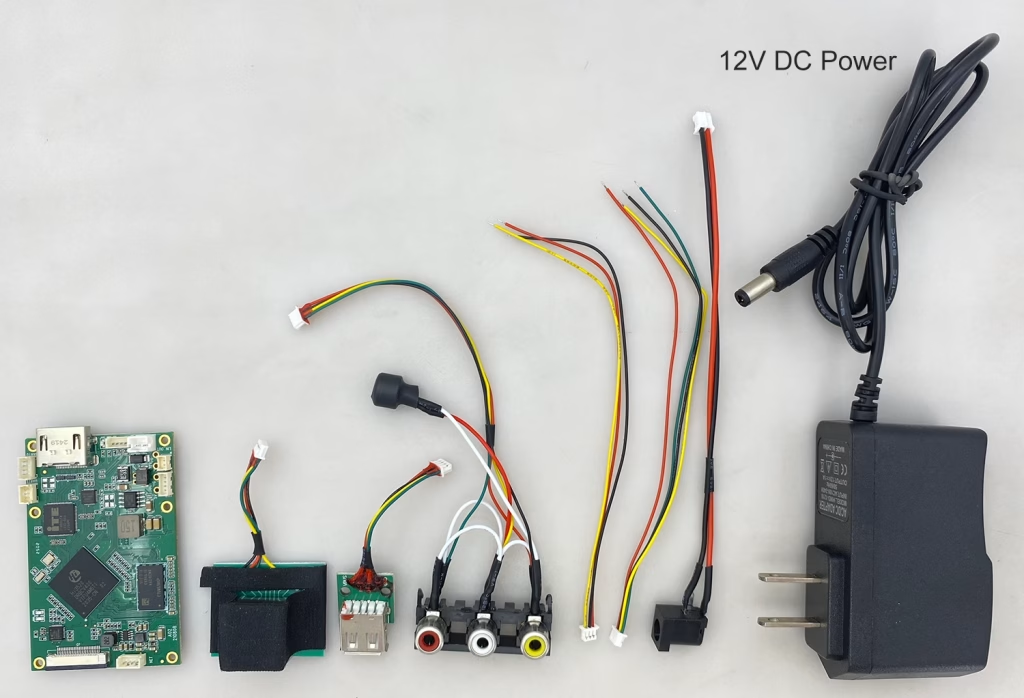
एनकोडर मॉड्यूल बोर्ड









डिकोडर मॉड्यूल बोर्ड




अनुकूलन के लिए उपलब्ध है
नए एनकोडर उत्पाद
| नहीं. | उत्पाद का नाम | विन्यास | प्रमुख विशेषताऐं | स्थिति |
|---|---|---|---|---|
| 1 | डुअल-चैनल USB UVC विज़िबल लाइट वीडियो एनकोडर | 2× यूएसबी इनपुट | दोहरी USB कैमरा वीडियो एन्कोडिंग का समर्थन करता है, और आरटीएसपी स्ट्रीमिंग; स्थानीय सीवीबीएस/एचडीएमआई आउटपुट; स्विच करने योग्य डिस्प्ले मोड | बड़े पैमाने पर उत्पादन |
| 2 | दोहरे चैनल एनकोडर (1× यूएसबी दृश्यमान लाइट + 1× यूएसबी थर्मल इमेजिंग कैमरा) | 2× यूएसबी इनपुट | डुअल यूएसबी कैमरा को सपोर्ट करता है (दृश्यमान + थर्मल) कब्जा, एन्कोडिंग, और आरटीएसपी स्ट्रीमिंग; स्थानीय सीवीबीएस/एचडीएमआई आउटपुट; स्विच करने योग्य डिस्प्ले मोड | बड़े पैमाने पर उत्पादन |
| 3 | आरटीएसपी डिकोडर एचडीएमआई/सीवीबीएस डिस्प्ले मॉड्यूल | HDMI + सीवीबीएस आउटपुट | 4×1080P@30fps तक RTSP स्ट्रीम डिकोडिंग का समर्थन करता है; वीडियो स्ट्रीमिंग प्रोटोकॉल अग्रेषण का समर्थन करें; एचडीएमआई/सीवीबीएस आउटपुट डिस्प्ले | नमूना उपलब्ध है |
| 4 | आरटीएसपी डिकोडर एचडीएमआई/सीवीबीएस डिस्प्ले मॉड्यूल के साथ 4.3"/5" एलसीडी | HDMI उत्पादन + एलसीडी चित्रपट | 4×1080P@30fps तक RTSP स्ट्रीम डिकोडिंग का समर्थन करता है; प्रोटोकॉल अग्रेषण; एचडीएमआई/सीवीबीएस आउटपुट डिस्प्ले | डिबगिंग |
| 5 | दोहरे चैनल एनकोडर (1× यूएसबी दृश्यमान लाइट + 1× सीवीबीएस एनालॉग) | 1× सीवीबीएस + 1× यूएसबी यूवीसी इनपुट | दोहरी वीडियो (यु एस बी + CVBS), एन्कोडिंग और आरटीएसपी स्ट्रीमिंग; स्थानीय सीवीबीएस/एचडीएमआई आउटपुट; स्विच करने योग्य डिस्प्ले मोड | डिबगिंग |
| 6 | दोहरे चैनल एनकोडर (1× यूएसबी यूवीसी + 1× एएचडी एनालॉग) | 1× एएचडी + 1× यूएसबी यूवीसी इनपुट | दोहरी वीडियो कैप्चर (यु एस बी + एएचडी), एन्कोडिंग और आरटीएसपी स्ट्रीमिंग; स्थानीय सीवीबीएस/एचडीएमआई आउटपुट; स्विच करने योग्य डिस्प्ले मोड | डिबगिंग |
| 7 | दोहरे चैनल एनकोडर (1× सीवीबीएस + 1× एएचडी एनालॉग वीडियो) | CVBS + एएचडी 2 वीडियो इनपुट | दोहरी एनालॉग वीडियो कैप्चर, एन्कोडिंग और आरटीएसपी स्ट्रीमिंग; स्थानीय सीवीबीएस/एचडीएमआई आउटपुट; स्विच करने योग्य डिस्प्ले मोड | डिबगिंग |
| 8 | दोहरे चैनल एनकोडर (1× सीएमओएस कैमरा + 1× यूएसबी थर्मल इमेजिंग कैमरा) | 1× यूएसबी इंटरफ़ेस | सीएमओएस का समर्थन करता है + यूएसबी थर्मल कैमरा कैप्चर, एन्कोडिंग और आरटीएसपी स्ट्रीमिंग; स्थानीय सीवीबीएस/एचडीएमआई आउटपुट; स्विच करने योग्य डिस्प्ले मोड | बड़े पैमाने पर उत्पादन |
अनुकूलित वीडियो इनपुट/आउटपुट रूपांतरण समाधानों के लिए जो हमारे उत्पादों में सूचीबद्ध नहीं हैं, OEM/ODM समर्थन के लिए कृपया हमसे संपर्क करें. हम आपकी आवश्यकताओं के आधार पर अनुरूप उत्पाद विकसित कर सकते हैं.
प्रश्न पूछें
आपका संदेश भेज दिया गया है