







कैमरे के लिए वायरलेस वीडियो ट्रांसमीटर और रिसीवर, drone video download link, COFDM
Wireless Video Transmitter for Camera, एचडीएमआई एचडी एच 265 264 encoder 1W/2.5W PA 1080P60

विषयसूची
आवेदन
- Full set HDMI input, HDMI output for long-rang Video Transmission.
- HD Wireless Video Transmitter and Receiver kit for CCTV Security cameras, Wedding DSLR camcorders,
- HDMI CVBS AV input on the Wireless Video Transmitter, Receiver has Ethernet / आरजे 45 / IP output to the computer, notebook for live streaming
- Wireless video transmitter for conference rooms (There are some obstacles between transmitters and receivers, NLOS: none-line-of-sight)
- Wireless 1080p video transmitter and receiver for Drone UAV video data downlink from the air to the ground
Transmitter Advantage
- This high-definition digital wireless video transmission transmitter includes an HDMI / CVBS (analog AV Audio Video)encoding board, a COFDM modulation module, and a small 1watts or 2.5 वत्स पीए power amplifier module.
- The entire box is made of a CNC aluminum alloy shell that is small and light. The transmission resolution is excellent, and the transmission distance is long.
- Modulation using COFDM.
- By default, H265/H264 video encoding supports up to 1080P/I @60fps.
- एईएस256 encryption is adopted.
- Non-line-of-sight high-speed mobile transmission is supported. (Up to 800km/hour, support UAV Drone video download link)
- Support to configure the center frequency, वायरलेस बैंडविड्थ, transmission stream, and so on parameters. (How to Configure?)
Transmitter Input Output
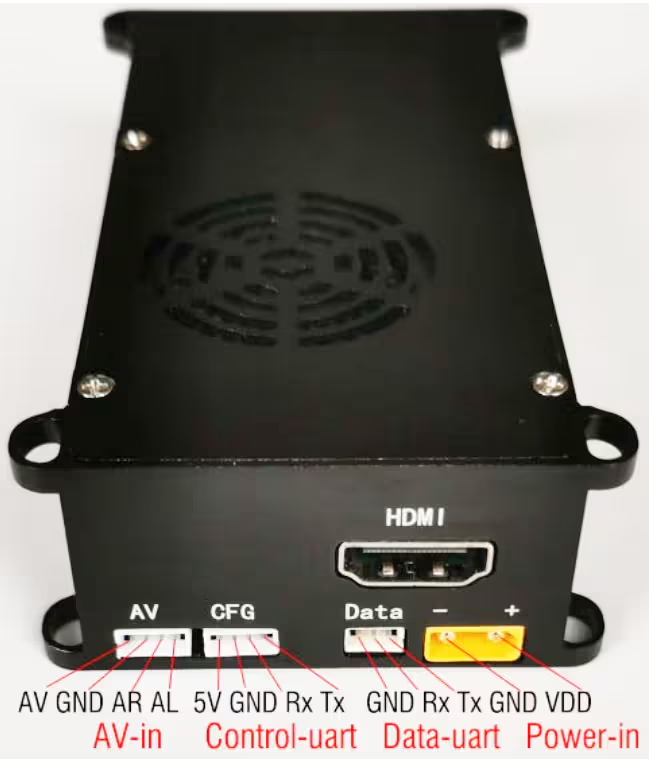
AV input interface:
SD input interface, 4PIN 1.5mm pitch socket, audio support Mic in or Line in input (specified at the factory before shipment). PAL or NTSC format can be set through the parameter panel. (How to change PAL / NTSC video format?)
| नत्थी करना | description |
| AL | audio input Left channel |
| एआर | audio input Right channel |
| जी.एन.डी | संकेत जमीन |
| का | एनालॉग वीडियो इनपुट |
Configuration Interface:
Configuration serial port (यूएआरटी को नियंत्रित करें), 4PIN 1.5mm pitch socket, टीटीएल 3.3V स्तर. The 5V signal is used to supply power to our पैरामीटर कॉन्फ़िगरेशन बोर्ड.
डेटा इंटरफ़ेस:
One-way transparent data serial port (डेटा यूएआरटी), the serial port data will be unidirectionally transmitted to the data serial port of the corresponding receiver through the COFDM wireless link. 3PIN 1.5mm pitch socket, the default shipment is TTL 3.3V level, and it can also be specified as a standard RS232 level serial port when shipped.
ट्रांसमीटर विशिष्टता
| इंटरफ़ेस | |
| एचडी वीडियो इनपुट | Standard HDMI Interface |
| SD video input | 4PIN 1.5mm pitch connector (CVBS Analog Audio Video Input) |
| One-way transparent data transmission serial port | 3PIN 1.5mm pitch connector, the default shipment is TTL3.3V level. The standard RS232 level can also be optional before shipment. |
| Configure Serial port | 4PIN 1.5mm pitch connector, TTL3.3V. It can be connected to our Parameter Configure board, and can also be connected to a PC or another host computer |
| पावर इनपुट | XT30PW-M कनेक्टर (12वी बिजली की आपूर्ति) |
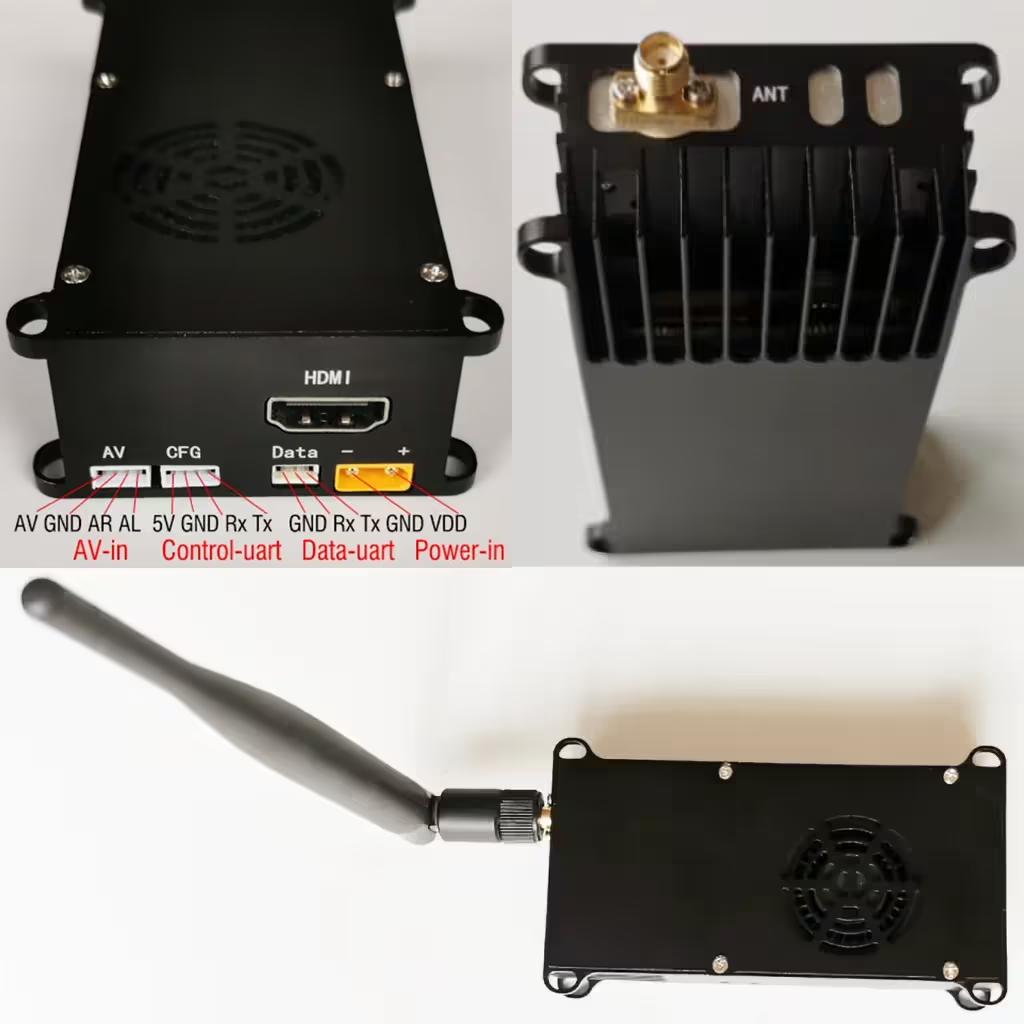
| ऐन्टेना इंटरफ़ेस | हाई स्कूल male thread inner hole |
| Wireless modulation transmission | |
| Wireless modulation | COFDM |
| IFFT mode | 2के |
| वायरलेस बैंडविड्थ | 1MHz~8MHz Adjustable, 1KHz कदम |
| FEC | 1/2, 2/3, 3/4, 5/6, 7/8 |
| गार्ड अंतराल | 1/32, 1/16, 1/8, 1/4 |
| नक्षत्र | QPSK, 16QAM, 64QAM |
| Wireless Code stream | 0.5Mbps to 31.67Mबीपी (bites per second) |
| Working frequency Band | Optional working frequency band:
300~360 मेगाहर्ट्ज; 350~400MHz; 450~500मेगाहर्ट्ज; 520~560मेगाहर्ट्ज; 580~620 मेगाहर्ट्ज; 680~720 मेगाहर्ट्ज; 820~860मेगाहर्ट्ज. Other working frequency bands between 200~860MHz can be customized. The center operating frequency is configurable, with a step of 1KHz. |
| संचरण शक्ति | 1डब्ल्यू (30dBm) or 2.5W (34dBm) वैकल्पिक 10-watts or 20-watts to support longer range and stronger signal |
| Audio and Video processing | |
| support video input | default single-channel video input encoding transmission: HD or SD. Video input is automatically detected after power is on. If connected at the same time, the device defaults to the preferred HDMI input, and can also be changed to the preferred AV input.
Optional dual video input simultaneous encoding and transmission. |
| Supported video formats | 1080@60पी, 1080@50पी, 1080@30पी, 1080@25पी, 1080@24पी, 1080@60आई, 1080@50I, 1080@30आई, 720@60पी, 720@50पी, 720@30पी,
720*480 60मैं(एनटीएससी), 720*576 50मैं(दोस्त) |
| Video Encoder | H265 or H264 |
| श्रव्य इनपुट | HDMI embedded audio or analog CVBS Right / Left Audio Input |
| ऑडियो प्रारूप | एएसी, 16अंश, स्टीरियो, 32केबीपीएस |
| Encryption and Decryption | एईएस256 |
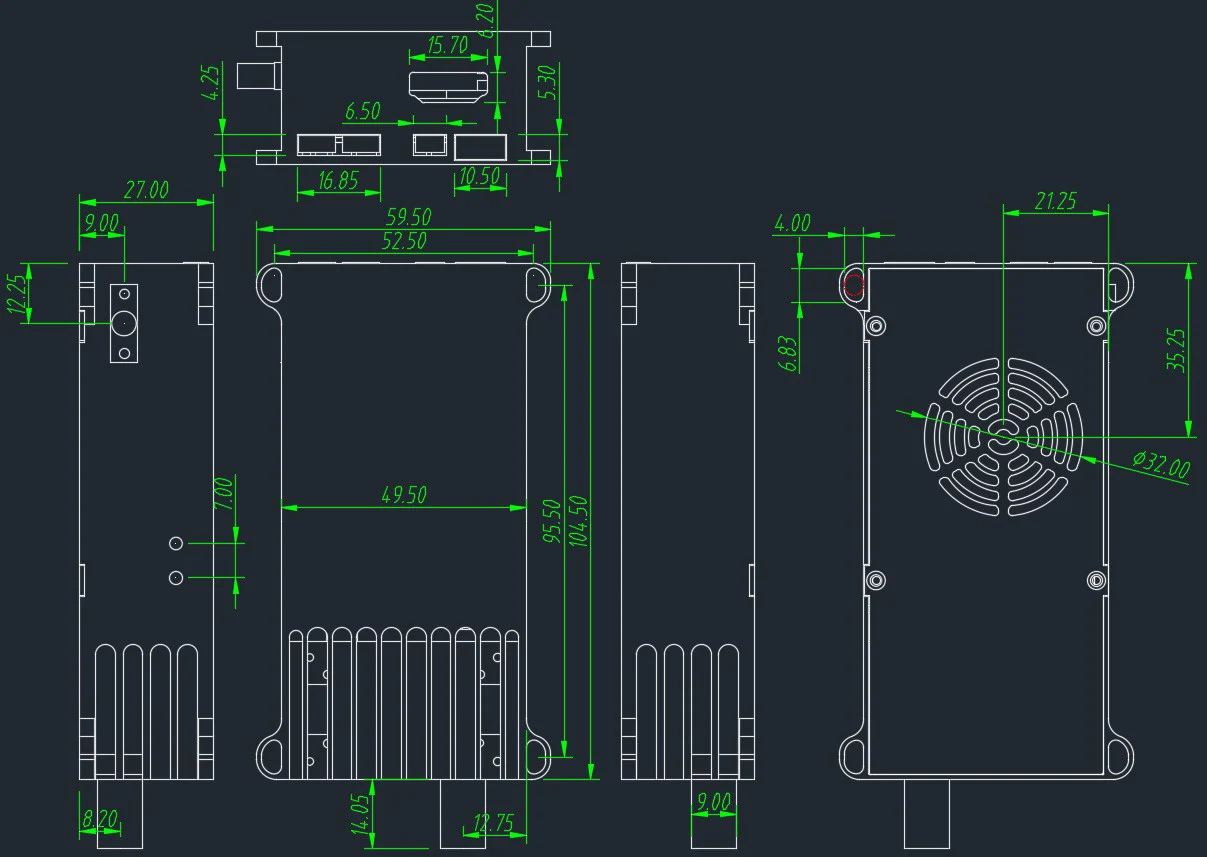
| आयाम | 10.5*5*2.7सेमी |
| वजन | <140 grams |
| Power supply
बिजली की खपत |
DC 12V power supply (11~13V)
1W PA power amplifier: the power consumption is less than 15W; 2.5W PA power amplifier: the power consumption is less than 23W. |
| विलंब | एच265: 0.2~0.3 second; एच264: 0.05-0.13 दूसरा |
Transmitter Dimension
Wireless Video Transmission Receiver

Receiver Advantage
- HD video COFDM wireless receiver with HDMI/CVBS/Ethernet/USB output interface
- एकीकृत आरटीएसपी server that allows video streaming over Ethernet for remote decoders. (गलती करना, आरटीएसपी://192.168.0.215/testStream ; port number should be 554, नहीं 8080) RTSP streaming is available only after a valid video input is detected and the transmitter–receiver link is established. How to set RTSP player?
- Allows remote Android device decoders to stream video over USB. (Splayer Android APK V5.0_2017)
- Supports displaying character strings on the video display screen alongside the video in OSD mode.
Receiver Feature
- Dual diversity Antenna receiving
- Supporting working frequency band:160मेगाहर्ट्ज~860 मेगाहर्ट्ज, the center operating frequency can be configured;
- Wireless bandwidth can be configured;
- Dual antenna receiving sensitivity -100±1डी बी एम (क्यूपीएसके 8 मेगाहर्ट्ज);
- Wireless receiving status information (eg Received signal strength, air interface rate, data bit rate, operating frequency, वायरलेस बैंडविड्थ, etc.) can be selected to be superimposed or not displayed on the video screen via the OSD switch button, and can also be output to the serial port (अनुकूलित);
- Low-latency H264 video decoding, with support for 1080P@60 decoding and playback;
- Audio and video output (HDMI, CVBS, USB, and Ethernet interface output at the same time):
- HDMI type A port audio and video output
- CVBS (lotus head) एवी ऑडियो और वीडियो आउटपुट
- USB port output Video stream to mobile phone/tablet for decoding and display
-
Ethernet RJ45 output Interface for living stream, RTSP player support
-
समर्थन AES256 decryption video reception
-
वीडियो रिकार्डिंग via TF card or USB disk is supported. (You can only choose one of the two, USB or SD card, and remember to format it into FAT32 format.)
-
उपलब्ध करवाना 1 serial port for one-way transparent data transmission;
-
Provide a serial port for parameter configuration for working settings (such as central working frequency, वायरलेस बैंडविड्थ, and receiving decryption password);
-
Power supply, 6~15V,
-
Working power consumption: 230mA@12V
-
आयाम: 11.5x9x3.4cm
-
वजन: 255 grams.
Receiver Input Output
| HD Video output | HDMI type “A” Connector |
| समग्र वीडियो आउटपुट | RCA Connector |
| ध्वनि - उत्पादन | Embedded HDMI and RCA Connector |
| आरएफ इनपुट | Two SMA |
| विद्युत आगम | 3PIN PH2.54mm Connector |
| यूएसबी होस्ट | Type A connector |
| TTL UART data(3.3वी) | 3पिन PH1.25mm कनेक्टर |
| टीटीएल यूएआरटी नियंत्रण(3.3वी) | 4PIN lockable Connector (बाएं से दाएं, टेक्सास, RX, जी.एन.डी, 5वी) |
| ईथरनेट | आरजे 45 |
| TF-Card | TF-Card slot |
| ओएसडी कुंजी | Switch key for OSD-display |
| Rec Key | Switch key for Video recording |
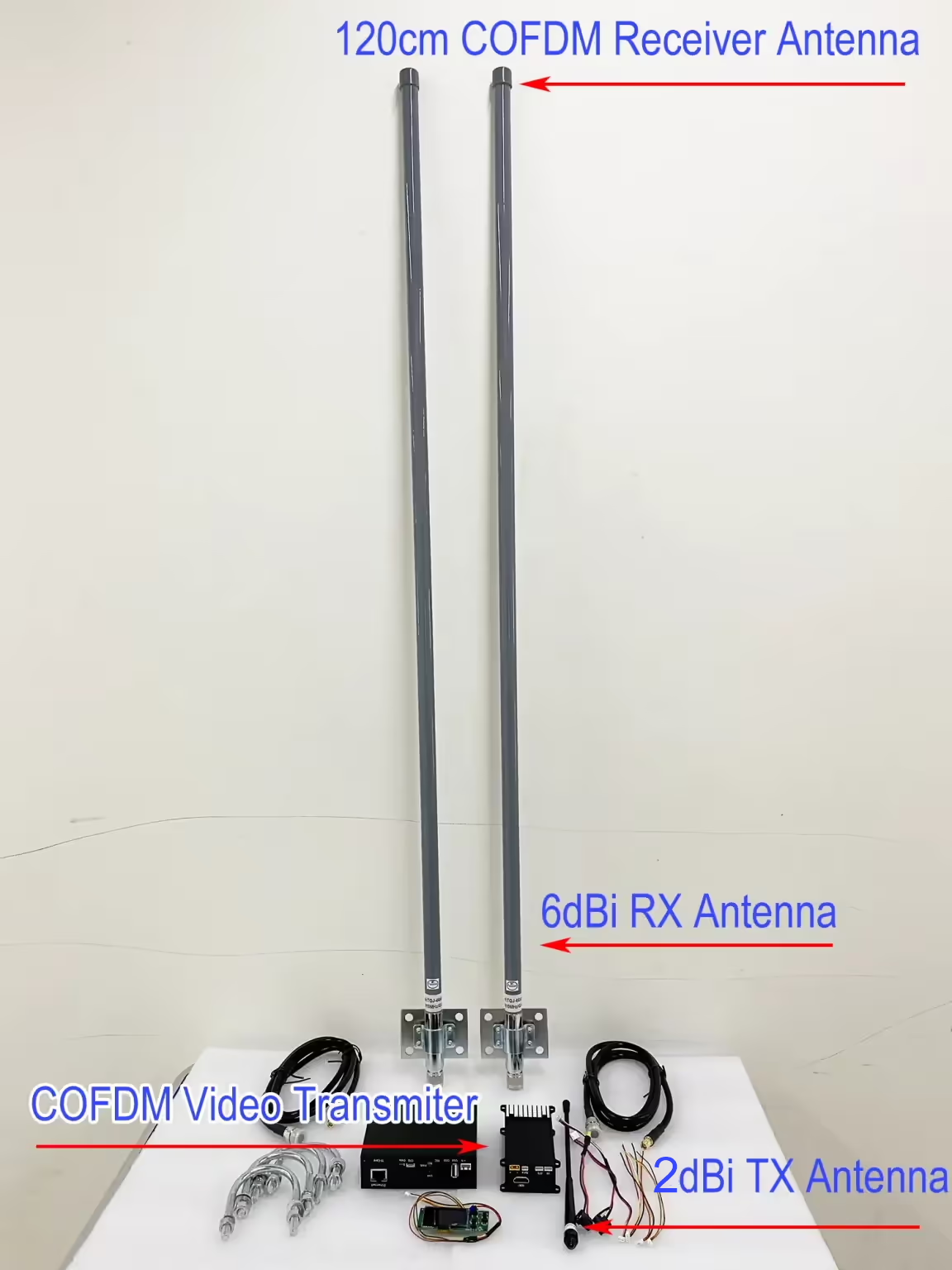
COFDM Video Transmitter and Receiver full-set

FAQs
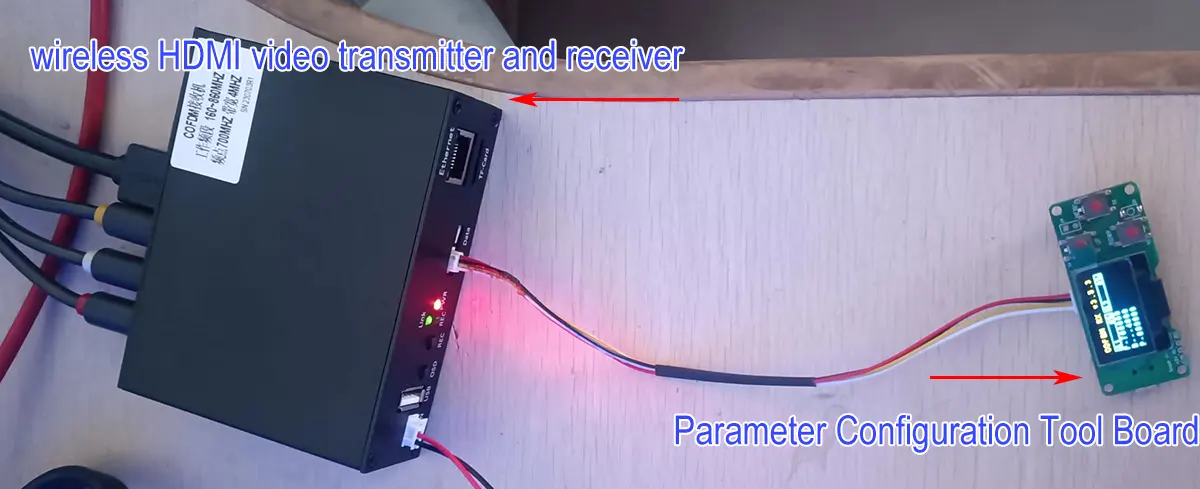
Please use the parameter configuration board to check.
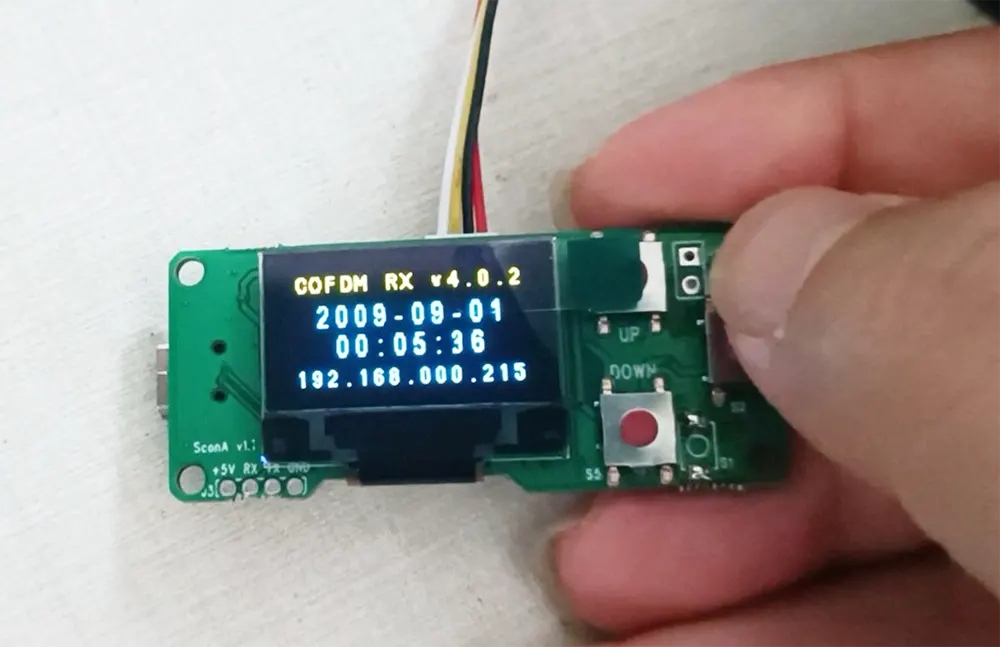
More operation guide for the parameter configuaration board, please see https://ivcan.com/parameter-configuration-panel-quick-operation-guide/
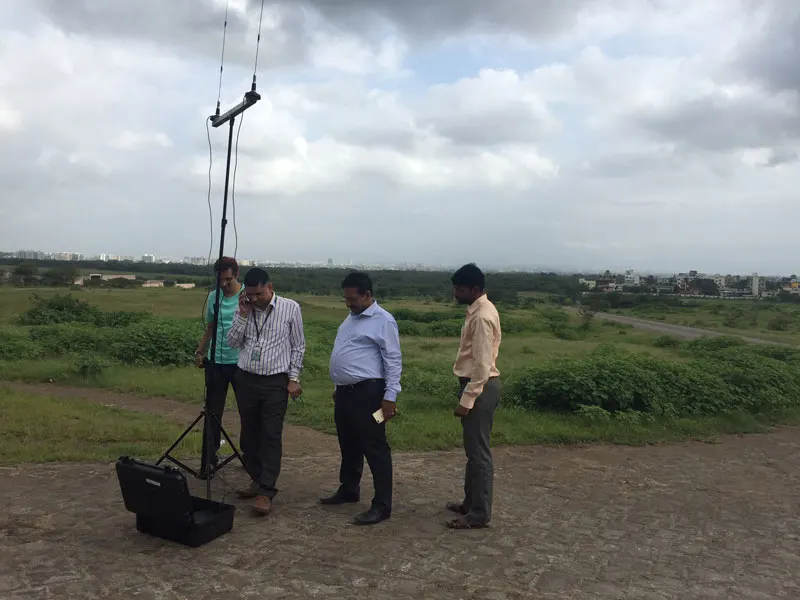
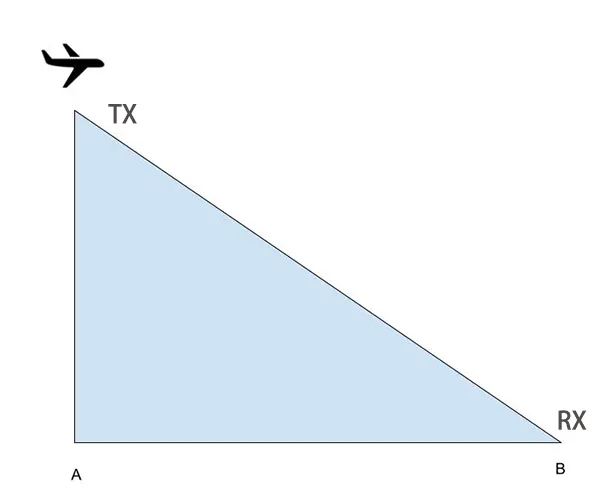
- Keep the antenna as high as possible because the ground absorbs the signal.
- Try to be at point B instead of point A. Because according to the transmission principle of the antenna, it propagates in an umbrella shape. The signal at point A is often very weak.
- The Transmitter frequency range can change to 1.4G or 1.34G.
- The receiver frequency range only supports 170-860Mhz, if you need 1.4G or 1.34G, you need to install a frequency down converter block at the receiver.
- हमारा frequency down converter block is here. Maybe you can contact the below other supplier.
- Above parameter LO frequency choose 1000MHz.
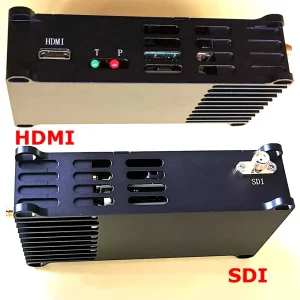
This model COFDM wireless video transmitter support video source input connector, HDMI, CVBS AV, एसडीआई, IP ethernet RJ45, and AHD, please tell us what video type you need before delivery.
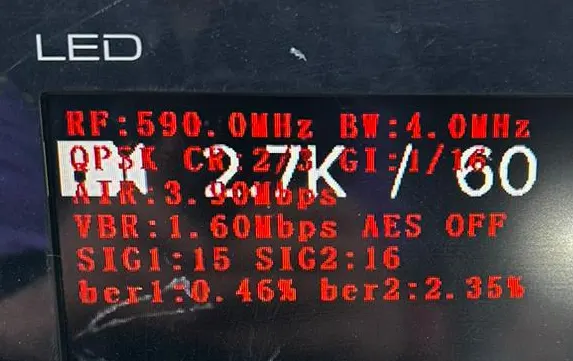
आरएफ: 338.0मेगाहर्ट्ज बीडब्ल्यू: 4.0मेगाहर्ट्ज; RF indicates the central operating frequency point, BW indicates the operating bandwidth
क्यूपीएसके सीआर: 2/3 सैनिक: 1 /16 ; QPSK is the modulation method, CR is the convolution code rate, GI is the guard interval
वायु: 3.90एमबीपीएस ; AIR एयर इंटरफ़ेस दर है
VBR: 3.05एमबीपीएस एईएस बंद ; वीबीआर वीडियो बिट दर है, AES OFF का मतलब कोई एन्क्रिप्शन नहीं है
एसआईजी1: 27 SIG2: 22 ; SIG1 refers to the received signal strength of the antenna near the HDMI port, SIG2 refers to another antenna
ber1: 0.14% बेर2: 100.00% ;ber1 refers to the receiving bit error rate of the antenna near the HDMI port, ber2 refers to another antenna
आरईसी ऑफ कोई भंडारण नहीं ; REC OFF का अर्थ है कोई वीडियो संग्रहण नहीं
कृपया यहां जांचें.
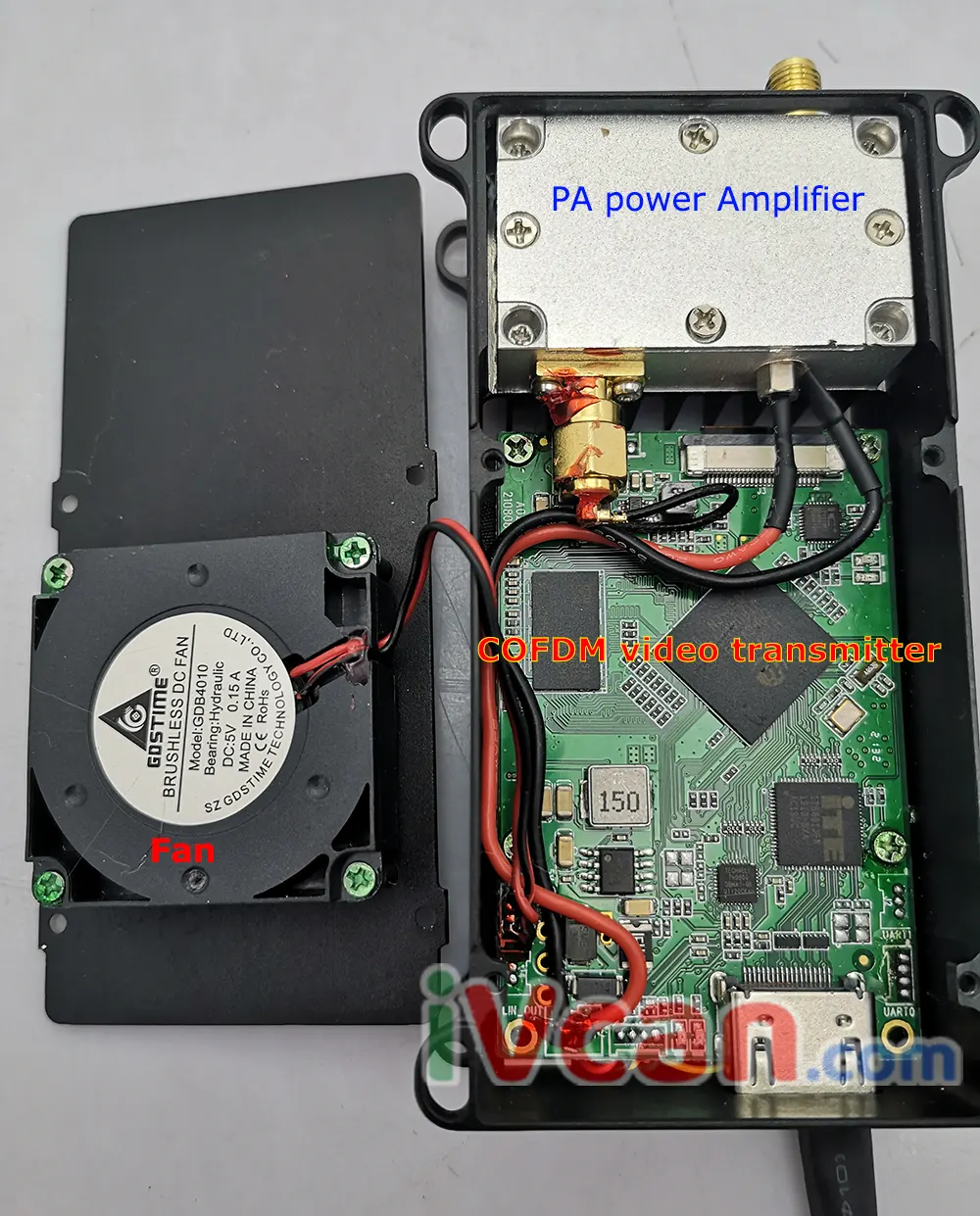
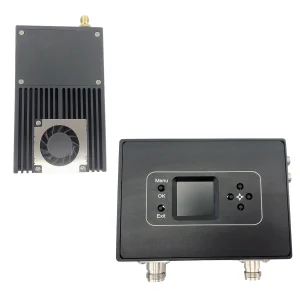
There are COFDM wireless video transmitter boards, पीए पावर एम्पलीफायर, and cooling fans.
ज़रूर
कृपया नीचे दिए गए लिंक की जाँच करें
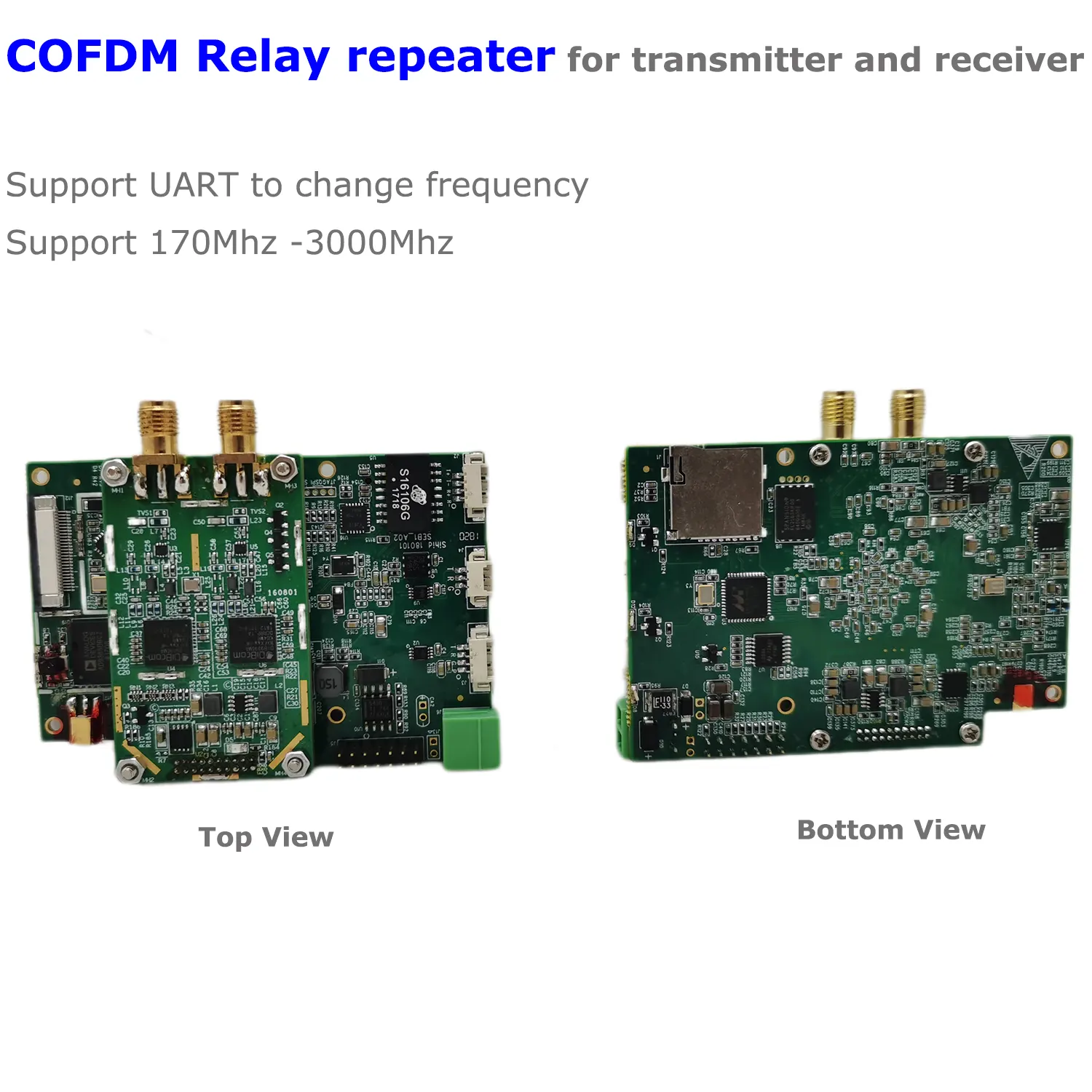
ड्रोन यूएवी वायरलेस वीडियो ट्रांसमीटर और रिसीवर Vcan1870 के लिए COFDM रिले रिपीटर मॉड्यूल
From some UAV customers have measured 50km when they are testing, and the height of the UAV is about 300 मीटर की दूरी पर.
- If the transmitter modifies the wireless parameters such as constellation, सैनिक, करोड़, and BW, the receiver must be restarted to lock and display normally.
- Another possibility is that your transmitter modifies the constellation parameters through the AT command, but the parameters are not actually written into the baseband board. You need to restart the transmitter board to confirm.
- Our one-way cofdm video transmission is not designed to consider your current usage scenario (fast switching frequency).
- This may not work, the delay of TX switching frequency involves many aspects, such as the delay of the encoder board itself (currently the main program processes parameter changes in a cycle of about 1 दूसरा), and the processing delay of the baseband board, so add It takes about 2 second to switch. The processing delay of the encoder board can be squeezed to within 1 second by modifying the firmware, but the delay of the baseband board is not easy to squeeze, and the most important thing is that it is not easy to update the firmware (you must return to the factory to use our equipment to update the firmware).
- Summarize:
The encoder board may be able to reduce the processing delay of 1 second by updating the firmware, but the delay of the baseband board cannot be squeezed, so the final optimized delay is about 2 सेकंड.
- Our Vcan1726 can support one HDMI and one auxiliary CVBS audio and video input at the same time, which can be connected to external microphones and power amplifiers.
- The current software can only support one sound source, which can be modified and selected through the parameter configuration board, HDMI sound, or CVBS sound, and cannot handle two channels of audio at the same time.
- Because COFDM is a one-way transmission, both video and audio can only be transmitted in one direction. From the transmitter to the receiver, the audio cannot have a two-way intercom, just like an ordinary radio, which can only broadcast in one direction.
The UART command is here.
Set Input Sources Command (switch HDMI / CVBS input)
| प्रारूप | एटीएसयू$(विन),$(ऐन)_ उदाहरण: ATSU0,1 _ |
| Parameter | 1. Video input selection VIN: 0 सिस्टम को पता लगाने दें; 1 force CVBS input; 2 force hdmi/SDI input 2. Audio input selection AIN: 0 सिस्टम को पता लगाने दें; 1 एनालॉग इनपुट को बाध्य करें |
| उपयोग | विशिष्ट एप्लिकेशन आवश्यकताओं को पूरा करने के लिए उपयोग किया जाता है (उदाहरण: एचडीएमआई/एसडीआई इनपुट वीडियो, एमआईसी इनपुट ऑडियो) |
| Return Value | उदाहरण: ATSU0,1_ ATSU0,1 OK |
| टिप्पणी | setting command, power-off save. |
Get Gain Audio Input
| प्रारूप |
ATSAIS(लिन),(ain vol)_ उदाहरण:बंद 0,50_ |
| Parameter |
एनालॉग ऑडियो इनपुट मोड चयन लिन: 0 माइक भीतर;1 line ine Analog audio input volume control ain vol: mic in recommended 50; अनुशंसित पंक्ति 0 |
| समारोह | एनालॉग ऑडियो इनपुट पैरामीटर सेट करने के लिए उपयोग किया जाता है |
| प्रतिक्रिया | उदाहरण के लिए: ATSAl0,50_ ATSAI0,50 ok |
| टिप्पणियाँ |
कमांड सेट करें और बिजली बंद होने के बाद इसे सेव करें. ain vol setting range [-78,80] |
हाँ, यह समर्थन करता है.
कृपया नीचे दिए गए लिंक पर विवरण देखें.
COFDM रिसीवर पर OSD डिस्प्ले फ़ंक्शन.
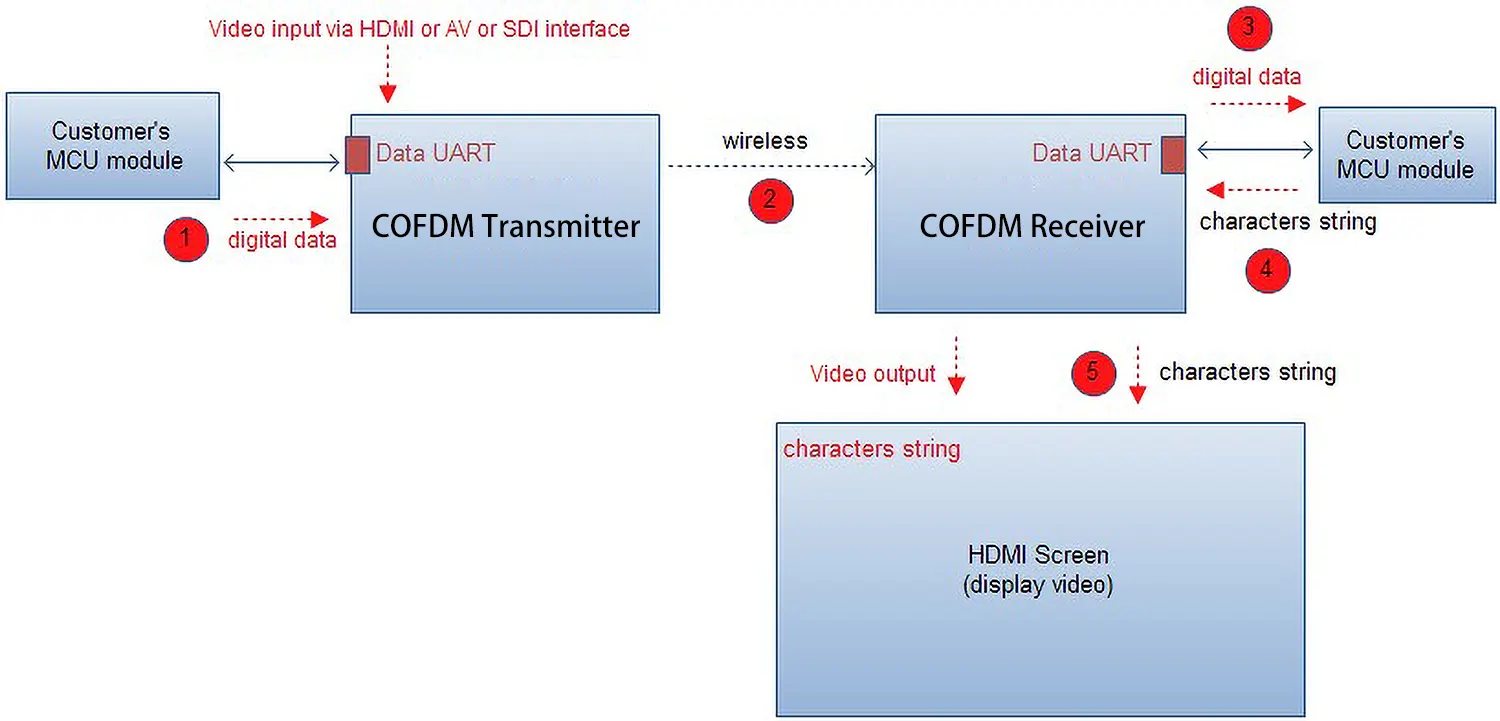
हाँ, if you need it working standard DVB-T protocol, please tell us, we will change a special firmware for you.
It supports three working model
- Standard DVB-T protocol (normal DVB-T receiver can get the transmitter signal, no encryption and decryption function)
- COFDM protocol (support TX encryption and RX decryption function, not super low latency model, support H265 and H264 encoding )
- COFDM H.264 low latency protocol (support TX encryption and RX decryption function, support low latency model, only H264 एन्कोडिंग)
How to change COFDM module working mode?

COFDM Video Transmitter Frequency customize to 664Mhz

How to upgrade the COFDM wireless video receiver newe firwmare
सापेक्ष पोस्ट
- सीओएफडीएम वायरलेस वीडियो ट्रांसमीटर डिकोडर रिसीवर बोर्ड के माध्यम से उपयोगकर्ता-परिभाषित ओएसडी मेनू फ्लाइंग डेटा को ओवरले कैसे करें
- सीओएफडीएम मॉड्यूल पैरामीटर कॉन्फ़िगरेशन यूएआरटी एटी कमांड





समीक्षा
अभी तक कोई समीक्षा नहीं.