





Cómo capturar un archivo Transport Stream?
Flujo de transporte (TS), is a standard digital container format for the transmission and storage of audio, video, and Program and System Information Protocol (PSIP) datos.[3] It is used in broadcast systems such as DVB-T, DVB-T2, ISDB-T, ATSC, and IPTV. Transport stream specifies a container format encapsulating packetized elementary streams, with error correction and synchronization pattern features for maintaining transmission integrity when the communications channel carrying the stream is degraded. Transport streams differ from the similarly-named MPEG program stream in several important ways: program streams are designed for reasonably reliable media, such as discs (like DVDs), while transport streams are designed for less reliable transmission, namely terrestrial or satellite broadcast. Más, a transport stream may carry multiple programs.
Para más detalles, please see Wiki, https://en.wikipedia.org/wiki/MPEG_transport_stream
Why need to Capture the Transport Stream file? Sometimes clients complain that the TV receiver has a problem. Por ejemplo, no sound, no channel, missed a channel, audio, and video NOT synchronized, etc.. The best solution is that send us TS (transport Steam ) archivo, which file has including all the information from local digital television broadcasts. we can test in the factory lab, and offer you upgrade software.
how to obtain a ts file of local tv program
If you want to obtain a .ts file of a local TV program, here are some possible methods depending on your setup:
Tabla de contenido
1. Using a Digital TV Tuner and Recording Software
- If your local TV program is broadcast over-the-air, puedes usar un DVB-T/C/S tuner (such as a USB TV tuner) and software like:
- Visor DVB
- NextPVR
- TSReader
- ProgDVB
- These programs allow you to record TV streams in
.ts(Flujo de transporte) formato.
2. Using IPTV Streams
- Some local TV stations provide IPTV (M3U) links for online streaming.
- You can use FFmpeg to capture the stream and save it as a
.tsarchivo:ffmpeg -i "http://stream-url" -c copy output.ts
- Alternativamente, usar VLC Media Player:
- Open VLC → Medios de comunicación → Open Network Stream.
- Enter the URL and start streaming.
- Usar Convert/Save to save as a
.tsarchivo.
3. Using a Set-Top Box with USB Recording
- If your TV provider allows recording, connect a USB drive to your DVB set-top box.
- Record the program and extract the
.tsfile from the USB storage.
4. Using Screen Recording as a Last Resort
- If no direct
.tscapture is possible, use screen recording software such as:- Estudio de notas
- VLC (with recording enabled)
- sin embargo, this will not give you the original
.tsformat but can be converted later.
How to capture Transport Stream file via our DVB-T2U USB DVB-T2 stick?
1. Please sure that you have the hardware DVB-T2U

2. In order to get a good tv signal, it is better that you can connect your local cable tv signal instead of a small antenna.
3. Assure that DVB-T2U is working well and getting a good tv signal.
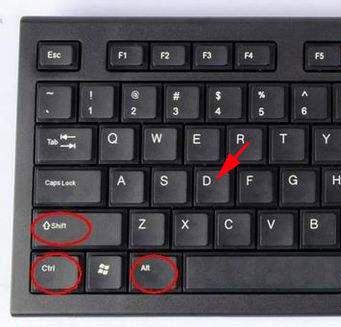
- Press Ctrl + Shift + Alt + D Simultaneously
5. The monitor will show special windows
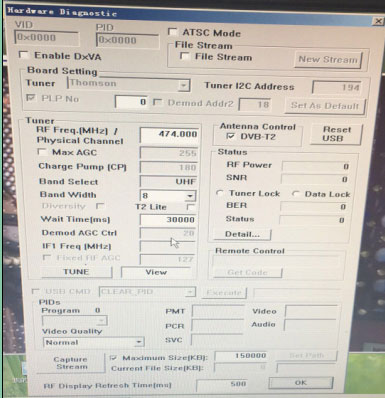
6. Choose DVB-T2U
7. Click Capture Stream
8. Click OK
9. Waiting for 2 minutos.
10. You will find the *.TS file on my computer>my documents>TVR>Capture>
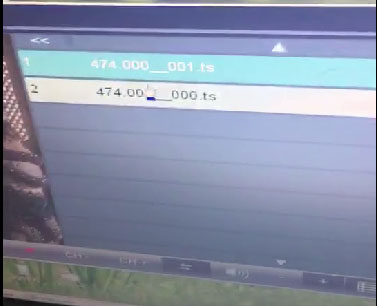
11. Please send us *. TS file.
Cualquier pregunta, por favor siéntete libre de contáctanos.
Haz una pregunta
Gracias por tu respuesta. ✨