






جدول المحتويات
المقدمة
هذه دليل استكشاف أخطاء دفق الفيديو متعدد البث UDP وإصلاحها!! يشرح كيفية تكوين دفق البث المتعدد, التحقق من اكتشاف الكاميرا, وحل مشكلات التشغيل الشائعة عند استخدام تدفقات UDP MPEG-TS مع VLC أو SPlayer.
وهو مصمم لمساعدتك على التعرف بسرعة على أخطاء التكوين والمشكلات المتعلقة بالشبكة أثناء الاختبار.
س: هل يدعم النظام البث المتعدد؟? هل يمكنني إخراج دفق واحد إلى عناوين IP متعددة?
ا: نعم فعلا.
النظام يدعم بشكل كامل UDP بث الفيديو المتعدد, السماح بتسليم دفق فيديو واحد إلى أجهزة استقبال متعددة في نفس الوقت دون تكرار التدفقات لكل عنوان IP.
هذه هي آلية دفق واحد إلى متعدد داخل نفس الشبكة.
كيف يعمل UDP المتعدد
لتمكين وضع البث المتعدد:
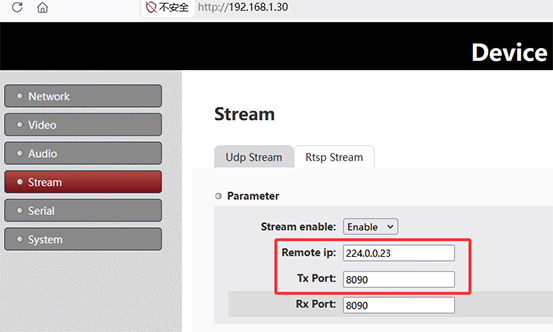
- تعيين الملكية الفكرية عن بعد على المرسل (التشفير) جنبًا إلى جنب مع عنوان البث المتعدد
مثال:224.0.0.23 - يجب أن تنضم جميع أجهزة الاستقبال إلى نفس مجموعة البث المتعدد باستخدام نفس عنوان IP
أمثلة تكوين جهاز الاستقبال

سبلاير:
- تعيين IP للمجموعة:
224.0.0.23
VLC Media Player:
- فتح دفق الشبكة:
udp://@224.0.0.23:8090
ملاحظات هامة
- عنوان IP الفعلي للجهاز ليس مهمًا في وضع البث المتعدد
- يعتمد تسليم الدفق على ما إذا كانت الشبكة تدعم البث المتعدد
- يجب أن تنضم جميع الأجهزة إلى نفس مجموعة البث المتعدد
- يعتمد الأداء بشكل كبير على استقرار الشبكة وتكوينها
مثال لإعداد IP عن بعد (جانب التشفير)
إعداد IP عن بعد على البث المتعدد من SDI/AHD إلى لوحة تشفير IP:
- ضبط وضع الإخراج: UDP البث المتعدد
- ضبط عنوان IP للبث المتعدد:
224.0.0.23 - تعيين المنفذ: منها مثلا.
8090 - احفظ التكوين وأعد تشغيل لوحة التشفير
⚠ الأهمية: يجب أن يتم تدوير جهاز التشفير بالطاقة (إعادة التشغيل) لتصبح التغييرات نافذة المفعول.
مثال على إعداد عنوان URL لشبكة VLC
إعداد عنوان URL لشبكة VLC لبث البث المتعدد:
- افتح برنامج في إل سي
- انقر الوسائط → افتح دفق الشبكة
- يدخل:
udp://@224.0.0.23:8090 - انقر فوق تشغيل
فحص الكاميرا والتشفير (مهم جدا)
قبل اختبار البث المتعدد:
- تحقق من صفحة فيديو خادم الويب
- تأكد من اكتشاف الكاميرا بشكل صحيح
- إذا لم يتم الكشف عن الكاميرا, لن يتم إخراج أي دفق فيديو
- التحقق من معلمات الترميز
- الدقة الصحيحة وإعدادات معدل البت
- تأكد من تمكين إخراج UDP
- أعد تشغيل برنامج التشفير بعد تغييرات التكوين
دليل استكشاف أخطاء دفق الفيديو المتعدد البث لـ UDP وإصلاحها!!
إذا لم يعمل البث المتعدد, اتبع قائمة التحقق من استكشاف الأخطاء وإصلاحها هذه:
1. مشكلات بيئة الشبكة
- جهاز التوجيه/المحول لا يدعم البث المتعدد
- تم تمكين IGMP Snooping ولكن لا يوجد IGMP Quierer
- الأجهزة موجودة على شبكات VLAN أو شبكات فرعية مختلفة
- تقوم شبكة Wi-Fi بحظر حركة البث المتعدد
- VPN أو تدخل الشبكة الافتراضية
2. الكمبيوتر / قضايا VLC
- يقوم جدار حماية Windows بحظر حركة مرور UDP
- يقوم برنامج مكافحة الفيروسات بحظر حزم البث المتعدد
- يرتبط VLC بواجهة الشبكة الخاطئة
- محولات الشبكة المتعددة تسبب تعارضات في التوجيه
- تنسيق دفق الشبكة غير صحيح المستخدم في VLC
3. مشكلات تكوين التشفير
- لم يتم الكشف عن الكاميرا → لا يوجد إخراج دفق
- تكوين IP أو منفذ البث المتعدد خاطئ
- لم يتم إعادة تشغيل برنامج التشفير بعد التغييرات
- تنسيق البث غير صحيح (يجب أن يكون MPEG-TS للتوافق مع VLC)
4. بروتوكول & مشكلات سلوك البث المتعدد
- البث المتعدد TTL منخفض جدًا بحيث لا يمكنه تمرير أجهزة الشبكة
- التبديل لا يدعم الطبقة 2 إعادة توجيه البث المتعدد
- الانضمام إلى IGMP غير مسجل بشكل صحيح
- لا تقوم الشبكة بإعادة توجيه حزم البث المتعدد بشكل صحيح
5. خطوات التصحيح الموصى بها
إذا كنت لا تزال غير قادر على استقبال الدفق:
- قم باختبار البث الأحادي أولاً للتأكد من عمل مخرجات جهاز التشفير
- جرب VLC على جهاز كمبيوتر شخصي أو واجهة شبكة مختلفة
- قم بتعطيل جدار الحماية مؤقتًا للاختبار
- قم بتوصيل جهاز التشفير والكمبيوتر مباشرة عبر المفتاح (نفس الشبكة الفرعية)
- تحقق من إعدادات جهاز التوجيه/التبديل للبث المتعدد (تمكين دعم IGMP)
ملخص
ال دليل استكشاف أخطاء دفق الفيديو متعدد البث UDP وإصلاحها!! يساعدك:
- قم بتكوين دفق البث المتعدد بشكل صحيح
- قم بتعيين معلمات التشفير وVLC
- فهم متطلبات شبكة البث المتعدد
- تشخيص الأعطال الشائعة بسرعة
يعد البث المتعدد قويًا ولكنه يعتمد بشكل كبير على دعم الشبكة. يعد التكوين الصحيح لكل من التشفير والبنية التحتية للشبكة أمرًا ضروريًا لتوصيل الفيديو بشكل مستقر.
س: زمن وصول RTSP مرتفع جدًا في تطبيقنا, بينما يعمل البث الأحادي UDP بشكل جيد مع زمن انتقال منخفض.
ومع ذلك, لم نتمكن من تكوين البث المتعدد UDP بنجاح. كبديل, هل من الممكن تكوين عدة عناوين وجهة UDP أحادية البث بحيث يمكن إرسال نفس الدفق إلى أجهزة استقبال متعددة في وقت واحد?
ا: من الناحية الفنية, متطلباتك هي بالضبط ما تم تصميم البث المتعدد UDP من أجله, ويظل البث المتعدد هو الحل القياسي والموصى به لتوزيع نفس دفق الفيديو على أجهزة استقبال متعددة مع الحد الأدنى من عرض النطاق الترددي.
إذا كان البث المتعدد لا يعمل حاليًا, تتعلق المشكلة عادةً بتكوين الشبكة وليس ببرنامج التشفير نفسه. تشمل الأسباب النموذجية:
- إعدادات IGMP للتطفل أو تصفية البث المتعدد على المحولات/أجهزة التوجيه
- مشكلات تكوين شبكة VLAN أو الشبكة الفرعية
- أذونات البث المتعدد من جانب المتلقي
- قيود التعامل مع البث المتعدد لنقطة الوصول اللاسلكية
كحل بديل, من الممكن تقنيًا إنشاء إصدار برنامج ثابت مخصص يدعم عدة عناوين وجهة UDP أحادية البث في وقت واحد. فمثلا, يمكن تعديل واجهة الويب للسماح بتكوين عدة عناوين IP مستهدفة, وسيقوم المشفر بإرسال تدفقات UDP منفصلة إلى كل وجهة.
ومع ذلك, لا يُنصح عمومًا بهذا الأسلوب لأنه يقدم حملًا كبيرًا لعرض النطاق الترددي.
فمثلا:
- 1 الوجهة = استخدام النطاق الترددي العادي
- 2 الوجهات = حوالي 2 × استخدام عرض النطاق الترددي
- 3 الوجهات = حوالي 3 × استخدام عرض النطاق الترددي
وهذا مهم بشكل خاص في بيئات الإرسال اللاسلكي, حيث تكون الإنتاجية المتاحة محدودة. يمكن أن تستهلك تدفقات البث الأحادي المتعددة عرض النطاق الترددي اللاسلكي المتوفر بسرعة وتقلل من استقرار النظام وأدائه بشكل عام.
وهذا هو بالضبط سبب وجود البث المتعدد: فهو يسمح لأجهزة استقبال متعددة بمشاركة نفس الدفق دون مضاعفة استهلاك النطاق الترددي للشبكة.
وبالتالي, ونحن نوصي بشدة بحل مشكلة تكوين شبكة البث المتعدد بدلاً من تنفيذ عدة مخرجات أحادية البث متوازية كلما أمكن ذلك.
طرح سؤال
شكرًا لردكم ✨