






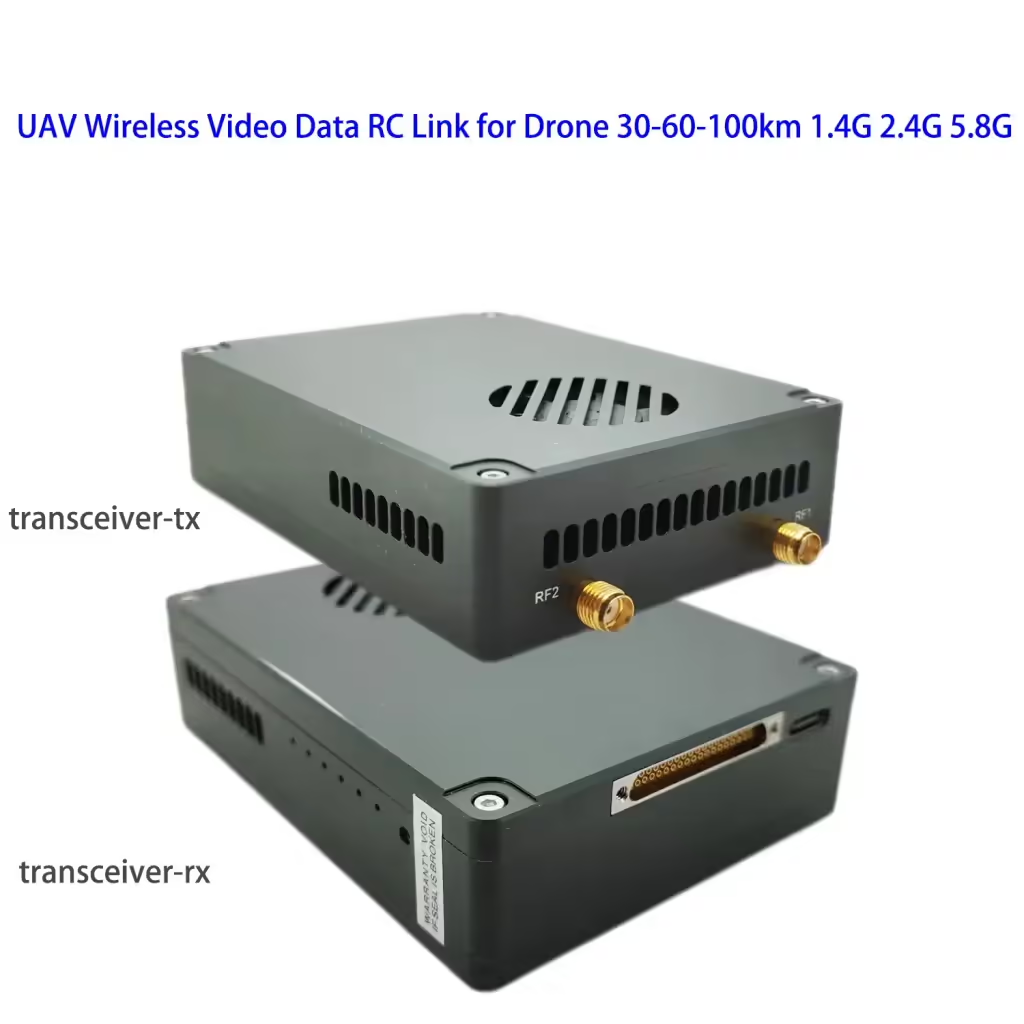
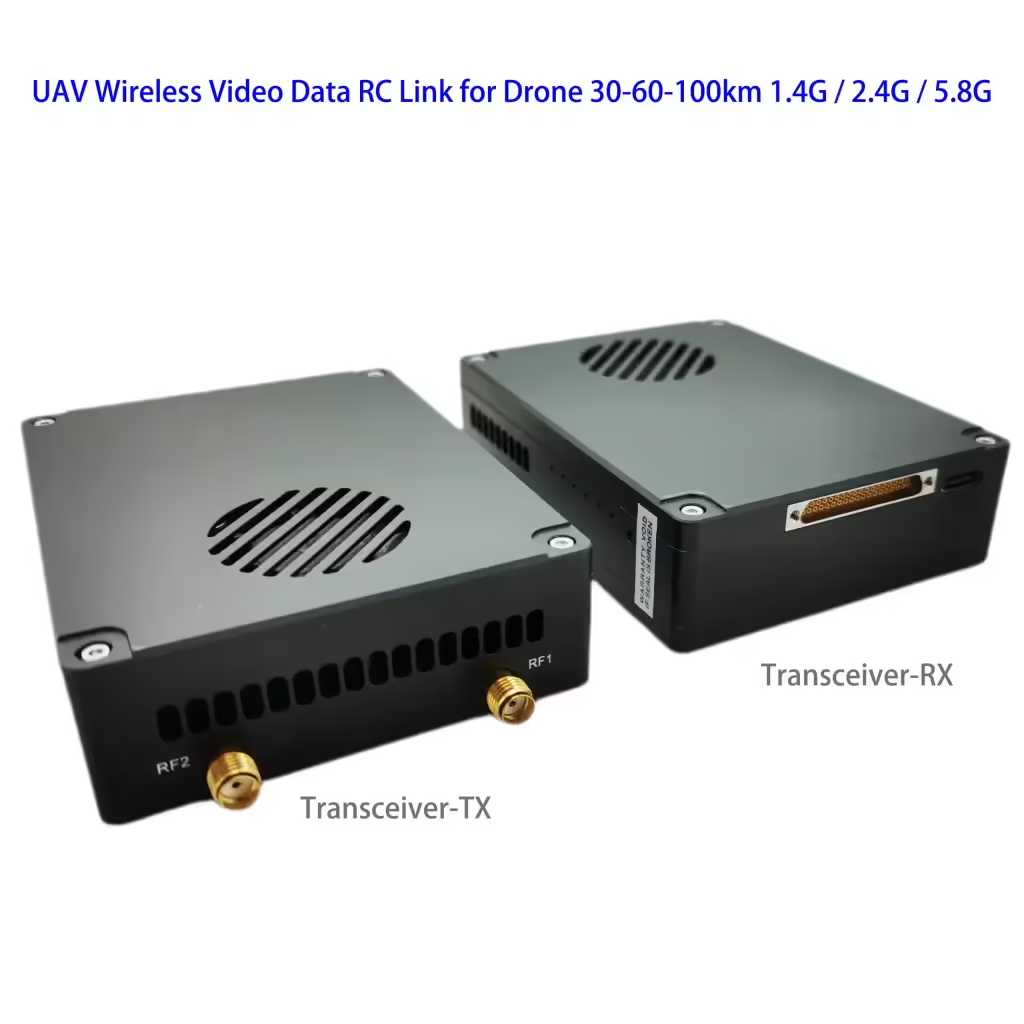
ड्रोन के लिए यूएवी वायरलेस वीडियो डेटा आरसी लिंक 15-20-30-50-100-150 किमी 1.4जी / 2.4जी / 5.8जी ट्रांसीवर ट्रांसमीटर-रिसीवर Vcan1818
विषयसूची
फ़ीचर:
- Video Data Control 3 में 1
- 30-60केएम वायरलेस ट्रांसमिशन ( 2.4जी आवृत्ति, 2डब्ल्यू: 30किमी; 5डब्ल्यू: 50किमी; 10डब्ल्यू: 100किमी)
- 4K कम विलंबता वाली उच्च-परिभाषा छवियां
- H265/H264 वीडियो संपीड़न
- Rich interface (Ethernet for IP camera, शक्ति, एसबीयू, टीटीएल, अनुकूलित)
- अनुकूली पुन:संचरण
- Automatic frequency hopping
विशिष्टता:
चैनल बैंडविड्थ: 2.5मेगाहर्ट्ज(अपलिंक), 10मेगाहर्ट्ज(डाउनलिंक)
अधिकतम उत्सर्जन ऊर्जा: 27dBm / 30dBm
वीडियो फार्मेट:
के: पाल, 50आईएनटीएससी, 60मैं
HDMI: 576i60, 480पी@60एफपीएस, 720पी@50एफपीएस, 720पी@60एफपीएस, 1080पी@50एफपीएस, 1080पी@60एफपीएस
एसडीएल: 720पी@50एफपीएस, 720पी@60एफपीएस, 1080पी@50एफपीएस, 1080पी@60एफपीएस
मॉड्यूलेशन विधि: OFDM
नक्षत्र: BPSK, QPSK, 16QAM
त्रुटि सुधार कोड अग्रेषित करें: एलडीपीसी(1/2, 2/3, 3/4, 5/6)
डुप्लेक्स मोड: TDD
डाउनलिंक थ्रूपुट दर: 2एमबीपीएस~8एमबीपीएस
अपलिंक थ्रूपुट दर: 300केबीपीएस (सीरियल पोर्ट + नेटवर्क पोर्ट + रिमोट कंट्रोल)
वीडियो इंटरफ़ेस: नेटवर्क पोर्ट, एचडीएमआई/एसडीआई/एवी
अन्य इंटरफ़ेस: सीरियल पोर्ट, पीपीएम/एसबीयूएस, एसबी
एन्क्रिप्शन: एईएस128/256
वीडियो संपीड़न: एच.264/एच265(एचडीएमआई/एसडीआई/एवी)
स्क्रीन-टू-स्क्रीन विलंबता: <300सुश्री
ग्राउंड एंड का आकार:
92X69X24मिमी (नेटवर्क पोर्ट)
वायु इकाई का आकार:
92X69X24मिमी
वजन: 195जी (Vcan1818-2W-30km, 195चना)
वर्किंग टेम्परेचर: -20डिग्री सेल्सियस-55 डिग्री सेल्सियस
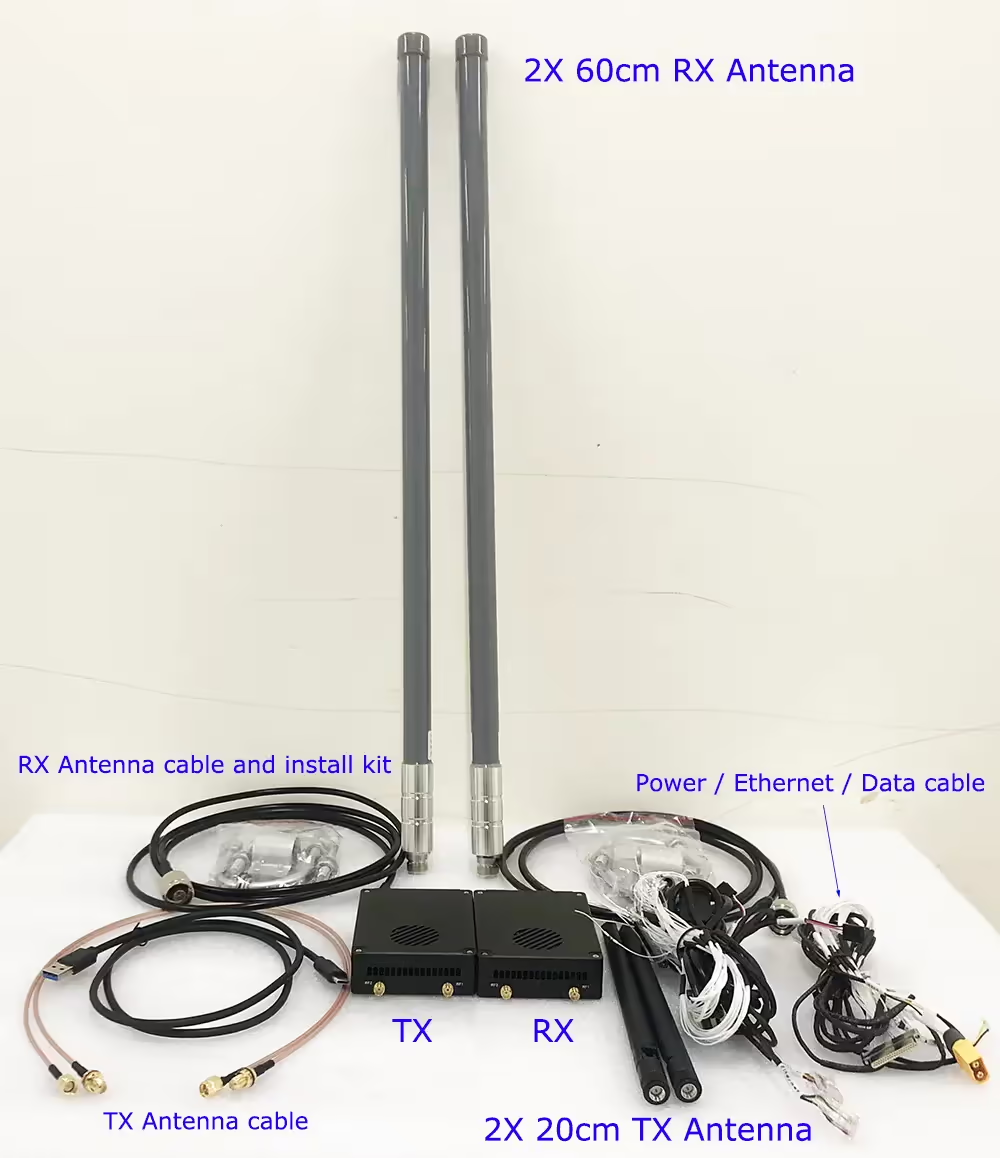
इनपुट / उत्पादन
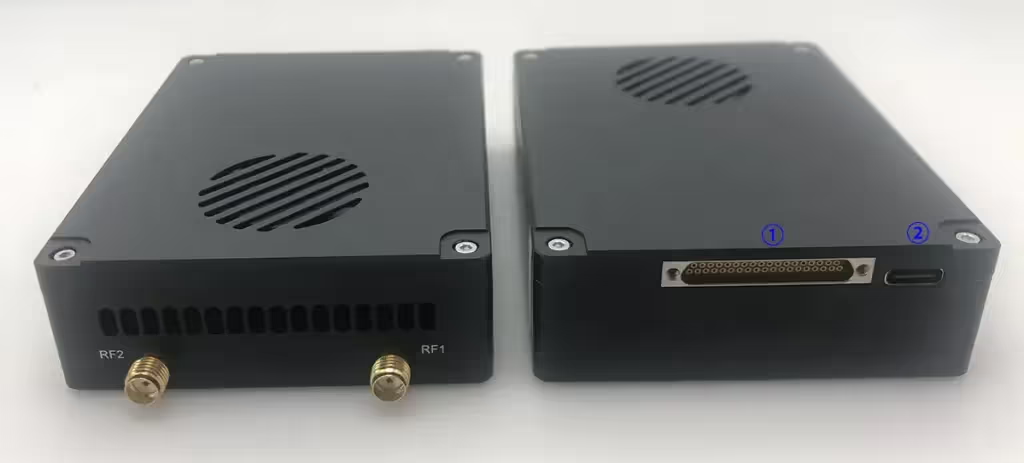
- एमआईएमओ कनेक्टर: शक्ति, ईथरनेट पोर्ट, डेटा ट्रांसमिशन सीरियल पोर्ट, और रिमोट कंट्रोल एसबीयूएस/टीटीएल/पीपीएम
- यु एस बी: कंप्यूटर USB से कनेक्ट करें, जिसका उपयोग डिवाइस और अन्य संबंधित संचालन को कॉन्फ़िगर और अपग्रेड करने के लिए किया जा सकता है.
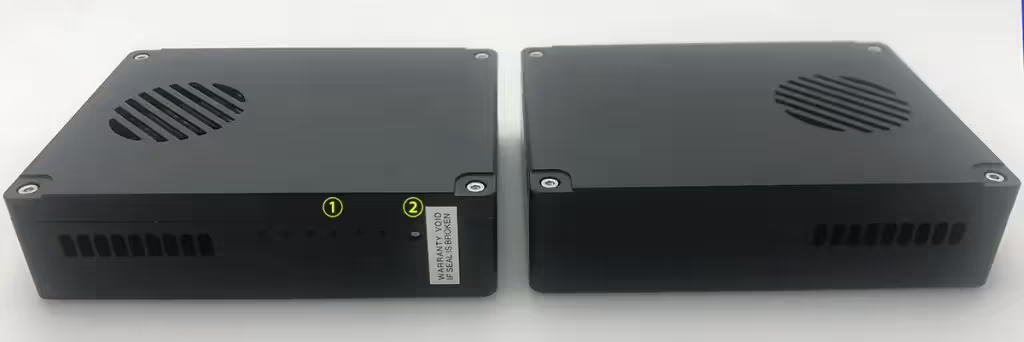
एलईडी
From left to right are:
Power indicator light (1)
Ethernet port indicators (3)
Uplink and downlink indicators (2).
When the wireless link is established normally, the link indicator of the air system will be off. The downlink indicator is multiplexed with the binding indicator function.
Pair button
Long press the button until the binding indicator light flashes, then release it to execute the binding operation. The factory equipment has been bound. If it is not necessary, the customer does not need to bind again.
Air Unit
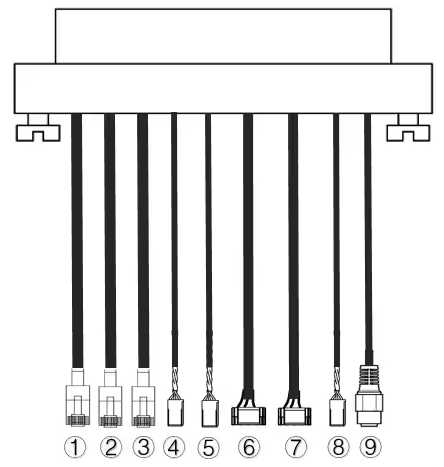
| नहीं. | इंटरफेस |
| 1,2,3 | ईथरनेट |
| 4,5 | S.BUS, as shown in the picture, NS 1अनुसूचित जनजाति pin from the left of the Dupont connector is the S.BUS signal, और यह 3तृतीय जी है. |
| 6,7 | टेलीमेट्री सीरियल, जैसा कि चित्र में दिखाया गया है, NS 2रा GH1.25 कनेक्टर के बाईं ओर से पिन Rx है, NS 3तृतीय टीएक्स है, NS 6वां जी है. (डिफ़ॉल्ट रूप से टीटीएल, आरएस232/422 विकल्प) |
| 8 | पीपीएम, as shown in the picture, NS 1अनुसूचित जनजाति बायीं ओर से पिन पीपीएम सिग्नल है, और यह 3तृतीय जी है. |
| 9 | शक्ति |
ईथरनेट 1, ईथरनेट 2
टीटीएल 1 ट्रैकर, टीटीएल2
एसबीयू 1, एसबीयू 2
विद्युत आगम
ग्राउंड यूनिट
Vcan1818-ग्राउंड-यूनिट-IO-केबल
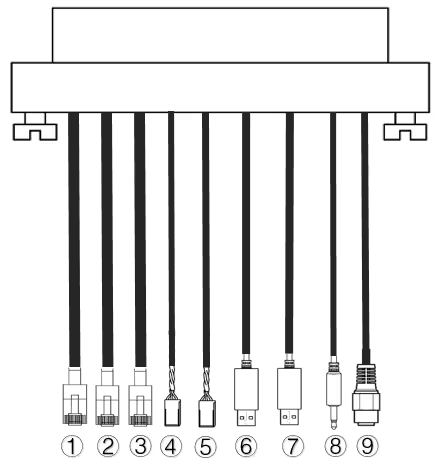
| नहीं. | इंटरफेस |
| 1,2,3 | ईथरनेट |
| 4,5 | S.BUS, जैसा कि चित्र में दिखाया गया है, NS 1अनुसूचित जनजाति बाईं ओर का पिन S.BUS सिग्नल है, NS 2रा 5V+ है, NS 3तृतीय जी है. |
| 6,7 | सीरियल-यूएसबी(टीटीएल-यूएसबी डिफ़ॉल्ट रूप से, आरएस232/422 विकल्प) |
| 8 | पीपीएम |
| 9 | शक्ति |
ईथरनेट 1, वैकल्पिक दूरी ग्रेड
टीटीएल1, टीटीएल2
एसबीयू 1, एसबीयू 2
विद्युत आगम
पूछे जाने वाले प्रश्न
- आवृत्ति है 2410-2478 हमारे परीक्षण वीडियो में मेगाहर्ट्ज.
- इस मॉडल की कार्य आवृत्ति अनुकूलित है, हम इसे बदल भी सकते हैं 2325 मेगाहर्टज.
- Vcan1818-5W में 20 किमी पर 6Mbps है, 30किमी, और 40 कि.मी.
- Vcan1818-2W में 20 किमी पर 6Mbps है, और 2-3Mbps पर 30 और 40 कि.मी.
- डिफ़ॉल्ट फ़्रीक्वेंसी रेंज 800-900Mhz है
- 800 मेगाहर्ट्ज को छोड़कर, 1.4जी और 2.4जी, यदि ऑर्डर मात्रा हमारे MOQ अनुरोध को पूरा करती है तो अन्य आवृत्तियों को अनुकूलित किया जा सकता है (50 जोड़े)
- The default transmitter has 2 sets of RJ45 Ethernet Video camera input.
- We also can customize 3 sets of RJ45 Ethernet video camera input when you order and notify us.
- Power Amplifier at 0.5 Watts support 2.4G and 5.8G both.
- Power Amplifier at 10 watts support 2.4G or 5.8G, it can not support two frequency bands at this 10 Watts output.
- If you choose a 10-watt power amplifier inside, it can not support 2.4G and 5.8G at the same time.
- हाँ, 3G~3.9Ghz working frequency is optional. वास्तव में, we can modify other frequencies if you need. You should have an order and agree to wait for 2 months for engineer development. (need re-layout the PCBA and small quantity to produce and test)
- Regarding automatic frequency hopping-FHSS, हाँ, it will auto-change to use the next working frequency if the signal is blocked or jammed.
- The drone wireless video data link module Vcan1818 power supply range: DC 18-26V.
- The antenna must be installed before powering on.
- भी, you should double check that the screws of the antenna and RF transmitter are tightened.
- Because if the antenna is not installed or the contact is poor, the power amplifier will burn out.
- You should install both two antennas on the air terminal.
- It is best to use the transmitter antenna we configure for you, ensuring that the frequency and gain of the antenna are tested and verified.
- The two antennas are best installed on both sides of the drone to ensure that the drone can still get the best signal when turning and maintain uninterrupted contact with the ground control station.
- You should install both two antennas on the ground terminal.
- It is best to use the transmitter antenna we configure for you, ensuring that the frequency and gain of the antenna are tested and verified.
-
The two ground wireless video data receiver antennas should be kept as far apart as possible.
-
They should be installed as high as possible above the ground to receive the signal from the drone transmitter.
-
The feeder cable is relatively long. For the convenience of packaging and transportation, इसे एक घेरे में बांधा गया है. वास्तविक उपयोग में, आपको फीडर लाइन को खोलना याद रखना चाहिए. इसे अपने मूल गोल आकार में ही न रहने दें, क्योंकि यह अदृश्य रूप से एक इलेक्ट्रॉनिक हस्तक्षेप वातावरण तैयार करेगा.
-
हाँ, बस ट्रेनर पोर्ट के माध्यम से मानक पीपीएम सिग्नल आउटपुट करें;
-
या संचार के लिए S.BUS रिसीवर का उपयोग करें.
- नहीं, एक विमान में केवल एक एयर यूनिट ट्रांसमीटर हो सकता है. यदि आपको अधिक कैमरों का समर्थन करने के लिए इसकी आवश्यकता है, कृपया हमें बताएं कि हम आपको बेहतर समाधान प्रदान करें.
- पी2पी पॉइंट-टू-पॉइंट डिवाइस केवल एक ग्राउंड टर्मिनल स्थापित कर सकते हैं.
- P2MP पॉइंट-टू-मल्टीपॉइंट डिवाइस कई ग्राउंड टर्मिनलों का समर्थन करते हैं.
- यदि आपकी यह आवश्यकता है, कृपया अपना ऑर्डर देते समय हमें बताना याद रखें और हम इसे आपके लिए कॉन्फ़िगर कर सकते हैं.
- जीपीएस के हस्तक्षेप को रोकने से बचने के लिए कृपया जांच लें कि ड्रोन वीटीएक्स का एंटीना जीपीएस से बहुत दूर है या नहीं.
- 1.4G उपकरण का फ़्रीक्वेंसी बैंड GPS फ़्रीक्वेंसी बैंड के करीब है, इसलिए एंटीना अलगाव की एक निश्चित डिग्री सुनिश्चित की जानी चाहिए.
- LED1 (शक्ति सूचक प्रकाश): बिजली चालू होने के बाद, प्रकाश हमेशा नीला होता है.
- LED2~4 (नेटवर्क कनेक्शन संकेतक):
- अगर लाइट हमेशा जलती रहे, इसका मतलब है कि नेटवर्क पोर्ट का भौतिक लिंक जुड़ा हुआ है.
- अगर लाइट बंद है, इसका मतलब है कि नेटवर्क पोर्ट का भौतिक लिंक कनेक्ट नहीं है.
- LED5 (अपलिंक सूचक):
- जब प्रकाश चालू हो, यह इंगित करता है कि जमीनी इकाई और वायु इकाई के बीच संबंध स्थापित हो गया है;
- जब लाइट बंद हो, यह इंगित करता है कि ग्राउंड यूनिट और एयर यूनिट के बीच का लिंक काट दिया गया है.
- LED6 (डाउनलिंक सूचक प्रकाश):
- जब प्रकाश चालू हो, यह इंगित करता है कि वायु इकाई और जमीनी इकाई के बीच संबंध स्थापित हो गया है;
- जब लाइट बंद हो, यह इंगित करता है कि वायु इकाई और जमीनी इकाई के बीच का लिंक काट दिया गया है.
कृपया नीचे दिए गए चरणों का पालन करें:
- कृपया जांचें कि एयर एंड और ग्राउंड एंड मॉड्यूल की बिजली आपूर्ति सामान्य है या नहीं;
- कृपया जांचें कि क्या हवा का सिरा और ज़मीन का सिरा सफलतापूर्वक बंधे हुए हैं;
- Please check whether the antenna installation of the air terminal and the ground terminal module is normal: whether there is any obstruction in the installation position of the antenna; whether the antenna interface is loose; whether the feeder is not tightened, and whether the interface is loose;
- Use the management software to check whether the transmitting frequency of the ground terminal is consistent with the receiving frequency of the air terminal;
- If none of the above operations can solve the problem, please contact our wireless video link technical support person.
कृपया नीचे दिए गए चरणों का पालन करें:
- कृपया जांचें कि एयर एंड और ग्राउंड एंड मॉड्यूल की बिजली आपूर्ति सामान्य है या नहीं;
- कृपया जांचें कि क्या हवा का सिरा और ज़मीन का सिरा सफलतापूर्वक बंधे हुए हैं;
- Please check whether the antenna installation of the air terminal and the ground terminal module is normal: whether there is any obstruction in the installation position of the antenna; whether the antenna interface is loose; whether the feeder is not tightened, and whether the interface is loose;
- Use the management software to check whether the transmitting frequency of the air terminal is consistent with the receiving frequency of the ground terminal;
- If none of the above operations can solve the problem, please contact our wireless video link technical support person.
कृपया नीचे दिए गए चरणों का पालन करें:
-
कृपया जांचें कि एयर एंड और ग्राउंड एंड मॉड्यूल की बिजली आपूर्ति सामान्य है या नहीं, and whether the modules start normally;
-
Please check whether the network cable is connected normally;
-
Please check whether the network camera is powered normally;
-
If none of the above operations can solve the problem, please contact our wireless video link technical support person.
कृपया नीचे दिए गए चरणों का पालन करें:
-
Confirm whether the wireless link status is established normally;
-
Please check whether the connection between the flight controller and the air terminal is correct, and whether the connection between the ground terminal and the ground station is correct;
-
कृपया जांचें कि एयर एंड और ग्राउंड एंड मॉड्यूल का डेटा ट्रांसमिशन लाइन अनुक्रम सामान्य है या नहीं. हमारी कंपनी मानक केबल प्रदान करती है. यदि आप वायरिंग स्वयं करते हैं, कृपया पंक्ति क्रम की जाँच करें;
-
प्रबंधन सॉफ़्टवेयर के माध्यम से जांचें कि डेटा ट्रांसमिशन बॉड दर उड़ान नियंत्रण के अनुरूप है या नहीं;
-
क्या ग्राउंड स्टेशन का कंप्यूटर फ़ायरवॉल बंद है;
-
If none of the above operations can solve the problem, please contact our wireless video link technical support person.
कृपया नीचे दिए गए चरणों का पालन करें:
-
Confirm whether the wireless link status is established normally.
-
Please check whether the connection between the flight controller and the air terminal is correct, और क्या ग्राउंड टर्मिनल और रिमोट कंट्रोल के बीच कनेक्शन सही है;
-
यदि पीपीएम मोड का उपयोग कर रहे हैं, कृपया रिमोट कंट्रोल के मोड कॉन्फ़िगरेशन की जांच करें; यदि S.BUS मोड का उपयोग कर रहे हैं, कृपया रिसीवर और रिमोट कंट्रोल कॉन्फ़िगरेशन की जांच करें;
-
कृपया जांचें कि एयर एंड और ग्राउंड एंड मॉड्यूल का रिमोट कंट्रोल लाइन अनुक्रम सही है या नहीं;
-
Check whether the remote control mode is configured correctly through the management software;
-
If none of the above operations can solve the problem, please contact our wireless video link technical support person.
कृपया नीचे दिए गए चरणों का पालन करें:
-
Confirm whether the wireless link status is established normally;
-
Confirm whether the network physical connection indicators of the air terminal and the ground terminal are normal;
-
If using a network camera, please confirm the IP address of the network camera, login user name and password;
-
Whether the IP address configuration of the ground station computer and the network camera are in the same network segment;
-
Whether the video stream address configuration for playing RTSP is correct;
-
क्या ग्राउंड स्टेशन का कंप्यूटर फ़ायरवॉल बंद है;
-
If none of the above operations can solve the problem, please contact our wireless video link technical support person.
कृपया नीचे दिए गए चरणों का पालन करें:
-
Confirm whether the downlink mode configuration is reasonable;
-
Whether the network cable used is connected properly;
-
Whether there is interference in the downlink, consider changing the working frequency point;
-
यदि कोई हस्तक्षेप न हो, क्या संचार लिंक की सीमा दूरी पूरी हो गई है;
-
देखें कि क्या पॉड की डाउनलिंक दर में बहुत अधिक उतार-चढ़ाव होता है. उदाहरण के लिए, पॉड की निश्चित बिट दर है 3 एमबीपीएस, और क्लाइंट की डाउनलिंक दर निर्धारित है 3.97 एमबीपीएस, और पॉड की बिट दर का चरम मान एक निश्चित चरण पर होने की संभावना है यदि यह इससे अधिक हो 3.97 एमबीपीएस, इस समय अंतराल या मोज़ेक घटना होगी. क्लाइंट की डाउनलिंक दर को सेट करें 5.27 एमबीपीएस, और सत्यापित करें कि क्या डाउनलिंक दर अधिक है 3.97 एमबीपीएस. यदि यह अधिक हो जाए 3.97 एमबीपीएस, क्लाइंट की डाउनलिंक दर को पॉड के चरम मान से अधिक सेट करें;
-
क्लाइंट की वास्तविक समय डाउनलिंक दर की जाँच करें, क्या डबल कैमरा स्ट्रीम हैं;
-
If none of the above operations can solve the problem, please contact our wireless video link technical support person.
कृपया नीचे दिए गए चरणों का पालन करें:
-
Confirm whether the antenna and connecting cable are installed correctly and whether they are standard materials of wireless video link;
-
Ensure that the antenna installation of the air terminal will not be blocked by the load, and that there is no obvious obstruction in the short distance of the antenna of the ground terminal, and that the antenna of the air terminal and the ground terminal are perpendicular to the ground;
-
Check whether the video transmission equipment hardware such as the power amplifier is damaged;
-
Whether the downlink mode configuration value is unreasonable, and the high-speed downlink mode will significantly reduce the communication distance;
-
Whether the working frequency is significantly interfered, you can select the optimal frequency through the client;
-
क्या हवाई टर्मिनल और ग्राउंड टर्मिनल उड़ान वातावरण में गंभीर रूप से अवरुद्ध हैं, और जटिल भौगोलिक वातावरण संचार दूरी को प्रभावित करेगा;
-
If none of the above operations can solve the problem, please contact our wireless video link technical support person.
-
माफ़ कीजिये, सबसे अधिक उपयोग की जाने वाली कार्य आवृत्ति 800 मेगाहर्ट्ज है, 1.4जी, और 2.4 जी. अन्य आवृत्तियों को अनुकूलित किया जाना चाहिए.
- 443मेगाहर्ट्ज COFDM आवृत्ति रेंज 170-860 मेगाहर्ट्ज से लगती है, लेकिन अधिकांश COFDM वीडियो ट्रांसमीटर और रिसीवर एकतरफा ट्रांसमिशन हैं.
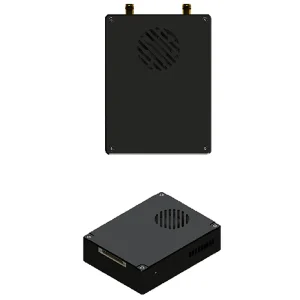
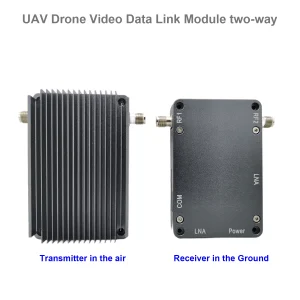
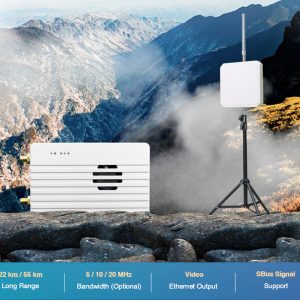
दो-तरफ़ा ट्रांसमिशन मॉडल यहाँ है.





iVcan.com –
I have been using the Vcan1818 UAV Wireless Video Data RC Link for several months, and it has exceeded my expectations. The video quality is excellent with 4K resolution and low latency, making real-time monitoring smooth and reliable. Setup is straightforward, and the adaptive frequency hopping ensures a stable connection even in complex electromagnetic environments. The long-distance transmission up to 100km is impressive, and the H265/H264 compression combined with AES encryption provides both efficiency and security. The multiple interfaces, including HDMI, SDI, के, ईथरनेट, और एसबीयूएस, offer great flexibility for different UAV applications. कुल मिलाकर, this module delivers professional-grade performance for drone video and data transmission.