






Πώς να φτιάξετε κάρτα αναβάθμισης SD για ασύρματο δέκτη βίντεο?
Πίνακας περιεχομένων
Ενας: Make the SD upgrade card
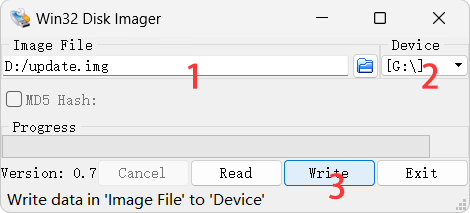
- Κατεβάστε Win32 Disk Imager.exe και update.img πρώτα.
- Κάντε διπλό κλικ “Win32DiskImager.exe” to run it.
- Select the image “update.img” for the SD card upgrade.
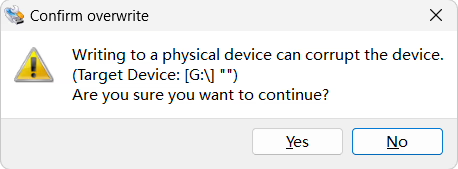
- Κάντε κλικ “Γράφω” and wait for the flash to complete, όπως φαίνεται παρακάτω.

Δυο: Copy the upgrade image file to the SD upgrade card
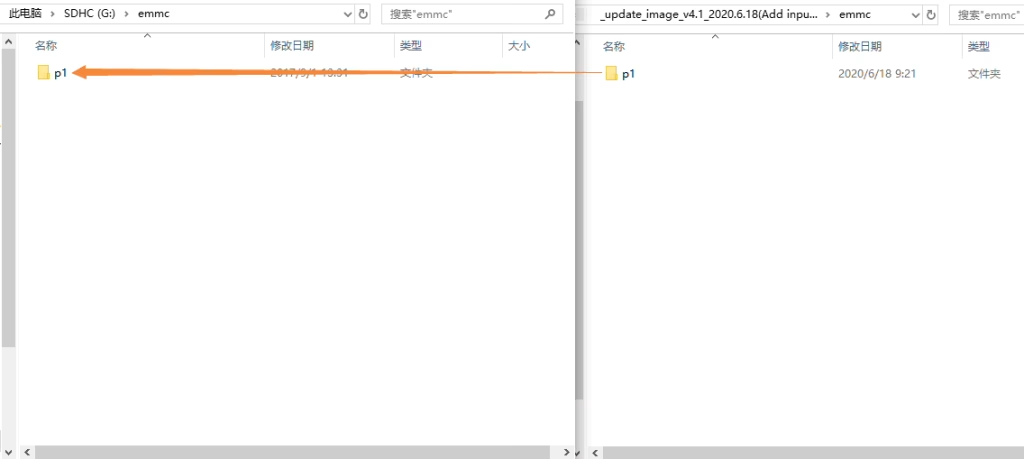
Αποσυμπιέστε το “update_image_xx_yy.zip” file and overwrite all the files within with the files of the same name in the same directory on the SD upgrade card you just created.
Three: Updating the New Firmware to wireless video receiver Using the Upgrade Card
- Insert the SD upgrade card into the Micro SD card port of the wireless video receiver board. Power on the receiver board. Once the system boots up, both green lights on the board will illuminate.
- Wait a few seconds until both green lights on the board flash simultaneously, indicating the update is complete. Remove the Micro SD card.
Κάνε μια ερώτηση
Το μήνυμά σας έχει σταλεί