






Як падключыць перадатчык дрона да кантролера?
Як падключыць кантролер палёту?
у цяперашні час, the wireless video data transmitter and flight controller are connecting through the D2 serial port.
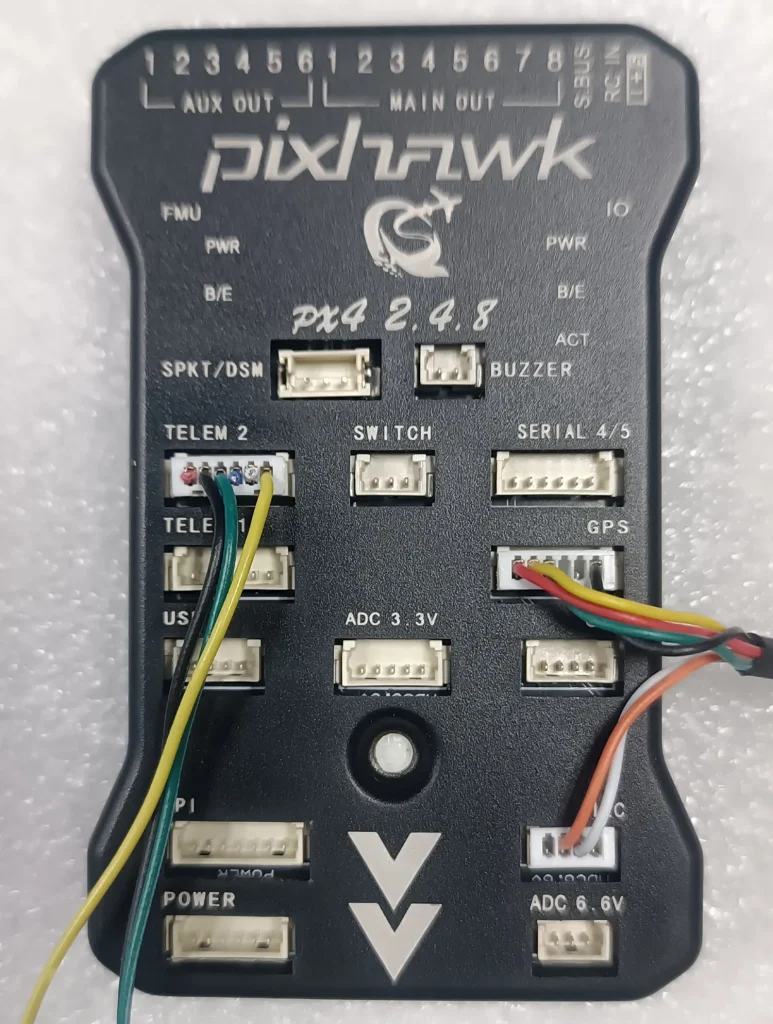
Connecting the serial cable
Look at the flight control here
We connected the TELEM 2 serial port on the flight controller.
This is the power supply 5V for the flight control from the battery
Please check the pin definition of our transmitter data port again.
There are two ways to connect the receiver to the computer, the network interface and the serial port.
This video demonstrates the first type, network cable connection.
Now you can see that our receiver is connected to the computer through a network cable.
I do the rest of the work on the computer, and I switch the video to the computer’s monitor.
Па-першае, нам трэба змяніць налады IP-сеткі кампутара.
Налады сеткі
Ethernet
у гэтай укладцы
Затым усталюйце гэты IP-адрас
Выкарыстоўвайце наступны IP, 192.168.1.2
Затым націсніце OK
У браўзеры, увайсці 192.168.1.12 (IP-адрас перадатчыка)
абярыце ўкладку SERIAL
UART2 (Паслядоўны порт D2)
Пратакол выбару UDP
Выбар хуткасці перадачы 57600
Звярніце ўвагу тут
IP-адрас тут павінен супадаць з IP-адрасам вашага кампутара.
Нумар порта па змаўчанні 8091
Затым націсніце пацвердзіць
абярыце ўкладку СІСТЭМА
Націсніце Перазагрузка
Звярніце ўвагу тут
Тут мы ўсталёўваем IP перадатчыка 12
IP-адрас гэтага падлучанага да кампутара прымача 192.168.1.11
Мы толькі што змянілі старонку перадатчыка на баку кіравання палётам.
Пасля перазапуску перадатчыка, мы абнаўляем старонку, а потым уводзім зноў
На ўкладцы серыял, аддалены IP-адрас - гэта той самы IP-адрас вашага кампутара.
Затым запусціце Mission Planner
Звярніце ўвагу тут
Выбіраем пратакол UDP
Then click connect directly
тут
8091 then click OK
When you see this progress bar, it indicates that the connection has been successful.
This is to connect the wireless video data receiver to the computer via a network cable.
In another video, we will demonstrate how to connect the wireless video data receiver to a computer via a serial cable.
Дзякуй за прагляд. Please contact us if you have any questions, contact us at https://ivcan.com

задаваць пытанне
Ваша паведамленне адпраўлена