





Re-Write program new update firmware, why?
جدول المحتويات
When do you need to Re-Write the program on your tv box?
If you upgrade the wrong البرامج الثابتة or your tv box programmable chipset has lost the firmware, تحتاج إلى إعادة كتابة البرنامج الثابت إلى صندوق التلفزيون الخاص بك من الكمبيوتر. يرجى التحقق من العملية في الفيديو أدناه.
A computer or tv box can upgrade with new firmware as it has the original firmware inside. If the device has lost or installed the wrong firmware, it can not upgrade to new firmware again. Except that the device’s engineer can offer you the new firmware but load it from the USB stick. Just like your computer os has been lost or a hard disk has been formatted, you can use a USB with the operating system to load and re-write a new firmware to the device. The below operation is similar to operation, from the computer instead of using a USB stick with the operating system.
Re-Write software to your tv box video guide.
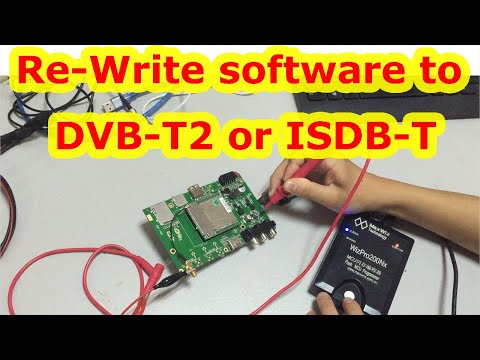
Re-Write new firmware to your tv box steps.
أحيانا, if you upgrade the wrong firmware to the tv box or the program chipset loses the firmware, you have to re-write the new upgrade program to your tv box. This video shows the rewrite operation via the chipset programmer step by step.
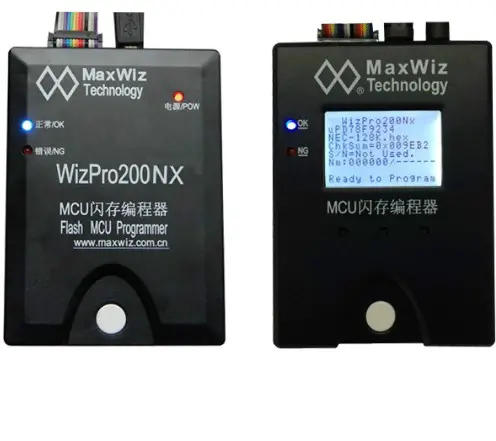
- خطوة 1, Prepare the chipset programmer, TV boxboard, and multimeter pen.
- خطوة 2, Connect the chipset programmer to the computer and power it. When the chipset programmer lights up blue, it means the chipset programmer is ready.
- خطوة 3, At the computer, open the chipset programmer burning tool.
- خطوة 4, Click the communication device configuration to find the device.
- خطوة 5, Click on the MCU model, the model here should be the same as the MCU model on the TV box board.
- خطوة 6, Load the software. and click download.
- خطوة 7: Power off the chipset programmer and power it on again.
- خطوة 8, Connect the wire from the chipset programmer to the tv board. The square pin of the wire is aligned with the ground.
- خطوة 9, Turn on the DC power supply and adjust the voltage to between 3.3~4.5V.
- خطوة 10, Connect the negative pole (أسود) of the DC voltage to the ground and the positive pole (أحمر) to the positive pole of the power supply.
- خطوة 11, Press the white button on the chipset programmer. The chipset programmer lights up blue and hears a “beep”, which means the upgrade is complete.
The operations should be operated by a professional person. Or ask for assistance from your tv box supplier. Thanks for watching the video about the Re-Write program’s new updated firmware.
If you have any questions about the above operation, يرجى الاتصال بنا.
ISDB-T البلدان المعتمدة
فئات البنك الإسلامي للتنمية-T
عرض النطاق الترددي ISDB-T
الجزء ISDB-T
كمية هوائي ISDB-T
تردد ISDB-T
ISDB-T ذات الصلة
شرائح ISDB-T
المعرفة ISDB-T

For more details, please also visit البنك الإسلامي للتنمية-t.com
اطرح سؤالاً
شكرًا لردكم ✨