





A client asked us if there is a way to customize and do frequency selection using some IO or maybe serial data command. We looking to add it to our product and enable selection through our interface.
Як перемикати частоту передавача FM-аудіо за допомогою високого та низького рівня кабелю керування
Зміст
FM Transmitter Product
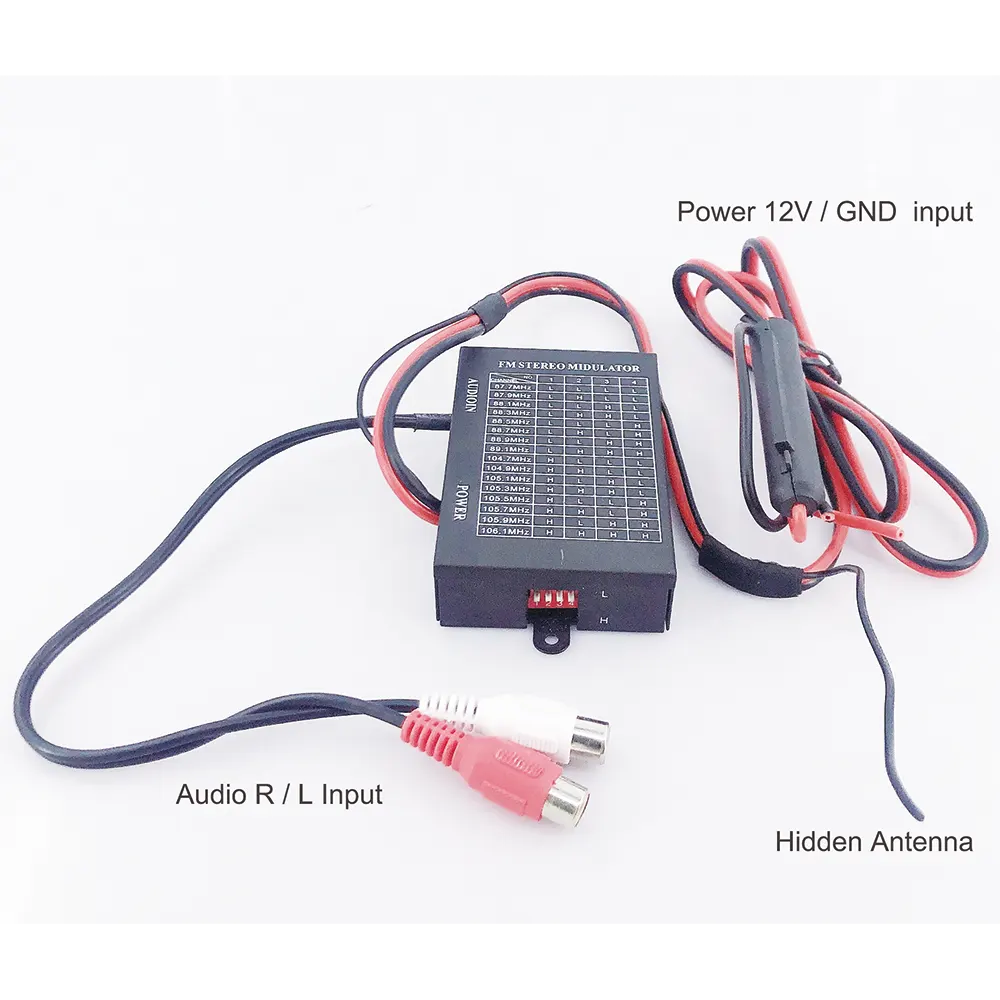
Так, many FM audio transmitter modules support frequency selection and configuration via IO or serial interfaces, such as I2C, SPI, or UART. Below are some common implementation methods:
- On the PCB board of FM-16 audio transmitter, these four pins are turned on and off by the external CPU.
- The switch is in an open state at the bottom. The logic is 1. The master can use the IO port to short-circuit to the ground, the logic becomes 0.


Text in the video
Now we will show how to switch the frequency of the FM transmitter by using high and low levels.
How to switch FM transmitter frequency via the control cable? These four switches are now turned to the bottom. These four switches are currently at high level. The HHHH corresponding frequency is 106.1MHz. To control this point is the high or low level, now we have soldered a wire on this to achieve the purpose of switching frequency.
This is the last one. (4th point), Then we will connect it to ground and make it a low level. the HHHL corresponding frequency is 105.3Mhz. Let’s adjust this FM radio to the 105.3Mhz. Now I will connec the fourth point to ground. Short circuit it. The frequency has been switched. The sound is there. we can hear the music. Take it away. No music.
You need to add an MCU to your peripheral circuit to control the output of four high and low levels. To switch the working frequency of the FM stereo audio transmitter. Please contact us if you have any further questions.
1. I2C/SPI Interface
- Frequency Selection: Send specific commands and data via I2C or SPI to set the transmission frequency.
- Configuration Registers: Many FM transmitter chips have internal registers that can be written to via I2C/SPI to configure frequency, потужність, та інші параметри.
приклад:
- Using I2C, send frequency data to a specified register address.
- Using SPI, send a command frame containing frequency information.
2. Інтерфейс UART
- AT-команди: Some modules support setting the frequency via UART using AT commands.
- Спеціальний протокол: If the module supports a custom protocol, you can send specific data packets via UART to configure the frequency.
приклад:
- Send a command like
AT+FREQ=98.5to set the frequency to 98.5 МГц.
3. GPIO Control
- Digital Input: Use GPIO pins to input digital signals for selecting preset frequencies.
- PWM Signal: Some modules may support frequency adjustment via PWM signals.
приклад:
- Use multiple GPIO pins in combination to select different frequencies.
4. MCU Integration
- Microcontroller: If your product already has a microcontroller (MCU), you can program it to handle frequency selection and configuration.
- Firmware Updates: Update the MCU firmware to support new frequency settings.
5. Software Libraries and APIs
- Existing Libraries: Some FM transmitter modules provide ready-to-use software libraries and APIs for easy integration.
- Розробка на замовлення: If no library is available, you can develop custom drivers and control code based on the module’s datasheet.
Implementation Steps
- Select a Module: Choose an FM transmitter module that supports the required interface (I2C, SPI, UART, тощо).
- Review the Datasheet: Carefully read the module’s datasheet to understand how to configure the frequency via the interface.
- Develop Interface Code: Write code based on the datasheet to implement frequency selection and configuration.
- Integrate into Your Product: Integrate the code into your product and provide frequency selection through your interface.
- Test and Validate: Test and validate the frequency selection functionality in real-world conditions to ensure stability and accuracy.
Example Code (Assuming I2C Interface)
#включити <Wire.h>

#define FM_MODULE_ADDRESS 0x60

void setFMFrequency(float frequency) {
  uint16_t freqValue = (uint16_t)(частота * 10); // напр., 98.5 MHz -> 985
  Wire.beginTransmission(FM_MODULE_ADDRESS);
  Wire.write(0x01); // Assume 0x01 is the frequency setting register
  Wire.write((freqValue >> 8) & 0xFF); // High byte
  Wire.write(freqValue & 0xFF); // Low byte
  Wire.endTransmission();
}

void setup() {
  Wire.begin();
  setFMFrequency(98.5); // Set frequency to 98.5 МГц
}

void loop() {
  // Main loop
}
Дотримуючись цих кроків, you can flexibly integrate the FM audio transmitter into your product and enable frequency selection through your interface.
задавати питання
Дякуємо за вашу відповідь. ✨