






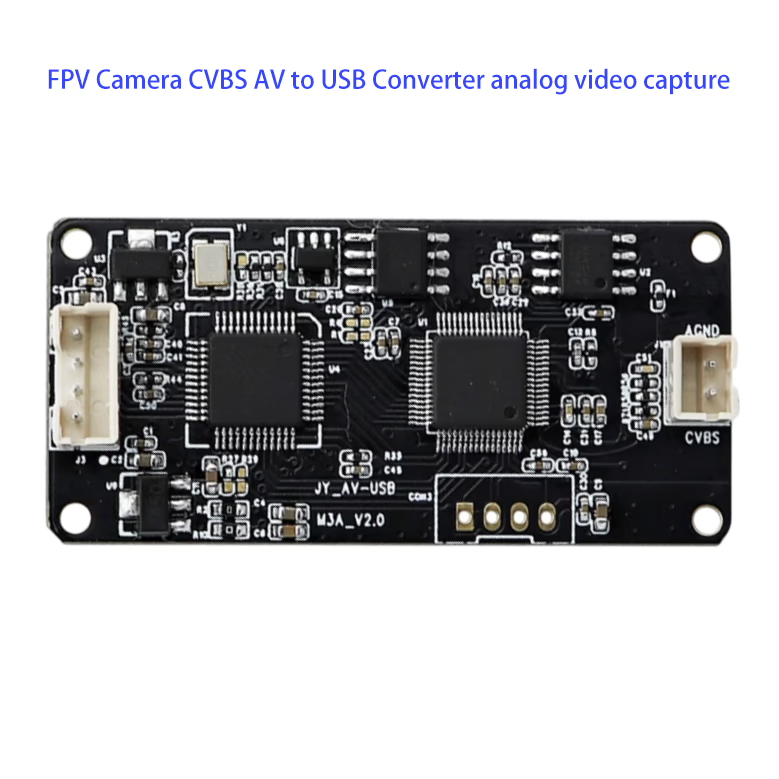
FPV Camera CVBS AV to USB Converter analog video capture
विषयसूची
विशिष्टता
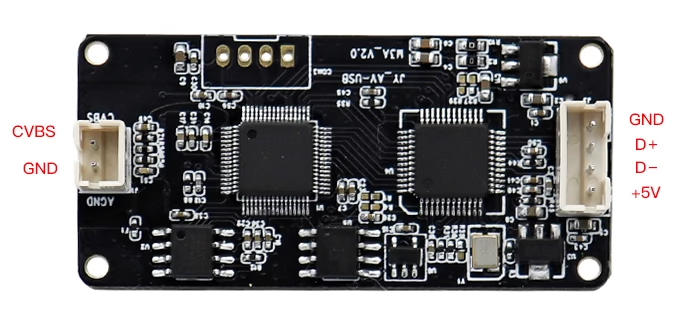
| इंटरफेस | AV to USB |
| Resolving power | 800X600, 640Cover480 |
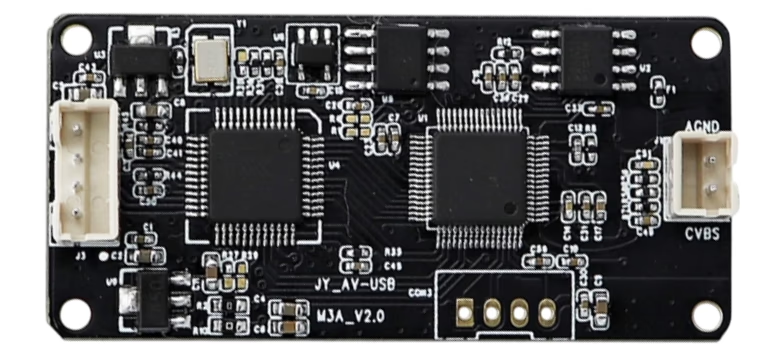
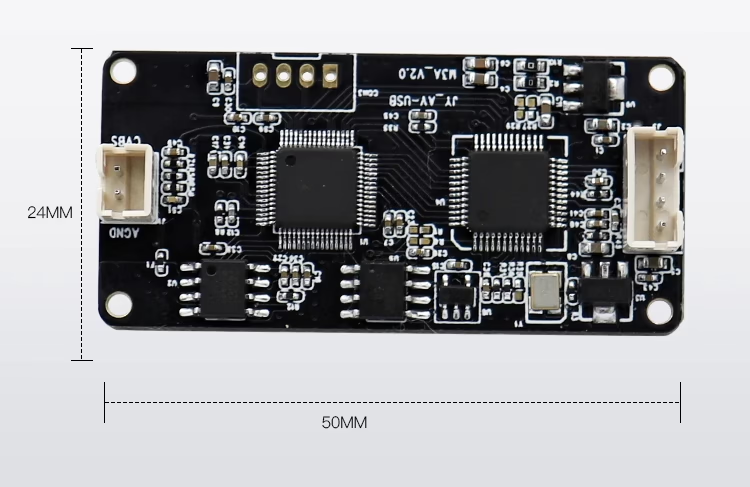
| Plate type | 50X24MM |
| Functional Support | Can be customized |
| फ्रेम रेट | 30एफपीएस |
| आउटपुट स्वरूप | MIPEG / YUY2 Default shipping is MIPEG
Need Select YUY2 format (25 Frame) Please tell us in advance ( YUY 2 only supported WIN 10 Systems) |
| Flash control | 50हर्ट्ज / 60 हर्ट्ज |
|
Software Compatibility |
WINXP SP2、VISTA、WIN7、Win8、LINU X. Ann
Freedom from driving; WINXP SP1, WIN2000 version needs to install free Drive a patch pack; |
| Single frame capture storage format | BMP/JPG |
| Dynamic capture storage format | AVI/WMV |
| वर्किंग टेम्परेचर | -10~75℃ |
| electric consumption | <0.7डब्ल्यू |
परिचय
NS FPV Camera CVBS AV to USB Converter – Analog Video Capture Device is a compact yet powerful solution designed to bridge traditional analog video sources with modern digital platforms. With the ongoing development of drones, FPV systems, रोबोटिक, सुरक्षा निगरानी, and industrial inspection, there is an increasing need to bring analog camera outputs into computers, Raspberry Pi boards, or even mobile devices for real-time viewing, प्रसंस्करण, and recording. This converter offers a seamless way to capture analog CVBS/AV video signals and convert them into USB-compatible digital streams, enabling flexible integration across multiple platforms.
Despite the rise of digital video standards, analog cameras and FPV systems remain widely used due to their affordability, कम विलंबता, और विश्वसनीयता. The FPV Camera CVBS AV to USB Converter is specifically engineered to maximize compatibility with these systems. It provides a stable and user-friendly interface that allows analog video to be displayed, recorded, or processed without requiring additional hardware complexity.
Key Features and Performance
This converter supports video resolutions up to 800×600 तथा 640× 480, with a frame rate of 30एफपीएस, ensuring smooth and clear video transmission. It outputs in एमजेपीईजी (चूक) या YUY2 प्रारूप, giving developers and users flexibility depending on their operating system or application needs. For specialized use, YUY2 output (25एफपीएस) is supported exclusively on Windows 10 platforms, making it particularly valuable for systems requiring raw uncompressed video.
The device consumes less than 0.7W, making it energy-efficient and highly suitable for mobile and embedded applications. Its board dimensions of 50×24mm allow easy integration into custom devices, ड्रोन, and portable monitoring systems. इसके अतिरिक्त, its functional support can be customized according to the specific requirements of industrial or consumer-grade applications, such as different output formats, frame rates, or interface options.
Software Compatibility
The converter works seamlessly across a wide range of systems including Windows XP SP2 and above (विस्टा, विन7, Win8, जीतें 10 अंक), as well as लिनक्स. It requires no additional drivers on most modern operating systems, making it virtually plug-and-play. For older platforms like Windows XP SP1 and Windows 2000, a free driver patch pack is available to ensure compatibility.
Captured video can be stored in multiple formats: single frames can be saved as BMP/JPG, while dynamic video recording supports AVI/WMV. This flexibility makes the converter useful not only for real-time FPV applications but also for post-processing tasks like video analysis, content creation, or archival storage.
Customization Options
One of the biggest advantages of this converter is its customizability. It can be tailored at the hardware, सॉफ्टवेयर, and application levels. Hardware customization may include modifications to connectors, board design, or signal processing. Software customization enables developers to adjust encoding formats, integrate additional functions, or optimize latency. At the application level, the converter can be adapted for niche uses such as aerial video streaming, medical imaging, or surveillance systems.
अनुप्रयोगों
-
FPV Drones & यूएवी: Capture analog FPV camera feeds and display them on a PC, Raspberry Pi, or mobile device for real-time flight monitoring and recording.
-
सुरक्षा निगरानी: Convert analog CCTV video signals into USB for integration with modern NVR or computer-based surveillance systems.
-
Industrial Inspection: Use in factory automation or machine vision systems where analog cameras are still deployed.
-
शिक्षा & अनुसंधान: Enable students, researchers, and developers to connect analog video devices to modern computers for testing, demonstrations, and experiments.
-
चिकित्सा & Scientific Imaging: Capture video from analog endoscopes, microscopes, or lab instruments.
-
Retro Gaming & Video Archiving: Record gameplay or digitize footage from older analog devices into modern digital formats for preservation.
निष्कर्ष
NS FPV Camera CVBS AV to USB Converter (Analog Video Capture Device) is a reliable, कॉम्पैक्ट, and versatile solution for bridging analog video signals with today’s digital computing platforms. With its wide system compatibility, customizable options, कम बिजली की खपत, and support for multiple video formats, it meets the needs of diverse applications ranging from FPV drone video transmission to industrial automation and video archiving. Whether for professional, औद्योगिक, or personal use, this converter offers the ideal balance of performance, flexibility, and ease of integration.
Customizable Options for FPV Camera CVBS AV to USB Converter
To better serve different applications, this analog video capture device supports a wide range of OEM/ODM customization:
Hardware Customization
-
Input/Output Interfaces: CVBS (के) इनपुट, USB-A, USB-C, Micro-USB, ओटीजी
-
Video Standards: पाल / NTSC auto-detection or fixed mode
-
संकल्प & फ्रेम रेट: 720× 480, 720×576, 960×576, 1080पी तक (interpolated)
-
बिजली की आपूर्ति: USB powered / external 5V–12V wide voltage input
-
आवास & आकार: Ultra-compact, lightweight for drones, or industrial-grade rugged housing
-
Durability: shockproof, जलरोधक, dustproof options for outdoor FPV use
-
Cable Options: Custom cable length (10से.मी / 30से.मी / 1मीटर / other) and connectors
सॉफ्टवेयर & Functional Customization
-
Video Compression Formats: एमजेपीईजी / एच 264 / H.265 output
-
System Compatibility: विंडोज, macOS, लिनक्स, एंड्रॉयड, आईओएस
-
Low-Latency Mode: Optimized for real-time FPV transmission (<100ms delay)
-
UVC Support: Plug-and-play UVC standard or custom drivers
-
OSD Overlay: वोल्टेज, timestamp, GPS coordinates, or other telemetry data
-
Capture Software: Branded recording, screenshot, and live streaming tools
Application-Level Customization
-
Camera Adaptability: Compatible with FPV analog cameras, सीसीटीवी, industrial cameras, and legacy devices
-
Target Applications: ड्रोन एफपीवी, UAV racing, remote education, medical imaging, industrial inspection, digital archiving
-
OEM/ODM Services: Custom logo printing, housing color, packaging design
Application scenarios:
1. FPV Drone Systems
-
उद्देश्य: Capture live analog video from FPV cameras on drones and stream it to a computer for real-time monitoring or recording.
-
Use case: Drone pilots can see a first-person view (एफपीवी) on their laptops without needing a dedicated FPV monitor.
2. Video Surveillance & सुरक्षा
-
उद्देश्य: Connect legacy analog CCTV cameras to modern PC-based surveillance software.
-
Use case: Upgrading old security systems without replacing existing analog cameras.
3. Industrial Inspection
-
उद्देश्य: Capture video from analog inspection cameras in manufacturing or maintenance environments.
-
Use case: Monitor assembly lines, पाइपलाइनों, or machinery using USB-connected computers for real-time diagnostics.
4. Scientific Research & Lab Experiments
-
उद्देश्य: Stream analog microscope cameras or lab experiment cameras to computers for recording and analysis.
-
Use case: Researchers can capture and process video data directly on a PC.
5. Video Capture & Recording for Content Creation
-
उद्देश्य: Record analog video sources like camcorders, retro gaming consoles, or video mixers via USB.
-
Use case: Digitize old analog footage or create live streaming content from analog devices.
6. शिक्षा & Training
-
उद्देश्य: Use analog cameras to demonstrate experiments, technical training, or teaching materials via a computer.
-
Use case: Students can watch live video streams from experiments or technical equipment.
7. Robotics & सुदूर निगरानी
-
उद्देश्य: Capture analog video from robot-mounted cameras and process it on a computer or a controller.
-
Use case: Enable real-time monitoring and decision-making for robotics applications.
8. Hobbyist & DIY Projects
-
उद्देश्य: Integrate analog cameras into custom projects that require USB video input.
-
Use case: FPV racing, RC cars, or home automation projects needing live video capture.
सामान्य प्रश्न
1. What is the FPV Camera CVBS AV to USB Converter?
It is a small device that converts analog CVBS video signals from FPV cameras or other AV devices into a USB video input for computers, Raspberry Pi, or smartphones.
2. How does the CVBS AV to USB Converter work?
It captures the analog video signal through the AV interface and converts it into a digital format (MPEG or YUY2) that can be recognized by your PC, Linux system, or mobile device.
3. Can this AV to USB converter be used for FPV drones?
हाँ, it is perfect for FPV drones, allowing you to connect your analog FPV camera to a PC or laptop for real-time monitoring or recording.
4. What resolution does the FPV CVBS to USB converter support?
The device supports 800×600 and 640×480 resolutions with a stable frame rate of 30 एफपीएस.
5. Does the FPV AV to USB Converter support Raspberry Pi?
हाँ, the converter works with Raspberry Pi, making it ideal for DIY projects and video capture applications.
6. Is this analog video capture device plug-and-play?
हाँ, it is plug-and-play on most systems including Windows XP SP2 and later, विंडोज 7, 8, 10, and Linux.
7. Do I need to install drivers for the AV to USB video capture card?
No drivers are needed for modern systems. Only Windows XP SP1 and Windows 2000 require a free driver patch.
8. What video output formats does this USB video capture card support?
It supports MJPEG by default and YUY2 format on request (YUY2 works only on Windows 10 systems at 25 एफपीएस).
9. Can I use this AV to USB adapter for live streaming?
हाँ, it can be used for live streaming by capturing the analog video signal and outputting it as a USB camera source for OBS or similar software.
10. Does the FPV Camera AV to USB Converter support audio capture?
It supports composite video and audio input, making it useful for cameras, वीसीआर, and FPV transmitters with AV output.
11. Is the CVBS to USB converter compatible with Linux?
हाँ, it works on most Linux distributions without requiring additional drivers.
12. What is the power consumption of this analog USB capture device?
It consumes less than 0.7W, making it energy-efficient for continuous operation.
13. Can I record video with this USB video capture card?
हाँ, you can record videos in AVI or WMV format and save snapshots in BMP or JPG format.
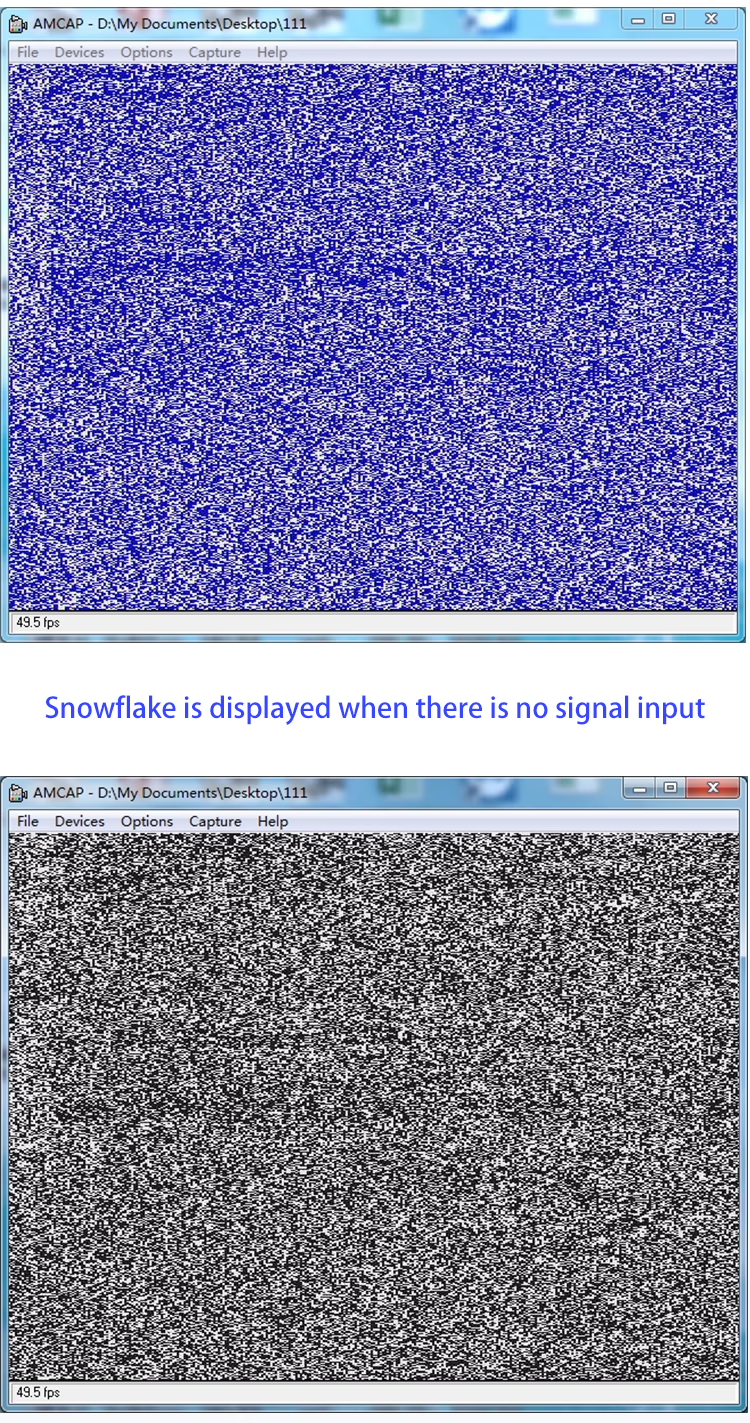
14. What happens if no video signal is connected?
The device will display a snowflake pattern when no video signal input is detected.
15. What frame rate does the AV to USB video converter support?
यह समर्थन करता है 30 FPS in MJPEG format and 25 FPS in YUY2 format on Windows 10.
16. Is this CVBS video to USB converter good for surveillance systems?
हाँ, it is excellent for upgrading analog surveillance cameras to digital recording systems via USB.
17. Can I use the FPV CVBS AV to USB converter with OBS Studio?
हाँ, OBS recognizes it as a USB video device for streaming or recording.
18. What operating temperatures can this converter handle?
It works reliably between -10°C and 75°C.
19. Is the FPV USB video capture card portable?
हाँ, its small size (50×24mm) makes it easy to carry and use anywhere.
20. Can this AV to USB converter be customized?
हाँ, customization options are available for specific functions or interfaces.
21. Does this analog video capture card work with MacOS?
It may work with MacOS if the system recognizes the USB video class device, but Windows and Linux are fully supported.
22. What software can I use with the CVBS to USB capture device?
It works with most video capture and streaming software including OBS, वीएलसी, Amcap, and Windows Media Encoder.
23. Can I use this device for retro gaming consoles?
हाँ, it is compatible with analog AV output from consoles like PlayStation, Nintendo, or Sega.
24. What input connector does the FPV AV to USB capture card use?
It uses a standard CVBS AV input (RCA or pin definition depending on configuration).
25. Can I capture PAL and NTSC video formats with this USB capture card?
हाँ, it supports both PAL and NTSC analog video standards.
26. Does the FPV Camera CVBS to USB converter work with Android phones?
It may work with Android devices that support USB OTG and UVC video input.
27. How do I switch between MJPEG and YUY2 formats?
MJPEG is the default. To use YUY2 (25 एफपीएस), you need to request it in advance and use Windows 10.
28. Is this USB AV capture device reliable for continuous video capture?
हाँ, with low power use and stable output, it is reliable for long-term video capture sessions.
29. Can I use multiple AV to USB converters on the same computer?
हाँ, multiple devices can be used as long as your system recognizes them as separate USB video inputs.
30. Does this converter introduce video delay?
The delay is minimal, making it suitable for FPV video capture and monitoring.
31. Is the FPV AV to USB converter durable?
हाँ, it is designed to handle a wide temperature range and stable long-term operation.
32. Can this analog video capture card convert black-and-white video signals?
हाँ, it supports both color and monochrome video input.
33. Does this device support time-lapse recording?
हाँ, when used with software that supports time-lapse, you can capture analog video frames over time.
34. Can this AV to USB converter be used for medical video capture?
हाँ, it can capture analog signals from medical imaging devices with CVBS output.
35. Is this FPV CVBS USB converter good for video archiving?
हाँ, it is excellent for digitizing old analog video tapes or FPV footage.
36. Does the converter support 50Hz/60Hz flash control?
हाँ, it supports both 50Hz and 60Hz to reduce flicker.
37. Can I capture still images with this analog USB video capture device?
हाँ, you can save single frames in BMP or JPG formats.
38. Is there any special software included with the device?
The converter works with common video software, and free options like OBS or VLC are recommended.
39. Can I use the FPV Camera AV to USB converter for YouTube streaming?
हाँ, it can be used as a USB camera input in streaming software to broadcast live on YouTube.
40. How do I know if my system supports the FPV AV to USB converter?
If your system supports USB video class (UVC) उपकरण, it should work without issues.
41. Can this CVBS to USB adapter be used in car video systems?
हाँ, it can connect car cameras with CVBS output to a PC for monitoring or recording.
42. Does this converter support wide voltage input?
It is powered directly through USB, so no external voltage adjustment is needed.
43. Can I use this USB capture card for video conferencing?
हाँ, you can use analog cameras as webcams for Zoom, स्काइप, or Teams.
44. Is this FPV AV to USB video converter suitable for beginners?
हाँ, it is very easy to use and requires no technical setup for most systems.
45. Can this device work with DVRs?
हाँ, it can capture output from DVR systems with CVBS video.
46. Does the AV to USB converter support multiple frame sizes?
हाँ, it supports adjustable image sizes, with resolutions up to 800×600.
47. Can I use this CVBS AV to USB converter for drone racing events?
हाँ, it allows FPV feeds to be viewed and recorded on a computer during races.
48. What makes this FPV analog video capture card better than others?
Its compact size, low power use, plug-and-play design, and wide compatibility make it a reliable solution.
49. Can this device be integrated into custom electronics projects?
हाँ, developers can integrate it into embedded projects due to its small board size.
50. Is the FPV CVBS AV to USB Converter worth buying?
हाँ, it provides an affordable and efficient way to convert analog video to digital for PCs, Raspberry Pi, और अधिक.




iVcan.com –
I am very impressed with the FPV Camera CVBS AV to USB Converter. It is compact, प्रयोग करने में आसान, and works flawlessly with my PC and Raspberry Pi. The video quality is stable with clear resolution, and the plug-and-play function saves a lot of setup time. I really like that it supports multiple formats and software compatibility across Windows and Linux. The low power consumption and reliable performance make it perfect for long-term use. This converter has greatly improved my workflow and is a must-have for anyone dealing with analog video capture.